
Softpedia
 

NEWS CATEGORIES:


NEWS ARCHIVE >>
SOFTPEDIA REVIEWS >>
MEET THE EDITORS >>
Home > News > Editorials

April 28th, 2007, 12:38 GMT · By

Switch or Router?

SHARE:

Adjust text size:


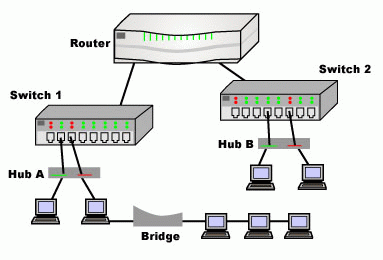
Hub Bridge Switch, Router
Enlarge picture
Browsing the network forums on the Internet I came across lots of stupid questions and even more stupid answers. At one point a "networkly retarded" guy (these are his own words) was asking for some help for choosing between a hub, a switch or a router in order to connect the two computers he had to the Internet without too much fuss. One of the answers was extremely funny and misleading. The "good samaritan" there guided our net-tard towards buying a hub as it offered great protection and the computers will connect to the Internet with no problems.

The poor guy went to the IT depot and bought a hub (he must have searched a lot for one) and after trying it he came back to the forum saying it did not work and that the computers were communicating perfectly between each other but
there was no WAN available. Another samaritan gave him the idea of buying a network switch, as it would definitely solve the problem. The net-tard went back to the IT shop and got himself a network switch. Obviously it did not work either so he bought a router. Problem solved.

Why all this hassle? Because he did not snoop around the Internet for appropriate advice and because it was more comfortable to be handed the solution then read about the properties of network hubs, switches and routers.

Network Hub
Enlarge picture
The hubs and switches are great for creating a LAN (well, switches, as hubs are extinct in my opinion). The connection between the computers is stable and the transfer rates are high (the dual-speed hubs supported speeds of even 100Mb). The trouble with the hubs is that you cannot connect two computers to the Internet with it. You will also need another network adapter installed on one of the computers in order to get the Internet connection from the modem. This way, the computer with the Internet connection will function as a gateway for the other one and share the WAN connection.

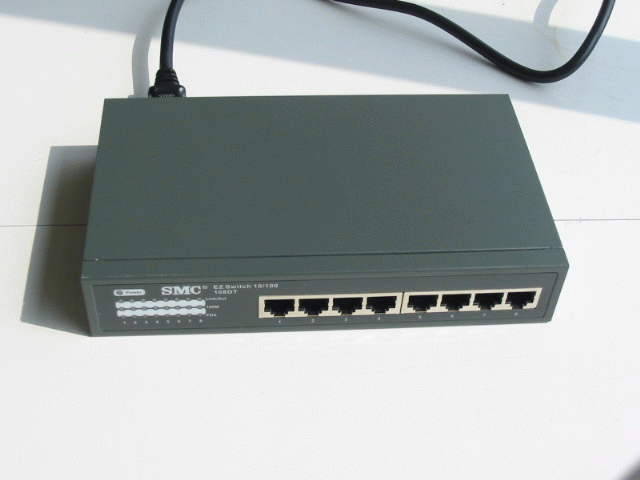
Network Switch Connection
Enlarge picture
The same happens with network switches. They also need a gateway for Internet connection sharing. The difference is that while hubs operate using a broadcast model (in a larger network, when two computers communicate with each other, the hub will pass through all the traffic of the network), switches can determine the individual traffic and send the data only to the computer that needs it. This is because of the virtual circuit model used. To put it simpler, switches do not have a big mouth and keep the "conversation" between the computers involved.

In the case of the switches, the data packets are inspected the minute they are received in order to detect the source and destination. After the sender and receiver have been established, the switch will forward the packets accordingly.

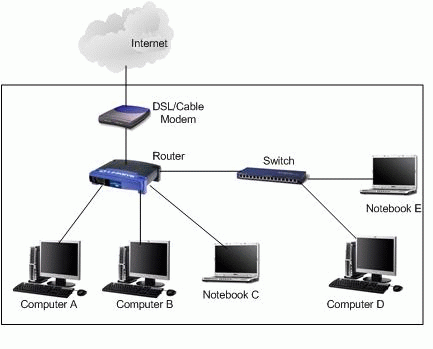
Routers represent the smartest way of connecting an entire LAN to the Internet. You need no supplementary network cards (it is a layer 3 gateway itself) and it is highly configurable for protecting your LAN.

Network Router Connection
Enlarge picture
Nowadays, routers provide DHCP and proxy support. More than this, the routers offer integrated firewalls for protecting your LAN. A huge step in networking has been made with routers. This is the most convenient device to connect the home network to the Internet without much hassle. All you need is some minimum information from your ISP (global IP address, DNS, gateway address) and you are done.

And as most ISPs have DHCP servers, all this data will be appended to your router automatically without you making any modification.

The features incorporated in the router include creating DMZs (demilitarized zones - a network between LAN and WAN) which is a great way of protecting the data in the SOHO network. Illegal access to your network stops in the DMZ and there will be no damage.

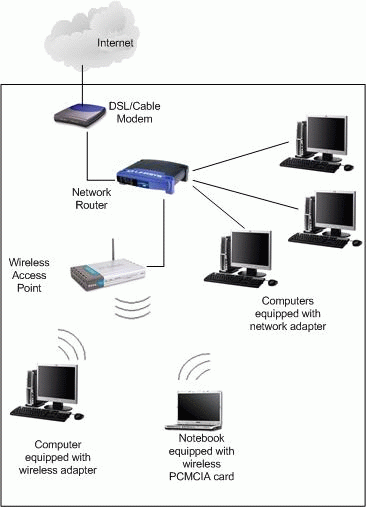
As switches and routers have very close prices, in SOHO networks it is simpler to have the computers directly connected to a router. With the expansion of Wi-Fi technology and the incorporated access points in the routers, things are getting less and less complicated and setting up a home network has become a trivial task.

The bottom line is that the aforementioned user in distress should have looked better before buying first the hub (I can't imagine where he could find one), then the switch, to ultimately find the appropriate device he needed, the router.

For a two computer LAN, a router will do just fine and you won't get a headache configuring it. As for wireless networking support of routers, I stand by my opinion and choose the wired alternative for its stability and inexpensiveness.
FILED UNDER:
router
switch
LAN

TELL US WHAT YOU THINK:

68,959 hits · 16 comments · Link to this article · Print article · Send to friend · Subscribe to news

MUST-READ RELATED ARTICLES:


Network Address Translation

IPv4 Goes IPv6

DHCPv6

Connect Computer Solutions

READER COMMENTS:


Comment #1 by: Tim O'Leary on 20 Aug 2009, 02:59 UTC reply to this comment

This is the info I was looking for. Cool! Thanks!


Comment #2 by: sat on 14 Nov 2009, 01:53 UTC reply to this comment

the simplest and clearest explanation i've ever read! tnx


Comment #3 by: me on 25 Dec 2009, 22:07 UTC reply to this comment

What is the best solution to connect 7 devices to include; ps3, internet enabled tv, blu-ray dvd player, printer, and obviously a few pc's. I currently dont have the tv or blu-ray player connected so I have everything running through my wireless n router already using all four ethernet ports. I also agree on having everything being wired so I would like to have the ability to wire all 7 devices. I heard I could use three ports on my router to use on my primary devices and connect the fourth port to a switch which would have four ports used on that. Any other suggestions?


Comment #4 by: Ionut Ilascu on 28 Dec 2009, 07:31 UTC reply to this comment

You can cascade routers in order to connect all devices, but in this case it would mean to use them as switches. I would go for switches behind the router as it'll get you the same results but with no hassle (no configuration is required for the switches).


Comment #5 by: Claudio on 07 Feb 2010, 20:02 UTC reply to this comment

Great article - exactly the info I needed!
I've the same situation as 'me' but I've an old D-Link router which lacks gigabit ethernet. If I get a gigabit capable switch and put all the gigabit capable devices directly on the switch - will I get the faster transfer speeds between these faster devices or will the router's presence on the switch limit the speeds regardless?
Thanks.


Comment #6 by: Ahmed Omer on 12 Apr 2010, 00:52 UTC reply to this comment

I need to design a lan for sharing servers and internet connection.

in a building with 4 floors.

about 40 host on each floor!

can i use 8 gigabit port router to connect the 4 floors with 48 port swithces!

i need 3 vlans and access points too!

would that be proper!! and which devices should i use ( routers + switches )

and what's the better speed for ADSL connection?


Comment #7 by: ANSAR ALI GUJJAR on 24 Aug 2010, 16:55 UTC reply to this comment

this difference is able to understand about switch and routers thanks to transmit this informaton for us. all the best. ..... BY ANSAR ALI GUJJAR


Comment #8 by: Len on 10 Sep 2010, 15:42 UTC reply to this comment

This only makes it more confusing. The question is: If you think a switch is useless, why do they sell them? Is it an wise option to go to a switch first hook a secure stand alone computer to one output then run a connection to a router to network the various not as needed security other computers together?

Comment #8.1 by: rs on 14 Dec 2010, 17:00 GMT

I don't think the author said switches are useless. Rather he said for the case in hand (where two computers needed to share an internet connection) a switch was useless. Basically, if you want to share Internet connection between multiple computers (and if you don't want to use one of your computers as the Internet gateway, which means you need to keep it on all the time) all network traffic from Internet should go through a router first. If the number of wired ports on the router are enough, you don't need any other device. But if you have more devices to connect with wire than the ports on the router, you need one or more switches.


Comment #9 by: Vitor R. on 27 Oct 2010, 21:24 UTC reply to this comment

I appreciated! Thanks from Brazil. :]


Comment #10 by: Victor535 on 11 Nov 2010, 07:46 UTC reply to this comment

I used to think that LANs, Networking, were complicated games, but with this simple article I can observe that there's nothing hidden; everything is clear. I'm now moving from net-tard -> net-adv.


Comment #11 by: Reista on 12 Feb 2011, 01:51 UTC reply to this comment

Actually, for a two computer lan, direct connect cable works the best.


Comment #12 by: shyman141 on 26 May 2011, 23:08 UTC reply to this comment

I have one internet connection, which I have a switch hooked up to share the internet connection with my other computer and also with a laptop, 16 bucks and no problems.. so the net-tard guy must have done something wrong.


Comment #13 by: WOW on 20 Oct 2011, 04:35 UTC reply to this comment

"networkly retarded" guy ,,,, hey dude ,,, are u the smartest guy on earth ? to judge others ? ,,,, hey complicated ,,, whats 1+1


Comment #14 by: khalid on 13 Feb 2012, 03:55 UTC reply to this comment

sir we have 4 connections connected with switch, sometimes browsing not did, even the google page not open, what is that problem? our one friend is using torrent downloader and mostly his windows is corrupt, so most of the time when i unplug his connection then the net runs.

Comment #14.1 by: Ionut Ilascu on 13 Feb 2012, 08:21 GMT

It looks like the torrent client takes up all the bandwidth. You can limit the download/upload speed in the torrent client in order to allow other sort of traffic through.

Copyright © 2001-2012 Softpedia. Contact/Tip us at

WindowsGamesDriversMacLinuxScriptsMobileHandheldNews

SUBMIT PROGRAM   |   ADVERTISE   |   GET HELP   |   SEND US FEEDBACK   |   RSS FEEDS   |   UPDATE YOUR SOFTWARE   |   ROMANIAN FORUM