
NEWS CATEGORIES:


NEWS ARCHIVE >>
SOFTPEDIA REVIEWS >>
MEET THE EDITORS >>
Home / News / Microsoft / Tweak Mode

Tweak Mode


Swap the Behavior of the Windows Vista Power Button

Sleep or shutdown?

By Marius Oiaga, Technology News Editor

3rd of January 2007, 16:24 GMT

Adjust text size:


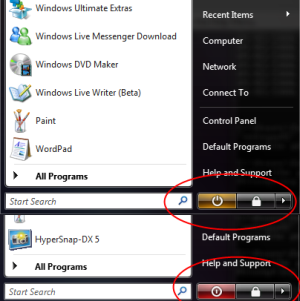
That is the question that concerns the power button in Windows Vista. The power button placed on the bottom right hand side of the Start Menu, accompanying the Search field in Windows
Vista for laptops is configured a tad different than we were used to in Windows XP. Pressing it will actually not Shut Down the machine but instead make it switch to Sleep mode.

Microsoft's argument for this is the increased functionality that the computer will gain by the time gained as the operating system will no longer have to reboot. However, the Redmond Company does allow users to switch back the behavior of the Vista Power button to Shutdown.

Via the Start Menu access Control Panel, then click System Maintenance, Power Options and prepare to modify the settings of your custom power management plan via the Change Plan Settings option. Then select Change advanced power settings, navigate through the Power Options until Power buttons and lid, and then to Start menu power button. Here you will be able to change Vista's Start Menu Power button behavior either if your machine runs On batteries or is Plugged in.

Those of you that have played around with Windows Vista on a laptop may already be aware of the "Change what the power buttons do" option. The "Change what the power buttons do" can be accessed via Start Menu > Control Panel > System Maintenance. Here do not click on Power Options but rather select the "Change what the power buttons do" beneath it.

However, I must emphasize that the "Change what the power buttons do" option actually modifies the behavior of the physical power buttons of the browser and not that of the Start menu power button.

TAGS:

Windows Vista | Windows | Shut Down
Read by 8,332 user(s) | Add comment | Link to this article TWEET THIS


Article rating:
Good (3.3/5) 11 vote(s)    

Subscribe to news | Print article | Send to friend

© Copyright 2001-2009 Softpedia
Contact:


SEARCH THE NEWS ARCHIVE :


Today's News
| Yesterday's News | News Archive


MORE RELATED ARTICLES:


Vista Will Not Guarantee Protection against Malware

Search in Windows Vista

Microsoft Confirms That Vista Is Affected by Malware from 2004

Windows Vista Migration Software

Microsoft Still Supports Windows Vista Beta

Life After Windows Vista

Vista Hybrid Sleep

Take Control of the Vista Explorer

User opinions:


Comment #1 by: Vincent on 08 Feb 2009, 14:41 GMT reply to this comment

From the article :

"Pressing it will actually not Shot Down the machine but instead make it switch to Sleep mode."

This is a relief. If the button actually "shot" down the computer, you'd have to buy a whole new one!

Consider changing the "shot" word to "shut". :)

Share your opinion:

Your Name:
Your Email Address:
(will not be used for commercial purposes)
Solve this to prove you're not a bot: =
Your review/opinion:


Windows tabGames tabDrivers tabMac tabLinux tabScripts tabMobile tabHandheld tabGadgets tabNews tab

SUBMIT PROGRAM   |   ADVERTISE   |   GET HELP   |   SEND US FEEDBACK   |   RSS FEEDS   |   ENTER NEWS SITE   |   ENGLISH BOARD   |   ROMANIAN FORUM