
Search Perform an advanced search query SOFTPEDIA
 
SOFTPEDIA
Updated one minute ago
HomeSubmit a program for being reviewedAdvertise on our websiteGet help on surfing our websitesSend us your feedbackGet information about our XML/RSS backend and how to use itBrowse the news archiveVisit our discussion forumVizitati forumul in limba romana


KLIP
  1. HOME
  2. SCIENCE
  3. TECHNOLOGY
  4. WEBMASTER
  5. SECURITY
  6. MICROSOFT
  7. LINUX
  8. APPLE
  9. GAMES
  10. TELECOMS
  11. REVIEWS
  12. LIFE & STYLE
  13. EDITORIALS
  14. INTERVIEWS
  15. RSS
Welcome!
Hello, Guest

Login if you have a Softpedia.com account.

Otherwise, register for one.

MAC

Style Your iMac/Cinema Display, Adding 4 USB Ports in the Process

- Macessity's LowKey stand is the perfect accessory for Mac fanatics

By: Filip Truta, Apple News Editor

Non-Mac fans are probably laughing at the trouble some companies go to in order to craft-out accessories for Apple electronics. This time around, for instance, Macessity's LowKey Stand for use with iMac/Cinema Display has arrived on the scene. Although it's clearly practical, it does beg the question: is it really necessary?

Given that it goes for $59.99, it's not exactly the kind of iMac or Cinema
Display add-on you'd desperately break a hundred over. Nevertheless, it looks awesome, blends with the two Apple products perfectly, sports connectivity features as well, and may just offer some degree of protection too. So, let's see some facts about it, shall we?

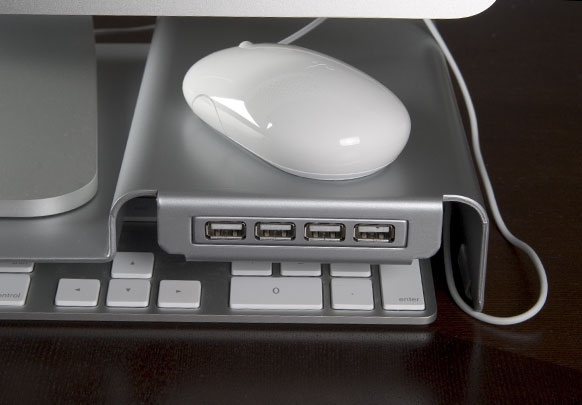
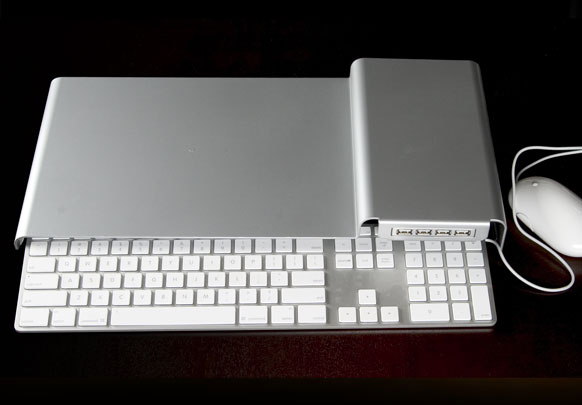
Ok, first of all, the LowKey is a stand that you can place the iMac or Cinema Display on, while sliding the Apple Keyboard underneath. The mouse goes pretty much anywhere from where I stand, but I'm guessing everyone will "tuck it in" on top of the USB hub, as shown in the images above. Which brings us to our next point of discussion.

The LowKey Stand also comes with this integrated 4 port USB 2.0 hub, so, just as Macessity themselves say: "No more reaching behind your iMac or Apple Display." Not that it's ever a pain in the a** to just turn the iMac / Cinema Display like 30 degrees or so to the left and just connect the whatever-uses-a-USB. But again, it's clearly in the user's advantage to just have the USB ports two inches away form the hand, ready for use without having to move stuff about.

The hub is self-powered too, of course, by a "compact" power adapter which actually powers the whole LowKey stand. The stand has been designed specifically for Apple slim keyboard's fans. It is constructed of 0.1085" thick steel and is powder-coated in aluminum color, matching iMac and Apple Display. The stand spreads out the entire length of the slim keyboard and 9" deep.

If you pre-order now, Macessity's LowKey Stand could begin housing your iMac/Cinema Display peripherals as soon as Feb 15, 2008.
MORE RELATED ARTICLES: Skype Plugin for Apple TV Now Available! Rumor - Apple Rep on iPhone Copy/Paste Feature Apple Answers MakBook Air Wireless Issues Battery Replacement Program for iBook G4 and PowerBook G4 No Movie Rentals for New iPods! Why? Analysis - Apple to Introduce Cheaper, Better Wi-Fi iPods Apple Has the Upper Hand on PC Makers Looking for Glory
 
Comments | Link here | Subscribe
Print | Send to friend
Today's News | Yesterday's News

Search:


4th February 2008, 14:47 GMT | Copyright (c) 2008 Softpedia | Contact:
Read by 752 user(s) | Rating: | 3 vote(s) so far | Cast your vote:
Style Your iMac/Cinema Display, Adding 4 USB Ports in the Process - USER OPINIONS


We are sorry, there are no opinions available for this article.


SHARE YOUR OPINION ABOUT Style Your iMac/Cinema Display, Adding 4 USB Ports in the Process

Since you are not logged on, your comments will have to be approved before being displayed.
Click here to login, or register.
Your Name:
Your Email:
Type in the result:
Your Opinion:


DO YOU WANT TO CONTACT US?  

If you have some comments or you want to send us some information you can send us an email directly to .
You can use the form below for the same purpose.
Your full name: (at least 3 characters)
Your email address: (at least 5 characters)
Message subject: (at least 5 characters)
Message text:
(at least 10 characters)
Type in the result:


© 2001 - 2008 Softpedia. All rights reserved.
Softpedia™ and Softpedia™ logo are registered trademarks of SoftNews NET SRL.
Copyright Information | Privacy Policy | Terms of Use | Contact Softpedia | Update your software | Archive