 14 DAY TRIAL //
 Viper, a company producing and selling car alarms and remote starters, has launched Viper SmartStart for iPhone and iPod touch. The app works with Viper remote-start systems and can start a car, lock or unlock its doors, open its trunk, or even locate it in a parking lot. Users can also set off a panic alarm. While more than one car can be controlled with the app, multiple users can just as well control the same vehicle.
“Are you tired of carrying around another clunky remote control on your keychain, or finding yourself out of range when you really need to warm up or cool down your car before getting in?” Viper says. “Now you can remote start or lock and unlock your car just by pushing a button on your iPhone or iPod touch, using the exciting new Viper SmartStart app from Directed Electronics, the leader in vehicle security and remote start,” the official App Store description reads.
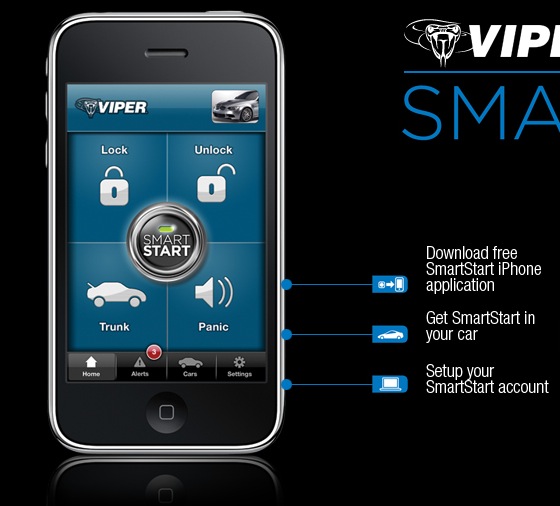
Viper cites the simple graphical interface as being the key feature giving users control over capabilities like lock/arm, unlock/disarm, remote car starter, trunk release and panic or car finder. The company also offers instructions for those looking to use the solution.
1) Download the free Viper SmartStart application to your iPhone or iPod touch; 2) Get SmartStart installed in your car (see www.viper.com/SmartStart for more information on SmartStart modules, and where to buy Viper SmartStart); 3) Set up your SmartStart account.
However, the Viper SmartStart solution requires a great deal of add-ons, so to speak, on the user’s end. While the three steps sound fairly easy, it's a bit more complicated.
First, you’ll need an iPhone or iPod touch. Then, if you’re an iPod touch user, the device will require a Wi-Fi connectivity. The actual Viper SmartStart application is also required, of course. You can easily download the app to your device via iTunes – luckily, it’s free. You also need a compatible Viper system in your car (see www.viper.com/SmartStart for details). Finally, a SmartStart service plan is required. SmartStart comes with a one-year service plan included, and renewals are $29 a year, while the terms and conditions apply. Knowing that you can always lose your iPhone / iPod touch, if you still feel that the Viper SmartStart solution is the way to go, start with the download link below.