
Softpedia
 

NEWS CATEGORIES:


NEWS ARCHIVE >>
SOFTPEDIA REVIEWS >>
MEET THE EDITORS >>
TRENDING TODAY
Home > News > Apple > Apple & Mac Blog

January 29th, 2013, 15:43 GMT · By

BLOG

Some Users Report Issues with iOS 6.1 Software Update

SHARE:

Adjust text size:


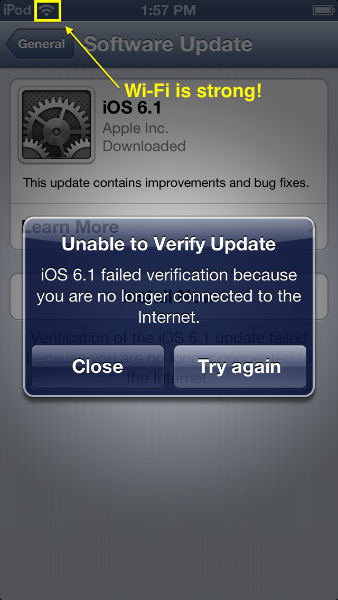
iOS 6.1 update error Enlarge picture - iOS 6.1 update error
A number of Apple customers are beginning to report issues with the newly released iOS 6.1 software update. Most reports seem to be centered around the OTA (over-the-air) update process which mostly affects iPod touch owners.

A growing thread on Apple Support Communities reveals there’s a problem with the iOS 6.1 software update on iPod touch (fifth-generation) devices.

Users are reporting that iOS displays an error saying, “Unable to verify Update” when they attempt to update over-the-air, through a wireless connection.

The error, displayed above, further states that “iOS 6.1 failed verification because you are no longer connected to the Internet.” However, all users reporting the problem claim their Internet connection is fine.

At the time of this writing, there was also one iPhone 5 owner acknowledging the same issue in the thread.

TELL US WHAT YOU THINK:

20,892 hits · 49 comments · Link to this article · Print article · Send to friend · Subscribe to news

MUST-READ RELATED ARTICLES:


Facebook Launches Big iOS Update with Voice Messages and Video Recordings

Apple Announces the 128GB iPad with Retina Display

iOS 6.1 Patches a Hoard of Security Holes

Untethered iOS 6.1 Jailbreak Prepared for Release

Apple Releases Free Xcode 4.6 in the Mac App Store

READER COMMENTS:


Comment #1 by: burnz on 29 Jan 2013, 16:51 UTC reply to this comment

I updated my 4S while connected to wifi then it shuts down showing connect to iTunes.


Comment #2 by: me on 29 Jan 2013, 18:35 UTC reply to this comment

Upgraded this mornig. all worked fine for about 30min then "no service". have to reset the handset....HELP!!!!!


Comment #3 by: Sandy on 29 Jan 2013, 19:52 UTC reply to this comment

loosing network at may places
earlier it was grate in such places


Comment #4 by: tatterscreek on 29 Jan 2013, 22:03 UTC reply to this comment

I upgraded this morning on my 4s and have many problems. I no longer get any "push notifications" and my gmail app won't delete emails. I keep getting "connect to iTunes to use push notifications" I'm not sure what that means. When I bring up iTunes nothing changes.

Comment #4.1 by: tatterscreek on 01 Feb 2013, 01:46 GMT

I connected the 4S to my computer and connected to iTunes but nothing changed. Still no push notifications. Losing information on other apps. No Apple support available?


Comment #5 by: Sal on 30 Jan 2013, 02:22 UTC reply to this comment

I have an iPhone 4S. Last night I updated all of my iOS devices (iPhone 4S, iPhone 5, iPad 3rd gen., iPad Mini). I ran into big problem with my 4S.

After trying to hit install after the download, it told me there was an error. So, I restarted my phone and tried again. My phone instantly shut off and went in to recovery mode. I was forced to reset my phone. I lost everything since my last back up... Information in some apps, videos, some photos. Gone. Luckily, I backed up on 12/31/12, but losing nearly a month of data is still pretty sickening.

Comment #5.1 by: Mikeee on 30 Jan 2013, 12:07 GMT

Exactly the same here, though on an iPhone 4. I also updated a 4S without problems. Had to connect to iTunes to recover the phone (which would have been extremely annoying if I had been travelling). Then, on the now wiped phone, Erase all Content and Settings so that it asks if you want to restore from backup. Fortunately I had iCloud backup running, so had a very recent backup. Am now waiting for all the apps and music to be downloaded again - looks like it will still be doing that this time tomorrow, but at least the phone is usable again.

If you aren't using iCloud backup, make sure you take an iTunes backup before installing the iOS upgrade!


Comment #6 by: Sal on 30 Jan 2013, 02:22 UTC reply to this comment

I have an iPhone 4S. Last night I updated all of my iOS devices (iPhone 4S, iPhone 5, iPad 3rd gen., iPad Mini). I ran into big problem with my 4S.

After trying to hit install after the download, it told me there was an error. So, I restarted my phone and tried again. My phone instantly shut off and went in to recovery mode. I was forced to reset my phone. I lost everything since my last back up... Information in some apps, videos, some photos. Gone. Luckily, I backed up on 12/31/12, but losing nearly a month of data is still pretty sickening.


Comment #7 by: Me on 30 Jan 2013, 14:18 UTC reply to this comment

I had the exact same problem as Sal on my 4S. Lost my apps and many other things as my most recent backup had been spotty.


Comment #8 by: Adri on 30 Jan 2013, 20:10 UTC reply to this comment

This is horrible! I updated this morning and tells me I need to connect to Itunes, I have no computer! Therefore I HAVE NO PHONE, extremely upset.....

Comment #8.1 by: me on 01 Feb 2013, 07:28 GMT

so how did you post this?


Comment #9 by: red on 30 Jan 2013, 22:53 UTC reply to this comment

I have an Iphone 4s and after downloading the update IOS 6.1, I now have connectivity issues. my network and wifi connection goes in and out.

Comment #9.1 by: TT on 01 Feb 2013, 00:50 GMT

This is happening to me as well. It's very annoying. Before I updated my signal was fine, now I keep loosing connection for a few seconds and then it comes back in.

Comment #9.2 by: E_Dub on 05 Feb 2013, 04:02 GMT

I have an IPhone 4 and ever since the upgrade (which is clearly a misnomer) I cannot stay connected to WiFi.


Comment #10 by: Wazza65 on 31 Jan 2013, 05:38 UTC reply to this comment

It is happening on ipad2 as well

Comment #10.1 by: Redeye on 19 Feb 2013, 20:17 GMT

My ipad2 also


Comment #11 by: Stone on 31 Jan 2013, 13:15 UTC reply to this comment

I did the update via itunes, on my IPOD touch 5. Seemed to work, even had the progress bar on the ipod for about a minute, then it stopped and put the ipod in recovery mode. Now it is on a loop where i have to restore and update, have gone through it about 10 times, still the same result. Tried it with the firewall off, tried it on a different computer, still same restore and update cycle.

Comment #11.1 by: Nomee10 on 07 Feb 2013, 21:10 GMT

Same here man! What to dooo


Comment #12 by: Stuie.d on 31 Jan 2013, 18:15 UTC reply to this comment

Double tap to launch music on iPhone 4 doesn't work anymore. Neither does my control talk on beats by Der, what is going on?


Comment #13 by: Nicnic on 31 Jan 2013, 19:38 UTC reply to this comment

Since updating to iOS 6.1 my network coverage has been awful, 3G cuts in and out, wifi is lost, apps like bbc news take ages to refresh... :(


Comment #14 by: Jay on 01 Feb 2013, 05:14 UTC reply to this comment

6.1 upgrade wiped out all my contacts, calendar events, and reminders... Apple your QA department sucks now!


Comment #15 by: Karimus on 01 Feb 2013, 08:32 UTC reply to this comment

Since I have ipdated my iphone 4S I have lost the ability to share my 3G connection. It seems that the device still always running to catch the option with no results


Comment #16 by: noel on 02 Feb 2013, 08:34 UTC reply to this comment

my ipad will not restore after udating the IOS to ver 6.1..


Comment #17 by: I've had enough on 02 Feb 2013, 11:34 UTC reply to this comment

A permanent fix to all of these problems. Android.


Comment #18 by: gilman661 on 02 Feb 2013, 17:37 UTC reply to this comment

I have a iphone 4 it took the ios update just fine but now i can not update my apps.The app store is showing 3 update i click on update and the screen just turns white.


Comment #19 by: LPnation on 03 Feb 2013, 06:09 UTC reply to this comment

Had the same problem. Unplugged my home router for a minute replaced and good to go now


Comment #20 by: anon on 03 Feb 2013, 11:05 UTC reply to this comment

Upgraded my Ipod touch 5 to iOS6.1, it failed to update due to an 'unknown error' and the device is now stuck in recovery mode. Not happy.


Comment #21 by: GungHo on 03 Feb 2013, 13:47 UTC reply to this comment

Same prob here. Connection was fine but would not update my 4s. Message as above appears


Comment #22 by: Texas Tom on 03 Feb 2013, 14:15 UTC reply to this comment

Since downloading ios 6.1 on my iPhone 4, all my new incoming emails do not go into my "inbox" but instead go unread directlly to "Trash". I have rechecked all my email settings and there is no setting that should cause this problem. Help!! how do I fix it?


Comment #23 by: Jdd on 03 Feb 2013, 16:45 UTC reply to this comment

My tool bar at the bottom of my iPhone 4S for deleting my emails isn't showing up


Comment #24 by: chefgirl on 04 Feb 2013, 21:18 UTC reply to this comment

anyone lose music and video volume without headphone after update

Comment #24.1 by: 999 on 07 Feb 2013, 13:27 GMT

Yes i have lost all volume and sound and my emails are playing up aswell, spoke to APPLE and they are as much use as a chocolate fire guard saying its not software issue but a hard ware issue. RUBBISH as mine worked fine until i did the upgrade. I have contacted the BBC WATCHDOG programe so if everyone who has problems can do the same we might get APPLE to do something?


Comment #25 by: Alan on 04 Feb 2013, 21:52 UTC reply to this comment

Why do people keep letting Apple abuse them?

iPhones are NOT user friendly AT ALL and the iTunes/iPhone combo is one of the WORST, most locked down, error prone pieces of hardware/software garbage EVER!

Same issues as reported here - downloaded 6.1 update over wireless, go into update - phone BRICKED and in recovery mode. Forced to wipe phone and reinstall backup.

Apple - YOU SUCK! Your attitude, non-inventiveness and crappy support/updates and itunes/user lockdowns are why I'm going over to Samsung. Like who needs this? Why take the abuse? Other companies have better phones/hardware and software - I'd even consider a Blackberry/Windows 8 phone at this point.

Apple's hardware is stale and constantly locks up, the Google feud denies consumers valuable features.

GOOD RIDDANCE!!!!


Comment #26 by: KiwiRunner on 04 Feb 2013, 22:31 UTC reply to this comment

My iPhone 5 froze (2hrs) during the update to 6.1 (progress bar did not move). It then would not shut-down, when it did finally allow itself to be shut down the restart stopped with a connect to iTunes USB screen showing.

Only recovered the iPhone after doing the factory reset process 5 times (with a PC restart after the 4th attempt)! Funnily enough it said after restore from back-up that it was now running iOS6.1. Go figure! The iPhone was connected to the PC by USB, not WiFi. Suspect they do not test PC based updates too well, especially W7-64bit.


Comment #27 by: Anon on 05 Feb 2013, 01:52 UTC reply to this comment

This is all extremely poor of Apple and pretty shameful!
I'd love to hear what Steve Jobs would have said - and maybe set their developers and testers straight.

I haven't updated my iPhone 5 since iOS 6.0.1 due to all these problems reported by people.


Comment #28 by: jejones on 05 Feb 2013, 19:43 UTC reply to this comment

There is also reports of contacts not displaying properly after updating. The contact still exists in the phone but the contacts folder on the phone says "no contacts".


Comment #29 by: 999 on 07 Feb 2013, 13:22 UTC reply to this comment

I have updated the software 6.1 on my 4s and have lost all sounds/speaker function through the phone. I know of at least 3 more cases being the same.


Comment #30 by: coach on 08 Feb 2013, 20:41 UTC reply to this comment

I have several users with iPad 2's that are having the same problem


Comment #31 by: wittsend on 19 Feb 2013, 01:05 UTC reply to this comment

I hate my iPhone since the update to 6.1 Nothing works! SUX


Comment #32 by: KH on 19 Feb 2013, 22:50 UTC reply to this comment

My iPad (latest generation) has this problem

Comment #32.1 by: SpareMoment on 22 Feb 2013, 01:22 GMT

Iphone5 ...had it about a week. I have internet connection... but am receiving the exact error message.. I've spent more time with help desk for various other problems then I have using the phone... now this tonite! I'm not happy...


Comment #33 by: Jkebler on 22 Feb 2013, 19:39 UTC reply to this comment

After updating to 6.1.2 my home screen flips upside down until an app is selected!


Comment #34 by: South Texan 1 on 24 Feb 2013, 03:09 UTC reply to this comment

Same problem with my iphone5


Comment #35 by: S_demouy on 20 Mar 2013, 03:59 UTC reply to this comment

I am experiencing the same problem on an iPhone 4S. Safari & Itune downloads are working fine at the same time I receive this error.


Comment #36 by: Maltaise on 20 Mar 2013, 20:26 UTC reply to this comment

Having same problem with ipad


Comment #37 by: Mooncookie 78 on 21 Mar 2013, 02:20 UTC reply to this comment

Here it is 3 months later... Any solution to this??... Should I backup or is it too late? Do I need to reset? 😡😫 please anyone???👀


Comment #38 by: Mooncookie 78 on 21 Mar 2013, 02:20 UTC reply to this comment

Here it is 3 months later... Any solution to this??... Should I backup or is it too late? Do I need to reset? 😡😫 please anyone???👀


Comment #39 by: Mooncookie 78 on 21 Mar 2013, 02:23 UTC reply to this comment

Help!😡😫


Comment #40 by: BigAl on 29 Mar 2013, 00:54 UTC reply to this comment

Had this error message after downloading latest iO6 with iPhone despite having working Internet connection. Turned phone off and then on again and problem went away. This has solved other problems in past as well.

Copyright © 2001-2013 Softpedia. Contact/Tip us at

WindowsGamesDriversMacLinuxScriptsMobileHandheldNews

SUBMIT PROGRAM   |   ADVERTISE   |   GET HELP   |   SEND US FEEDBACK   |   RSS FEEDS   |   UPDATE YOUR SOFTWARE   |   ROMANIAN FORUM