
Softpedia
 

NEWS CATEGORIES:


NEWS ARCHIVE >>
SOFTPEDIA REVIEWS >>
MEET THE EDITORS >>
Home > News > Microsoft > Windows Software

August 20th, 2011, 11:01 GMT · By

Softpedia Giveaways 2011: 25 Licenses for Ashampoo Magical Defrag

SHARE:

Adjust text size:


Free licenses for Magical Defrag from Ashampoo
Enlarge picture
Defragmenting your hard disk(s) in order to maintain your computer running at high performance is inevitable. And we’ve got the right tool for you, Ashampoo Magical Defrag, and 25 free license codes to give away.


The deal is as simple as always: you write a witty comment relevant to the application and we’ll pick the best 25 of them and award the authors with a free code. In the lines you drop you can share your experience with such software or the benefits of Magical Defrag.

Ashampoo Magical Defrag was designed as a convenient defragger that does not intrude on you. Even more, it can run optimization tasks only when the drives are idle. This way it won’t hinder your work on the computer.

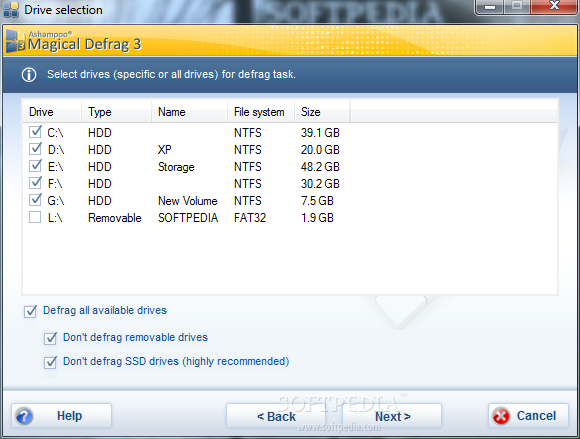
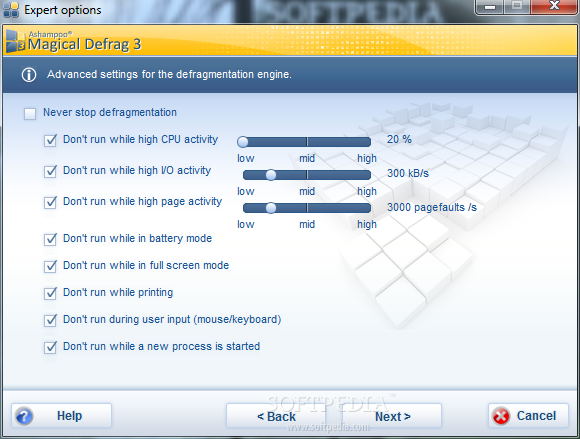
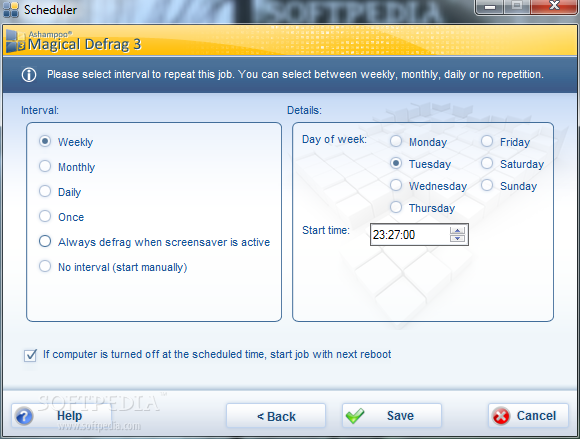
There are multiple defrag jobs available, which can be set to be triggered by specific CPU, I/O and page activity. Additional restrictions let you prevent the optimization if there is an app running in full-screen mode or if the computer is printing or running on battery.

Bottom line is that Ashampoo Magical Defrag is a set-and-forget type of program. Once configured you won’t have to make additional tweaking. It is simple to use and puts stored data into contiguous blocks.


Enlarge picture

Enlarge picture

Enlarge picture

Enlarge picture
Review image

For a deeper look at what Ashampoo Magical Defrag can do for you and the results of our testing you can head to our review page.


Your chances to win one of the 25 free codes are only as good as your comment. So make your remarks as honest and witty as possible.

You have a week to post your message, until Friday, so that you can also test the program and form a pertinent opinion of it. Don't forget that we need a valid contact email address.

For a full list of the software featured in our giveaway campaign you can check this article on a weekly basis, keep an eye on the weekly giveaway tag or receive the info by following the Softpedia Giveaway Twitter account.

Note: The winners will be picked from the comments section of this article, and will be contacted in 5 days after the giveaway expires. They will have to provide their full name in private (when required) in order to collect their prize. No other information except for your comment and the alias / nickname you provide will appear online.

We urge you not to double post and, most importantly, be original because pasting from different sources on the Internet will get you kicked from the giveaway campaign.

TELL US WHAT YOU THINK:

9,841 hits · 73 comments · Link to this article · Print article · Send to friend · Subscribe to news

MUST-READ RELATED ARTICLES:


Ad-Aware Internet Security Pro Discount for Softpedia Readers

100% Discount on AllMyNotes Organizer Deluxe

Softpedia Giveaways 2011: 50 Licenses for Sticky Password PRO

Awesome Giveaway Weekends on Softpedia

Softpedia Giveaways 2011: 20 Licenses for Emsisoft Anti-Malware

READER COMMENTS:


Comment #1 by: madinchadra on 20 Aug 2011, 12:21 UTC reply to this comment

alright! nice chance to try a new piece of work.
Lotsa defrag software out there but i'm sure this one is a good choice!

Comment #1.1 by: lostprophet on 20 Aug 2011, 13:14 GMT

Wasn't too bad, when I used it, but sadly it wasn't updated in 2 years and I even couldn't uninstall it with Revo Uninstaller.


Comment #2 by: azmisme on 20 Aug 2011, 12:24 UTC reply to this comment

I am using 3 of Ashampoo utilities and they are as good as they claim to be.It hasn't let me down.Would definitely like to use the Ashampoo magical defrag if i ahd the chance.


Comment #3 by: MrXyresiC on 20 Aug 2011, 12:32 UTC reply to this comment

Do I need to give a reason everytime???????????? This time, I want the license. Yeah. I want it. Got that? :P


Comment #4 by: tuhin on 20 Aug 2011, 12:39 UTC reply to this comment

thank you very much softpedia .


Comment #5 by: Haddad on 20 Aug 2011, 13:06 UTC reply to this comment

I have used this program, it's a great tool (for home users) , you have not to care about disk fragmentation the programm will do it for you in backgroud. But the program is not too much custumisable (zones and defrag methods)
good luck for all


Comment #6 by: abdu on 20 Aug 2011, 13:21 UTC reply to this comment

I'm eager to try this software, I'm a bit familiar with ashapoo software, and I do not defrag at all my hdd, so maybe all get lucky this time and defrag my hdd :)


Comment #7 by: Ajay on 20 Aug 2011, 13:41 UTC reply to this comment

There are many defragmanting softwares. I have used many but they were irritating. They just consumed my time, very slow and it made my system run slow. I think that this software will give a new look to disk defraging specially if the size of disk is large. If i get a chance to use it and if it impresses me then for sure i'll b using it until i find something better than it. I'll also refer it to my friends if its nice. will be waiting for it!! :-)


Comment #8 by: jerzy601 on 20 Aug 2011, 13:52 UTC reply to this comment

This is the excellent derfragmentator hard discs.I am recommending, I hope that I manage to obtain licences.This programme same defragmentuje files atomatycznie in the system.This programme is something in type instaluj it and forget your him.


Comment #9 by: girija on 20 Aug 2011, 14:06 UTC reply to this comment

it may be another good product from ashampoo.


Comment #10 by: To_sh on 20 Aug 2011, 14:15 UTC reply to this comment

I love this software :))) thanks SOFTPEDIA !!!


Comment #11 by: Desu on 20 Aug 2011, 14:43 UTC reply to this comment

aight, let's give this one a go. Hope it's gonna be better than any other defragger.


Comment #12 by: Liviu Popa on 20 Aug 2011, 14:49 UTC reply to this comment

I'm already using some Ashampoo programs and I'm looking forward to see how this program is. Will you give me a chance to try it? Thank you Softpedia!


Comment #13 by: Ty on 20 Aug 2011, 14:58 UTC reply to this comment

Ashampoo defrag...I'm all in. Thanks!


Comment #14 by: Gwolf2u on 20 Aug 2011, 15:31 UTC reply to this comment

Instead of having to remember to defrag disks, Ashampoo Magical Defrag will keep up with the task with little intervention on your part. It may not be magical, but it is a practical approach to a job that needs to get done but often gets forgotten. I remember that I have actually tested this myself 4-5 months ago and worked flawlessly.
Well there are quite a few free other solutions out there, but if you have the money you can for sure get this and be supportive to the guys that built this amazing tool.
The user interface is pretty basic, but the straightforward design makes it easy to navigate.
Once you click the "Defragment Now "button, setup is pretty much finished.
One of the best features it has is that this works when your computer is idle. You can pause the program, but otherwise you don't need to do anything. If you're really interested, the defrag screen visually displays the process but that is just for a eye candy preview.
Well go get it guys, is my suggestion, and you will for sure love it!


Comment #15 by: RF on 20 Aug 2011, 15:47 UTC reply to this comment

Magic Defrag looks a little bit slow, besides that it do the job of preventing the fragmentation of the disk and also .
It looks like i definitely leave the defrag app from windows.
Please count me in.

Regards,


Comment #16 by: Giveaway Winner of this product! on 20 Aug 2011, 17:23 UTC reply to this comment

Wow!!! Last 4 or 5 giveaways were no use for me. But this baby is surely made for me because i have tons of Games and softwares occupying too much space while randomly placed and giving me a pain in the back. My system's speed has been slowing down gradually. Windows7 disk-defrag takes a year to defrag so i hope this Baby is better than that.SO after reading this whole lecture please at least gimme a license or at least a half-license if thats possible.(Period)


Comment #17 by: j@mey on 20 Aug 2011, 20:11 UTC reply to this comment

Never tried this software. In I.T. Field, my home computer I am using Vista home edition~well its alright~but I think it would be awesome to see a defrag actually work well on this system!!


Comment #18 by: William525 on 20 Aug 2011, 20:28 UTC reply to this comment

I would love to try this defrag software.


Comment #19 by: Hacene on 20 Aug 2011, 21:03 UTC reply to this comment

j'ai déjà essayer Ashampoo Magical Defrag et je trouve qu'il est un logiciel très sympa et très léger en matière de défragmentation de disque. J'aimerai bien avoir une licence.
Merci à toute l'équipe de softpedia.


Comment #20 by: Stefan Julian on 20 Aug 2011, 21:10 UTC reply to this comment

this is slow defrag but more effective and powerfull software...the easy one when using it without any critical problem. it's works on my pc
Count me in, thanks


Comment #21 by: gimp66 on 20 Aug 2011, 21:49 UTC reply to this comment

i love "burning studio 10 and win-op 8"
i would love the defrag as well....please


Comment #22 by: lupo78 on 21 Aug 2011, 01:51 UTC reply to this comment

e che dovrei dire se riuscirà ad installarlo saro felicissimo...pensare che sono le 3 e 49 e sul testo dice 20 agosto quindi...sono arrivato giusto?
sicuro arriveremo nel 2035...travel


Comment #23 by: mon on 21 Aug 2011, 07:48 UTC reply to this comment

this is a great offer... im hoping to get one, since ive been looking for a better hard-working and cost efficient tool that can be my partner in my busy hard working life....


Comment #24 by: yashiscool on 21 Aug 2011, 09:34 UTC reply to this comment

I have not used this product before but I surely want a Pro version Defrag Software.

I hope that I will get this one.
Thanks,
Yash


Comment #25 by: syed hussain on 21 Aug 2011, 10:16 UTC reply to this comment

it is surely a great Defragmention software for any hard disk,would recommend it to every windows user.thanks.


Comment #26 by: joa13 on 21 Aug 2011, 13:25 UTC reply to this comment

I used once previous version of this software. And it working correctly. But this very backward version, Ashampoo Magical Defrag 2.0, and I want to test it newest version. Please count me in. :)


Comment #27 by: mizdoc on 21 Aug 2011, 14:52 UTC reply to this comment

Have not Defragged in Years!
I have used Ashampoo Magic Defrag for several years now, since way back in Windows 98; bought version 1 and version 2, and loved it. Magic Defrag sits in your sys tray (or notification area as it is called in Windows 7) and it runs only when your computer is idle. Consumes very little resources. Since I started running Magic Defrag, I have yet to need to spend time defragging my computer. I periodically analyze my drives with another defrag program and it ALWAYS show defragging is NOT necessary. I would, and often have, recommend this program to everyone running any version of Windows! I had no problem uninstalling it (version 1 to install version 2). Even though Version 2 still works on Windows 7, I sure would love to win a licence for Version 3


Comment #28 by: gijoe104 on 21 Aug 2011, 15:26 UTC reply to this comment

top of the line program...free is better


Comment #29 by: Ryu8146 on 21 Aug 2011, 15:28 UTC reply to this comment

I wish to get a copy of this giveaway! Defragmentation is important to a computer because it will keep our file organized and able to access the file faster. It is like make sure our room in neat and tidy, so we can access required things when we know the location of it. This application really help me to do this job much more easier.


Comment #30 by: Marwan M on 21 Aug 2011, 18:17 UTC reply to this comment

I have magical defrag 2. And it is good. run automatically whenever needed. I am very proud of it. I hope I can win the license for the newest one. Thank you


Comment #31 by: MerleOne on 21 Aug 2011, 20:21 UTC reply to this comment

Hi,
This is a nicely done software. I tried it once in the past. Take a few instants to configure, but after that, all is going well.


Comment #32 by: supercracker on 22 Aug 2011, 01:27 UTC reply to this comment

Usually HDD performance reduces if they are not defragmented atleast once a month or two (mainly offices).It would be a very good idea to use a tool that could defrag your HDD and increase system performance.

I already use some Ashampoo products and they seem very good.Some of the defragmenting softwares I used earlier required user supervision.But this tool totally works in the background.I strongly recommend users to try it..........


Comment #33 by: Hondros on 22 Aug 2011, 08:06 UTC reply to this comment

Thanks for the Ashampoo Magical Defrag giveaway.
I have never used the Defrag before & love to try this. (I am using some Ashampoo products Ashampoo Anti-Malware & Ashampoo Snap 4).
Hopefully can win 1 license then.

Thanks & Regards


Comment #34 by: pulkittheninja on 22 Aug 2011, 09:39 UTC reply to this comment

this software must be compared to other defragglers like registry booster....


Comment #35 by: jindal_bharat on 22 Aug 2011, 10:35 UTC reply to this comment

i like to try new software i want to know that what so good about it


Comment #36 by: Alex_mmiiii on 22 Aug 2011, 16:32 UTC reply to this comment

A good program to defragment the registry. Ashampoo Win Optimizer in a disk defragmenter.


Comment #37 by: HAMMER on 22 Aug 2011, 22:59 UTC reply to this comment

me want magic software i can get no please? me like others no read note what mean witty? me see lots of begging, no wait i mispel everyting so me fit inn now pleas?
with othr poosts?


Comment #38 by: ORKAN on 23 Aug 2011, 01:20 UTC reply to this comment

Nice giveaway.
I use only free defrag software for time being & hope to win 1 license of Ashampoo Magical Defrag the.
Please count me in.

Thanks & Regards


Comment #39 by: alro on 23 Aug 2011, 04:00 UTC reply to this comment

i want the best for my computer and that way i can also be best and it will be best it i use Ashampoo Magical Defrag so that it will give me the best performance i will expect.


Comment #40 by: HagSara on 23 Aug 2011, 04:08 UTC reply to this comment

Thanks for another nice giveaway. I have used magical defrag in the past (version 1 I think) and found it very useful. The nice feature that I liked most was the automatic pause when the CPU load is high and then automatic resume when the machine is idle. This was a really nice feature. I hope I can get the latest version of this program. thanks again.


Comment #41 by: alro on 23 Aug 2011, 04:12 UTC reply to this comment

I want the best for my computer. so want to have Ashampoo Magical Defrag so that it will give me the best performance.


Comment #42 by: paulcrousel on 23 Aug 2011, 08:38 UTC reply to this comment

Through set and forget Option Ashampoo Magical Defrag will ensure the continuous windows hard drive defrag in such a way that files will be accessed faster; i like the simple interface since is impossible to get lost in the defrag corridor, especially novice will like it since thay have few info on what is defrag?


Comment #43 by: G Rajesh on 23 Aug 2011, 11:23 UTC reply to this comment

Its is one the best defrag tool as close as Perfect disk or smart defrag, the main problem is as it said it work on install and forget principal. Mean it autorun with PC start, defrag the process on background. Mean i am not the user who run disk defrag regularly. there are schedule for defragmentation and option when to run defrag process or not.

For registry cleanup scheduled option is ok, but for defrag i don't thinks its needed,
ashampoo should think on this

But is does it job well. thanks for giveaway count me in


Comment #44 by: nicole on 23 Aug 2011, 11:39 UTC reply to this comment

would definitely love to try this. i love online gaming (& yes, i'm a girl!) and i have to make sure that my PC is at its best performance. sure hope i could try this so i can recommend it to my friends online and in school. :)


Comment #45 by: RGG SOFT on 23 Aug 2011, 14:21 UTC reply to this comment

Great one from Ashampoo, its plus point is that we dont need to configure any thing for defrag process, it automatically defrag the disk on background when we not doing any work. showing proper details of defrag process on completion. good user interface.

Love to have pro of it

Thanks
SOFTPEDIA


Comment #46 by: Whaleross on 23 Aug 2011, 16:35 UTC reply to this comment

Not again! I don't need another free license software cause my hard disk is absolutely full and may system very slow.


Comment #47 by: rizaldi wisnu on 23 Aug 2011, 21:53 UTC reply to this comment

better than free defragmenters. I hope i can win it


Comment #48 by: Martik on 24 Aug 2011, 07:10 UTC reply to this comment

Give me a license please?


Comment #49 by: Azhar on 24 Aug 2011, 08:11 UTC reply to this comment

This software is almost similar to Ashampoo hdd control, but the software is specific to defragment my hard drive. if Ashampoo hdd control, he served for controlling the hard drive, but if Ashampoo Magical Defrag, defrag emang special affairs, for those who like to remove or add programs are encouraged to use the software to defrag the hard disk, so disk performance is maintained ....


Comment #50 by: ALEEM on 24 Aug 2011, 11:08 UTC reply to this comment

BEST SOFT EVER IT GIVES QUICK TASK THAT DEALS WITH HIGH DEFRAGMENTATION PROCESS AND I LIKE THIS UTILITY TO BE RECOMMENDED FOR EVERY ONE , AND NOW I REQUEST A LICENCE KEY FOR ME !


Comment #51 by: mario on 24 Aug 2011, 13:00 UTC reply to this comment

I'm a big fan of Ashampoo products. Very easy to use products, very well designed GUI's, their products usually have all options an average to expert user would ever need, the products really DO WORK as promised - so there are no hidden surprises, their prices are very reasonable, not to speak about Ashampoo's promotions, when the prices fell bellow any "reasonable" point, becoming almost giveaways! On the "dark side" of Ashampoo, there's their known and almost spam like e-mails sending. One must be prepared to receive at least a couple of e-mails with promotions every day. Now about "defraguers" :
there was the time when this kind of software was a must in any computer. Hard disks were very expensive and slow. There was not much space available, and thru constant writing and deletions of files on them, they would become like a "patch work blanket" with bits and pieces of files spread all over them. With this, the reading heads had to look for these file parts as crazy all over the disk. This also meant that after some time, there was no much contiguous space available for saving bigger files in only one chunk, and before even starting to work with the file,, it was already fragmented all over the disk. So a defragmenting software was a must for putting some order on the disks, increasing their speed and life. Enter today : hard disks are much, much cheaper, space is counted in gazillion bites and speed is enormous. Defragmenters now are a nice to have feature, not a must anymore - at least for home computers. But even with all these changes in hard disks, I like to defragment from time to time. I don't like my disks to be a mess!! There will always be a speed increment and higher life for the disk. Maybe this is why, not even Ashampoo has a new defragmenter - this version 3 is pre-Vista, being advertised as Vista ready. But on the same time, it also means that it has all functions that a defragmenter could have - well maybe not ALL, but, frankly speaking, how many more functions a defragmenter could have that Ashampoo's doesn't?
So this is the cream of the cream of defragmenters! And, if possible, I would like to have it!
mario


Comment #52 by: ray058 on 24 Aug 2011, 14:39 UTC reply to this comment

Great choice


Comment #53 by: partha on 24 Aug 2011, 16:19 UTC reply to this comment

defrag tools are essential utility applications very much needed to keep
the system in prime condition.
And if it comes from no other than ashampoo,it further enhances its efficacy.


Comment #54 by: partha on 24 Aug 2011, 16:26 UTC reply to this comment

defrag tools are an essential utility devices to keep your system in prime condition.And when the Ashampoo name is tagged to it ,then it becomes even more important.


Comment #55 by: Jozsef on 24 Aug 2011, 19:49 UTC reply to this comment

I hope to win this giveaway, thanks


Comment #56 by: Black-Bull on 25 Aug 2011, 10:45 UTC reply to this comment

Why like beg and peck at each other like hungry chickens for a grain of corn in this contest when you can get Ashampoo WinOptimizer FREE 6.60 at this link:
www.softpedia.com/get/System/OS-Enhancements/Ashampoo-WinOptimizer.shtml
It has Magical Defrag 3 & other tools to tune-up your computer such as disk cleaner, registry optimizer, internet cleaner, file shredder, information tools, anti-spy tool, system tweaker, start up tuner, process manager, internet tuner, file-splitter & joiner, undeleter, context menu manager and more tools... Oh did I mention it is FREE? So download Magical Defrag with other great tools...AKA WinOptimizer.


Comment #57 by: adrianc on 25 Aug 2011, 11:20 UTC reply to this comment

If you want your pc to work smooth you really need a defrag utility. I like Ashampoo Magical Defrag utility because it's looking very fancy, but I love it cause of its "don't run while ..." advanced settings. With other products I have to stop all what I'm doing and wait until the defrag process finishes. With Ashampoo Magical Defrag I don't have to worry that the system will be unusable during defrag. I just schledule it and it runs as it should.


Comment #58 by: Ankit on 26 Aug 2011, 05:06 UTC reply to this comment

This is excellent software.I love it.Thanks Softpedia for giving us such opportunity.


Comment #59 by: ha14 on 26 Aug 2011, 10:41 UTC reply to this comment

Ashampoo Magic Defrag is superior to Microsoft defrag program and you never need to schedule a time to defrag your pc hard drive. With Ashampoo Magic defrag Set it and Forget it Technology, it's always working to keep your hard disk optimized at all times. Will also defrag even no user logged in Windows. COOL.


Comment #60 by: antonytony on 26 Aug 2011, 14:47 UTC reply to this comment

I have seen dozens of defrag programs on the net and tried them, but ashampoo magical defrag was really magical. It is simple , fast and doesnt affect your systems responsiveness and performance.

Stuffs neat about this program :
-Its principle "Install and Forget"
-background defragmentation so less user intervention is needed
-non interference with SSDs to prevent wear
-Its superior graphical map of drives gives the idea about a drive at a glimpse
-Multiple Jobs at the same time
-Skip files according to their sizes
-Works when the system is idle so it doesn't trouble other programs
-Schedulable defragmentation
-Manual On demand defragmentation
-Screensaver which gives different designs such as cities, world map to keep track of the process
-hassle free program
-Improved statistics of defragmentation process
-Friendly to Laptop, pauses when in battery mode
-Doesn't require high config systems, performs good even in low-end ones
-Friendly interface, sufficient help contents
-And BEST OF ALL ITS JUST $ 14.99

If you add tons of data daily and your system slows down, then this is the program for you, no other pc keepers needed as defragmentation causes most of the slowdowns.

Its one of the best programs in the category of defragmentation, but still it lacks certain features as it is designed for easy usage.Thanks to Softpedia and Ashampoo for this wonderful giveaway.


Comment #61 by: Mahafuz on 26 Aug 2011, 17:58 UTC reply to this comment

Defragmention of different drives of hard disk smoothly is a crucial task. I hope "Ashampoo Magical Defrag" will fulfill the requirement. Thanks.


Comment #62 by: shahyash on 26 Aug 2011, 19:46 UTC reply to this comment

I love Ashampoo products for many reasons. One of them is the variety of products that they have to offer you.
Magical Defrag is one of them and I don't see anything superficial with it yet. Based on my product experience so far, I have understood that it needs to provide an option to use some more defrag algorithms as well. Since, I use defrag softwares at multiple locations for different purposes. For e.g.: a file server would require a different algorithm for defrag than a web server.
Anyways, please count me in for this giveaway contest.


Comment #63 by: Harleyman33 on 26 Aug 2011, 22:14 UTC reply to this comment

WHAT REASON TO TRY??.
THAT'S A GOOD QUESTION IN MY CASE I HAVE SPENT 3 DAYS STRUGLING WITH WINDOWS XP DOWN LOADS exp 8 . WHY? DONT REALLY KNOW WHY IT ASKS ME TO DOWNLOAD STUFF I HAVE 5 TIMES AND IT WILL NOT LOAD UNKOWN ERROR. I found softpedia by accident. had seen it a few yrs ago but forgot about it. My knowledge of them is a strong company with out trouble some down loads from reliable companys. So this is my reasoning for the request.. Give it UP !!:=)


Comment #64 by: Grr on 26 Aug 2011, 23:03 UTC reply to this comment

Thanks for the giveaway. Please count me for a license. My review based on usage on XP-sp3.

Ashampoo Magical Defrag 3, Version 3.0.2.91 (0244)

My review:

Good part:
1. Can install for either all or only the current user.
2. Easy to install.
3. Jobs could be set/scheduled to run the defrag.
4. Good interface
5. Help file is good as well. When help is clicked it opens that particular section which is currently active.
6. It is multi-lingual and has over 20 languages to choose from.
7. It does the work in background, and defragments as necessary.
8. Defragmentation could be paused by the user.
9. Shows statistics of all the defragments removed.
10. Ability to add a new defrag job with the following options:

**removable drives
**all drives
**non-removable drives only
**day, date, time
**don't defrag SSD drive
**defrag based on file size
**defrag based on old date
**not to run when on battery
**not to run when on high I/O
**not to run when on high CPU usage
**not to run when on high page activity
**not to run when on printing

11. Overall it worked good on XP.


Bad part:

1. No new updates. Not updated since Feb-2010. Version 3.0.2.91 (0244)
2. Installs Ashampoo Magical Defrag 3 Screensaver, if not unchecked.
3. On the first run-it checks for update plus Analyzes the disk - all without user permission.
4. The default job runs the defrag weekly at Monday 10.26Pm. It should rather run after midnight or preferably on a weekend. i'm not sure if it's the default setting for all.

Thanks, Grr


Comment #65 by: Giovi on 27 Aug 2011, 03:08 UTC reply to this comment

We all know that HD get fragmented very quickly because of poor PC maintenance, resulting in a significantly performance loss.

This tool is one of the best and easiest “install and forget” DEFRAG TOOLS out there which does not require a MASTER in PC SCIENCE to make it work properly...LOL!

Why?? Simply because, after you have installed it, it runs quietly in the background and defragments your HD only when your PC is idle, so as to minimize your intervention to minimum terms.

The last version of this great tool, kindly offered here by Softpedia, provides several new astounding FEATURES which make the defrag process of your HD even more effective.

One of the best ones is for sure its option to tweak WINDOWS SYSTEM SETTINGS in a safe and stable way, so as to make WINDOWS run faster and more flawlessly than it usually does by default.

Another great feature, lacking in many other similar defrag programs out there, is the SSD protection that prevents the "Average Joe user" from involving SSDs in the defragmentation process, as they do not need to be defragmented at all.

This program also provides multiple customizable DEFRAG JOBS and above all a JOB SCHEDULER, giving users the ability to edit time settings for each defrag job.

With ASHAMPOO MAGICAL DEFRAG you can also eliminate USELESS FILES to make your PC run quicker and more steadily and get bigger room for your files.

This defrag tool also protect your Privacy effectively, by erasing your browser and temporarily file tracks completely from your system.

Overall ASHAMPOO MAGICAL DEFRAG is a very effective defragmentation tool, originally designed for noobs, which can be very useful for those GEEKS like me who use a PC extensevely, removing and/or copying files on a daily basis.

So I give ASHAMPOO MAGICAL DEFRAG a final rate of 4 out of 5 STARS!!

Count me in please!!


Comment #66 by: zenislev on 27 Aug 2011, 12:20 UTC reply to this comment

awesome.... :D


Comment #67 by: The Gamer on 27 Aug 2011, 20:23 UTC reply to this comment

I really want this because I heard it is good and I don't have one besides the windows defragger. The reason being because the best ones are usually paid for like this one. I really hope I get one and I want to say one more thing, I love softpedia.com !


Comment #68 by: NIBEK on 28 Aug 2011, 19:17 UTC reply to this comment

Saludos a todos..!
Bueno lo que les puedo decir sobre este programa es relativamente corto, y esto se debe a que lo he usado por poco tiempo, he tenido la suerte o no, de haber encontrado un programa que me parecio mas acorde a lo que yo buscaba en ese momento, un desfragmentador que hiciera el trabajo sencillo, rapido, y AUTOMATICAMENTE, es por eso que decargue Auslogics Disk Defrag y realmente me gusto mucho, creo que Ashampoo es un programa interesante, pero que tiene grandes competencias, y soluciones mas sencillas, hasta el mismo desfragmentador de Windows puede entrar en esa categoria.


Comment #69 by: Qduc on 15 Sep 2011, 15:27 UTC reply to this comment

I used Ashampoo Defrag version 2 two years ago it very well, I hope to Winner.


Comment #70 by: mchl on 17 Sep 2011, 13:00 UTC reply to this comment

please acount me fenck softpédia


Comment #71 by: mn on 03 Oct 2011, 13:56 UTC reply to this comment

it was the worlds fast defragment tool...
and also it was my foviraesite


Comment #72 by: Mehdi on 03 Oct 2011, 17:02 UTC reply to this comment

After using a lot of defrag freewares. A good opportunity to use a commercialware. I really miss the auto defrag option in defraggler, which I am using. Hope to see the magic of Ashampoo Magic defrag, which I am sure is blazingly fast.

Copyright © 2001-2012 Softpedia. Contact/Tip us at

WindowsGamesDriversMacLinuxScriptsMobileHandheldNews

SUBMIT PROGRAM   |   ADVERTISE   |   GET HELP   |   SEND US FEEDBACK   |   RSS FEEDS   |   UPDATE YOUR SOFTWARE   |   ROMANIAN FORUM