
Softpedia
 

NEWS CATEGORIES:


NEWS ARCHIVE >>
SOFTPEDIA REVIEWS >>
MEET THE EDITORS >>
TRENDING TODAY
Home > News > Microsoft > Windows Software

September 24th, 2011, 12:00 GMT · By

Softpedia Giveaways 2011: 20 Licenses for Backup4All Professional

SHARE:

Adjust text size:

Backup4All Pro's functionality can be extended through various plugins
Enlarge picture
If you’re looking for a data backup solution that is both versatile and easy to use, stop scouring the Internet. Backup4All, priced $49.95 (€39.54), stands up to its name in terms of effortless handling and we’ve got 20 licenses to give away for this week’s campaign.


Most of you already know the story, but here goes for those yet unaware of the rules: you write a smart comment about the application, and thus sign up for a chance to win one of the codes we put on the line.

You don’t have to make literature with your lines, sharing an honest opinion about the application, its ups and downs as well as what’s lacking should be enough.

Backup4All Professional is a full-fledged solution as far backing up your data goes. It is ready to drop password-protected copies of the sensitive content you choose to a local path or save them in a remote location.

Sporting full, incremental, differential and mirror backup types the application can easily be instructed to run the jobs with a user-defined frequency or at a specific time and date.

Featuring both standard and advanced working modes, Backup4All Professional makes available options for both beginners and more seasoned users. The range of choices and possibilities depends strictly on your skills.

Even if out-of-the-box it is versatile enough, plugin support make it open to an even larger set of scenarios, allowing you to automate tasks relating to backing up specific applications installed on your system.


Enlarge picture

Enlarge picture

Enlarge picture

Enlarge picture

Enlarge picture
 
 Review image

For a deeper look at what Backup4All Professional can do for you and the results of our testing you can head to our review page.
 

Your chances to win one of the 20 free codes are only as good as your comment. So make your remarks as honest and witty as possible.

You have a week to post your message, until Friday, so that you can also test the program and form a pertinent opinion of it. Don't forget that we need a valid contact email address.

For a full list of the software featured in our giveaway campaign you can check this article on a weekly basis, keep an eye on the weekly giveaway tag or receive the info by following the Softpedia Giveaway Twitter account.

Note: The winners will be picked from the comments section of this article, and will be contacted in 5 days after the giveaway expires. They will have to provide their full name in private (when required) in order to collect their prize. No other information except for your comment and the alias / nickname you provide will appear online.

We urge you not to double post and, most importantly, be original because pasting from different sources on the Internet will get you kicked from the giveaway campaign.

GIVEAWAY CAMPAIGN ENDED


12,369 hits · 66 comments
Link to this article · Print article · Send to friend

MUST-READ RELATED ARTICLES:


100% Discount on AllMyNotes Organizer Deluxe

Awesome Giveaway Weekends on Softpedia

Softpedia Giveaways 2011: 25 Licenses for Ashampoo Cover Studio

Softpedia Giveaways 2011: 20 Licenses for Emsisoft Mamutu

Softpedia Giveaways 2011: 50 Licenses for Advanced SystemCare

READER COMMENTS:


Comment #1 by: gokboru on 24 Sep 2011, 11:37 UTC reply to this comment

nice giveaway thank u


Comment #2 by: yudhi.94 on 24 Sep 2011, 12:06 UTC reply to this comment

excelent software to backup my PC


Comment #3 by: blaster on 24 Sep 2011, 12:36 UTC reply to this comment

thumbs up! password-protection backup is okay. incremental/differential backup is a good feature. It is a flexible backup solution to those competing backup software solution in the market today


Comment #4 by: Cerem Beyazit. on 24 Sep 2011, 13:08 UTC reply to this comment

I Wanna backup but i need a hard disk.


Comment #5 by: bala on 24 Sep 2011, 15:11 UTC reply to this comment

A backup is very important cuz u dont know when ur hdd can crash. Its also usefull for totally wipimg out malaware infested system and then we can scan and re-transfer the data. I would like to get a license for this backup software. Its user interface is easy to use and fully automated.


Comment #6 by: mario from brasil on 24 Sep 2011, 15:13 UTC reply to this comment

Seems a very nice package. But I've already received from you my share of backup software giveaways so, I'm just posting to thank you for all your good work and excellent choices being presented to us in this giveaways section. Please don't count me in.
mario


Comment #7 by: Kriss_Hietala on 24 Sep 2011, 16:24 UTC reply to this comment

I switched from mac to PC and I lack Timemachine. This apps should provide useful ;) Security is top priority, no matter what.


Comment #8 by: myimmortalize on 24 Sep 2011, 17:15 UTC reply to this comment

Count me in please...


Comment #9 by: zain on 24 Sep 2011, 21:19 UTC reply to this comment

nice.
i need one !


Comment #10 by: kielu on 24 Sep 2011, 21:45 UTC reply to this comment

I must have it, is a great program to make backup copies.


Comment #11 by: JOFME on 24 Sep 2011, 21:55 UTC reply to this comment

Another good program, use the free edition to back up photos, etc. but the full version has been a little to expensive for my tight wallet. Haven't used the restore yet and hope I don't have to.


Comment #12 by: melmitts707 on 25 Sep 2011, 02:35 UTC reply to this comment

I tried several different "Free" backup programs. Each seem to have its problem areas. After a few different "Trial" software experiments I downloaded Backup4All and have found it to be easy to setup, excellent variety of plugins and solid performance. I have since purchased 2 Pro licenses and a Portable license. Highly recommended for anyone serious about backing up there data.


Comment #13 by: Lilia on 25 Sep 2011, 05:31 UTC reply to this comment

Participating!


Comment #14 by: smaragdus on 25 Sep 2011, 08:00 UTC reply to this comment

I have tested and used many back-up and sync applications but I have never been entirely pleased with any of them (all the apps I have tried lack features I need) so I have been forced to use 3 or 4 programs for different tasks. I am still searching for a back-up solution that will be exactly to my liking and meeting all my needs. Perhaps it will be Backup4All Professional?


Comment #15 by: Hacene on 25 Sep 2011, 08:50 UTC reply to this comment

Bonjour à toute l'équipe de softpedia.
Pour être honnête, je ne connais pas encore ce logiciel et je ne l'ai pas encore essayé.
Mais en toute sincérité, j'aimerai bien avoir une licence afin de l'utiliser dans un cadre légal.
Je vous remercie vivement.
Le vôtre, Hacene.


Comment #16 by: MerleOne on 25 Sep 2011, 10:34 UTC reply to this comment

Hi, I have been using the pro version 3 (not 4) and I would definitely like to upgrade. I have tested so many other software and this one really stands out. Easy to use and efficient.


Comment #17 by: Buntydee on 25 Sep 2011, 11:53 UTC reply to this comment

I tried to be witty, but I couldnt find the words;
I`m gonna use the program,but it`s gonna be afterwards::
I think I deserve a Pro copy for my rhyme at least(+I seem to be the 1st to write in..)


Comment #18 by: zidane on 25 Sep 2011, 13:04 UTC reply to this comment

count me please please please ;-)


Comment #19 by: Phil on 25 Sep 2011, 15:55 UTC reply to this comment

One of the best, if THE best back up software on the market today! I've been looking for a good if not GREAT back-up software. Thanks BackUp4All & Softpedia.... Your AWESOME!!!!


Comment #20 by: supercracker on 25 Sep 2011, 16:09 UTC reply to this comment

A backup solution is very necessary these days.A Mal-ware attack or an unpredicted accident may destroy our valuable data.......At these situations a backup solution may save us.If we talk about $49.95 priced Backup4All all I can say is that "It saves our time and money".It's price is nothing when compared to the price we have to pay if we loss all our data..But if we think deeper it's a little high.

It's a strong software good for Office as well as for Home usage.The main thing users would love is that we can secure our backups using passwords...It's plain and simple interface makes average users to operate it with ease.We can make as many as backups we want and organize them in to groups for further easy usage.

I'm familiar with many other backup solutions.And when I compare this stuff with them what I find bad was this has no option for Drive Backup....But the other utilities are good and satisfying....I must say """This is a very useful Giveaway""


Comment #21 by: VCN on 25 Sep 2011, 17:04 UTC reply to this comment

Thanks for share ♥ I hope that I get a license key for Backup4All Professional.


Comment #22 by: partha on 26 Sep 2011, 01:56 UTC reply to this comment

Backup4all professional helps in creating your backup of all valuable applications and data. It is a must have for pc users as it is always prone to crashes. Its user friendly interfaces would be easy for novices.


Comment #23 by: herryseputro on 26 Sep 2011, 07:58 UTC reply to this comment

promos are awaited to get Backup4All Professional license, because with this software I will be quiet with the security of my data that there are huge numbers. thank you for this opportunity and I hope to be one winner from 20 people


Comment #24 by: Rajesh Ghadye on 26 Sep 2011, 13:50 UTC reply to this comment

Softland its known for its products like nopdf, freeware dopdf, backup4all.
Pro provide feature of backup locked file, also provide backup scheduler, once set don’t need to remember it again.

Love to have such Product.

THANK YOU SOFTPEDIA FOR AGAIN GREAT GIVEAWAY


Comment #25 by: Haddad R on 26 Sep 2011, 14:21 UTC reply to this comment

every day lot of poeple are loosing valuable data due to virus, non-right use or hardware failure, so a backup tool is a necassary thing to have
Backup4All Professional is a well rated backup tool
good luck for all


Comment #26 by: Azhar on 26 Sep 2011, 15:03 UTC reply to this comment

This software is very good, in terms of backing up data, or restore the original data as usual.


Comment #27 by: Mahafuz on 26 Sep 2011, 17:13 UTC reply to this comment

Backup software is an essential part of PC. The importance of backing up data can be realized when it is loosed. So I want to win this nice and important backup software. Thanks.


Comment #28 by: Adi on 27 Sep 2011, 04:30 UTC reply to this comment

I am very thankful to Softpedia they offer great priced softwares. I have participated in their giveaway and have recieved the free license. Softpedia is a great site. The Backup4All professional is a handy tool. I think every IT professional should have a copy of this software.


Comment #29 by: ck on 27 Sep 2011, 04:39 UTC reply to this comment

I installed a free trial version and tested it to backup my windows VPS. Backup4All has thoroughly implemented all nuances of backing up files. Anything you can think of they have covered it.

Pros:
Ability to save backup space area by limiting backups to X amount
Compressing and encrypting to zip files
Multiple types of destination for backups: ie FTP to remote locations, another Hard Drive
Multiple attributes can be tested to see if a file has changed

Cons:
Runs as a windows scheduler task
Does not have a built in SQL Express backup capability


Comment #30 by: abhishek on 27 Sep 2011, 05:59 UTC reply to this comment

sounds good thanx


Comment #31 by: asdasdasdadasd on 27 Sep 2011, 07:39 UTC reply to this comment

Simply the best Backup software in market... it doing some smart task and this thing is a life saver... i really like it... if i got one


Comment #32 by: RGG SOFT on 27 Sep 2011, 07:44 UTC reply to this comment

One of the best product of softland, Great user interface, help topics. Provide multiple backup option even on removable media like CD, USB. Schedule backup facility.
bEST bACKUP sOFTWARE
Count me for it
thanks softpedia


Comment #33 by: Rafi on 28 Sep 2011, 01:59 UTC reply to this comment

Backing up my datas is one thing I always forget! The remote backup feature of Backup4All Professional seems to free me from that curse!! so, looks pretty useful especially for me. I will definitely give it a probe if I win a license! Hope I will win one :)


Comment #34 by: ramesh on 28 Sep 2011, 13:07 UTC reply to this comment

Thank you I Hope choose me for your try this software.


Comment #35 by: Bullpedia on 28 Sep 2011, 16:45 UTC reply to this comment

Yes...I have the "Lite" version and I think it is worth receiving. It has many options and is very easy to use and understand, I'd love to have the professional version. Thank you for this offer. Softpedia... I Love U


Comment #36 by: tone on 28 Sep 2011, 18:55 UTC reply to this comment

Great program, I hope that I get license.Thanks!


Comment #37 by: Stefan on 28 Sep 2011, 20:16 UTC reply to this comment

great giveaways. It's very good when can backup your PC for easy use and friendly interface. Thanks for sofpedia
Good bless for all


Comment #38 by: paddy on 29 Sep 2011, 10:29 UTC reply to this comment

G'Day,

We all know we should backup, don't we?, and there are various methods available that many people use, well Backup4all is certainly a very well known and established program to backup your all important files with options to schedule automatic backups (relieves the drain on the brain having to remember to backup) and to run incremental,differential,mirror or full methods and then compressing the results (Zip64 to enable large file support as well as a standard format that can be opened in other programs)to save on disk space (who ever has enough disk space?).It can also encrypt your sensitive data using AES 128,192,256 encryption and runs a crc to make sure that the data was saved correctly (nothing worse than restoring a backup only to find that it is corrupted).Being able to backup open or locked files is a plus as having a backup fail due to a file being open or locked is a total pain (especially explaining to the Boss, why the backup for last night did not run, which usually takes 6 hours and the servers have crashed and the recent data has been corrupted, yup the ol dole queue looks pretty good just about now!).There are also built in mechanisms to upload the backups to offsite ftp and sftp servers.Nice options are available in the line of filters to differentiate the types and locations of files for backup as well as predefined backups for My Documents, email etc. making this software very simple to set up in the first instance for novices, but it has more than enough options and tools for the power user/professional (as the name suggests).Another nice feature is file version restore, very handy for programmers backing up multiple versions of their work. Finally a built in cd/dvd burner makes it a simple process to burn your backups to optical media without having to use external programs/resources.

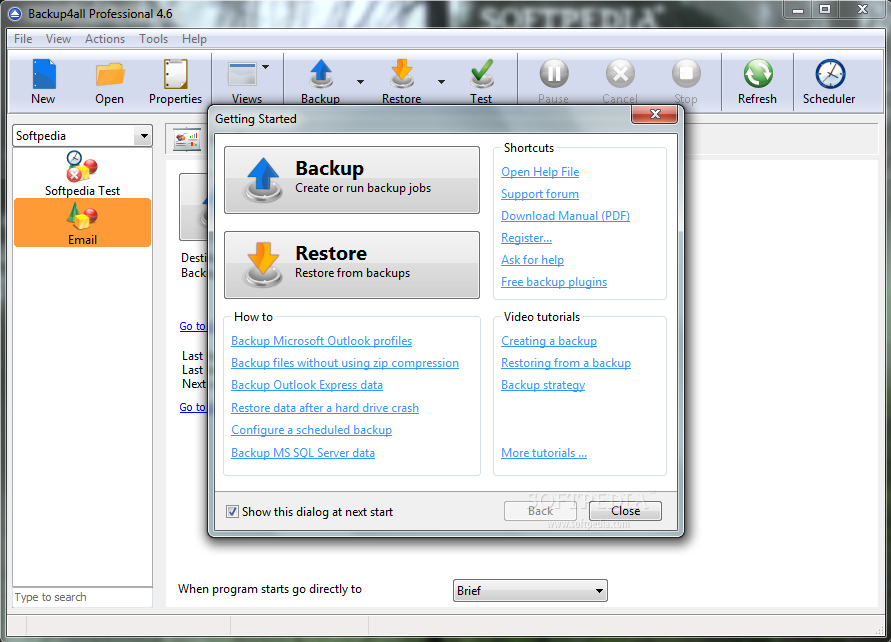
Upon opening the program a "Getting Started" dialog appears (can be disabled if not needed) with helpful suggestions as to what you would like to do with the program, such as how to's, shortcuts and tutorials as well as 2 big buttons namely "Backup" and "Restore".

To restore a backup you need to first have at least created a new backup (duh) give it a name and location to save to (local,network,ftp,sftp) then select the files or folders to backup (use filters here or preconfigured options from dropdown list) then select backup mode and encryption, if needed,then set schedule options and then save or save and run, simple really. (note that this was done in the standard view, not the advanced view, which is esentially all the same options, but all from the same menu, rather than from window by window view).

I found that the backup was resonably quick, but obviously this will vary from machine to machine and the size and quantity of files being backed up as well as whether compression and encryption are used.

Pros; Simple and advanced views.
Locked open file backups.
Option to test backups.
File version restore option.
Comprehensive help files.
Does a fairly quick job backing up.
Company offers several versions at different prices for different needs.

Cons; None at the moment.

Conclusion; A very well thought out piece of software that should enable easy backups for users of all levels of experience.

Note: All comments and observations are purely subjective and my differ to others' experiences.

Please count me in Thanks.


Comment #39 by: sunit on 29 Sep 2011, 10:58 UTC reply to this comment

excellent back up option for pc's without tension


Comment #40 by: reseacher on 29 Sep 2011, 17:48 UTC reply to this comment

Thanks for this!!! Very cool!!!


Comment #41 by: laci291 on 30 Sep 2011, 06:36 UTC reply to this comment

A Backup4all Professional változatával a biztonsági mentési feladatok automatizálásával védekezhetünk adataink teljes vagy részben történő elvesztése ellen. Bármilyen helyi vagy hálózati meghajtóra, FTP-kiszolgálóra (SSL-titkosítás, proxy kiszolgáló, passzív módtámogatásával), CD/DVD/Blu-ray lemezre vagy más cserélhető adathordozóra (például USB-meghajtóra) készíthetünk vele biztonsági mentést. Szerintem egy nagyon hasznos alkalmazás, ajánlom mindenkinek aki biztonságba akarja tudni adatait! Köszönöm Softpedia a bemutatót!


Comment #42 by: laci34 on 30 Sep 2011, 06:39 UTC reply to this comment

I like this program is useful, it is recommended for everyone! Softedia Thank you!


Comment #43 by: geekcoder on 30 Sep 2011, 13:38 UTC reply to this comment

In a home network topology, a backup solution like this is very important. Currently, I am running a series of scripts to accomplish my backup needs but the requirements set forth are tedious. Having an awesome utility like Backup4All Pro would greatly reduce my stress levels and thus contribute to my well being so that I will not die young by banging my head against a wall or by a massive heart attack! :) Thank you for an opportunity to win a free Backup4All Pro license!


Comment #44 by: Saud on 30 Sep 2011, 18:35 UTC reply to this comment

I tried create synchronicity, now I want to try this software, it looks good from the screenshots.


Comment #45 by: Sid_7 on 30 Sep 2011, 20:10 UTC reply to this comment

Hello. In this post, first I will share my experience with Softland software & then why I would love to get a Backup4all Pro license!

I have been using Softland's freeware FBackup for last 1.5 years.
Originally, I had used GFI Backup Home Edition for my file backups. It had so many errors that I was forced to look for an alternative.

I settled on FBackup after testing a record 14 programs.
Recently, I came across a Backup4all Lite 4.x giveaway on 'The Windows Club', a popular website run by a Microsoft MVP. Since last 1 month, I have switched to Backup4all Lite.
There is not much of a difference between FBackup or Backup4all Lite. But, both work FLAWLESSLY, unlike others. There is no pesky advertising or background services [GFI Home had one] to deal with. As an ordinary user, that is precisely what we expect.
As such, Softland is now one company I can trust. Also, I have participated in selected Softpedia giveaways - i.e., only for those software which I can really trust & consider 100% worthwhile. This is one such vendor & software.

The features which I like most in Backup4all Professional, are the incremental & differential backup - if given a license, I simply will run it on my new Windows 7 PC. The mirror backup offered by Fbackup & Backup4all Lite is little more than folder syncing.
Its no secret that incremental & differential give you tremendous power & flexibility along with all the other options offered by Pro edition.

Backup4all Professional is quite expensive [also pointed in the review by Ionut Illascu] but program quality is of highest order - frankly, Softpedia's giveaway is that wonderful opportunity to get such precious software for free.
Thank you for everything,
Sid_7


Comment #46 by: Purushotum Kumar on 30 Sep 2011, 21:32 UTC reply to this comment

once i tried to install easus todo backup workstation and it was well after installtion just after that i took back up for my system image with it.when a day after that my system fails to start i tried to recover my system with easeus todo backup workstation for data that was backed up earlier and situation goes more worse even than before. Then i installed fresh copy of os on my system after that i dicided to not to try again that stupid product.and just after it I tried for trial version of backup4all and took backup of my whole system with help of it. it was working awesome when i tried to restore my system with help of it.Then i found my self fall in love with backup4all. but as i am a student there was always some financial problem with me thats why i cant afford it by way of purchasing.but when i found this giveaway a hope inside me arose that it is a chance to have backup4all. its really a nice giveaway many many thanks for organising this giveaway.i pray to god to give me a chance to have this great product so called backup4all through this giveaway.


Comment #47 by: antonytony on 01 Oct 2011, 10:58 UTC reply to this comment

The first backup program in softpedia giveaway. Backup4all Professional offers all the features required for a good backup program. It has an intuitive interface, and allows easy access to pending and current jobs using its explore view.

Its backup wizard does its job by just asking where, what, how and when. Restoration is even simpler ,by a single click.

Stuffs neat about this program :
-Simple wizards for backing up and restore
-4 backup types
full backup,
incremental backup to backup only newly changed items,
differential backup which cumulatively backs up all changed items after a normal
backup
mirror backup which creates an exact copy which is accessible by explorer
-Backs up to zip archives so backups are program independent and portable and small
-Supports AES encryption 256 bits so data is highly secured
-Supports zip64 so backups can have larger sizes
-Data can be backed up to servers securely using SFTP
-Automated backups
-Powerful version tracking system to filter out file versions
-Backups can be made on CD DVD Blu Ray Disc and USB Sticks and Drives
-Backup of open applications is possible
-Backup plugins for popular applications are available for free so selective data can be be
backed up
-Multiple backups can be made
-No of backups can be limited
-Email notifications are given for actions
-Side bar for windows 7

Losing our precious data can be painful, so such softwares are greatly required today. Thanks to Softpedia for this giveaway.


Comment #48 by: Carol S. on 01 Oct 2011, 20:29 UTC reply to this comment

This looks great. My husband and I have been looking for ways to backup our computers. I had a nasty virus last year and lost everything! We keep saying it's something we have to do, but just have not gotten around to looking at options. The reviews of this product are really impressive.


Comment #49 by: aiglesh@gmail.com on 01 Oct 2011, 23:09 UTC reply to this comment

nice offer


Comment #50 by: Ruukki on 02 Oct 2011, 07:43 UTC reply to this comment

Folosesc de mult timp acest produs . De la fondarea lui de catre Kasperky Lab in anul 1997 sub conducerea lui Eugene Kaspersky si Natalia Kaspersky , acest produs a avut o crestere considerabila in randul ,, consumatorilor casnici '' dar si in randul marilor companii . Ajungand la peste 2000 de angajati , aceasta companie a dovedit ca administreaza un software de securitate care se mentine in top si poate face fata tuturor amenintarilor . Il recomand cu incredere tuturor .


Comment #51 by: dickdg on 02 Oct 2011, 13:52 UTC reply to this comment

Count me in.


Comment #52 by: salhob on 02 Oct 2011, 13:55 UTC reply to this comment

thanks SOFTPEDIA...

happy birth day

I need it..


Comment #53 by: eugenb on 02 Oct 2011, 16:31 UTC reply to this comment

interesant softulet


Comment #54 by: Chandrasekar on 03 Oct 2011, 12:11 UTC reply to this comment

I have used this software and found it had an easy interface and excellant backup features and it also has various types of backup and recovery methods suiting the user needs.Thanks Back up pro and softpedia for givig us this #1 software absolutely free


Comment #55 by: Mehdi on 03 Oct 2011, 16:12 UTC reply to this comment

Lets Backup every important file, which if lost, makes our brain stop working for a while and leave us nowhere. Great Giveaway!!! Thank you Softpedia!!! Happy 10 year Anniversary!!!


Comment #56 by: Emil-M on 04 Oct 2011, 15:50 UTC reply to this comment

Super software . Everybody must have that . Thanks for share !


Comment #57 by: Maria on 04 Oct 2011, 16:05 UTC reply to this comment

LA MULTI ANI SOFTPEDIA si multumesc pentru concurs . Stiu cit de important este un astfel de program si am auzit numai lucruri bune despre Backup4All Professional . Poate am noroc si cistig acest program .


Comment #58 by: negmfore on 12 Oct 2011, 18:32 UTC reply to this comment

The Best Site Ever For Programs Is Softpedia!!!!!!


Comment #59 by: lello.siddi on 13 Oct 2011, 07:27 UTC reply to this comment

Cool! I should love to use this program! Please... take me into account. And thank you very much for all these giveaways...
;)


Comment #60 by: Jozsef on 31 Oct 2011, 09:37 UTC reply to this comment

I used the free version of this software and loved it. Please count me in too.
Thank you.
J.


Comment #61 by: MMmike on 03 Nov 2011, 16:38 UTC reply to this comment

Backup4All is a good full-fledged solution.
I like Backup4All.


Comment #62 by: fay on 04 Nov 2011, 07:32 UTC reply to this comment

good software......


Comment #63 by: rabi on 12 Nov 2011, 12:58 UTC reply to this comment

Really a great software to backup all our personal data...


Comment #64 by: Crow on 28 Nov 2011, 13:41 UTC reply to this comment

I like that the professional version of Backup4all can create full, incremental and differential backups. This expediates the backup process by only backing up changed files since last backup. There is a 256-bit encryption for sensitive data and built in support for burning to removable media. Overall, a very good backup package to keep your data safe.


Comment #65 by: rgwhiteusa on 02 Dec 2011, 23:40 UTC reply to this comment

I would like to try this and hope this is a better version than 3.


Comment #66 by: PapyLuc on 24 Dec 2011, 07:02 UTC reply to this comment

Free Backup4All Lite! [24-hours only] - December 17th, 2011

Lite… Had to keep the key and the installation file. No problem to reinstall & registration this 2011/12/24

Bye from Belgium (Liège/Luik/Lüttich).

Copyright © 2001-2013 Softpedia. Contact/Tip us at

WindowsGamesDriversMacLinuxScriptsMobileHandheldNews

SUBMIT PROGRAM   |   ADVERTISE   |   GET HELP   |   SEND US FEEDBACK   |   RSS FEEDS   |   UPDATE YOUR SOFTWARE   |   ROMANIAN FORUM