
Softpedia
 

NEWS CATEGORIES:


NEWS ARCHIVE >>
SOFTPEDIA REVIEWS >>
MEET THE EDITORS >>
Home > News > Microsoft > Windows Software

October 27th, 2011, 12:01 GMT · By

Softpedia 10 Year Anniversary: 50 Licenses for XYplorer Pro [Ended]

SHARE:

Adjust text size:


XYplorer shows an impressive list of features
Enlarge picture
For most users file managing resumes to copying and moving data in Windows Explorer. On the other hand, advanced users acknowledge the power of professional tools such as XYplorer Pro, which is feature rich and highly flexible.


The 50 codes we’re lining up today for XYplorer Pro have no expiration date, meaning that they’ll work regardless of the amounts of updates and new versions the developer releases. In order to get your hands on one of the 50 lifetime free licenses, you have to drop off smart comment at the end of this article. Make it original and different and your chances will increase drastically.

XYplorer Pro (reviewed here) is regularly available for $69.95 (€49.95) and includes a slew of features designed to permit easy navigation from one location to another as well as spotting specific files. The application is portable by default, so all settings and configuration is stored in its folder, allowing you to carry it on a removable device.

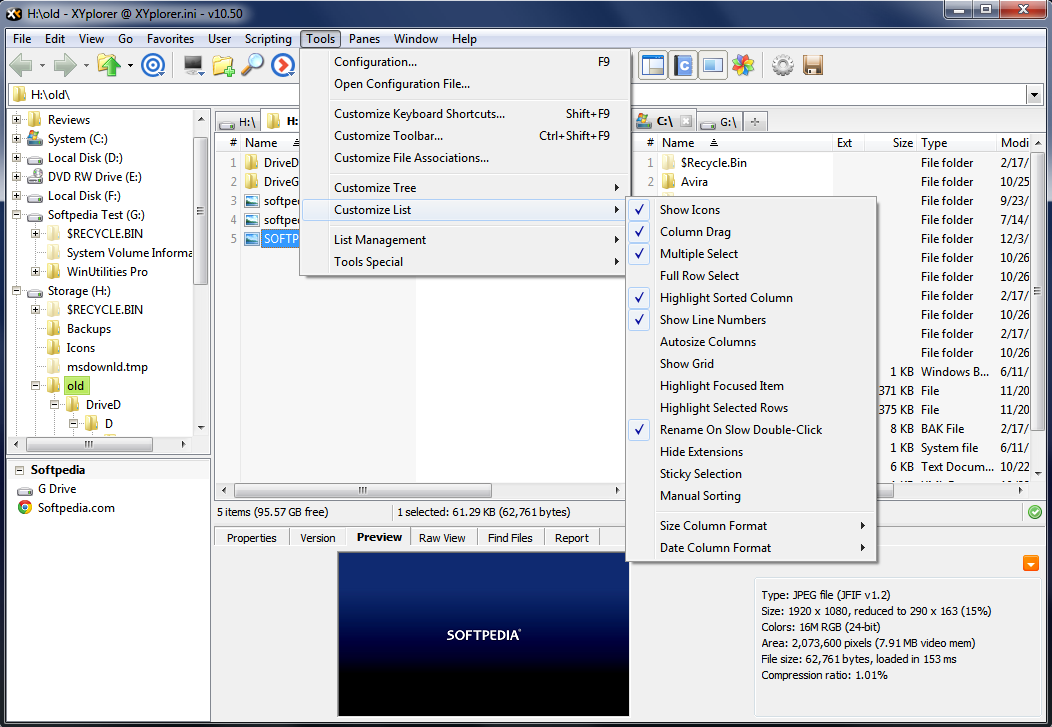
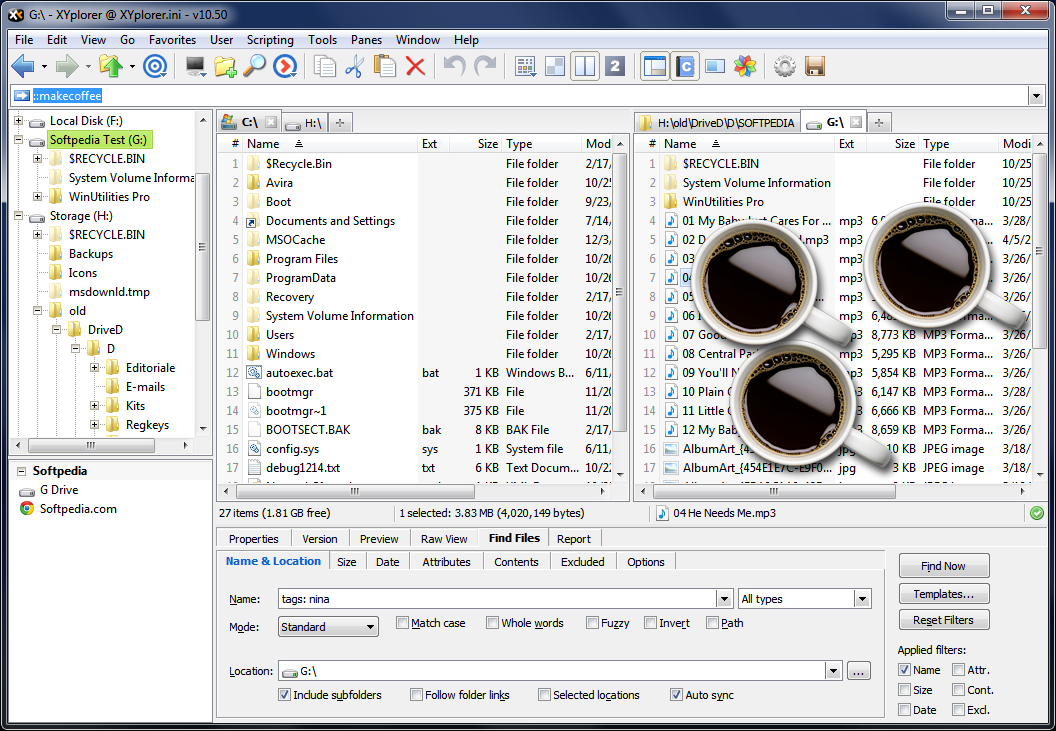
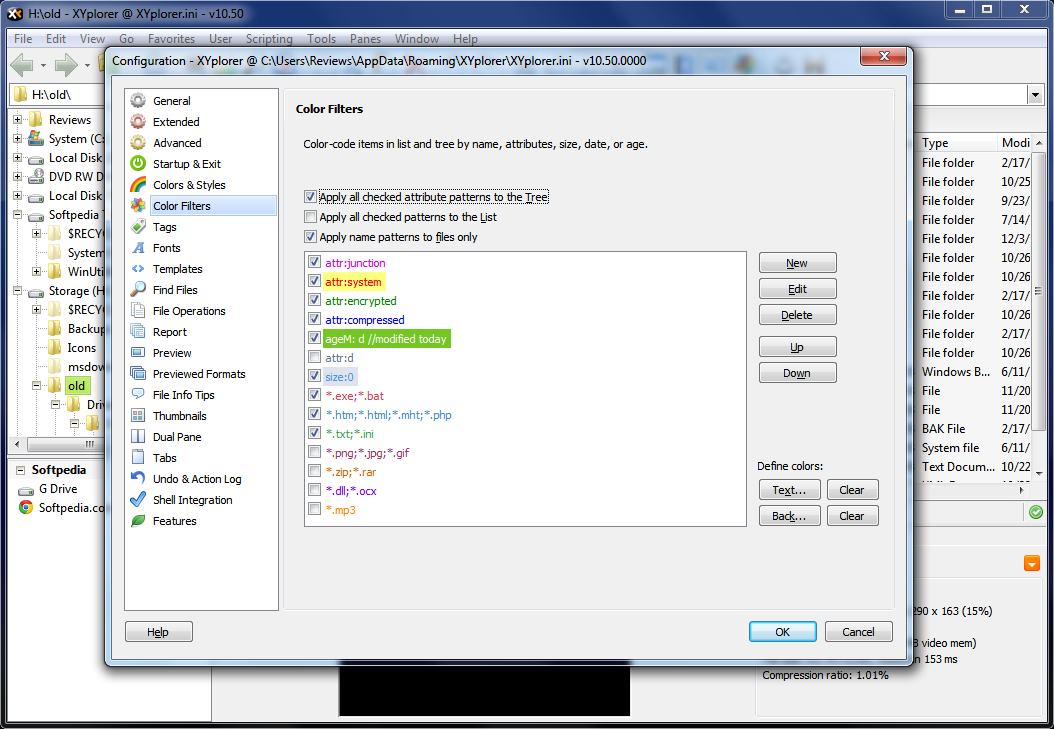
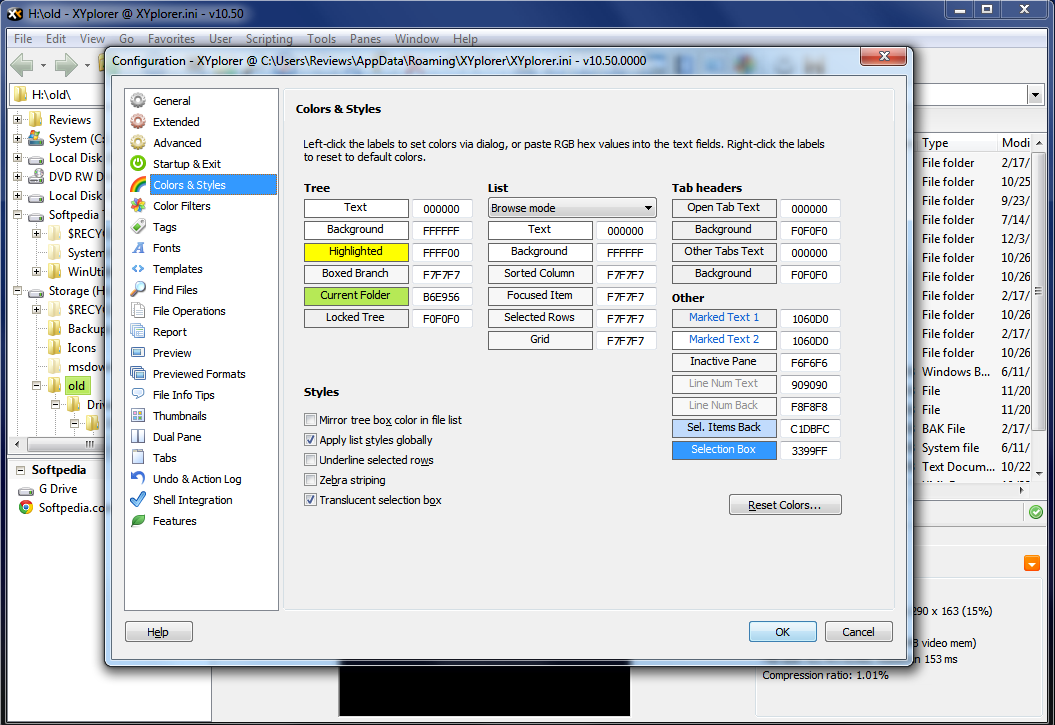
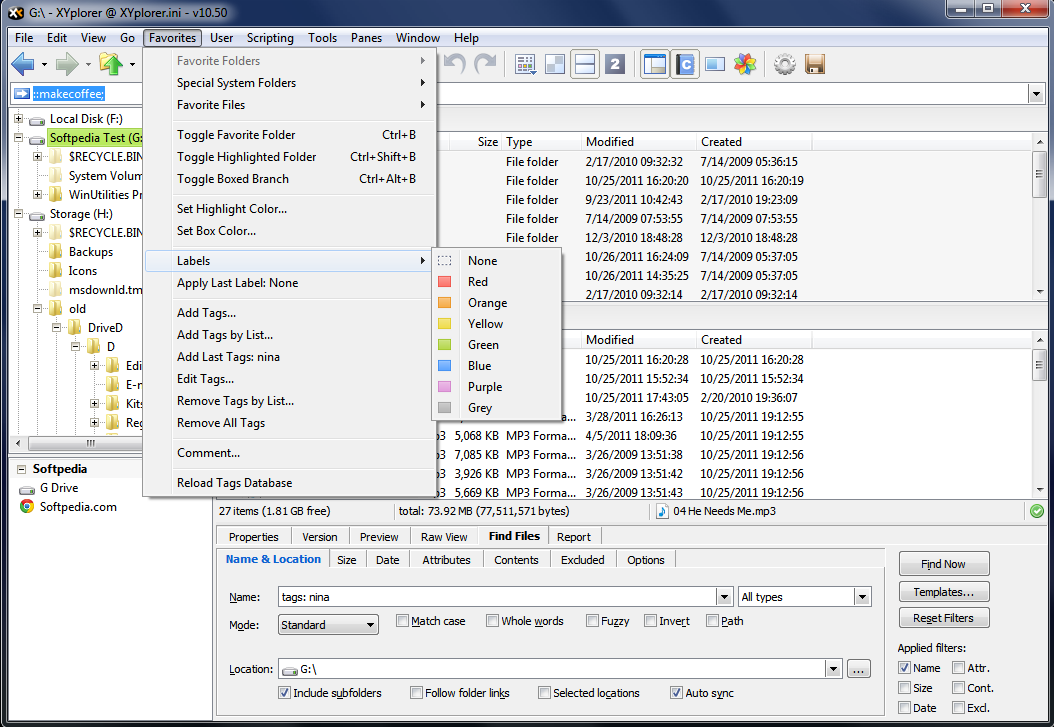
The list of features is more than impressive, even for an advanced user, some of the most prominent being dual-pane view, all sorts of filters (color, tags), elaborate search options (metadata included), background processing, support for scripting, and, on a less serious side, coffee making, as you can see from the pictures below.


Enlarge picture

Enlarge picture

Enlarge picture

Enlarge picture


Enlarge picture


Note: You have 24 hours to post your comment from the publish time of this article. Your chances to win one of the 50 free codes are only as good as your comment. So make your remarks as honest and witty as possible.

The winners will be picked from the comments section of this article, and will be contacted in 5 days after the giveaway expires. They will have to provide their full name in private (when required) in order to collect their prize. No other information except for your comment and the alias / nickname you provide will appear online.

We urge you not to double post and, most importantly, be original because pasting from different sources on the Internet will get you kicked from the giveaway campaign.

Follow us on Twitter @spgiveaways to receive updates about the new giveaway

GIVEAWAY OVER!
TELL US WHAT YOU THINK:

10,268 hits · 151 comments · Link to this article · Print article · Send to friend · Subscribe to news

MUST-READ RELATED ARTICLES:


Softpedia 10 Year Anniversary: 50 Licenses for Sticky Password Pro [Ended]

Softpedia 10 Year Anniversary: 50 Licenses for Ad-Aware Internet Security Pro [Ended]

Softpedia Giveaways 2011: 50 Licenses for PowerArchiver 2011 [Ended]

Softpedia Giveaways 2011: 50 Licenses for TotalMedia Theatre 5 [Ended]

Softpedia Giveaways 2011: 50 Licenses for AVG Internet Security 2012 [Ended]

READER COMMENTS:


Comment #1 by: Rifez on 27 Oct 2011, 11:08 UTC reply to this comment

i want that. please

Comment #1.1 by: Don Do on 27 Oct 2011, 11:19 GMT

I waaaaant it, I waaaaant it, I waaaaant it !!!


Comment #2 by: ibhecks on 27 Oct 2011, 11:11 UTC reply to this comment

Softpedia, a sentence from you is what makes me shiver "The 50 codes we’re lining up today for XYplorer have no expiration date, meaning that they’ll work regardless of the amounts of updates and new versions the developer releases"
I imagine I could continue to use this software, which will surely continue to make me think of your generosity


Comment #3 by: Sir Lance on 27 Oct 2011, 11:17 UTC reply to this comment

count me in, pls


Comment #4 by: Arie on 27 Oct 2011, 11:24 UTC reply to this comment

so, basically this software looks much like norton commander.. but the price is a bit.. high.. i think.. well, sometimes the built in windows explorer give up on me (meaning : hang) and need some treatment (meaning : restart), if it happens a lot then it make me feel irritated (meaning : boring, angry, you name it), oh boy, but what can i do, it's all i have to explore my pc..
then please include me on the draw, i would love to have an explorer that don't make me irritated, thank you very much.


Comment #5 by: Flopvake on 27 Oct 2011, 11:26 UTC reply to this comment

dit spreekt me heel erg aan count me in please


Comment #6 by: asdasdsad on 27 Oct 2011, 11:36 UTC reply to this comment

please count me in, i like this software very much because for its function and this is the most valuable and high quality software that Softpedia giveaway today.HP Softpedia and thanks


Comment #7 by: balvinder on 27 Oct 2011, 11:36 UTC reply to this comment

XYplorer pro is the best coping and moving solution ever...softpedia is ultimate and best which is providing.


Comment #8 by: Vu on 27 Oct 2011, 11:45 UTC reply to this comment

it sounds an interesting alternative to windows explorer. let me try it. thanks


Comment #9 by: tihamer on 27 Oct 2011, 11:47 UTC reply to this comment

In the MS-DOS days you could only do things by typing in commands, but luckily we got many file managers back then, like Norton Commander. NC was my personal favorite, but there were others like Volkov Commander, and DOS Navigator. By using these orthodox file managers you could speed up pretty much any file operation, by eliminate the need of typing in long commands, and using keyboard shortcuts instead. By the way I bough Norton Commander from my own money and I'm proud of it.

Then Windows 3.X was born, it had some kind of file manager, but I missed the old MS-DOS one. Sure they will run them, but you need to run it under the DOS environment. Then I heard about Total Commander, and wow that thing was a beast in the past. It did pretty much anything that I needed.

I used the shareware version of it, until 1999 and I decided to register my copy of Total Commander. And I sure did it. Christian Ghisler is an awesome developer, and his creation are widely know on the world, and also gets updates quite often.

I still have TC on my computer, but also tried many other Explorer alternatives like Directory Opus, CubicExplorer, Xplorer2, Q-Dir, and a ton of freeware ones, but none of them are for me.

Quite recently I found XYplorer, thanks to the Softpedia blog, and I think I found the right explorer alternative that I like. It's light, portable and lightning fast, but also packs a lot of useful features. Unfortunately my trial version just expired, and now I'm using the free unsupported version by the time being.

My English is pretty bad, so I have to apologize for that.
Keep up with the great work, I love you Softpedia!


Comment #10 by: nour aldeen mostafa on 27 Oct 2011, 11:52 UTC reply to this comment

mmmmmm.....btw that's a gr8 giveaway from softpedia :D
i hope i could win that :)
am a 12 years old student & computer technician
and i say that is awesome!!
thank you softpedia for that gr8 give-away even if i dont win :)


Comment #11 by: Mahafuz on 27 Oct 2011, 11:52 UTC reply to this comment

I like it, I love it
I feel it, I need it
Hey dear softpedia
Will you kindly give it?


Comment #12 by: ha14 on 27 Oct 2011, 11:54 UTC reply to this comment

XYplorer Pro already conquered worldwide Windows pc. XYplorer Pro copy folders full of folders and files much faster than some knows explorers. The tabs combined with the explorer on the left and the dual pane look like a very solid combo. Plus lots of sensible configuration options. Many commands exist and it's a snap to assign a keyboard shortcut of your choice to them. There is also the "Catalog" which is easier to configure than the buttons: You simply drag-drop folders on a category and like magic there is your clickable/droppable link. Its Similar to the Favorites pane in Explorer and very easy. A script which opens all marked files' parents/folders in separate XYplorer tabs is useful when want to browse certain folders while viewing XYplorer info pane and tagging while working on a project. Many plugins can incorporate XYplorer Pro like Quickjump and AutoDialogs. XYplorer Pro is amazingly powerful small footprint and has a unique place on Windows desktop.


Comment #13 by: Mayur on 27 Oct 2011, 12:08 UTC reply to this comment

I want to try this
hope to get one...


Comment #14 by: HaddadR on 27 Oct 2011, 12:12 UTC reply to this comment

very good file manager
have a lot of features
a very very good alternative for Windows explorer but not too good as Directory Opus ;)
thanks softpedia!


Comment #15 by: Softaddicted on 27 Oct 2011, 12:14 UTC reply to this comment

i tested this software in the past, using a free version and i can say is very useful and good alternative to windows explorer.
offtopic: happy anniversary softpedia, keep it up!


Comment #16 by: paddy on 27 Oct 2011, 12:16 UTC reply to this comment

G'Day,

Another great giveaway, XYPlorer is an absolute must, excellent dual pane and tabbed views, very capable copy engine, built in preview, powerful search feature, mini tree, tagging and a whole lot more available as a portable as well, in fact you need to use this just to see what is missing in Windows Explorer.
On top of this you get a very active developer, who responds rapidly to issues and is always willing to add useful requests to this application. Add to this the very generous licencing terms and you really cannot go wrong with this.
The only thing that i would like added into this application would be FTP functionality, but it is something that i could live without.
Please count me in for this excellent file manager.

Good Luck to All.


Comment #17 by: Hadron on 27 Oct 2011, 12:16 UTC reply to this comment

Checking out the acompanying images, this is something I could really do with. Being a bit of a junkie when it comes to collecting chess games and electronic chess articles, I have so many files spread over my main drive, 1 TB external drive and some flash drives...finding stuff at the drop of a hat is about as hard as finding a politican who makes sense. The tab browers and color filters look like a friggen awesome feature....I need 'order' in my electronic 'chaos'!...Amen


Comment #18 by: i love softpedia on 27 Oct 2011, 12:18 UTC reply to this comment

Softpedia is always my 1st resort for free softwares, updated softwares, new softwares. thanks softpedia, you are the best
-Mobile Alerts Nigeria


Comment #19 by: Manide on 27 Oct 2011, 12:19 UTC reply to this comment

It was one of the first apps I used since I have my own PC. (Every new version made me glad as I got a gift). The freeware version I use right now is far better than any (free) filemanager I know. It has so many features that you need some time to get used to them.

From time to time I give a try to similar apps, but nothing compares to XY...


Comment #20 by: Kussai on 27 Oct 2011, 12:20 UTC reply to this comment

I WANT ONE PLEASE :D ...... I have been reading on this site for the past 4 years....i know thats not much compared to others but i am a loyal reader in the end right? :) I DESERVE ONE! :P


Comment #21 by: Ashwin on 27 Oct 2011, 12:22 UTC reply to this comment

This is certainly far better than the boring old Windows Explorer. I have always been a fan of tabbed browsing and multiple panes, helps me manage my files more quickly without constantly clicking on My Computer or opening a new window in Explorer.

But the best feature I like is the Undo/redo which is more powerful than what the standard Windows Explorer has, I have often made mistakes like putting files in the wrong folder or accidentally renaming the wrong file. Yup, if this multiple undo/redo can help correct such errors this is the most important feature for me. And color coding files is such a blessing to assort my recent docs from older ones or backup copies. And lastly the UI, its simple yet beautiful. I like it better than Q-dir.


Comment #22 by: acidflash on 27 Oct 2011, 12:23 UTC reply to this comment

This site is the absolute best if you are looking for quality (usually reviewed) applications! I know Softpedia has helped me when trying to find the best application in a given area (IE: Anti-Virus).


Comment #23 by: Kussai on 27 Oct 2011, 12:23 UTC reply to this comment

Don't mean to get annoying or anything but i would really like one! THX!


Comment #24 by: paradox on 27 Oct 2011, 12:25 UTC reply to this comment

It sounds good. I would like to win. Thanks Softpedia.


Comment #25 by: viet_nobi on 27 Oct 2011, 12:29 UTC reply to this comment

i like it


Comment #26 by: Joe on 27 Oct 2011, 12:29 UTC reply to this comment

This site is the absolute best if you are looking for quality (usually reviewed) applications! I know Softpedia has helped me when trying to find the best application in a given area (IE: XYplorer, the best.)

XYplorer is worth paying for hands down, I'm glad Softpedia lead me to it...


Comment #27 by: smud2 on 27 Oct 2011, 12:36 UTC reply to this comment

Wow! This looks like a very nice program. I record music and have problems finding older versions of songs that are stored on my hard drive. XYplorer Pro appears to have detailed info for each file. This would be very helpful to me in finding the correct file fast.


Comment #28 by: bunty on 27 Oct 2011, 12:36 UTC reply to this comment

that must be fabulous software to complete the file managing for business and personal purpose.really really coooool.


Comment #29 by: Zeikas on 27 Oct 2011, 12:39 UTC reply to this comment

El programas esta genial yo lo estoy probando y no se si es el mejor programa en su rubro yo lo tengo desde hace 15 dias y da resutado pero tiene limitaciones ya que se necesita registrarlo


Comment #30 by: dvrrao on 27 Oct 2011, 12:39 UTC reply to this comment

there is no download link available I sincerly wish to use this interesting software


Comment #31 by: EverArale on 27 Oct 2011, 12:49 UTC reply to this comment

Count me in


Comment #32 by: werj87 on 27 Oct 2011, 12:56 UTC reply to this comment

XYplorer Pro is a really great replacement for Windows Explorer. There are dozens of free file managers and fewer paid ones. There is an old saying "you get what you pay for." XYplorer Pro has all the features worth paying for - its stable, easy customization with frequent releases to ensure long-lasting use. When comparing file managers, XYplorer Pro is a must-have. Count me in for one! The life-time license is a real treat and that's no trick.


Comment #33 by: Peter84PL on 27 Oct 2011, 12:58 UTC reply to this comment

Hello Softpedia,

I would like to win this license, please count me in this contest.

Thank you,
Peter84PL.


Comment #34 by: paulcrousel on 27 Oct 2011, 13:00 UTC reply to this comment

If you want to enjoy a better explorer stability and improved features then XYplorer Pro is an incredible candidat, dual panes and tabbed interface is clearly the way to go. You can customize it all you want. Personal favorite, thumbs view, preview, batch rename, scripting... XYplorer pro is extremely fast at accessing the network drives and uses very little resources. Fast search engine ad copy functions, with no time big files will be accurately copied and moved, no more checksum error problems. Undo/redo will ensure that nothing will get lost. XYplorer lets preview files, change attributes, and navigate the entire file system in the easiest straightforward manner. The backup capability is also very easy to use. Identify the files that you want to backup and simply right click and tell the system to backup to a given drive and then it will backup only files that are new or changed and ignore the others. You can color code your drives in tree view. Nothing can stop XYplorer to do the job.


Comment #35 by: Ande on 27 Oct 2011, 13:00 UTC reply to this comment

I've been using windows explorer since 3.0 and have found other better until now. Xyplorer Pro has the techniques and capabilities of a professional software system that I really could make great use of. If you give me one of these licenses, I am sure to use this product every day, many times, and will advertise the wonders of it's capabilities to all of my co-workers and friends. They will certainly see me in action and be very jealous of my increased capabilities and speed.


Comment #36 by: nasiryaar on 27 Oct 2011, 13:06 UTC reply to this comment

Hello,
Softpedia, the most Dense and Rich Store of Softwares is giving away free licences and I still did'nt get one.

Well what to say? . . . hoping the Admin of Softpedia will keep this old user and companion of good and bad times and will spare me a copy of XYplorer Pro.

Thanks.
Nasir (nasiryaar@yahoo.com)


Comment #37 by: david on 27 Oct 2011, 13:09 UTC reply to this comment

Please, count me in.Thanks


Comment #38 by: sidd on 27 Oct 2011, 13:11 UTC reply to this comment

XYplorer is the best replacement for default windows explorer.We can do a lot more with the help of XPplorer.I have tried this soft a time ago and i t works very perfectly.I can do "Tabbed browsing" of my data and can also "queued my files" ,even do a single click preview of my media files.I really like it over Windows explorer.The things i love in this soft are "Dual pane mode" working and "color filter". These are very awesome features and help me in sorting my data with super ease.Scripting is also a very cool feature ,now i can develop my own commands and can script them to XYplorer :).I have became a great fan of this speedy and useful tool.So please count me in for this Awesome Giveaway.Hope i win one of the 50 lifetime license.

HAPPY 10th Anniversary SOFTPEDIA.COM and Thanks for offering the license keys to us.

Thanks,
sidd

"EXPLORE THE WORLD WITH XYPLORER"


Comment #39 by: Judy on 27 Oct 2011, 13:16 UTC reply to this comment

wow, i like this software. perfect......
thanks softpedia


Comment #40 by: Glev on 27 Oct 2011, 13:18 UTC reply to this comment

Just downloaded AdBlock For IE8,
Hope she XYplorer Pro will be usefull too for my file archive management.
Thanks for the great soft/


Comment #41 by: antonytony on 27 Oct 2011, 13:22 UTC reply to this comment

Probably one of the best file managers for efficient management of files. XYplorer is surely a master piece file manager. It can be used instead of low featured windows explorer. A first hand look at it gave me a feel of using internet explorer /fire fox seeing its tabbing feature.

XYplorer is a very powerful tool for processing more files at the same time easily rather than the hasty work of switching explorer windows. The right click menu appears on it with all features which show up usually , along with special functions. It includes the rename special function for fast renaming of files, which can also be done in batch mode, it also provides easy way of removing diacritics. It also includes a paste special function for pasting with few added capabilities such as pasting into a new folder, pasting as a backup or copy or even moving the file. It also gives us the ability to view and edit files in the clipboard. We can also change the tasks from copy to cut or vice versa.

It also gives us a special ability to pause and resume which is not in the default explorer. We can also be confident with our work as it includes a powerful multi level undo/redo feature to correct our mistakes.

XYplorer has queuing function to handle large jobs in the background without overloading the system. It can also be made to perform parallel to other.

XYplorer has a very powerful and fast search feature that enables us to find files using more no of criteria than the usual. It also supports content searching.

We can also have our own custom functions with names that we choose for easy handling of different jobs. It features a script editor and processor , so we can type in frequently used function in scripts and execute them at the press of a button.

XYplorer has a powerful information window that lists out all the infos about a file or folder or drive including info which are not shown usually. It also has special capabilities with mp3 and other media files, allowing us to edit tag infos easily. We can also edit the time stamps of files according to our wish. This is really a cool feature. We can also change file attributes.

XYplorer also has a distinct preview tool to view all media. We can also use color coding for visual distinction of the files according to criteria. It also gives us the ability to create custom short cuts for all features.

XYplorer is a portable app so no need to perform troublesome installation, we can carry it in a thumb drive with all the settings unchanged including file associations, so we can be our boss wherever we go.

XYplorer is a great app and getting a lifetime license in giveaway for this is a rare thing. Thanks to softpedia for this.


Comment #42 by: Woomera on 27 Oct 2011, 13:45 UTC reply to this comment

tabbed file manager that gives users plenty of options for organizing and maintaining their files.interface is fairly attractive and intuitive, and highly customizable.Users can view files as lists with or without details, or as icons or thumbnails.
users can search files, color-code file names and add comments, and create lists of favorite files and folders. More experienced (or adventurous) users will enjoy being able to automate tasks using the program's scripting feature, and we especially appreciated the crash course in scripting that the built-in Help file provides.


Comment #43 by: Cornelius on 27 Oct 2011, 13:53 UTC reply to this comment

Seems great!
I have learn it for a while and get very interested. And now I have already downloaded the trial master. So, please be kind to me, and give me one license. Thank you.


Comment #44 by: mikered on 27 Oct 2011, 14:03 UTC reply to this comment

i'll enter and give my chance a try , who knows , maybe....


Comment #45 by: ReviewsAntivirus on 27 Oct 2011, 14:15 UTC reply to this comment

XYplorer Pro is a great alternative to Windows Explorer. Currently using the trial version. It is very convenient to use.

I would love to win it

Happy Anniversary Softpedia!

Sorry for my English. I use Google Translator.

http://www.facebook.com/reviewsantivirus/posts/186890568058564
http://twitter.com/#!/ReviewsAntiviru


Comment #46 by: derekuda on 27 Oct 2011, 14:34 UTC reply to this comment

Sweet! I love File Managers. The more geeky utilities the happier I am!


Comment #47 by: rummoy on 27 Oct 2011, 14:35 UTC reply to this comment

I had used this many years ago when i was in win xp. That time i loved it because of its multitab feature and a very good alternatinve for regular windows explorer.But that was a trial version.So this will be a great chance for me to experience this pro version.


Comment #48 by: BIll Q on 27 Oct 2011, 14:40 UTC reply to this comment

Happy Anniversary!

The tabbed interface looks great. I just downloaded it to give it a try. The portable install feature will make it a permanent feature in my toolbox USB drive. As I examine the feature list, only the lack of FTP capability gives me a any reason to want more. Perhaps that feature is coming soon?

Here's hoping I win a license!

Thanks in advance if I win, or if I don't, still thanks for making me aware of this utility.


Comment #49 by: Shishegar on 27 Oct 2011, 15:01 UTC reply to this comment

Thanks
Count me in


Comment #50 by: jishnu on 27 Oct 2011, 15:11 UTC reply to this comment

If you are not COMPLETELY satisfied with your current explorer XYplorer is my best choice


Comment #51 by: Adrian on 27 Oct 2011, 15:12 UTC reply to this comment

You are sure to get addicted from the moment you start using it.My search for a good file manager started with x2plorer and Total commander but XYplorer has everything the others lack.It is the king of file managers.The performance and support are the plu points.The price is the only negative point i can think of...is expensive for students and low income families but quality products are not cheap.It is portable,stable and polished with great support.


Comment #52 by: Michał on 27 Oct 2011, 15:22 UTC reply to this comment

XYplorer is an advanced file management manager for the Windows operating system. The application has extensive configuration options and user-friendly interface looks like Windows Explorer. In addition, equipped with a powerful search files.

XYplorer program has about 600 functions which can be without too much trouble assign keyboard shortcuts. One touch can watch video clips, audio, and even his own collection of paintings. We can also easily adjust the view of each destination file or folder and view them in the tree view.

I think it's much better than total commander!
Thanks for giveaway!


Comment #53 by: fay on 27 Oct 2011, 15:23 UTC reply to this comment

I NEED IT......


Comment #54 by: kelly on 27 Oct 2011, 15:35 UTC reply to this comment

I need to transfer files over pc and other removable devices for work purpose so I could use this program. Thanks.


Comment #55 by: cinda on 27 Oct 2011, 15:44 UTC reply to this comment

I think this is great and would love to win the spgiveaway.


Comment #56 by: magexin99 on 27 Oct 2011, 15:52 UTC reply to this comment

The best in life are free...:P The best software tastes better when its free! Sweetly Epic file manager! May this file manager aid me in my future and journey of life. Thanks Softpedia!


Comment #57 by: iPrism on 27 Oct 2011, 15:53 UTC reply to this comment

Thanks a lot Softpedia and XYplorer Pro for the giveaway.I would love to win one license of the Pro version for its impressive following features,
Tabbed browsing, Custom Copy, Powerful File Search, Folder View Settings and One-click preview.

Best regards


Comment #58 by: Howard on 27 Oct 2011, 15:57 UTC reply to this comment

XYplorer is famous software. It is a very nice file manager. It is fast and stable. It can let you bookmark folders so that you can locate a folder very fast. I would love to win a license. Cheers!


Comment #59 by: Terieron on 27 Oct 2011, 16:01 UTC reply to this comment

XYplorer Pro and I forget about inconvenient Windows Explorer ...please count me in.


Comment #60 by: tubby1000 on 27 Oct 2011, 16:03 UTC reply to this comment

Seems to be a good piece of software, I have never used it but id like to try it and explore all the features it has to offer. Thanks for the contest.


Comment #61 by: devore on 27 Oct 2011, 16:24 UTC reply to this comment

XYplorer remembers me about Norton commander. Long time i only use eplorer so please count me one. Thanks


Comment #62 by: Leo Zwart on 27 Oct 2011, 16:30 UTC reply to this comment

Ben ooit begonnen met NC. Was het beste wat ik toen kon gebruiken. Nu de DOS dagen voorbij zijn ben ik verder gaan zoeken. Heb diverse prog's uitgeprobeerd, zoals Xplorer2, CubicExplorer, Qdit etc. Heb nu al enige tijd XYplorer gebruikt en kan zeggen dat het snel, zeer handig en fantastisch regelbaar is. Zou graag de pro willen hebben en de code ontgvangen. Denk alleen dat veel meer mensen dat willen. Ik zal dus wel niet bij de 50 gelukkigen horen. Hoop echter nu eens op een meevaller. In ieder geval gefeliciteerd met het 1ste lustrum.
Leo Zwart


Comment #63 by: pito on 27 Oct 2011, 16:37 UTC reply to this comment

Great, been searching for something like this, count me in, wishing all good luck to win, greetings from Slovakia, thanks


Comment #64 by: Pinhead on 27 Oct 2011, 16:48 UTC reply to this comment

Hello,

Please count me in, thanks.

Regards,


Comment #65 by: Pr0fessor on 27 Oct 2011, 17:13 UTC reply to this comment

It is a good and useful software for everyday use. Also nice is the user-friendliness. Furthermore, software can adapt and adjust well. So does it work well and fast by the hand and it is also well suited as an explorer replacement. all in all - a good product


Comment #66 by: dajli on 27 Oct 2011, 17:20 UTC reply to this comment

3dmax1012


Comment #67 by: alro on 27 Oct 2011, 17:21 UTC reply to this comment

nice.count me in.thanks


Comment #68 by: nektar on 27 Oct 2011, 17:23 UTC reply to this comment

seems great, I want it!


Comment #69 by: tanviir on 27 Oct 2011, 17:23 UTC reply to this comment

i am feelin lucky to got the free license


Comment #70 by: cipriansorin on 27 Oct 2011, 17:24 UTC reply to this comment

Xyplorer is an excellent windows explorer replacement. The great news is that every single time when Microsoft comes out with something less than proficiency convenient, somebody else takes charge and does it a lot better. This is the case with today, s giveaway. Moreover, this software is a keyboard lovers dream. It allows customization so you can basically every single command, and this is not all. Colored files extensions offers a better visual experience so you will find your files a lot easier. Not every single aspect of Microsoft's software is to blame. For me, a plus for XYplorer is the fact that id does have a similar to windows explorer icon appearance. I use Windows operating system every day, so having the same icons on an alternate windows explorer makes it for me easier to handle it and a lot more convenient to switch to something else. There are a few other good explorer replacements that somebody would love to have, the truth is this one is the easier to handle for the average user.


Comment #71 by: RushArt on 27 Oct 2011, 17:41 UTC reply to this comment

Another giveaway worth competing over.

Due to Windows file explorer is really lacking in the capability of serious file management capability (dual panel is the most glaring omission, in my not so humble opinion), there are needs of third-party file manager.

While there are lots and lots file managers, in which the free ones are good enough, what makes XYplorer truly stands out is the searching capability. XYplorer has almost unrivaled capability when you are trying to search for file.

It's also light, truly feather-ly light, with minimal hardware specification which is only 100Mhz (even my smartphone has better CPU ability than this!).

Truly one outstanding software.


Comment #72 by: southtownguy on 27 Oct 2011, 17:49 UTC reply to this comment

I would love to win a copy of XYExplorer. Looks like a wonderful program and to have the licensce be lifetime is a plus!!!


Comment #73 by: ajay on 27 Oct 2011, 17:54 UTC reply to this comment

One i would love to have for renaming which i have to do one to other it has mass rename feature which comforts you. Useful & amazing file manager. It features a powerful file search, a versatile preview, a highly customizable interface, optional dual pane, and a large array of unique ways to efficiently automate frequently recurring tasks. what to demand further for, thanks for the giveaway.


Comment #74 by: holderofthhehorns on 27 Oct 2011, 18:02 UTC reply to this comment

Looks good. I would like to try this. Great for techs I think.


Comment #75 by: tek.fu on 27 Oct 2011, 18:02 UTC reply to this comment

i will win this one !!!


Comment #76 by: swilly on 27 Oct 2011, 18:05 UTC reply to this comment

Wow, Dora's got nothing on this XYplorer! I work in IT and I would use this super app every single day. Is there anything it can't do? Can it sing, "I'm the map, I'm the map, I'm the map, I'm the map, I'm the map..." Please tell me it can't.


Comment #77 by: Maria on 27 Oct 2011, 18:15 UTC reply to this comment

XYPlorer Pro the file manager is necessary to me it
I hope to win
Give me please the license
Softpedia many thanks


Comment #78 by: Pradeep Singha on 27 Oct 2011, 18:17 UTC reply to this comment

Thanks a lot for the giveaway at first! I regularly download a lot of stuffs from the internet to my pen drive, computer, laptop and many other media. Now everyday I need to move or copy these items to my portable hard drive for my personal storage, backup and safety. So I mostly do moving or copying with windows default program i.e., windows explorer. And yes its true! I have experienced many many times error while operation and ultimately I require to cancel everything and the next it becomes more difficult because everything just get mess up. So if I win this wonderful program then I think I will not have to again go through those errors while copying or moving data. Thanks a lot for bringing it to us. Hope I win one by luck. :)


Comment #79 by: Bionic on 27 Oct 2011, 18:22 UTC reply to this comment

Pure awesomeness.. Thank you DonL & Softpedia.
http://twitter.com/Bionic_/status/129621721874579457
---

Geek Theology:

In the beginning, God created the bit. And the bit was a zero.

On the first day, he toggled the 0 to 1, and the Universe was. (In those days, bootstrap loaders were simple, and "active low" signals didn't yet exist.)

On the second day, God's boss wanted a demo, and tried to read the bit. This being volatile memory, the bit reverted to a 0. And the universe wasn't. God learned the importance of backups and memory refresh, and spent the rest of the day (and his first all-nighter) reinstalling the universe.

On the third day, the bit cried "Oh, Lord! If you exist, give me a sign!" And God created rev 2.0 of the bit, even better than the original prototype. Those in Universe Marketing immediately realized that "new and improved" wouldn't do justice to such a grand and glorious creation. And so it was dubbed the Most Significant Bit. Many bits followed, but only one was so honored.

On the fourth day, God created a simple ALU with 'add' and 'logical shift' instructions. And the original bit discovered that -- by performing a single shift instruction -- it could become the Most Significant Bit. And God realized the importance of computer security.

On the fifth day, God created the first mid-life kicker, rev 2.0 of the ALU, with wonderful features, and said "Forget that add and shift stuff. Go forth and multiply." And God saw that it was good.

On the sixth day, God got a bit overconfident, and invented pipelines, register hazards, optimizing compilers, crosstalk, restartable instructions, microinterrupts, race conditions, and propagation delays. Historians have used this to convincingly argue that the sixth day must have been a Monday.

On the seventh day, an engineering change introduced Windows into the Universe, and it hasn't worked right since.


Comment #80 by: Beryl1234 on 27 Oct 2011, 18:43 UTC reply to this comment

XYPlorer Pro is a WINNER of a tool to organize, locate or tranfer your the daily collection of of dowloads, photos and surfing goodies. Spend less time dragging things, or syncing folders and more time having fun or getting work done. Is the XY in the name a hidden allusion to something sexual? Like XY chromosomes? Hmm.... Inquiring minds want to know. ;)


Comment #81 by: Arbab on 27 Oct 2011, 18:48 UTC reply to this comment

thanks


Comment #82 by: monish sharma on 27 Oct 2011, 18:59 UTC reply to this comment

It is a best and very very help full for my p.c.


Comment #83 by: Velichkov on 27 Oct 2011, 19:03 UTC reply to this comment

Thank you for the giveaway, Softpedia! Count me in, please!


Comment #84 by: crtonthebeach on 27 Oct 2011, 19:06 UTC reply to this comment

Looks like a highly versatile file manager - looking forward to seeing more!


Comment #85 by: Sid_7 on 27 Oct 2011, 19:19 UTC reply to this comment

Its no understatement that Windows Explorer can be very frustrating to use. For long, I have been searching for a good replacement for Windows Explorer.

That is how I stumbled across XYplorer. I have run this software for only 2 weeks sometime in early 2011, but I remember that it made a great impression on me.
Not only is it portable, but accessing my favorite folders quickly, file attributes [& changing them too on the fly], tabbed browsing, color coding, etc are all pluses!

One HUGE point is the 'Search' function, without the overhead of the 'Indexing Service' in Windows. And even that is customizable in XYplorer.
Another STAND-OUT FEATURE for me - batch jobs on files [like renaming]! It can sometimes be the difference between insanity & sanity..

Frankly, being a trained musician, I have lots & lots of music & music video files on my PC arranged into tens of folders on different disks & partitions. Managing them using Win Explorer is extremely cumbersome!
I would love to get a license for XYplorer since it will greatly simplify my work with files & folders.
Right now, I try managing with Win Explorer. I set aside a day every 2 weeks to keep my files & folders arranged perfectly - XYplorer will enable me to get rid of this 'scheduled task' in my life as everything will remain arranged at all times.

I find today's giveaway special also because of the kind of license - its a lifetime license for the product.
If I can win, I will use the product on Windows 7. As I have shared earlier also, I always participate in only those product giveaways which I have personally used & liked or atleast have memorable experiences in using the vendor's other similar products. And in this case, I have actually used the product.
Inspite of the lifetime license, 69$ is quite a lot. So I also thank Softpedia on giving this opportunity to get such a gem for free.
I shall wait eagerly for the results!
Thank you for everything.
Sid_7


Comment #86 by: amirbahaleghraan on 27 Oct 2011, 19:25 UTC reply to this comment

that's a great software which will serve its purpose completely well.It is must-have for everyone including me.plz count me in your giveaway license list


Comment #87 by: smaragdus on 27 Oct 2011, 19:27 UTC reply to this comment

XYplorer is one of the best file managers with over-abundance of features.


Comment #88 by: Have on 27 Oct 2011, 19:32 UTC reply to this comment

I had tried many file managers. Some lacked some features in other other features. After seeing the screenshots and review XYPlorer on the official site, I became interested in the program and learn about opportunities to get in the drawing of the Pro version of the program, I decided to write her a short-message. Hoping to get a key. All the best!


Comment #89 by: keqeno on 27 Oct 2011, 19:51 UTC reply to this comment

Please count me in and very thanks !!!


Comment #90 by: Ganesan on 27 Oct 2011, 19:59 UTC reply to this comment

The default Windows explorer will literally leave you hanging when multiple processes are carried, leave alone file processes that sometimes are carried out.A suitable replacement would be in order and that is XYplorer which does not give you the chill along the spine and makes you forget about windows ring of death. A potential lifesaver in a Soho or gaming computer


Comment #91 by: Thomas Machak on 27 Oct 2011, 20:30 UTC reply to this comment

WooHoo! what crazy nice event isn't this!!
Thanks heaps for arranging all this & Happy Anniversary.


Comment #92 by: Alpha on 27 Oct 2011, 20:37 UTC reply to this comment

One of the main reasons for our advancements is because of our knack of exploration. We are a pretty curious creature. Since the very early ages we have started exploring and that lead us to many new inventions. Early man explored the world and found suitable places for their stay. Great explorer Vasco da Gama explored and discovered many places in this world. Now scientist are constantly exploring different planets to find whether there is any life outside the world.
This shows us how important exploring is, unless we explorer and find different things our lives will be stagnant and we won't be able to grow.

The most important thing in any kind of exploration is the tools which you should carry before you start. Before starting you should always carry specific things else the exploration will always fail. To make it successful we should take care that we carry with ourselves proper tools. Like for a sea voyage you need proper food, water, map etc.

Now lets leave the real life exploration and think about exploring our computer systems. Its seems strange, but true that to get the maximum out of your system you also need to explorer and check specifically where is everything. And unless you know where it is it will take you hours to search and in the worst case you will never find.
So basically here also you need specific tools to make your exploration successful. And thanks to XYPlorer you can easily achieve that. XYPlorer provide everything that a system explorer needs. It's a perfect replacement for it. And what better, it is more efficient and easy to use also.

I won't go into a detailed description of the product as you guys already did that already, so i will just end this comment by saying thank you to the softpedia team for this generous offer.

--"XYPlorer is required to make your pc exploration successful."--


Comment #93 by: Michael Kozma on 27 Oct 2011, 20:55 UTC reply to this comment

TELL US WHAT YOU THINK: ??
--------------------
All I can possibly think of right now is a "BIG" Softpedia Group Hug.


Comment #94 by: Watcher1924 on 27 Oct 2011, 21:01 UTC reply to this comment

Hi. For most users file managing resumes to copying and moving data in Windows Explorer. On the other hand, advanced users acknowledge the power of professional tools such as [AD]
XYplorer Pro, which is feature rich and highly flexible.

XYplorer Pro is regularly available for $69.95 (€49.95) and includes a slew of features designed to permit easy navigation from one location to another as well as spotting specific files. The application is portable by default, so all settings and configuration is stored in its folder, allowing you to carry it on a removable device.

The list of features is more than impressive, even for an advanced user, some of the most prominent being dual-pane view, all sorts of filters (color, tags), elaborate search options (metadata included), background processing, support for scripting, and, on a less serious side, coffee making, as you can see from the pictures.

:)


Comment #95 by: janans on 27 Oct 2011, 21:50 UTC reply to this comment

I never used any 3rd party file manager, at least since long forgotten times of MS-DOS and NortonComander, but this one get my attention.

Somedays I arrange multiple explorer windows as ‘dualpane’ view, turn on ‘folders’ tab for one on the left and then navigate using it and address bar for the rest of them.
Why not to use a feature rich alternative for this awkward construction? I’m sure that can pay off.


Comment #96 by: kim on 27 Oct 2011, 22:01 UTC reply to this comment

Please count me in :-)
Really good filemanager!
Thanks for the opportunity.


Comment #97 by: RG on 27 Oct 2011, 22:07 UTC reply to this comment

XYplorer Pro is one of the more complete Explorer alternatives, would be great to win a copy.


Comment #98 by: allin77 on 27 Oct 2011, 22:24 UTC reply to this comment

I would like to change the Windows Explorer for this advanced program. Thank you for this opportunity. Birthday wishes and congratulations!


Comment #99 by: chandrasaekar on 28 Oct 2011, 00:01 UTC reply to this comment

Simply the easy way to quickly explore files without always seeing unwanted details on windows thank u softpedia for this giveaway and this would help me to organise my large no of files and in easy viewing


Comment #100 by: qbic on 28 Oct 2011, 00:05 UTC reply to this comment

Dear Sir,
I would really like to win that licence because otherwise i will need to give up on eating cheese for several months to save some cash and buy one. And i really love cheese..i mean really, really. Ending up without cheese for that long could be fatal for me.
On the other hand, using Windows Explorer is kinda frustrating and gives me a headache or something worse so that too could be fatal..

XYplorer is a great, portable, and most of all proper replacement for it, but it's too many cheese i would have to give up for it, and these are harsh times and you need to think in advance that your cheese stash not get depleted.

Anyway, whoever wins, congratulations!
You won something Windows Explorer should be.

Cheers,
I'll go get a slice of Maasdam now!


Comment #101 by: negm_gleam on 28 Oct 2011, 00:23 UTC reply to this comment

sanks softpedia
please i want it


Comment #102 by: iceblade112 on 28 Oct 2011, 00:29 UTC reply to this comment

I'd LOVE to have a code. It'd be awesome!
I've never... never ever won a giveaway before, so... I'm crossing my fingers.
The trial seems like an awesome file explorer!


Comment #103 by: Arun Mummidi on 28 Oct 2011, 00:44 UTC reply to this comment

This innovative application eases your life. Whetther you are a regular PC user or System administrator, it provides you a smart way to manage things. The interface is amazing. It keeps the stuff simple. And the features are plenty and useful. This tool will become part of your life for sure. I'm addicted to this tool already ;)


Comment #104 by: negm_gleam on 28 Oct 2011, 00:59 UTC reply to this comment

count me in, pls
i need it


Comment #105 by: dosboss on 28 Oct 2011, 01:21 UTC reply to this comment

I have tried many different pieces of software some good some not so good. I think based on the fact that many people want to have it or at least try it ,then it must be good.Bye the way is it a boy or a girl plorer? Thanks for reading.


Comment #106 by: BlogWurm on 28 Oct 2011, 01:34 UTC reply to this comment

______________________________________________________________________________________________

THE FLEXIBLE FILE MANAGER
______________________________________________________________________________________________
000_____000_000______000_000000000__000_________0000000___000000000____0000000000_000000000___
000_____000__000_____000_0000000000_000________000000000__0000000000___0000000000_0000000000__
_000___000____000___000__000____000_000_______000_____000_000____000___000________000____000__
__000_000______000_000___000____000_000_______000_____000_000____000___000________000____000__
___00000________00000____000000000__000_______000_____000_000000000____00000000___000000000___
___00000________0000_____00000000___000_______000_____000_00000000_____00000000___00000000____
__000_000_______000______000________000_______000_____000_000___000____000________000___000___
_000___000_____000_______000________000_______000_____000_000____000___000________000____000__
000_____000___000________000________000000000__000000000__000_____000__0000000000_000_____000_
000_____000__000_________000________000000000___000000____000______000_0000000000_000______000
______________________________________________________________________________________________

... combines for me, elegantly basic functionalities of traditional file managers
- common & widely used dual pane view
- basic copy, move, show & sort operations
- detail-view & thumbnail preview of common file types

with nearly unlimited enhanced professional features, you can:
- highlight your important files through color filtering by different attributes
- tag all your files (and not only multimedia ones) with tagbased filesystem to find them faster later
- find files with grep
- copy your files verified & there is no more waiting until one job is done, just queue them & they will be done
- simply take notes out of each application by only drag&drop to folder in XYplorer
- undo/redo up to 100 actions. Along the lines of you can fix today, what you broke yesterday.
- can create user-defined commands and other scripts
- secure delete/wipe out sensible data
and many many more.

This all comes in a smart, handy and fully customizable user interface.

I especially like cool grep searching
e.g. "\d{4}-\d{1,2}-\d{1,2}" AND ".doc$" will find all doc-files containing dates
in filename with format dddd-dd-dd (d: digit).

Remarkable bonus features are:
- fully portable
- quick 24/7 support incl. support-forum
- lifetime updates
- german quality product =)

The only "negative" is that it has so many customizable features built-in,
that you can't fully max them out in your life. ;)

Until now I only used very limited windows explorer and some little extra tools e.g. for renaming.
So it would be nice to win and get all the functionalities in one single application - XYplorer.

Thanks Softpedia for this giveaway
and Donald Lessau the developer of this wonderful piece of software.

P.S. I think if there is a worthwhile feature that not exists today, it will exist next day. ;)
______________________________________________________________________________________________
0000000000000000000000000000000000000000000000000000000000000000000000000000000000000000000000
0000000000000000000000000000000000000000000000000000000000000000000000000000000000000000000000
__________________________0___________________________________________________________________
_________________________000__________________________________________________________________
________________________00000_________________________________________________________________
_________________________000__________________________________________________________________
______________________________________________________________JUST_TIME__TO_MAKE_____________
__________________________________________________________________SOME_COFFEE________________
_____________0000000000000000000000000_000000_________________________________________________
_____________000000000000000000000000000000000________________>>_::makecoffee;_

Comment #106.1 by: BlogWurm on 28 Oct 2011, 18:08 GMT

I've seen that my second ascii-art was shortened somehow.
Here is it again only for completion. Enjoy =)
_______________________________________________________________________________________
000000000000000000000000000000000000000000000000000000000000000000000000000000000000000
000000000000000000000000000000000000000000000000000000000000000000000000000000000000000
___________________0___________________________________________________________________
__________________000__________________________________________________________________
_________________00000_________________________________________________________________
__________________000__________________________________________________________________
_______________________________________________________JUST_TIME__TO_MAKE______________
___________________________________________________________SOME_COFFEE_________________
______0000000000000000000000000_000000_________________________________________________
______000000000000000000000000000000000________________>>_::makecoffee;_

Comment #106.2 by: BlogWurm on 29 Oct 2011, 13:19 GMT

Maybe shortening comes from a bad token,
which got ascii-art broken.

For completion this is my last try,
sorry for this second reply.
_______________________________________________________________________________________
000000000000000000000000000000000000000000000000000000000000000000000000000000000000000
000000000000000000000000000000000000000000000000000000000000000000000000000000000000000
___________________0___________________________________________________________________
__________________000__________________________________________________________________
_________________00000_________________________________________________________________
__________________000__________________________________________________________________
_______________________________________________________JUST_TIME__TO_MAKE_____________
___________________________________________________________SOME_COFFEE________________
______0000000000000000000000000_000000_________________________________________________
______000000000000000000000000000000000___________________::makecoffee;_________________
______00000000000000000000000000____000________________________________________________
______0000000000000000000000000_____000________________________________________________
_______000000000000000000000000___0000_________________________________________________
________0000000000000000000000000000___________________________________________________
_________0000000000000000000000000_____________________________________________________
__________000000000000000000000________________________________________________________
___________000000000000000000__________________________________________________________
00000000000__________________0000000000000000000000000000000000000000000000000000000000
000000000000000000000000000000000000000000000000000000000000000000000000000000000000000


Comment #107 by: eyebee on 28 Oct 2011, 01:42 UTC reply to this comment

so, correct me if I'm wrong ... but I'm guessing that I would have to place my monitor in a horizontal position on my desk in order to keep my coffee from spilling. Oh!, and is there a built in function that would keep my coffee warm.

I would be more than willing to test this. Of course, I would need the license.

one other thing. are free refills included.

Certified Coffeeholic


Comment #108 by: Ty on 28 Oct 2011, 02:12 UTC reply to this comment

XYPlorer is a great explorer tool! One of the best. I like it because it has a wide array of functionality but still performs quickly. Not too mention, it's not bogged down in different functionality which can make the interface cluttered. Thanks!


Comment #109 by: Don Do on 28 Oct 2011, 02:46 UTC reply to this comment

I waaaaant it, I waaaaant it, I waaaaant it !!!


Comment #110 by: Craig on 28 Oct 2011, 03:02 UTC reply to this comment

xyExplorer steers you in the right direction having xy co ordinates that puts you at the right spot or folder all the time. An explorer that has x and y corodinates must be xtremely terrific and is as simple and abc or is that xyz anyway xyExplorer will get you there with very little fuss
Cheers Craig


Comment #111 by: TBuck on 28 Oct 2011, 03:29 UTC reply to this comment

Browsing the comments I see nuff said already about the abysmal windows explorer and the fantastic feature set of Xyplorer. As I was skiing the interweb reviewing this gem (snowing here tonight - so no more surfing for a while) I was surprised to land on an MSDN blog page discussing the improvements for windows explorer in Win8.

Customer suggestions on the evolution of windows explorer mentioned Xyplorer by name as one of the explorer replacements that already offer features they would like to see. Yup, Microsoft mention's Xyplorer by name.

Here's a quote "With greater than 85% of command usage being invoked using a method other than the primary UI, there was clearly an opportunity to improve the Explorer user experience to make it more effective—more visible and uniformly accessible."

So what is their solution and road-map for Windows Explorer for Win8? Wait for it.... Nope, you're wrong. It"s Office style ribbon for explorer. Yeah, gonna love that. Office style ribbon, go figure.

As I sat here contemplating sticking a sharp pencil in my left eye, I realized this giveaway is for a LIFETIME license. Please, Oh Please, rescue me from a lifetime of misery and possible eye damage and send me a license. I know begging is pathetic, but I have seen the future and it is wrapped in a pretty ribbon.

Here is a hot cup of coffee for whoever gets to read through these posts...

/~~~~~~~~/ |
/ /######/ / |
/ /________/ / |
========= / ||
|__________|/ ||
| \__,,__/ ||
| __,, __ || ((
|_\====/%____|| ))
| /~~~~\ % / | ..........
_| / \%_/ | | |]
| | | | / \ /
|__\______/__ |/ '____'
~~~~~~~~~~~

Oh yeah, reference for stuff quoted from the web - http://blogs.msdn.com/b/b8/archive/2011/08/29/improvements-in-windows-explorer.aspx
ascii by Joe Jacques


Comment #112 by: Satechip on 28 Oct 2011, 04:14 UTC reply to this comment

Quote from one of spgiveaways tweets “…fire witty comments to win one..” so here’s my


While surfing the web I thought:
I should check Softpedia® today.
There I found a XYplorer giveaway, a file manager with no equal.
Tabs, dual-pane, color filters are just some of its great features.
You are offering a lifetime license and that’s awesome.

Count me in is what I’ve to say.
Other than XYplorer, I’ve tried some softwares.
Many were trials, others were free.
Most lacked something, so I uninstalled them.
Excellent features are what XYplorer offers and that’s why I want it.
Now I’m hoping my comment is good enough to win one license.
That’s all, thank you for your attention.


Comment #113 by: FENNERS on 28 Oct 2011, 04:35 UTC reply to this comment

i WOULD LOVE TO TRY IT AND SEE HOW IT COMPARES TO Q-DIR AND POWERDESK WHICH I HAVE USED A LICENCED VERSION FOR YEARS UNTIL THEY WERE TAKEN OVER BY AVANQUEST WHO SHUT DOWN MY NEW AND PAID UPGRADES BECAUSE I INSTALLED IT ON MY DESKTOP AND LAPTOP AT THE SAME TIME... YOU KNOW WHAT THEY CAN DO!


Comment #114 by: Anurag Shah on 28 Oct 2011, 05:16 UTC reply to this comment

Softpedia is a very good site to get all ur needs fulfill regarding PCs(Any Platform). I salute the Admins of this website! Please keep adding new softwares. Thankyou


Comment #115 by: Grr on 28 Oct 2011, 05:35 UTC reply to this comment

Dear Softpedia,
Thanks for bringing us another jewel as XYplorer.

I have tried a few freeware file managers, but always missed couple of things which XYplorer provides us.

[all below on version 10.50, installed version (XYplorer_10.50_Install.exe)]

The portable thing is the main catch here and should interest one and all. The big help results in use anywhere. The next thing is the tabbed pane which is another hit - as I am used to "tabbed" feature of Mozilla, Chrome and now IE. It is very convenient and time saving.

I'm one of those wo have same folders/contents spread all over my laptop, virtual OS, USB drive and office PC. Over the period of time it leads to lot of trouble finding which folder is having the current/updated documents. Having the dual panel will provide some ease to compare the dates and filesize to determine which is going in recycle bin!

The tagging feature is something which I came to know from another software and since then I'm using its free version. The tag feature in XYplorer is much more powerful (given it is PRO) and again useful in my daily work.

The search is definitely faster than windows default and google desktop search (which I tried and uninstalled). It was interesting to do some expression searches and yet find the files.

The Multi-Level Undo/Redo is something very useful for me. Currently I'm preparing some technical documentation and wished that I had this power. A Real * saver!

Their scripting is something serious business, not for newbies in my view. However given my professional knowledge of scripting, I'm sure to reap some good use of it.

I still found some * -bits missing:

1. There is no column (I selected show all columns) for information related to media (movie, song) file such as bitrate, length and others.
2. The Interface is still the same like in their older versions. No round corners. Opps...the sharp corners hurt me...lol
3. It should not show Label, tag, comments which are empty; while preview (moving mouse over a file-it shows the preview information)
4. The right click on any folder or file from within the pane/window didn't had the virus scan option. I have an antivirus installed and have the right-click scan option.
5. There was no error prompt when I tried reloading tag database or even removing all tags (from favourites menu) - when I didn't create any tag.
6. It doesn't shortens the name of the tab, and if one of the tab is having a real-big name, and we have multiple tabs open -eventually the +tab is lost. See below:
http://i44.tinypic.com/4qgd1c.jpg


On the whole XYplorer is a very powerful file manager which could save lot of productive time in our day-to-day life. It is very extensive, yet smart.

I will highly appreciate if you could consider me for a license.

Thanks,
Grr


Comment #116 by: Mahesh on 28 Oct 2011, 06:14 UTC reply to this comment

Softpedia is almost an encyplopedia for softwares in all platform.Its a tension free,trusted,cool site for downloading softwares.i wish you(softpedia)all best for your plans and become one stop download and information for all the softwares and hardwares.


Comment #117 by: anup jax on 28 Oct 2011, 06:51 UTC reply to this comment

its very good pls select me


Comment #118 by: syahrial on 28 Oct 2011, 07:04 UTC reply to this comment

I have been using Q-Dir but XYplorer looks pretty good and have more features. It also got Excellent Review by SP !! I want to try. count me in..
cheers


Comment #119 by: Gopal on 28 Oct 2011, 07:12 UTC reply to this comment

Execelent management file manager is first introduced by the name that published by soft pedia thanks to softpedia for this awesome giveaway.


Comment #120 by: Asriel Rusdyawan on 28 Oct 2011, 07:16 UTC reply to this comment

Thanks Softpedia for this giveaway!
This tool can become proud of itself because of it's ability to what windows' explorer can't!
Please count me in Dude..

THX, LJBU!


Comment #121 by: sandeep on 28 Oct 2011, 07:23 UTC reply to this comment

hei. I am soooo happy

-sent via mobile


Comment #122 by: James000 on 28 Oct 2011, 08:08 UTC reply to this comment

I didn't use it before that giveaways. I downloaded and installed it and it
looks like a very good soft. It has a portable version and that is a good
thing because I follow advanced users'advice and so try to use only portable
software, even on my computer.
It has really an amazing number of features to... explore and to learn.
If I am not mistaken, it is only in English but this is not such a hurdle.

It is obviously light and fast. Really more reactive than Windows Explorer !
I thought the slowness of W.E. was because of my computer but XYplorer leads
me to understand that it is because of Windows Explorer'own slowness !

The XYplorer.chm file included is a good choice as some software force us to
go on the web to find such explanation and this is neither convenient nor kind.
The only drawback for the moment is I can't open a file with just one left click
but there is perhaps a parameter to change : if it does exist, I will
find it.

As it is a "no expiration date" code, this is really a great giveaway !

Thanks to Softpedia !


Comment #123 by: JustAsking on 28 Oct 2011, 08:25 UTC reply to this comment

No more comments?


Comment #124 by: Luong.Apl on 28 Oct 2011, 08:54 UTC reply to this comment

the best explorer I've seen. It's will be great for my life if I win an licenses with this program. Thank you Softpedia any way.


Comment #125 by: Clarence on 28 Oct 2011, 09:26 UTC reply to this comment

It is very versatile and usefull! I even use it in the office, standalone, on a servermap, where my organisation they have everything protected.


Comment #126 by: MerleOne on 28 Oct 2011, 09:53 UTC reply to this comment

What makes XYPlorer stand out from the fierce competition in that field is the ease of use and configuration, the blazingly fast non indexed search and the overall power. It also regularly updated, and most of the time, updates bring new functionalities, not just fixes. Thanks for the giveaway. Please count me in.


Comment #127 by: ahhohoh on 28 Oct 2011, 10:32 UTC reply to this comment

i think softpedia is great by giving us these things


Comment #128 by: Geomonster on 28 Oct 2011, 10:55 UTC reply to this comment

At a price of about 70$, it looks too costly, but it has the unbeatable features which makes it impressive. It can be useful to find a file when we are in a hurry (Mostly happens with documents & presentations). I've an extra folder in most of the drives named unsorted, to keep the files which are confusing, and also new arrivals. I spend most of my time in sorting them, and have to remember the location of every file. The second option left is to use XYplorer. Tabbed browsing and custom keyboard shortcuts are worth mentioning. One more good thing is filters. The appearance is not catchy, but the performance rocks.....


Comment #129 by: Rhogie on 28 Oct 2011, 12:04 UTC reply to this comment

great!


Comment #130 by: voyager529 on 28 Oct 2011, 15:50 UTC reply to this comment

XYPlorer Pro: What Microsoft should make Windows Explorer look like...but never will.


Comment #131 by: geekcoder on 28 Oct 2011, 16:52 UTC reply to this comment

I love using file managers like this and sort of reminds me of Midnight Commander that I have used with Ubuntu. Looking forward to receiving a license for this awesome software!


Comment #132 by: Rajesh Ghadye on 29 Oct 2011, 07:03 UTC reply to this comment

One of the best file manger and best in file search.
Xyplorer is best in preview function, file system reports, had support no of most usablefiles such as mp3,html, php etc. Good and simple user interface with tree menu.
I would like to suggest if possible add one taskbar at the bottom of main window having shortcuts for basic/advanced functions

Thank you softpedia LOVE tO have it
COUNT ME IN


Comment #133 by: jelson on 29 Oct 2011, 08:22 UTC reply to this comment

XYplorer is simply what Windows Explorer should have been.


Comment #134 by: andybandy on 29 Oct 2011, 14:48 UTC reply to this comment

well it's sound very useful for working with files maybe i win a code


Comment #135 by: TTTZavac on 29 Oct 2011, 16:01 UTC reply to this comment

XYplorer Pro
I need it


Comment #136 by: nom on 29 Oct 2011, 16:24 UTC reply to this comment

I like this tool XYplorer Pro.


Comment #137 by: cornelius on 29 Oct 2011, 16:28 UTC reply to this comment

Wonderful software. Thanks for this promotion


Comment #138 by: jock on 29 Oct 2011, 21:22 UTC reply to this comment

Cannot afford to buy it but would so like to try it.


Comment #139 by: myimmortalize on 29 Oct 2011, 21:29 UTC reply to this comment

count me in please


Comment #140 by: EverArale on 30 Oct 2011, 00:32 UTC reply to this comment

Count me in


Comment #141 by: Emmen on 30 Oct 2011, 06:50 UTC reply to this comment

XYplorer is a veru good browser. I need it. :) Thx.


Comment #142 by: Chester on 30 Oct 2011, 08:20 UTC reply to this comment

Happy Birthday and thanx for this gift


Comment #143 by: rover3500 on 30 Oct 2011, 12:39 UTC reply to this comment

I tried this program years ago and it was comprehensive back then.I downloaded it again to help write this and it's got even better.I don't think they could add any more functions to it that you would need;you can customize it to use your own scripts or tools or change look or menus,even has the facility to write user defined commands.I seem to remember you don't get some customizing in the free version,but I don't think there is a free version anymore,just trial.In my opinion $43 is alot for an explorer type program,I think they would be better reducing it to about $25 even though alot of time and effort was obviously put into it.If you're not a lover of total commander or similar,I don't think you could do better than this program.I use cubic explorer at the moment as it's free but I would jump at the chance to use this instead,an excellent program all round with unbelievable customization possibilities and looks good.Great!This is one program I would find so useful to have.I want one!!And good luck to everyone.


Comment #144 by: devendra on 30 Oct 2011, 12:56 UTC reply to this comment

Xyplorer is strong contender
1. Tabbed View rather than 2 Pane
2.Tabbed Reduceing time and key stroke time
3.that using multi tasking approach
4.easy file transfr and copy
5. one of best file finder
6. mostly used in geeky level(recommaned by LH,MUO,TSA)
7. It is designed to be very intuitive and to have any useful function that can be implemented in such a program.
8.multi level undo redo and session
9.new copy technology
10 new taging file management
11.folder view setting
12.mini tree ,folder size
13. access control manager
14. named filter
15 CMD interface
16. preivew file if compitable like mp3,wav,images,video,text,html and more
17. portable version
18.custmize your own toolbar for xyplorer
19. its really user taken
and last trouble free user friendy simple element ,and save time,money,light power and PRODUCTIVITY

atlast if you give this licenses to me i always use this license version
i used is last 5 year and its last free version 5.55 which you get from downloading sites

this very short but best for more plse
http://www.softpedia.com/reviews/windows/XYplorer-10-Review-230610.shtml
this link of softpedia
Thnks to read my post


Comment #145 by: Jason on 31 Oct 2011, 02:57 UTC reply to this comment

Please include me.

Thanks.


Comment #146 by: FreeBrother on 31 Oct 2011, 11:42 UTC reply to this comment

XYPlorer PRO is a dual pane multi-tabeber and I am a single pane multi-tabbee. I Love multi tabbing software (ie tabbed internet browsers, tabbed notepads, etc) because all the current files are at your fingertips. Geeks are conisoures of simplicity and speed. This product has both. Thanks for everything.


Comment #147 by: vu on 31 Oct 2011, 13:06 UTC reply to this comment

What a great chance!


Comment #148 by: Terieron on 01 Dec 2011, 18:50 UTC reply to this comment

Very good, fast and transparent file explorer&manager with great possibilities! Count my in and thanks for great giveaway!

Copyright © 2001-2012 Softpedia. Contact/Tip us at

WindowsGamesDriversMacLinuxScriptsMobileHandheldNews

SUBMIT PROGRAM   |   ADVERTISE   |   GET HELP   |   SEND US FEEDBACK   |   RSS FEEDS   |   UPDATE YOUR SOFTWARE   |   ROMANIAN FORUM