
Softpedia
 

NEWS CATEGORIES:


NEWS ARCHIVE >>
SOFTPEDIA REVIEWS >>
MEET THE EDITORS >>
Home > News > Microsoft > Windows Software

October 12th, 2011, 11:01 GMT · By

Softpedia 10 Year Anniversary: 50 Licenses for PowerISO [Ended]

SHARE:

Adjust text size:


With PowerISo you have an all-in-one ISO processing tool
Enlarge picture
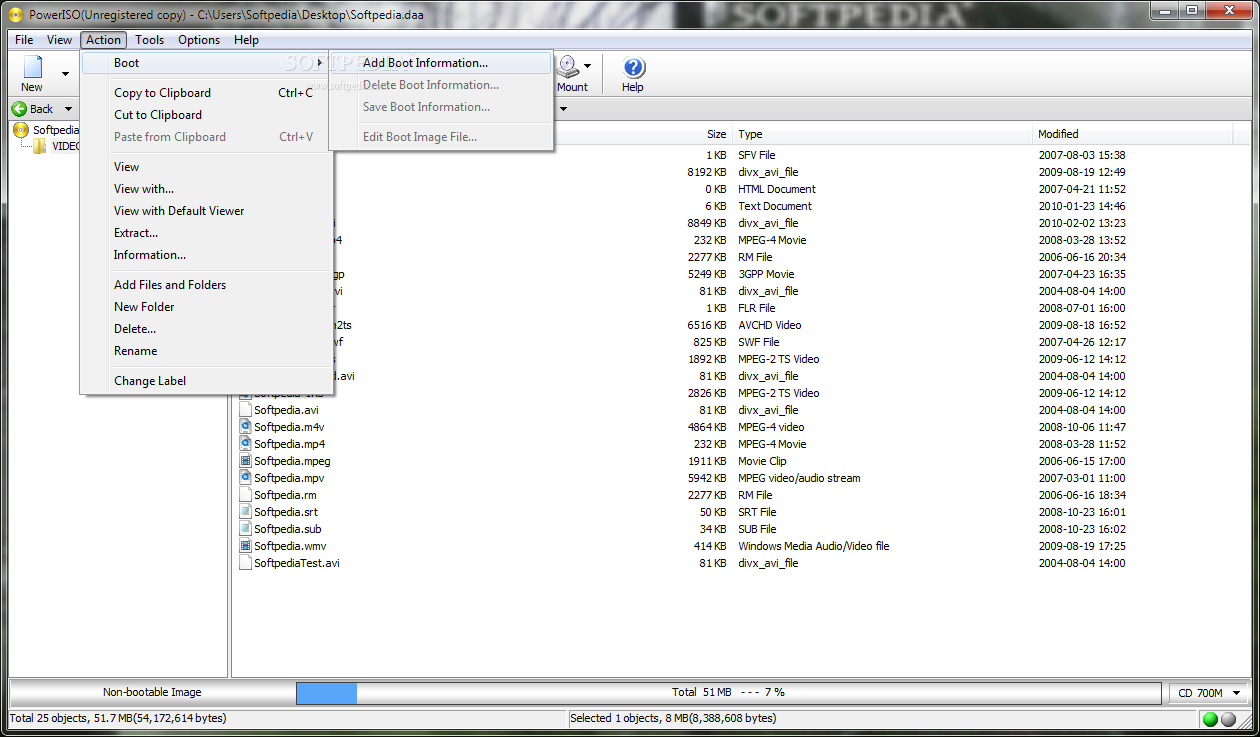
PowerISO is like a dinosaur among current software, but instead of fading away it got better and adapted to the modern times. If you want to create, burn or process ISO images in any other way, this is the program to do it with. As usual, we have 50 licenses to give away.


To grab one you just have to drop a few original lines in the comments section below this article. Dare to produce something different from the other posts and your chances to win a free code will definitely increase.

Provided the hefty list of features it displyas, PowerISO is bound not to come too cheap. The tag reads $29.95 (€23.22), but for this money you can process ISO files at leisure. You can create such an image from scratch, make it bootable, edit or burn it to a CD/DVD or a Blu-ray disc.

The application also boasts conversion abilities to other image formats, from BIN to ISO and vice-versa. DMG files on Apple systems can be turned to ISO as well. As for the range of disc images supported, PowerISO covers all the popular ones and then some.

For Windows users there is one more important feature, and that is the possibility to create bootable USB drives for Windows XP, Vista and Windows 7.


Enlarge picture

Enlarge picture

Enlarge picture

Enlarge picture

Enlarge picture

Note: You have 24 hours to post your comment from the publish time of this article. Your chances to win one of the 50 free codes are only as good as your comment. So make your remarks as honest and witty as possible.

The winners will be picked from the comments section of this article, and will be contacted in 5 days after the giveaway expires. They will have to provide their full name in private (when required) in order to collect their prize. No other information except for your comment and the alias / nickname you provide will appear online.

We urge you not to double post and, most importantly, be original because pasting from different sources on the Internet will get you kicked from the giveaway campaign.

Winners for this campaign:

· Raman - #146
· Carlos - #51
· paddy - #130
· malkhaz - #52
· John Matt - #32
· zeusz4u - #88
· ropin - #108
· zxy - #185
· Grr - #125
· KOUSHIK - #184

· Sandy - #170
· Velichkov - #58
· siddharth - #77
· Lootyhoof - #81
· Ashwin - #39
· Ladika - #84
· hlm - #118
· mkg_just4u - #145
· antonytony - #100
· mamk - #104

· helpcor - #110
· golec orkiestra xD - #92
· Satechip - #107
· cipriansorin - #93
· qwer0 - #98
· vaibhavalways - #178
· BlogWurm - #142
· rokdude - #71
· enough2010 - #99
· Wulf - #78

· iPrism - #89
· RAGAGH - #47
· Tuffy - #61


We are still waiting for the others to confirm their email address.


Follow us on Twitter @spgiveaways to receive updates about the new giveaways

GIVEAWAY OVER!


TELL US WHAT YOU THINK:

12,192 hits · 198 comments · Link to this article · Print article · Send to friend · Subscribe to news

MUST-READ RELATED ARTICLES:


Softpedia 10 Year Anniversary: 50 Licenses for Revo Uninstaller Pro [Ended]

Softpedia 10 Year Anniversary: 50 Licenses for Emsisoft Anti-Malware [Ended]

Softpedia 10 Year Anniversary: 50 Licenses for FlashFXP [Ended]

Softpedia 10 Year Anniversary: 50 Licenses for Internet Download Manager [Ended]

Softpedia 10 Year Anniversary: 50 Licenses for Panda Internet Security 2012 [Ended]

READER COMMENTS:


Comment #1 by: ReviewsAntivirus on 12 Oct 2011, 11:10 UTC reply to this comment

PowerISO is a tool designed to perform a series of operations (create, encrypt, edit, extract, compress and convert) the images of CD / DVD. The program supports 20 popular file formats, among which are the images ISO, BIN, NRG, CDI, DAA, MDF, IMG, etc, including virtual disk files created by programs Virtual PC (VHD), VMware (VMDK) and VirtualBox (VDI). The big advantage of the application is the ability to convert almost any video file format to ISO, BIN and DAA (advanced options). You can use PowerISO, you can also mount CD images in a virtual drive, samostartujące create ISO files, burn compilations prepared and much more. Additionally, the application allows the integration of the coating system, the context menu supports copying and pasting data from clipboard and drag the data to the main window.

List of supported file formats of images, media:
ISO, DAA, BIN, CUE, MDF, MDS, ASHDISC, BWI, B5I, LCD, IMG, CDI, CIF, P01, PDI, NRG, NCD, PXI, GI, FCD, VCD, C2D, DMG, BIF, IMA, FLP, IMG, UIF, WIM, VMDF, VHD, VDI.

Comment #1.1 by: LuisG on 13 Oct 2011, 04:46 GMT

PLz count me in!


Comment #2 by: zzzrrr1 on 12 Oct 2011, 11:16 UTC reply to this comment

PowerISO - a program for working with disk images. It supports all most popular formats: ISO, BIN, NRG, CDI, DAA and so on This utility allows you to convert disk images from one format to another, and open them using the built- in optical drive emulator. In addition, you can compress, encrypt, create, and cut into chunks iso disk images.


Comment #3 by: nghia on 12 Oct 2011, 11:17 UTC reply to this comment

thanks, i want a license


Comment #4 by: ha14 on 12 Oct 2011, 11:18 UTC reply to this comment

PowerIso is a perfect utility to handle iso image, If the file you to be burned is not an ISO, then the software will ask you for the permission to convert it, handy and this makes the use of the software easier. the software is only 1835K, and that it supports DAA (Direct-Access-Archive) files. PowerISO offers the possibility to mount such files into the virtual drive that can be created through one module from the program itself. You can save the image file into smaller parts and put them separately on multiple CD/DVDs. . It can also be used to open and edit image file directly. Contents can be added and simultaneously removed from an existing image and the image can be repacked to be burnt. For gamers just use PowerIso to mount the iso file and play with great speed.


Comment #5 by: Hao Ren on 12 Oct 2011, 11:18 UTC reply to this comment

PowerISO, the best you can ask.
Been using PowerISO and UltraISO for like 5 years and now.
The rest are just bloat


Comment #6 by: MiDooooZ on 12 Oct 2011, 11:21 UTC reply to this comment

i need a serial :)


Comment #7 by: my tin on 12 Oct 2011, 11:22 UTC reply to this comment

I love it!


Comment #8 by: cornwallcats on 12 Oct 2011, 11:22 UTC reply to this comment

For those of us who use laptops, the idea of having to carry a bundle of CDs/DVDs around with us is a bit of a drag. That's where tools like PowerISO come into their element. With PowerISO you can create, open, edit and mount disc images, so say goodbye to that bundle of games disks and create yourself an image instead. With the image stored on your laptop you not only save carrying physical discs but you save on wear & tear of the disc, and power as you access them from the hard disc instead of spinning up a CD.

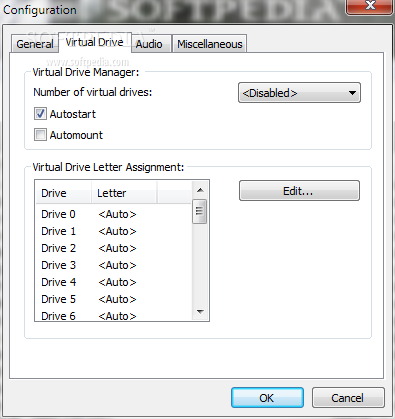
I've used a few ISO tools before, including those that allow you to create a virtual CD drive (that you mount the disc image to) but most of these require the software to be running all the time, on the other hand PowerISO allows you to disable the virtual drive(s) and reload it when you need them and this for me is the winning * of this compared to other ISO tools.

What's more you can create your own bootbale discs, edit other disc image files, and even burn images to physical disc using it's built in burning engine.

PowerISO also allows you to save in it's own format (.daa) which can be compressed and encrypted when compared to standard disc image formats (.iso, .bin etc) that don't allow this. How cool is that? It's cool. PowerISO is a must have application.


Comment #9 by: tommysoft on 12 Oct 2011, 11:25 UTC reply to this comment

PowerISO is a great tool. I like the functions of the virtual CD ROMs.


Comment #10 by: iTommysoft on 12 Oct 2011, 11:33 UTC reply to this comment

PowerISO has indeed made computing easy. great product!


Comment #11 by: C.I.T undergrad on 12 Oct 2011, 11:35 UTC reply to this comment

I feel like a dinosaur in the big world of technology, PowerISO would certainly give me some new energy in these old dinosaur bones.


Comment #12 by: Olsen on 12 Oct 2011, 11:35 UTC reply to this comment

PowerIso is a powerfull software to work with CD/DVD images. You can make new images, add or delete files from images, burn images on CD/DVD. I think it's a very good program and hope to win a licence ;p


Comment #13 by: smaragdus on 12 Oct 2011, 11:36 UTC reply to this comment

A nice and complete ISO tool.


Comment #14 by: Olsen on 12 Oct 2011, 11:38 UTC reply to this comment

PowerIso is a powerfull software to work with CD/DVD images. You can make new images, add or delete files from images, burn images on CD/DVD. I think it's a very good program and hope to win a licence;p


Comment #15 by: dani.user on 12 Oct 2011, 11:39 UTC reply to this comment

A must-have for Power Users


Comment #16 by: Pinhead on 12 Oct 2011, 11:39 UTC reply to this comment

Hello,

Please count me in, thanks.

Regards,


Comment #17 by: Peter on 12 Oct 2011, 11:40 UTC reply to this comment

Poweriso is a one of the best archive softwares. The size is small yet it is very powerful. It not only extract compressed iso image. It can be used to virtually mount iso image. It is my number choice of archive software and it is highly recommended. I will be grateful if I can given one of the licenses.


Comment #18 by: ov1d1u on 12 Oct 2011, 11:43 UTC reply to this comment

I always loved PowerISO. I'm on Linux now, but I still run PowerISO over Wine because there aren't any tool of such quality. I hope for a graphical version of PowerISO for Linux, but until then I'm using either native poweriso CLI version or PowerISO for Windows, with Wine.

To PowerISO team: please, make a GUI version in Linux, too!


Comment #19 by: Matroska on 12 Oct 2011, 11:48 UTC reply to this comment

The first time I say happy birthday to Softpedia, the second I say a huge thank you for the giveaway that has been and will be made, and the third is that I expect to win one license key of this giveaway, hopefully Softpedia always been at the forefront in providing update software is clean and reliable


Comment #20 by: Herman Hermit on 12 Oct 2011, 11:48 UTC reply to this comment

After reading the features list of PowerISO, I'd only like it also to make coffee. Otherwise, with PowerISO you can do everything you want + 50 % more.


Comment #21 by: vvif on 12 Oct 2011, 11:49 UTC reply to this comment

PowerISO is a powerful CD / DVD / BD image file processing tool, which allows you to open, extract, burn, create, edit, compress, encrypt, split and convert ISO files, and mount ISO files with internal virtual drive. It can process almost all CD / DVD / BD image files including ISO and BIN files. PowerISO provides an all-in-one solution. You can do every thing with your ISO files and disc image files.


Comment #22 by: Ad-jet on 12 Oct 2011, 11:52 UTC reply to this comment

i really really really want this my fingers are crossed


Comment #23 by: ray on 12 Oct 2011, 11:55 UTC reply to this comment

Another great software reviewed by Softpedia..
I hope for 1 license please..
Happy 10 year anniversary for Softpedia,


Comment #24 by: LG on 12 Oct 2011, 11:57 UTC reply to this comment

Please count me in for PowerISO and thank you for the giveaway.


Comment #25 by: Loop on 12 Oct 2011, 11:57 UTC reply to this comment

I love PowerISO, the best program of its fiels, please count me in. Following on twitter. Thanks ! :)


Comment #26 by: moocy on 12 Oct 2011, 12:00 UTC reply to this comment

likeee


Comment #27 by: apex2000 on 12 Oct 2011, 12:00 UTC reply to this comment

I think PowerISO is an excellent app and hope it continues for many years to come in spite of the fact that Win 8 will be able to read and mount ISO files natively.


Comment #28 by: Arslan on 12 Oct 2011, 12:01 UTC reply to this comment

Ok i didn't won any previous license of 11 products so plz just at least give me this time will ya.........


Comment #29 by: tek.fu on 12 Oct 2011, 12:05 UTC reply to this comment

hope to win !!!!!!!!!!!!!!!!!!


Comment #30 by: Nick on 12 Oct 2011, 12:10 UTC reply to this comment

why don't yu guys declare winners name? be transparent..how one can know who won the competition. i really doubt on this giveaways of your web..other forum people declare winners names...

Comment #30.1 by: ArslanKas on 12 Oct 2011, 17:15 GMT

Heeyyyy!!!!! Softpedia don't declare winners name but instead sends the license to the winners Email address. I have won 2 licenses of 2 different products before. Softpedia isn't a show-off website like others. It gives the license to the deserving ones very queitly just like giving something politely to a poor person without being noticed. Its a very unique style too.!!!!


Comment #31 by: 89118 on 12 Oct 2011, 12:11 UTC reply to this comment

Happy anniversary Softpedia! I would be lost w/o u. Softpedia! is the original App Store!

I need the PowerISO to take over the world! HaHaHa!


Comment #32 by: John Matt on 12 Oct 2011, 12:15 UTC reply to this comment

Want to play with an image file, play it the way u like with powerISO. Nothing which PowerISO cannot do with Image files. Be it create / burn / mount/ edit / compress/encrypt/split /extract /virtual drive or anything. think of any process and do it with powerISO


Comment #33 by: tzepesch on 12 Oct 2011, 12:17 UTC reply to this comment

Power ISO is the only program that i've used since i've started tu use a pc, more than 12yrs ago, and it's still unbeatable at creating cd/dvd virtual images. The best


Comment #34 by: Zeikas on 12 Oct 2011, 12:18 UTC reply to this comment

This is a good program as it relates to working with iso images similar to the ultra iso are the two best in which refers to working with these types of files very good program offered in today's Day greetings and happy anniversary


Comment #35 by: SilverFox on 12 Oct 2011, 12:19 UTC reply to this comment

PowerIso is like choosing a car - you know when it's right! This product feels good and everything is where you expect it to be.


Comment #36 by: nganbk92 on 12 Oct 2011, 12:24 UTC reply to this comment

love you softpedia.com


Comment #37 by: mickymouse on 12 Oct 2011, 12:24 UTC reply to this comment

Happy anniversary Softpedia.
I can use a program like this, always trying with freeware but this is leading software with leading possabilities.

greetings


Comment #38 by: Leo on 12 Oct 2011, 12:26 UTC reply to this comment

More POWER TO I, SO please give me one... :)


Comment #39 by: Ashwin on 12 Oct 2011, 12:27 UTC reply to this comment

I have used the free version of PowerISO, mainly for mounting virtual images of dvds I had. The interface is a little outdated IMO, but the functionality makes up for that. Works great, supports almost all dvd formats. Haven't tried burning images with PowerISO, I use Imageburn for that.


Comment #40 by: sankar1991 on 12 Oct 2011, 12:28 UTC reply to this comment

power iso is a great tool which can make virtual disks hence we can use them to emulate many image files..the last time i used it i kind of like it.it's a perfect need for people like me downloading games and softwares usually..so i would be delighted to have one of the license code for power iso..thank you softpedia for being generous to us.


Comment #41 by: iwan88 on 12 Oct 2011, 12:33 UTC reply to this comment

It's a pretty good editor CD images, the program installs a virtual drive, integrates with the coating system, allows you to burn bootable discs.


Comment #42 by: Bogdan Cucuruzac on 12 Oct 2011, 12:35 UTC reply to this comment

Softpedia Happy Birthday! I wish you continued success and will want to have as many visitors. Frequently the site of the 2005 and each time discover something new, get on it. You are a team that I respect very much and who always made ​​us only pleasant surprises. I hope that continues to exist as many promotions now. I've always downloaded from the easiest and most secure without having to make my numerous accounts to download some software. I have to say below something about "Power ISO" 6 and I work with and I'm not disappointed yet again. Softpedia Luckily I found that otherwise do not know if such software.I would very much to win a license because I needed it because the one we have now is not just me.
Thanks for all that you do for us Softpedia!
PS: Sorry but I used Google Translate to write this comment, I do not know English very well. Greetings from Romania!

PowerISO is a powerful CD/DVD image file processing tool, which allows you to open, extract, create, edit, compress, encrypt, split and convert ISO files, and mount these files with internal virtual drive. It can process almost all CD-ROM image files including ISO and BIN.If you have PowerISO, you will own ISO creator, ISO editor, ISO extractor, ISO converter, ISO burner, virtual drive, CD burner, DVD burner, BD burner, audio burner, audio ripper and video burner.

Features

Supports both 32-bit and 64-bit Windows
Can open and extract ISO files
Can create an ISO file from hard disk files or CD/DVD-ROM
Can edit an existing ISO file
Can convert image files between ISO/BIN and other formats. PowerISO can convert almost all image file formats to standard ISO format file
Can make bootable ISO file, get boot information from bootable ISO file
Can make floppy disk image file
Can optimize files to save disk space while saving ISO file
Can mount ISO files with its internal virtual drive
Supports shell-integration
PowerISO can save DAA images, which add the following features that are absent in ISO (but can be obtained by manually compressing ISO files):
Can compress DAA images, thus saving space and allowing smaller downloads
Can password protect DAA images
Can split DAA images into multiple smaller files

Direct Access Archive

Direct Access Archive, or DAA, is a proprietary file format developed by PowerISO Computing for disk image files. The format supports features such as compression, password protection, and splitting to multiple volumes. Popular disk image mounting programs such as Alcohol 120% and Daemon Tools currently do not support the mounting of DAA images.
Currently there is no published information about the format. Among mainstream applications, it can be opened or converted with PowerISO and MagicISO. Various free open source packages are also available to convert DAA to ISO images
Conversion tools
PowerISO provides free command-line tools for Linux and Mac OS X which allow the user to extract DAA files or convert them into ISO format, however these tools haven't been updated to support the newest version of the DAA format. The PowerISO Windows trial version only supports converting images from DAA files up to 300MB[4], less than half of the capacity of a standard CD.
AcetoneISO is a free CD/DVD management application for Linux that can convert DAA to ISO with the help of the external PowerISO command-line tool for Linux.
daa2iso[5] is an open source command line application has been developed to convert DAA files to ISO files. The program comes with a Windows binary and source code which compiles under Unix-like operating systems. daa2iso allows users to select the .daa file, and the location for the .iso output via standard windows open and save dialogs.
For Mac OS X, DAA Converter[6] is a GUI application which wraps the daa2iso command-line tool (GNU license).

System requirements

Windows98/Me, Windows2000/XP/2003/Vista operating system or above (although the internal virtual drive needs Windows2000/XP/2003/Vista or above)
Intel Pentium 166 MHz or above
64MB memory
At least 10MB hard disk space

Comment #42.1 by: don_juan on 12 Oct 2011, 12:50 GMT

Hey................glad that you troubled yourself to comment here and fight for a license....................BUT, seriously dude????

This is Softpedia, not Wikipedia...........anyone can look it up over there and paste it here............come up with something original dude

we don't want to waste our time to read stuff that's plagiarized!!!!!!


Comment #43 by: Blaga Samuel on 12 Oct 2011, 12:39 UTC reply to this comment

Thanks for this giveaway. I really love softpedia.


Comment #44 by: abhishek on 12 Oct 2011, 12:41 UTC reply to this comment

power iso i think it is the best iso tool in market
softpedia on fire man!!!!!!!!


Comment #45 by: sergei on 12 Oct 2011, 12:44 UTC reply to this comment

PowerIso is a powerfull software to work with CD/DVD images.I need a license for Power ISO!


Comment #46 by: guddu on 12 Oct 2011, 12:45 UTC reply to this comment

What to say?
It is very light and its user interface is very user friendly.So it is not a hassle to find the option which i need.Again its virtual drive feature is also excellent & at last which i should mention , i like the drag n drop & shell integration feature.


Comment #47 by: RAGAGH on 12 Oct 2011, 12:45 UTC reply to this comment

PowerISO is best CD dvd image editing software compares to others in terms of size of the program and image function it provides. I think The Close competitor is Is Ultra ISO.

PowerISO supports many image formats, had feature to edit image file directly and USB Support for creating Bootable disk.

Good ISO software, Hope i will win one license of it

THANKS SOFTPEDIA


Comment #48 by: WAVE on 12 Oct 2011, 12:45 UTC reply to this comment

a litle to everything...


Comment #49 by: Arie on 12 Oct 2011, 12:48 UTC reply to this comment

a software like this is what i need, that is a software that can process a ISO file. i have several software to make ISO from disc, and or to burn ISO to disc, for that a software like ImgBurn is enough. but it can't process the ISO files, i can't edit the ISO files. software like 7zip can only open/read the ISO files, and that's that. so what i need is ISO file processor/editor. looks like this one is promising. please count me in on the draw, thank you very much.


Comment #50 by: dragonforce_bil on 12 Oct 2011, 12:55 UTC reply to this comment

PowerISO is an item that I have been using the free version of for a while, and I would love to have a license for it!

Comment #50.1 by: najmy on 12 Oct 2011, 13:04 GMT

i love it more then you because my job need it


Comment #51 by: Carlos on 12 Oct 2011, 13:07 UTC reply to this comment

I love this software is one of the best one's out there. This tool is a total keeper. I been wanting this software for about 5 years now. If i had the money i will buy it. I have been waiting for this moment for a long time. Thank you so much and i hope i am one of the winners.

I had left a comment on user reviews.

http://www.softpedia.com/progViewOpinions/PowerISO-27557,.html


Comment #52 by: malkhaz on 12 Oct 2011, 13:07 UTC reply to this comment

Really your offers are getting better and better, and frankly saying I am out of words now. I am not good at English, and it is difficult to me to write comments here. I wanted to skip today's giveaway at Softpedia, but when I saw your offer, I decided to take a part in it, because PowerIso is my favourite program for working with image files. Shortly saying it is the greatest program for working with image files. It is very small, but it has so powerful features that nothing it is impossible to it. Softpedia , honestly saying I wish that your birthday would continue forever, because it makes everybody happy, including me.


Comment #53 by: Abd123 on 12 Oct 2011, 13:13 UTC reply to this comment

This is an awesome software i want this software


Comment #54 by: vitor sequeira on 12 Oct 2011, 13:15 UTC reply to this comment

i need it to create and burn iso files.
Thanks


Comment #55 by: Spurs on 12 Oct 2011, 13:15 UTC reply to this comment

give it to me


Comment #56 by: Iam Pankaj on 12 Oct 2011, 13:20 UTC reply to this comment

As PowerIso is best utility that allows us to open, extract, mount and burn ISO files with ease and also reduces the time consumption as it is easy to use tool...
Finger crossed...


Comment #57 by: silentisgold on 12 Oct 2011, 13:24 UTC reply to this comment

gimme gimme :"]


Comment #58 by: Velichkov on 12 Oct 2011, 13:31 UTC reply to this comment

Happy anniversary, Softpedia! Thank you for the giveaway! A licensed copy of PowerISO would be really appreciated. Since Internet is full of disk images today, a software for processing ISO-s is pretty useful. PowerISO is among the best applications for this task.


Comment #59 by: Mandeep on 12 Oct 2011, 13:36 UTC reply to this comment

This muscular disc-imaging utility is excellent and is loving like softpedia to me much and matters a lot therefore i want a licence key.please count me in


Comment #60 by: badgoti on 12 Oct 2011, 13:43 UTC reply to this comment

PowerISO is powrful CD / DVD / BD image file processing tool, which allows you to open, extract, burn, create, edit, compress, encrypt, split and convert ISO files, and mount ISO files with internal virtual drive. It can process almost all CD / DVD / BD image files including ISO and BIN files. PowerISO provides an all-in-one solution. You can do every thing with your ISO files and disc image files.
Support almost all CD / DVD / BD-ROM image file formats.
Make bootable ISO file, get boot information from bootable ISO file.
Support 64-bit Windows.
PowerISO can not only copy Audio CD to image file, but also rip it to MP3 files. It can also rip Audio CD to APE, FLAC, WMA, or WAV files.


Comment #61 by: Tuffy on 12 Oct 2011, 13:45 UTC reply to this comment

Hi,
I have been looking for a burning program that will allow me to burn the windows automated installation kit (which is a .img file) to a dvd for installation. This program sounds like it just might be the one to do the trick.
Thank you


Comment #62 by: kyo on 12 Oct 2011, 13:53 UTC reply to this comment

^^! i can't use english to write somethings about PowerISO but i realy want a key :)


Comment #63 by: Triyan on 12 Oct 2011, 13:55 UTC reply to this comment

I just say that its features made easier to use and completed. This program works better than any other software in this utility category. so I get comfortable when using this software.


Comment #64 by: Jake on 12 Oct 2011, 13:57 UTC reply to this comment

Oh, oh... PowerISO. You burn a disk like a soft subtle wisp - you glide the binary highway with style and little risk. You are a dinosaur moving across the frontier, burning through disks with very little fear. You swept the land with you cunning ways, and will burn more CD's for many more days.


Comment #65 by: davhag64 on 12 Oct 2011, 13:57 UTC reply to this comment

I really would love to have a license for this. There are free programs I have used but the pro version of PowerISO would be a great addition.


Comment #66 by: iprashant on 12 Oct 2011, 14:07 UTC reply to this comment

I want to try it ....


Comment #67 by: tass on 12 Oct 2011, 14:10 UTC reply to this comment

One of the best, easy to use, do it all software package


Comment #68 by: A7mads on 12 Oct 2011, 14:12 UTC reply to this comment

i want one cuz i always wanted to know how does it feel like to ride a dinosaur, and since they all fade away, i could try using a computer dinosaur like power iso :)


Comment #69 by: viet_nobi on 12 Oct 2011, 14:14 UTC reply to this comment

i like it


Comment #70 by: fesepe on 12 Oct 2011, 14:16 UTC reply to this comment

thanks...


Comment #71 by: rokdude on 12 Oct 2011, 14:17 UTC reply to this comment

PowerISO is an excellent tool, and has been recommended by several friends to use to burn ISO files. I am a professional musician (struggling)and would like to have a licence for PowerISO. "In the valley of the jolly, * * * , Power ISO!"


Comment #72 by: OnimenoKyo on 12 Oct 2011, 14:22 UTC reply to this comment

i can't use english to talk about PowerISO clearly but i love it ^^!


Comment #73 by: Vu on 12 Oct 2011, 14:32 UTC reply to this comment

Perfect app to deal with ISO files. Count me in for one license, please


Comment #74 by: alex14 on 12 Oct 2011, 14:41 UTC reply to this comment

better than others.


Comment #75 by: sourav on 12 Oct 2011, 14:42 UTC reply to this comment

yes, its a dinosaur but you must know 'Jurassic Park' is more popular than original dinos!


Comment #76 by: plopadop on 12 Oct 2011, 14:49 UTC reply to this comment

I think, therefor iso.


Comment #77 by: siddharth on 12 Oct 2011, 14:51 UTC reply to this comment

Thank you so much softpedia for such a great and useful Giveaway.I have tried Poweriso so many times and it works really great.It is far better than any other its competitor.It is very powerful in building .ISO and burning them down to cd.It supports a wide range of formats.Its "create bootable disk" function is really very awesome and cool.Overall it is a complete product.I just don't like one thing which is that they do not update the program regularly .They took almost more than an year to update 4.6 version to 4.8.
Count me in.Hope i win.

Thank and regards,
siddharth


Comment #78 by: Wulf on 12 Oct 2011, 14:53 UTC reply to this comment

I have tried all the ISO programs out there Magic ISO etc and so far the only one that has ever done what I really need it to do has been PowerISO. The Program lets me play games without needing CDs and I have also used it to burn some PS1 games that I needed backups of.


Comment #79 by: Arbab on 12 Oct 2011, 14:54 UTC reply to this comment

Thanks for this nice giveaway.


Comment #80 by: przemo on 12 Oct 2011, 15:00 UTC reply to this comment

PowerISO is a CD/DVD image file processing tool, which allows you to open, extract, create, edit, compress, encrypt, split and convert ISO files, and mount these files with internal virtual drive. It can process almost all CD-ROM image files including ISO and BIN.


Comment #81 by: Lootyhoof on 12 Oct 2011, 15:10 UTC reply to this comment

I use ISO tools regularly for backing up/using my legal disk copies. However, for most free software, the features supplied are mostly sub-par, either not providing the service I need or not providing it well. I also have been looking at paid alternatives, but most seem rather expensive for my needs. That is why if I won a license to PowerISO, it would be an amazing experience for me, considering I'd then be using a superior tool. (plus, it's always nice to win something...right? ;))

So please, allow me this chance to have a great experience with professional tools...!


Comment #82 by: Jonathan on 12 Oct 2011, 15:11 UTC reply to this comment

PowerISO is a great tool for mounting ISO images. Its always easy to burn bootable installation discs as well. In-fact, I've never been able to make it work on anything other than PowerISO!


Comment #83 by: Dolph on 12 Oct 2011, 15:14 UTC reply to this comment

Great please count me in
thanks


Comment #84 by: Ladika on 12 Oct 2011, 15:18 UTC reply to this comment

The PowerISO is a software that allows the CD and DVD image files are handled. The application can create files in the ISO format, extract, open, edit and convert. In addition, the images can assign virtual drives. This program is very useful, I recommend to everyone on the plane is a basic requirement! Thank you for your presentation Softpedia!


Comment #85 by: bongo on 12 Oct 2011, 15:24 UTC reply to this comment

A very useful program to handle disc images. This software allows among
other things: create, edit, convert, mount CD images in a virtual drive and
much more.


Comment #86 by: HvQ on 12 Oct 2011, 15:25 UTC reply to this comment

thank you very much.


Comment #87 by: pr3y on 12 Oct 2011, 15:45 UTC reply to this comment

PowerISO looks like a very useful software. It has many great features and the interface seems easy to use.
Thanks


Comment #88 by: zeusz4u on 12 Oct 2011, 15:50 UTC reply to this comment

I have tried several versions of PowerISO so far. It's a very useful program, that might come handy when you want to edit or create your own image files. It can handle very well .iso images, and it has a very good own image file system called .daa, I didn't really find any other program that can create image files with such a great compression ratio.

The virtual drive can emulate your images files and a sign a drive letter to them, so you never ever have to install more resource-hungry programs such as Alcohol 120% or Daemon Tools, or other virtual drive programs.

If you have PowerISO, then no other program is needed for burning DVDs and CDs, as this program can do that for you also. So don't have to install nero which will consume over 3 Gigs on your harddrive, as most of us use this simply for burning disks.

After all, it can replace sever utilities that most of us have on their machines.

I liked this program so much. Unfortunately the trial has limitations and cannot create images greater than 300 MB I think, so you must purchase a license to use the full-flavored version. Menus are clear, and even a one-time user can simply find whatever he wants to do with the program.

Thanks for this giveaway. Hope to win 1 of those 50 licenses. Happy birthday Softpedia.


Comment #89 by: iPrism on 12 Oct 2011, 15:59 UTC reply to this comment

Thanks Softpedia for the PowerISO giveaways, I need PowerISO to burn ISO images on my removable medias like my CD/DVD and USB's and converting images according to my needs and preferences when working with different Windows OSes.PowerISO is the best when it comes to burning good quality ISO images in my trial run and yes as mentioned in the article the cost has eluded me from buying but thanks to the giveaway I stand a chance to win one license.

Regards


Comment #90 by: that guy over there on 12 Oct 2011, 16:04 UTC reply to this comment

I love you guys!?


Comment #91 by: Radu on 12 Oct 2011, 16:06 UTC reply to this comment

Good Birthday Softpedia,
The PowerIso is very good program for images. I will happy if I will win one licence.
Best regards
Radu


Comment #92 by: golec orkiestra xD on 12 Oct 2011, 16:29 UTC reply to this comment

Power ISO nice turns invisible boards :D The program is grazing:)
If I had it my CD drive does not have to heat up the red xD
PowerISO installs up to 23 virtual drives in which we can put a disc image, so you'll have access to the data disc (image) without having to burn CD / DVD.
So my drive to a little rest and at the same time would be saved from an excess of deaths from CD :D
Lick here to give me no other choice xD
Thanks Softpedia :D:D:D:D:D:D:D::D:D:D:D


Comment #93 by: cipriansorin on 12 Oct 2011, 16:32 UTC reply to this comment

Every day I can not wait to see what will be next. Yesterday Softpedia just read my thgouts. Today I was going to make a bootable Win Os installer.Thank you. As many files I am downloading on our computer are iso ad as the HDD space increases with every year to pass, having a backup for CD' s and keeping this backups always at hand on a partitioned drive is really helpful. Games, movies, photos, software, you name it.
I found the interface easy to use and the quality of burned disks excellent. The memory print footage is not a problem and I can say that Power ISO is a keeper for me. I am hoping more than 30 days.
Thank you Softpedia for this chance.


Comment #94 by: eiffel on 12 Oct 2011, 16:40 UTC reply to this comment

Old, but at same modern software. Probably is still the best compared with similar software.


Comment #95 by: tone on 12 Oct 2011, 16:43 UTC reply to this comment

PowerISO is a tool for processing cd and dvd image files. Using PowerISO you can open, extract create, split and convert ISO file without burning. Overall this application complies with everything you need related to cd/dvd authoring .


Comment #96 by: cesitbol on 12 Oct 2011, 16:55 UTC reply to this comment

Thanks softpedia for giveaway


Comment #97 by: catalin on 12 Oct 2011, 17:07 UTC reply to this comment

omg!! omg!! i cannot believe that Softpedia is giving 50 PowerIso licences.i hope i win.
its been a long time since they released a new version but hey they recently released the 4.8 version.i really like the easy of use interface of poweriso,it handles a lot of cd specific images,since the recentlyes version you can burn directly to the cd...who use the program knows exactly how powerful is poweriso
io hope i win since a licence key for poweriso it means also a licencekey for life and most importantly u can upgrade for free to the latest version of poweriso


Comment #98 by: qwer0 on 12 Oct 2011, 17:09 UTC reply to this comment

In my opinion not every one needs PowerISO. But if some want operate on cd/dvd/blu-ray images - this software is just great. I like this and i'd like to use this soft. Especially that i dont have cdrom drive in my netbook and it would be very helpful to have PowerISO virtual one.


Comment #99 by: enough2010 on 12 Oct 2011, 17:13 UTC reply to this comment

The most interesting and usefull aspect of this application is the fact that you can mount an iso file and execute without having to buyn a disk. This will save a lot of time and resources while allowing me to test out other software and not have to burn a disk before I know i'll keep it. It also looks like a great app for creating an iso copy of a group of apps to burn on one disk. I need one, forsure. Free is better but if I have to i'll probibly buy one.


Comment #100 by: antonytony on 12 Oct 2011, 17:19 UTC reply to this comment

PowerISO is one of my favorite apps which i always install immediately after a format. It is one of the most needed and frequently used apps in my computer as I make backup copies of my games and other softwares using PowerISO and with its image mounting feature it can make the computer think that there is a real cd/dvd on the drive. It saves my precious movie and games collection so i owe it a lot.

PowerISO has everything but the kitchen sink when it comes to managing of virtual drives and images.

I have been using powerISO for more than 3 years and never found a single fault with it. I like each and every feature of it.

First ill start with its cd/dvd image editing and conversion features. PowerISO handles almost all the image formats including the popular ones such as .nrg, .mds, .mdf, .iso, .bin etc and also its own .daa format.

PowerISO can be used to edit image files , to add, delete set compression and even convert image of one format into another. New images can be created and old images can be extracted.

Next powerISO is a good cd burning software. I have started to use it instead of default cd burning softwares. It can be used to burn cd, dvd. copy disc, erase disc and even create and edit bootable disks. PowerISO can also be used to rip audio.

Next I need to say about my most favorite feature in PowerISO , mounting of images. PowerISO is an excellent virtual drive manager. It can handle upto 23 virtual drives and assign autostart and automount functions to them. By making images we can save the original disks from scratches and overusage. The images will function just as an ordinary drive with PowerISO.

PowerISO is an essential software for every computer whether it be home or at workplace. Priced at just around 30$ it has pretty impressive features and it has even free lifetime upgrades and email support.

Thank you softpedia for this giveaway. U r as good as always.


Comment #101 by: Anu on 12 Oct 2011, 17:25 UTC reply to this comment

cool site
i ;liked it

specily pc n


Comment #102 by: Anurag on 12 Oct 2011, 17:27 UTC reply to this comment

awesome sdgdascvzxed


Comment #103 by: MerleOne on 12 Oct 2011, 17:34 UTC reply to this comment

Hi,
This iso manager is a must have nowadays. Iso is everywhere and with the decrease of HDD prices, it makes sense to store CD/DVD in that format.
I do hope I win this time...
Thanks.


Comment #104 by: mamk on 12 Oct 2011, 17:37 UTC reply to this comment

well...this is a very great piece of software ,since it's growing to take a big share of the market ,i hope their marketing plan will include 3rd world countries,i need this software here but we do not have official supplier,and we are not using cracked software ,so you should find a solution to this situation.


Comment #105 by: LauRoman on 12 Oct 2011, 17:41 UTC reply to this comment

I want to find out if PowerISO is better than ImgBurn at saving space on disc images. I know PowerISO can compress files on disks, i want to find out if it can store duplicate files as one physical one but "hardlinked" to different place in the directory structure of that disk.


Comment #106 by: rerono on 12 Oct 2011, 17:49 UTC reply to this comment

Create,edit,extract,convert,compress,encrypt,split and mount CD/DVD image file. PowerISO is a powerful CD/DVD image file processing and file compression tool, which allows you to create, extract, compress, edit and convert CD/DVD image files, and mount these files with internal virtual drive. And most of all, the compressed files can be used directly without decompressing.


Comment #107 by: Satechip on 12 Oct 2011, 17:59 UTC reply to this comment

PowerISO is an all-in-one solution with many features as comment #42 has already shown us. Personally I've used PowerISO only to mount disc image files to a virtual drive (many times), to burn a bootable disc and to edit one ISO file, however having one license of this software would be great because I'd have THE SOFTWARE to perform any image related jobs I could need.

One thing I have to mention is that, with PowerISO, I can easily (with a right click) and quickly mount a CD / DVD / BD image. Before this software I used others that took quite some time to do that same job.

Definitely PowerISO is one of the most powerful programs of its kind; I'm sure its power level over NINE THOUSAAAAAAAND! :P

Thank you.


Comment #108 by: ropin on 12 Oct 2011, 18:10 UTC reply to this comment

I must say to Softpedia - best giveaway action ever!
I have some good experience with this software. Now I'm using old version from some PC Magazine promotion.
Very useful for all operations on ISO images. Many image formats available. Very powerfull. Good , easy menu.
Irreplaceable for gamers. If you mount virtual drive you don't have to insert cd every time when you want to play a game.
"Must have" software.
But on the market are many good similar software like for example:
- Magic ISO
- Ultra ISO
- Daemon tools
- Alcohol :)
Sorry for my weak english.


Comment #109 by: niewiasta on 12 Oct 2011, 18:15 UTC reply to this comment

PowerISO, what can I say, is simply a great program for disc images. I
would like win the key for this software! Please count me in!


Comment #110 by: helpcor on 12 Oct 2011, 18:25 UTC reply to this comment

Not many people know or have ever experienced with ISO. But many players undoubtedly familiar with the concept of virtual disk. Actually work with the ISO is very necessary and interesting to do, requiring no special skills or higher education.
Save copies of your favorite CDs, process them, to throw out everything not needed and add the necessary files, all this can be done easily with PowerISO
Very flexible and smart software. Thanks Softpedia for this giveaway and thanks for the chance!!!


Comment #111 by: DCStrain on 12 Oct 2011, 18:30 UTC reply to this comment

Woops ///..\\

I noticed you made a small spelling mistake,
In paragraph three of the Giveaway page:

"Provided the hefty list of features it displyas,"
-- displayas should be displays --

I am sure you appreciate the time that I take,
And consider rewarding this old proofreading sage

One license for free of the PowerISO app,
So creating an ISO can be done in a snap.

My entry is different but give me a break,
If I don't get a free copy I will feel like a sap.

DCStrain


Comment #112 by: Ande on 12 Oct 2011, 18:35 UTC reply to this comment

I've been working with ISO images for many years. I think running an ISO image off your hard drive is like having a high speed CD or DVD. When I put together my ISO images to burn, I do it with later thinking of loading that image to a hard drive and using it like another hard disk. I can save my music, games, and other portable software to ISO images, burn them once or twice for backup and when I want to use them, I just load them to my hard drive and use an emulator to run them. I've experimented with moving some software to the ISO procedure, and I've found that if the emulated disk is mounted to the same drive letter every time, it works (Mostly); this still needs some work. This is why I could make good use of power ISO.
Thanks.


Comment #113 by: BlueStrut on 12 Oct 2011, 18:57 UTC reply to this comment

Why not UltraISO? However, I still have the chance to test this...


Comment #114 by: Dark on 12 Oct 2011, 19:01 UTC reply to this comment

This is a great tool for create and managment CD/DVD images. Thanks for giveaway ;)


Comment #115 by: Inkiad on 12 Oct 2011, 19:03 UTC reply to this comment

I was in need of a CD/DVD that could open and modify almost any type of CD/DVD. Be it an image or creating a Bootable image.
I was searching for a tool that can do them easily. And found PowerISO on Softpedia.
On first use it impressed me. After a couple of time of using it blew me away. I can open and modify an existing image, can create a new one and think what, I can now easily create a Bootable image by PowerISO.
If you are an average user, it is very simple to use. If you are more advanced user this is also for you. PowerISO can handle pretty much every image type. You can create image from CD/DVD and from scratch. You can also burn them by PowerISO. You can convert one typeof image file to another like BIN to ISO.
Need virtual drive? PowerISO have it too. You can mount any disk image on PowerISO's virtual drive. You can have upto 8 numbers of virtual drive!
PowerISO is the best CD/DVD image software I have ever used. I love PowerISO from heart for the amount of work it does for me.


Comment #116 by: geekcoder on 12 Oct 2011, 19:14 UTC reply to this comment

I have been using ISO apps for several years to store CD/DVD images on my hard drive for later use or create ISO images that I could burn later. The problem with several of the apps I have used was that you cannot edit the ISO's and their list of supported disc images was adismal! Not so with PowerISO! PowerISO supports several common disc images, can edit images (big plus), can convert images and offers encryption. Awesome stuff! Now that's a must-have app!


Comment #117 by: thsn on 12 Oct 2011, 19:16 UTC reply to this comment

power iso wonderfull...


Comment #118 by: hlm on 12 Oct 2011, 19:29 UTC reply to this comment

PowerISO?? Definitely the best all around CD and DVD managing tools. Just name it Create image from CD - check, mount CD or DVD image - check, convert .mdf or another cd image format to .iso - definitely a big check. Sometimes I wonder why should i bought the somewhat hefty price for the software (sorry I'm cheapskate kinda guy)?? When I could download free to use but somewhat limited functionality D***on Tools? The answer is simple simply because the plethora functionality provided by PowerISO akin to another famous software A*****l 120. Just give a try and you will definitely not disappointed. Thanks again for Softpedia for organizing this giveaway and good luck to all. Cheers


Comment #119 by: nek4d on 12 Oct 2011, 19:30 UTC reply to this comment

bootable iso is a great feature not found in free software. count me in!


Comment #120 by: John on 12 Oct 2011, 19:37 UTC reply to this comment

it's a powerful app.


Comment #121 by: MarcuCaius on 12 Oct 2011, 19:52 UTC reply to this comment

I'm searching for a simple way to create a bootable USB drives in Windows and Linux - I'm very happy that I found it: PowerISO


Comment #122 by: marcucaius on 12 Oct 2011, 19:59 UTC reply to this comment

I'm searching for a simple way of creating a bootable USB drives for Windows and Linux - and here it is: Power ISO - I'm very happy that I found it!


Comment #123 by: renata on 12 Oct 2011, 20:07 UTC reply to this comment

PowerISO was developed to be a powerful CD/DVD image file processing tool, which allows you to open, extract, create, edit, compress, encrypt, split and convert ISO files, and mount these files with internal virtual drive. It can process almost all CD-ROM image files including ISO and BIN.....


Comment #124 by: B98002 on 12 Oct 2011, 20:38 UTC reply to this comment

The best software for making bootable images and is very user friendly.


Comment #125 by: Pradeep Singha on 12 Oct 2011, 20:50 UTC reply to this comment

Well its very obvious today that if you have tons of softwares with yourself, they are most probably vulnerable to viruses and they most often get corrupted also. Its nothing if they are downloadable. But it affects a lot if they are specialized software copies and are not available for download again. So this is the reason that I need PowerISO maker so that I can build images of my collection of softwares and sit hasstle free while working and I will not have to scan the bulk of softwares everyday for viruses and just worry about them. Because a virus cannot inject itself into an image file so it will not be able to eat up any of my valuable software. So thats the reason for my need for PowerISO Maker. And PowerISO has all the features that are required to professionally manipulate images. I don't need to mention them. Thanks a lot for the giveaway! Hope I win one by luck. :)


Comment #126 by: AndrewJP2011 on 12 Oct 2011, 20:51 UTC reply to this comment

I believe that I will make very good use of this program, because I want to easily mount ISO files to access certain files, and be able to manipulate ISO files without extracting them using other software.


Comment #127 by: ada on 12 Oct 2011, 20:54 UTC reply to this comment

Thank you very much for this wonderful giveaway


Comment #128 by: SHUBHAJIT on 12 Oct 2011, 21:00 UTC reply to this comment

THIS IS THE PLACE WHERE MY SOUL LIVE
MANY SOFT WARES ARE STORED IN THIS PLACE
IT IS THE HEAVEN OF SOFT WARES
I AND MY FRIENDS LOVE THE WEBSITE
VERY MUCH
THANKS,
I WISH THE WEBSITE SPREAD ALL OVER THE WORLD.


Comment #129 by: marcell on 12 Oct 2011, 21:09 UTC reply to this comment

one of the best software for working with images.


Comment #130 by: paddy on 12 Oct 2011, 21:33 UTC reply to this comment

G'Day,

Ah the humble iso format, yes a somewhat old format, but a reliable and venerable one that works.
I use an old version of UltraIso to create and test live Linux and Window cd builds in conjunction with Virtual box. I also create various distros of sample programs and database apps that i test as iso before burning to cd/dvd and so find a program such as these indispensible. Another use is to be able to convert some old testing software that were written to floppy disk to be copied to and emulated from a bootable cd, (sometimes old software never dies), as nowadays floppy disk drives are just not easy to get built into new machines.
Unfortunatly my old copy of UltraIso is starting to creak at the joints and i really could do with a shiney new iso editor such as PowerIso, especially as i am now running 64bit on my main box and having to use the old 32bit box, that runs as slow as a snail and growns like a geriatric can be a real pain.
So please count me in for this very nice offer,
Thanks and Good Luck to All.


Comment #131 by: Angel S on 12 Oct 2011, 21:35 UTC reply to this comment

"Is the best way to bag your CD's inside your computer, not in your heavy bag pack."
I love it.


Comment #132 by: pofu on 12 Oct 2011, 21:44 UTC reply to this comment

Power ISO Maker is a professional make and burn ISO tool. It can quickly create a ISO file from your computer,and burn the ISO file to a CD/DVD-R disc. The software can also rip your CD/DVD discs to an ISO file,and burn it.


Comment #133 by: rafa on 12 Oct 2011, 21:56 UTC reply to this comment

One word. I think he said it best and was CLEARLY (subconsciously) thinking of PowerISO when he first said it.

Ladies and gentleman, I give you the one word that sums up PowerISO:
"Winning" -- Charlie Sheen


Comment #134 by: krunci on 12 Oct 2011, 22:00 UTC reply to this comment

Tired of swapping discs? Try PowerISO, and go swap something else.


Comment #135 by: Begnr712 on 12 Oct 2011, 22:53 UTC reply to this comment

I haven't had the opportunity to try PowerISO but from the comments, it would be well-worth the effort. I especially like the capability of creating bootable USB Images since I have been trying to do this for some time with other resources and have been unable to do so. I would like to be given the opportunity to try this program for all my ISO needs. Thanks Softpedia for your great Website and Happy Anniversary. I visit your site daily.


Comment #136 by: Nettwerk on 12 Oct 2011, 22:55 UTC reply to this comment

I have expirence with PowerISO. I always use to backup DVD or CD of system/installation disks. Yeah I'm not happy to use ilegal registered, but I'll be really glad to get one for me. And thanks Softpedia for giveaway.
And Happy birthday...


Comment #137 by: John D on 12 Oct 2011, 23:00 UTC reply to this comment

Can you give me a license please?
I like the various things provided by PowerISO for ISO files, making my life easy.

john d


Comment #138 by: Eletile on 12 Oct 2011, 23:08 UTC reply to this comment

WATCH OUT!!! The giant Power ISO Dinosaur Is back on the loose terrorizing all the other ISO burners like they were ants!!!


Comment #139 by: Mike on 12 Oct 2011, 23:31 UTC reply to this comment

I see quite a few names here that look familiar to the forums which I am a member of and have read lots of good things about this software so decided I would try my luck at a license key. Thank You


Comment #140 by: Hondros on 12 Oct 2011, 23:48 UTC reply to this comment

Nice giveaway.
Please count me in for the contest.
Thanks & Regards


Comment #141 by: ronaldt on 12 Oct 2011, 23:56 UTC reply to this comment

I have always been convinced of PowerISO. None is better. Virtual CDs are easily created with it and for all desktops and laptops I have fixed PowerISO was installed to the delight of my friends.


Comment #142 by: BlogWurm on 13 Oct 2011, 00:18 UTC reply to this comment

PowerISO is well known and it's like a swiss knife for all cases concerning ISO images.
It helps in different situations.

Situation 1: Mobility (Missing cd/dvd/bd-rom):
----------------------------------------------
In times of Tablets, Netbooks, Notebooks, ... without cd/dvd/bd-rom, it's quite handy
to have such a tool to create images of data-discs to use it portable e.g. at a usb-stick.
This has also the advantage that you don't need to seek out the disc needed.
You only have to mount the wanted iso with PowerISO's integrated virtual drive to have all needed data accessible right now.
This process takes only a few seconds compared to using real disc.

So you don´t have to be a DJ :)

Situation 2: Bootable USB-sticks:
---------------------------------
With PowerISO it's easy to create bootable USB sticks.
This is quite useful for unattended OS installation e.g. Windows 7.
There are only a few requirements (PowerISO | usb-stick | BIOS with support for booting from usb device)
and steps needed to get ready:
Start PowerISO > Insert usb-stick > open "Create Bootable USB Drive" Dialog from Tools menu and follow it.
After that go to bios and set the boot device to booting from usb. That's it.

This method with usb-stick has the advantage not to burn discs, which saves time, money and it's good for environment.
You also can setup your own rescue usb-stick with anti-virus, disc-imaging and so on to be prepared for worst case.


Situation 3: Working with disc images:
--------------------------------------
PowerISO supports opening, editing and extracting of common disc images.
With it you have access to different types of partitions e.g. to rescue data.

In case of missing floppy device at pc#1 there is the workaround to create an image at pc#2 with floppy and
mount it later at pc#1. It supports many types of floppy image formats e.g. *.bin, *.img, ...

It's also nice to browse disc images of all common virtual machines (VMWare, VirtualPC and VirtualBox)
and extract needed data-files without previously booting the virtual machine.

These are only some specific cases to use PowerISO.
But there are many more like ripping audio, burning, converting isos, ... .
For these operations all common file-formats are also supported.

Finally PowerISO comes in a smart and easy to use multilanguage GUI and also has a commandline version for advanced users.
Furthermore there are versions for Linux and Mac OSX available for free.

It would be terrific to win and get the opportunity to use this great tool without limitations.

Thanks Softpedia and PowerISO for this giveaway.


Comment #143 by: Rusty Steele on 13 Oct 2011, 00:31 UTC reply to this comment

Of course Power ISO is one of the preeminent tools for working with and creating disk images. It also has one of the most user-friendly image-mounting systems you'll ever find. Frankly, I hope you give me a license so I'm not tempted to, well, you know, circumvent the protection. Not that I would, of course... but it's an awfully good program!


Comment #144 by: :O on 13 Oct 2011, 01:04 UTC reply to this comment

LMAO i would rather torrent this :D


Comment #145 by: mkg_just4u on 13 Oct 2011, 01:06 UTC reply to this comment

Great, once again great. Softpedia doing wonderful. Please carry on...
Today a very surprising software has been put in the give away campaign. I have used a variety of iso image softwares. Power ISO is on of them. It is really great software. I have used free and trial iso softwares. In free category, I have used InfraRecorder, Saturn Disk Image, DVD Flick, DeepBurner Free, Daemon Tools Lite, etc. And, on paid or trial side I have used Nero, Ashampoo Burning Studio, PowerISO, etc. But, among them PowerISO is a great one. It has great tools and features. I have also used Linux version of PowerISO, it is good but has limited features. But, in windows version of PowerISO, it feels like running a great app. It is not a cup of tea for computer beginners. Its name itself explains that it has great powers regarding ISO.
It supports a large number of file formats like BIN/CUE, DAA, UIF, DMG, MDF/MDS, ASHDISC, BWI/B5I, LCD, IMG, ISO, CDI, CIF, P01, PDI, NRG, NCD, PXI, GI, FCD, VCD, C2D, BIF, etc. It consists all the features required and related to CD/DVD/Image. It can create virtual CD/DVD drive. It burns CD/DVD at a very high speed and quality. one of the great feature is that it can split a file into so many parts. It can also compress and encrypt files. As a whole it is all in one Imaging Software. It helps in ripping the CD that cant be copied. In the latest version of PowerISO that I have used very recently, there are few great features added like, burning blu ray disc, creating bootable usb device, supporting utf 8 file, etc.
Finally, east or west Power ISO is the best, It has got a lot of features that are difficult to explain in few words.
Last but not the least, once again happy birthday to Softpedia and looking forward to grab one of the 50 licences.
May god help softpedia and me as well .....!!!


Comment #146 by: Raman on 13 Oct 2011, 01:51 UTC reply to this comment

We know the power of power iso because the virtual drive concept is good and this will be give a chance to create that drives.the other uncomparable feature is bootable usb drives.so the name power iso is perfectly suitable for it.thanks for introducing these soft wares.


Comment #147 by: sathiya on 13 Oct 2011, 01:53 UTC reply to this comment

Hey mature team softpedia!
seems like its your birthday ;) congratz buddy..

First, leave all our comments. Tell me how do you feel in this auspicious occassion. Not only me, each and every person who rely on www.softpedia.com wants to wish you, for your:
1)free service ,
2)hassle free downloads ,
3) everlasting threads and download mirrors ,
4) constant updates,
5)easy to browse(with directory structure as if we are browsing our own home Personal Computer),
6)most reliable by providing redundant download mirrors &
7)did this type of service upto 10 full years and continuing.

Due to this healthy service, i always search for any software first in www.sofpedia.com before searching for it in other popular search engines.

I expected and have been waiting a long time to CONGRATULATE YOU.
Now, i think you cannot get prevented from getting my congratulations.

Whether i get this software or not, its immaterial. I am happy about my wishes reaching you without any problem. I request and expect a reply or acknowledgement from Team Softpedia for this comment to satisfy me whether you have actually read it.

I am always happy with your service. Be proud of you :)

MAINTAINING SOMETHING IS MORE DIFFICULT THAN CREATING NEWER ONES..


Comment #148 by: l2f5d6c348 on 13 Oct 2011, 01:54 UTC reply to this comment

ISO so happy I came here today. ISO desprately need a good ISO rprogram. ISO happy I could cry!!! ISO hope I win one. ISO love SOFTPEDIA - Your the best! Even if I don't win nuttin-( You'll Always Be Number One In My Pooter ) l2f5d6c348.


Comment #149 by: thinkjamil on 13 Oct 2011, 02:03 UTC reply to this comment

Complete iso care. every feature needed for iso treatment is there.I want a license too.


Comment #150 by: wwaish on 13 Oct 2011, 02:25 UTC reply to this comment

Ouch it burns Yes all kinds of discs. Copy you say Perfect imaging my good man.It makes almost perfect effort in a bid to please and impress. Themable UI. Comprehensive menus. Proprietory technology. Traditional disc burning workflows. Unbounded image format support. Gymnastic like manipulation for your every disc related need. The result Software you can never turn your back. A deadly weapon in your arsenal. A cannon cleverly disguised as a pistol. Happy hunting

-sent via mobile


Comment #151 by: hroark on 13 Oct 2011, 02:41 UTC reply to this comment

I've been using PowerISO for years. I've tried just about every other ISO tool out there: DaemonTools, Magic ISO, Virtual CD, etc. None of them have been as consistent and reliable as PowerISO. DaemonTools now bundles spyware. MagicISO doesn't work on Vista 64-bit etc.

If you're looking for the easiest, cleanest, most reliabe ISO tools PowerISO is a no-brainer.


Comment #152 by: Grr on 13 Oct 2011, 02:49 UTC reply to this comment

Hi Softpedia,

Thanks for the giveaway.

(I tried the trial, however it doesn't works for a 700mb CD-image file, may be due to trial limitations.)

PowerISO is one such tool which can handle any type of image file you throw to it- such as ISO, BIN/CUE, NRG, DAA, MDF / MDS and IMG. Given the different features I'm excited on the following features which are of my need and concerns, due to which I would like to have a license.

1. multiple image format/file support. [1]
2. create ISO files from windows [2]
3. Rip Audio CDs [3]
4. EDIT ISO file without losing any information----most important. [2]
5. Has a built-in virtual drive to mount images virtually. [4]
6. Image conversion many to ISO format. [5]
7. Make, edit Bootable ISO image files [6]
8. Windows right-click shell integration.
9. FAT32 & NTFS-both support.
10. Works on 64-bit OS.
11. Light on system resources-CPU+RAM.

From above I have mentioned numbers in square bracket[]. This is done to indicate the additional number of software's that are required if there is no PowerISO. For me it saves 6 more additional software's. What else I could ask for.

Appreciate if you could count me in this giveaway.

Thanks,
Grr


Comment #153 by: TATYS18 on 13 Oct 2011, 03:08 UTC reply to this comment

___________________________´´´´´´´´´´´´´´´´´´´´´´´´´
___________________________´´´´´´´´´´´´´´´´´´´´´´´´´
___________________________´´´´´´´´´´´´´´´´´´´´´´´´´
___________________________´´´´´´´´´´´´´´´´´´´´´´000
___________________________´´´´´´´´´´´´´´´´´´´´´000´
___________________________´´´´´´ ´´´´000000´´´000´´
___________________________´´´´´´´´´000000000´000´´´
___________________________´´´´´´´´000´´´´000000´´´´
___________________________´´´´´´´0000´´´´00000 ´´´´
___________________________´´´´´´00000´´´´0000 ´´´´´
___________________________´´´´´000000´´´´000´´´´´´´
___________________________´´´´000´ 000000000´´´´´´´´
___________________________´´´000´´´ 000000´´ ´´´´´´´
___________________________´´000 ´´´´´´´´´´´´´´´´´´´´
___________________________´´´´´´´´´´´´´´´´´´´´´´´´´´
___________________________´´´´´´´´´´´´´´´´´´´´´´´´´´
___________________________´´´´´´´´´´´´´´´´´´´´´´´´´´


_╔═╗
_║║╬═╦╔╦╔╦═╦╦╗_
_║║║║║║║║║║║║║_
_║╔╝║║║║║║╔╣╔╝_
_╚╝╚═╩═╩═╝═╩╝__

_____________╔══╗╔═╗╔═╗_
_____________╚╗╔╝║═╣║║║_
______________║║_╚═║║║║_
_____________╔╝╚╗╩═╝║║║_
_____________╚══╩═══╩═╝_

_╔═╗╔╗╔╗
_║║║║║║║___╔╦╦╗__╔═╦╦╦═╗_╔═╗╔═╗╔╗_╔╔╗╔══╗╔╗═╦╦╗_
_║_║║║║║___║║_║__║║║_║║║_║═╣║║║║║_║║║╚╗╔╝║║║║_║_
_║║║║╚╣╚╗__║║║║__║║║║║╔╣_╚═║║║║║╚╗║║║_║║_║║║║║║_
_╚╩╩╩═╩═╝__╚╩╩╝__╚═╩╩╩═╝_╚═╝╚═╝╚═╩══╩═╩╩═╩╩═╩╩╝_


_╔══╗__╔╗__________
_╚╗╔╝__║║╔═╦╔╦═╗___
__║║___║║║║║║║╔╣___
_╔╝╚╗__║╚╣║║║║╔╣___
_╚══╝__╚═╩═╩═╩═╝___

_________________╔═╗_╔═╦══╦═╗__╔╦╦═╗___
_________________║═╬═╬═╬╗╔╬║╬═╦╝║║║║___
_________________╚╗║║║╔╝║║║╔╝╔╣║║║_║___
_________________╔╝║║║║_║║║║_╔╣║║║║║___
_________________╚═╩═╩╝_╚╝╚╩══╩═╩╩╩╝___


Comment #154 by: Phil on 13 Oct 2011, 03:50 UTC reply to this comment

Power ISO is one of the BEST, if not THE BEST of its kind ! Been wanting this one for a very long time! Thanks Softpedia!


Comment #155 by: AIsrael_CB on 13 Oct 2011, 04:18 UTC reply to this comment

If I need to play isos or others, use them to my taste, get the juice, etc. and then put it on a disk or USB bootable or not, I think PowerISO.
Softpedia Congratulations on your first decade are the best!
excuse me,I speak spanish


Comment #156 by: Hammadi on 13 Oct 2011, 04:48 UTC reply to this comment

please add me :) I love Power ISO A LOOOOT


Comment #157 by: jess on 13 Oct 2011, 04:53 UTC reply to this comment

i love it


Comment #158 by: Fswat on 13 Oct 2011, 05:20 UTC reply to this comment

ISO Solution applications are key to restoring full metal backups to save computer users from future data loss and computer & hard disk crashes. You should not exist without ISO image software.


Comment #159 by: jelson on 13 Oct 2011, 05:45 UTC reply to this comment

I need a replacement for UltraISO... 'nough said.


Comment #160 by: Bhanu Mittal on 13 Oct 2011, 06:25 UTC reply to this comment

power iso make easy for writing media on disk. Virtual drive make it fantastic. I am using this since 4 year. By using crack but i want original key. Also use for making booteble disk.


Comment #161 by: d3ph03n1x on 13 Oct 2011, 06:33 UTC reply to this comment

Softpedia is the best. At one point in time it was cnet. Now it softpedia all the way.


Comment #162 by: adidasumbronikelotto on 13 Oct 2011, 06:51 UTC reply to this comment

Share your thoughts on this story...PowerISO is a tool designed to perform a series of operations (create, encrypt, edit, extract, compress and convert) the images of CD / DVD. The program supports 20 popular file formats, among which are the images ISO, BIN, NRG, CDI, DAA, MDF, IMG, etc, including virtual disk files created by programs Virtual PC (VHD), VMware (VMDK) and VirtualBox (VDI). The big advantage of the application is the ability to convert almost any video file format to ISO, BIN and DAA (advanced options). You can use PowerISO, you can also mount CD images in a virtual drive, samostartujące create ISO files, burn compilations prepared and much more. Additionally, the application allows the integration of the coating system, the context menu supports copying and pasting data from clipboard and drag the data to the main window.

List of supported file formats of images, media:
ISO, DAA, BIN, CUE, MDF, MDS, ASHDISC, BWI, B5I, LCD, IMG, CDI, CIF, P01, PDI, NRG, NCD, PXI, GI, FCD, VCD, C2D, DMG, BIF, IMA, FLP, IMG, UIF, WIM, VMDF, VHD, VDI.

PowerIso is a perfect utility to handle iso image, If the file you to be burned is not an ISO, then the software will ask you for the permission to convert it, handy and this makes the use of the software easier. the software is only 1835K, and that it supports DAA (Direct-Access-Archive) files. PowerISO offers the possibility to mount such files into the virtual drive that can be created through one module from the program itself. You can save the image file into smaller parts and put them separately on multiple CD/DVDs. . It can also be used to open and edit image file directly. Contents can be added and simultaneously removed from an existing image and the image can be repacked to be burnt. For gamers just use PowerIso to mount the iso file and play with great speed.

The first time I say happy birthday to Softpedia, the second I say a huge thank you for the giveaway that has been and will be made, and the third is that I expect to win one license key of this giveaway, hopefully Softpedia always been at the forefront in providing update software is clean and reliablePoweriso is a one of the best archive softwares. The size is small yet it is very powerful. It not only extract compressed iso image. It can be used to virtually mount iso image. It is my number choice of archive software and it is highly recommended. I will be grateful if I can given one of the licenses.

please count me.thanks and HP:)


Comment #163 by: neko on 13 Oct 2011, 07:01 UTC reply to this comment

I really like to get this license! :)


Comment #164 by: Reinaldo on 13 Oct 2011, 07:07 UTC reply to this comment

This muscular disc-imaging utility is not kidding around (though we thought the demo might be). PowerISO lets you mount virtual drives, create bootable discs, and generate CD and floppy images. It supports a huge number of image formats, including standard ISO and IMG files as well as files created by almost all popular disc-burning programs such as Nero, CloneCD, and Alcohol120%.
Our one major caveat is that the trial version doesn't let you create images larger than 300MB (most CDs hold 700MB), making it much harder to fully test the product. On the other hand, the trial period is unlimited, so some users may actually prefer this arrangement. Trial restrictions aside, we think PowerISO makes a good pick for intermediate to advanced users.


Comment #165 by: zxy on 13 Oct 2011, 07:19 UTC reply to this comment

Thanks for organising this giveaway
PowerISO is a great tool.
PowerIso is a powerfull software to work with cd/dvd images. You can make new images, add or delete files from images, burn images on cd/dvd. I think it's a very good program and hope to win a licence


Comment #166 by: Jedi on 13 Oct 2011, 07:32 UTC reply to this comment

I installed it for tryout .8 days remain , a license from your webside will be fine, Its a very good software small of size. Greetings from Berlin, Germany
and Happy Birthday Softpedia my first all day Webside for new stuff.


Comment #167 by: Rajesh Ghadye on 13 Oct 2011, 07:52 UTC reply to this comment

Awesome ISO Image Software. Very good in extracting and and creating ISO. Its plus point is that its support various formats and its require less CPU Resources.
Great to have POWERISO, Count me in.
thanks for nice giveaway


Comment #168 by: gabi on 13 Oct 2011, 08:10 UTC reply to this comment

I am one of many amateurs but I use PowerIso in a several ocasion. I don t know how to make a bootable image from C disk but I want to have a software who can do that


Comment #169 by: Dawesi on 13 Oct 2011, 08:26 UTC reply to this comment

PowerISO would be the coolest for converting my dvd image iso's to IMG format so Windows media centre 7 can read them natively! Sweet!


Comment #170 by: Sandy on 13 Oct 2011, 08:42 UTC reply to this comment

I tried many other tools like this,but PowerIso is best on most of the ways, simple,easy,light and it has many features i need for everyday computing and many more.


Comment #171 by: Mikedown on 13 Oct 2011, 08:43 UTC reply to this comment

Hi! thanks softpedia ... i got some free very good programs from here.. you know im a computer enthusiast and im really grateful if you can give me a license for poweriso... thanks


Comment #172 by: Sanphen on 13 Oct 2011, 08:53 UTC reply to this comment

Very nice and easy to use burning and iso manager tool,i am using it for a long time because is powerful tool for my everyday computing.Its just easy,stable,light tool with many options.recomending to everyone who need burning tool and other its fantastic options.Its good for proffessionals and also for beginners.Try it you will like it.


Comment #173 by: khaja84 on 13 Oct 2011, 09:01 UTC reply to this comment

Its a must have Software as the use of CDs/DVDs and Blu-rays is very common today in Computers. I love this Software as it contains all the features (such as copying discs, editing disc images, mount disc images, burning discs etc...) associated with discs in a simple package. Frankly, I prefer this software than other disc burning Software such as Nero. And, ofcourse, the price of the Software is very reasonable and affordable.


Comment #174 by: beni on 13 Oct 2011, 09:18 UTC reply to this comment

I think that power Iso is the fisrt powerfull software in the world


Comment #175 by: Stevan on 13 Oct 2011, 09:30 UTC reply to this comment

Power ISO gives you real power to work with disk images.


Comment #176 by: ilksoldier on 13 Oct 2011, 09:51 UTC reply to this comment

not bad :) this area daemon tools is best software ... thanks


Comment #177 by: Neeraj on 13 Oct 2011, 10:19 UTC reply to this comment

I have got a genuine winxp boot cd.However there is always the risk of it getting inadvertently scratched.Hence I want to create a bootable usb win xp installer drive.It will bring me peace of mind.So defintely count me in the giveaway.


Comment #178 by: vaibhavalways on 13 Oct 2011, 10:20 UTC reply to this comment

The word " best" is even a much small word to describe its greatness in its performance and its awesome effieciney to take the things.it supports a huge number of formats including BIN,ISO,CDI,DAA, MDF, IMG, etc, etc. from BIN to ISO and vice-versa. DMG files on Apple systems can be turned to ISO as well. As for the range of disc images supported, PowerISO covers all the popular ones and then some.its size is only 1835k which is a very bit size considering today's large storage capacity and is million miles away when it comes for a competition against memory hungery applications though delivering a absolutely great performance.the image file parts can be saved to very smaller parts when it comes to saving files and use latest function to use separately on multiple cds or dvds.
THOUGH I feels very proud and happy to say all these short but awesome descriptions of it as it is above all the sheepy crowd software hurdles that are jsut nothing but a big and big regretting decisions which all its owners seems to have for them.as other softwares are just like a fresh rain drop which is fresh for a little time only and then in just no time it starts dirtness by being polluted.while this software is like a fresh stream which freshes itself by new features,full customer support,easy and hepful updates,easy user interfence,and above all so easy for learning that even a new user can make it .

so guys its a worthful and best opportunity grabbing product so have it and i can guarantee you that its going to be in yours best decisions of yours life wonderful life.
THANKS


Comment #179 by: Azkiyak Muhammad on 13 Oct 2011, 10:23 UTC reply to this comment

Aku akan senang sekali bila mendapatkan kode lisensi gratis itu. Aku membuktikan sendiri bahwa Power ISO sangat nyaman digunakan, bahkan untuk Pentium 1 sekalipun. Dan hasil pekerjaan dari software itu cukup memuaskan. Setelah komputerku rusak aku belum memasang Power ISO, ini dikarenakan untuk memasang Power ISO aku harus membeli kode lisensi lagi.


Comment #180 by: siraj on 13 Oct 2011, 10:35 UTC reply to this comment

not bad


Comment #181 by: Cobaw66 on 13 Oct 2011, 10:56 UTC reply to this comment

I'm always looking to problem-solve in the fastest way possible so in turning to PowerISO I get what I need in the quickest time.


Comment #182 by: Rose on 13 Oct 2011, 10:57 UTC reply to this comment

Soon I am going to buy a netbook.I would like to install xp on it.With this nifty tool by my side,I would be able to accomplish this task in a jiffy.So a license would be highy appreciated.
Thks...Rose


Comment #183 by: Joker on 13 Oct 2011, 10:58 UTC reply to this comment

i want a license too


Comment #184 by: KOUSHIK on 13 Oct 2011, 11:23 UTC reply to this comment

when I got my first PC I used to use NERO as a burning software..........
But now NERO is to large in size(nearly 1 gig)...........
On the the other side Power ISO is a simple tool with powerful options and it also has Virtual CD/DVD Drive options..........ans in spite of all these
features it is so small in size ( only 2 MB).........
It(Power ISO) really shows us how BULKY Nero really is..........
I have to say Power ISO is really a small tool with many extraordinary features :) it doesn't really have any fancy looks like NERO but still it(Power ISO) is better......... !!!!!!!!!!


Comment #185 by: robbertson1 on 13 Oct 2011, 11:45 UTC reply to this comment

PowerISO is the one of the best tool to work with CD/DVD images (compression, edit, convert) and mount in a virtual drive. Happy birthday Softpedia.


Comment #186 by: samou on 13 Oct 2011, 11:50 UTC reply to this comment

Happy anniversary Softpedia...
Congratulations ! Wishing you all the best in the future.
We wish you another years of success
PowerISO is one of the best...and I love it
I will be grateful if I can given one of the licenses...
Please count me in, thanks


Comment #187 by: rizco on 13 Oct 2011, 12:04 UTC reply to this comment

softpedia is the best becAUse complette


Comment #188 by: Gmart on 13 Oct 2011, 12:14 UTC reply to this comment

PowerISO has been powerful tool and a shear brilliance of work. kuddos!


Comment #189 by: Ashok on 13 Oct 2011, 12:36 UTC reply to this comment

Most Easy and affordable Software for layman also


Comment #190 by: ion on 13 Oct 2011, 12:43 UTC reply to this comment

I looooooooooove Softpedia,just like that


Comment #191 by: southtownguy on 13 Oct 2011, 16:16 UTC reply to this comment

ARGGH i missed this. I could have user power iso


Comment #192 by: Corno on 13 Oct 2011, 19:28 UTC reply to this comment

PowerIso is fabulous, and it is so for a reason ......


Comment #193 by: Ummed Singh on 16 Oct 2011, 12:38 UTC reply to this comment

great way for ISO Files. The name is enough.


Comment #194 by: zzzx on 29 Oct 2011, 20:40 UTC reply to this comment

Program is very wonderful and indispensable experience

Copyright © 2001-2012 Softpedia. Contact/Tip us at

WindowsGamesDriversMacLinuxScriptsMobileHandheldNews

SUBMIT PROGRAM   |   ADVERTISE   |   GET HELP   |   SEND US FEEDBACK   |   RSS FEEDS   |   UPDATE YOUR SOFTWARE   |   ROMANIAN FORUM