
Search Perform an advanced search query SOFTPEDIA
 
SOFTPEDIA
Updated one minute ago
HomeSubmit a program for being reviewedAdvertise on our websiteGet help on surfing our websitesSend us your feedbackGet information about our XML/RSS backend and how to use itBrowse the news archiveVisit our discussion forumVizitati forumul in limba romana


KLIP
  1. HOME
  2. SCIENCE
  3. TECHNOLOGY
  4. WEBMASTER
  5. SECURITY
  6. MICROSOFT
  7. LINUX
  8. APPLE
  9. GAMES
  10. TELECOMS
  11. REVIEWS
  12. LIFE & STYLE
  13. EDITORIALS
  14. INTERVIEWS
  15. RSS
Welcome!
Hello, Guest

Login if you have a Softpedia.com account.

Otherwise, register for one.

LAPTOPS

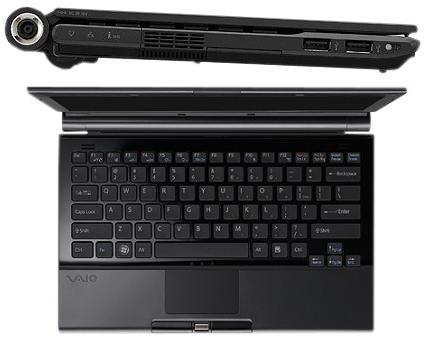
Sexy Sony Vaio TZ191N, Flash SSD Drive-Powered

- The low power approach at notebook storage might not be just what users need

By: Bogdan Botezatu, Hardware Editor

Sony Vaio series have always been fashionable. From aspect to quality, Sony managed to deliver the fashion equivalent of a stylish piece of clothing. The Vaio TZ191N notebook could not be an exception
to the rule and Sony managed to keep it up to nowaday's digital trends.

Under the black carbon-fiber case, there beats an Intel Centrino Duo processor that runs at 1.2 GHz with a bus speed of 533 MHz, 2GB DDR2 SDRAM and a double-layer DVD writer. The display is made of a WXGA active-matrix TFT color LCD screen that delivers an extremely sharp image at a maximum resolution of 1,366 by 768. The notebook looks breath-taking and there's more thrill to it, since it only weighs about one kilogram with batteries or 1,5 kilograms if you plan to take the power adapter with you.

Sony's Vaio TZ191N has switched to solid-state drive (SSD) storage. The 32 GB SSD consumes less power than a standard laptop HDD, not to mention that it runs cool and features extremely fast access times. The single downside to the SSD approach is that the storage capacity is the average of what a laptop could deliver five years ago. Moreover, things are going to shrink for you, as the majority of the SSD will be taken up by the operating system and the additional software, which leaves you no room for music, photos and other multimedia stuff. As for the high definition content, you may wave your hands goodbye.

The storage space issue can easily be corrected by purchasing a fast external hard drive, but this would spoil the minimalistic weight of your laptop bag. Moreover, investing some extra money in external storage might make you run amok because it is supposed you have already paid enough dough (around $3100) for your priceless Vaio.

MORE RELATED ARTICLES: Sony Vaio G2 Comes with New Options Solid State Drives Make Waves Transcend Starts Shipping Its 32GB SSD More PCs with Solid State Drives to Come Alienware Boosts Performance with 64GB SSDs Solid State Drives Have a Sure Future Ahead SanDisk Launches Cheap Solid State Drives Two More Laptops from The Successful VAIO Line NAND Memories Are Here to Stay
 
Comments | Link here | Subscribe
Print | Send to friend
Today's News | Yesterday's News

Search:


29th November 2007, 12:00 GMT | Copyright (c) 2007 Softpedia | Contact:
Read by 663 user(s) | Rating: | 5 vote(s) so far | Cast your vote:
Sexy Sony Vaio TZ191N, Flash SSD Drive-Powered - USER OPINIONS


We are sorry, there are no opinions available for this article.


SHARE YOUR OPINION ABOUT Sexy Sony Vaio TZ191N, Flash SSD Drive-Powered

Since you are not logged on, your comments will have to be approved before being displayed.
Click here to login, or register.
Your Name:
Your Email:
Type in the result:
Your Opinion:


DO YOU WANT TO CONTACT US?  

If you have some comments or you want to send us some information you can send us an email directly to .
You can use the form below for the same purpose.
Your full name: (at least 3 characters)
Your email address: (at least 5 characters)
Message subject: (at least 5 characters)
Message text:
(at least 10 characters)
Type in the result:


© 2001 - 2008 Softpedia. All rights reserved.
Softpedia™ and Softpedia™ logo are registered trademarks of SoftNews NET SRL.
Copyright Information | Privacy Policy | Terms of Use | Contact Softpedia | Update your software | Archive