
Softpedia
 

NEWS CATEGORIES:


NEWS ARCHIVE >>
SOFTPEDIA REVIEWS >>
MEET THE EDITORS >>
Home > News > Linux > Linux Distributions

January 20th, 2010, 15:50 GMT · By

Run Android on Your PC

SHARE:

Adjust text size:


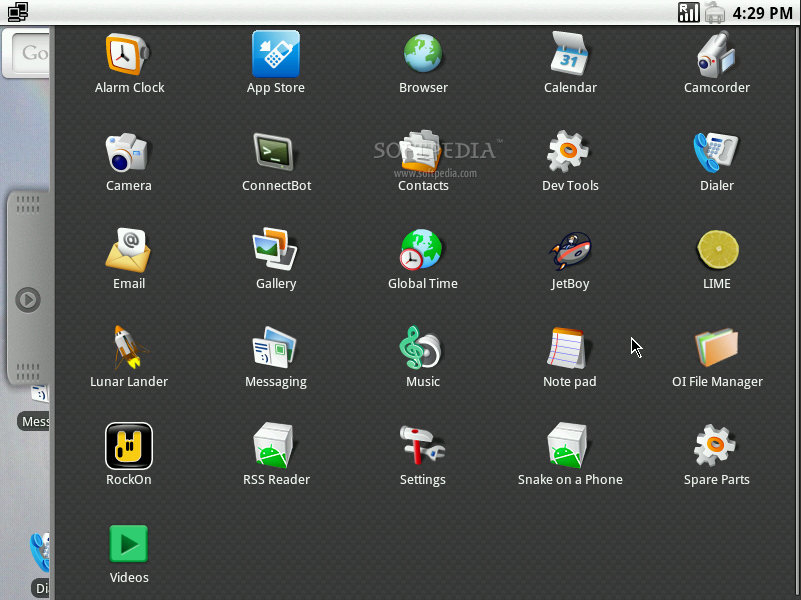
The applications of Android-x86
Enlarge picture
Today we are proud to announce a new operating system, a port of Google's famous Android platform for the x86 (32-bit) architecture. Simply named Android-x86, this Live CD Linux distribution is designed mostly for the Eee PC netbooks, but can also run on any other 32-bit (x86) platform. The current stable version of Android-x86 is based on Android 1.6 (Donut) and it's powered by Linux kernel 2.6.29 with kernel mode-setting (or KMS for short) enabled. It has support for the EXT3, EXT2, NTFS and FAT32 filesystems, and can be run directly from the CD (yes, no installation required)! But, if you like it and you want to install it on your hard drive or on a USB stick, we have a short tutorial for you at the end of the article.

"The original plan was to host different patches for android x86 support from open source community. A few months after we created the project, we found out that we could do much more than just hosting patches. So we decide[d] to fork our code base that will provide android x86 support on different x86 platforms, and set up a git server to host it. To reflect this major change, we create this new project." - the developers behind the Android-x86 project said on their website.
Review image
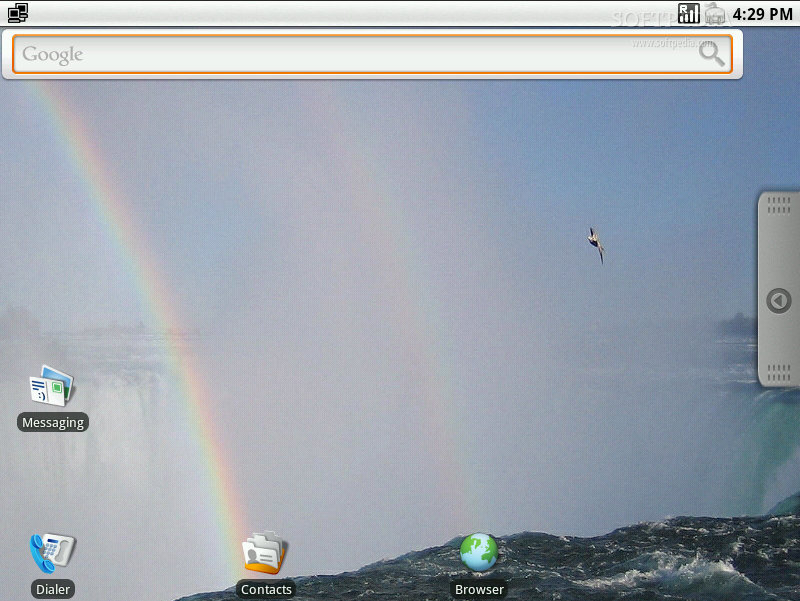
The main desktop

Highlights of Android-x86 1.6:

· Based on Android 1.6 (Donut);
· Linux kernel 2.6.29 with KMS enabled;
· Support for Wi-Fi connections;
· Graphical user interface for Ethernet configurations;
· Hard drive installer;
· Support for suspend/resume functions (S3 mode);
· Shows the status of the battery on netbooks;
· Support for mouse wheel/cursor;
· ALSA driver for better audio;
· Support for the native resolutions of netbooks;
· Support for netbook's webcams (via V4l2);
· Support for external monitors;
· Automatic mount of external disk drives;
· Support for Bluetooth;
· Busybox;
· Proxy support.

Until now, Android-x86 was tested on the following Eee PC models: 701, 701SD. 900, 900A, 901, 904HD, 1000, 1000HE, 1000HD, 1005HAG, S101, T91 (VESA mode, touchscreen works), Eee Top 1602C (VESA mode, touchscreen works) and Lenovo ThinkPad x61 Tablet. As you can see, except for the T91 and Eee Top 1602C models, which run only in VESA mode, all the other models enumerated above can run in their native resolution (1024x600 or 800x480) thanks to the i915 Intel video driver.

How to install Android-x86?

Below is a quick guide that provides you with instructions about how to install the Android-x86 Linux distribution on your Eee PC or home computer. It can be installed on a local/external hard drive or a USB flash drive. If you don't have an external/internal CD-ROM on your system, you can write the ISO image to a USB stick by following our "How to Run Linux from an USB Flash Drive" tutorial.

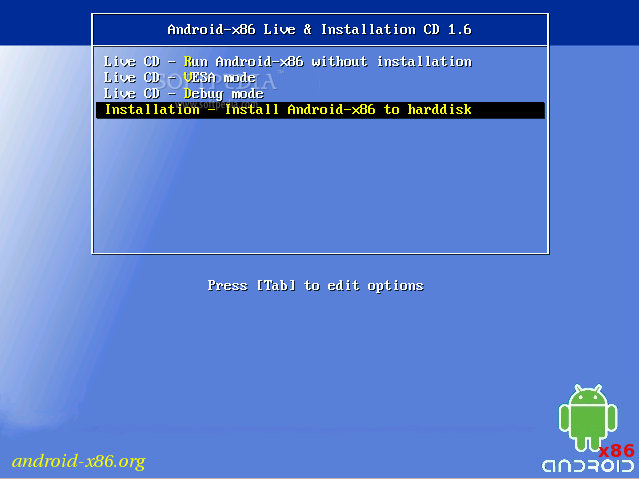
Insert the CD or USB drive and boot from it (check your BIOS settings for that). At the boot loader select the last option: "Install Android-x86 to harddisk."
Review image

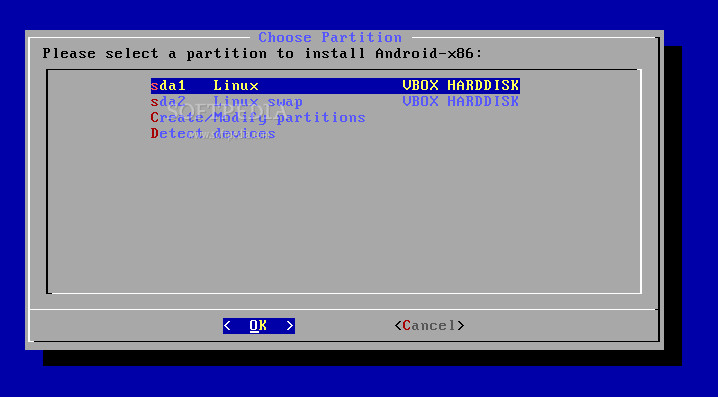
Wait for it to load and you'll be asked to choose or create the required partitions. If you install on a USB flash drive and it's not detected, choose the "Detect devices" option. Click OK when done...

Review image

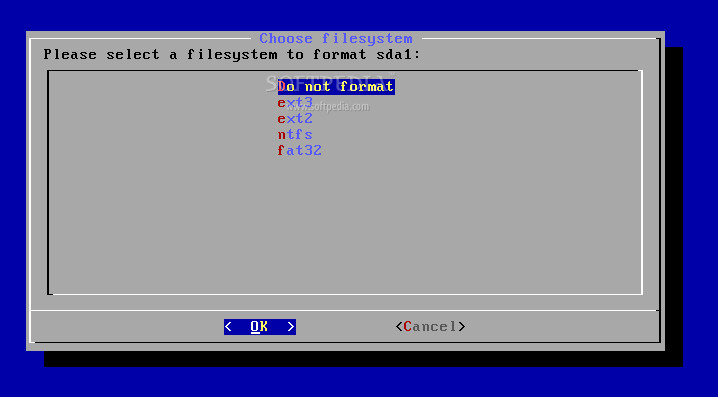
On the next screen you can format the partitions with a desired filesystem (ext3, ext2, ntfs and fat32 are supported at this time). EXT3 is recommended. Click OK when done...

Review image

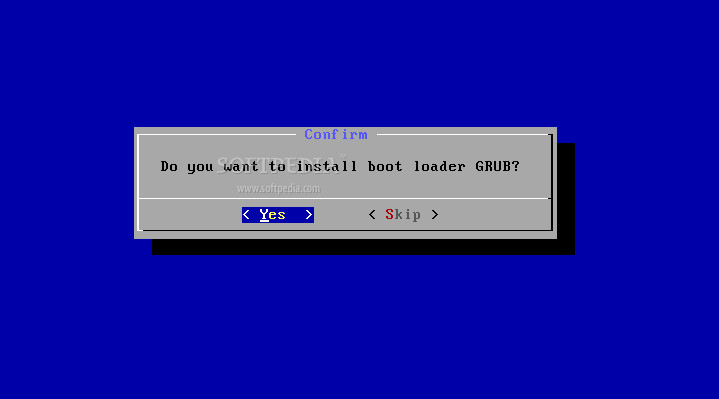
Then you will be asked if you want to install the GRUB bootloader, which can also be used to boot another installed operating system. Hit "Yes"...

Review image

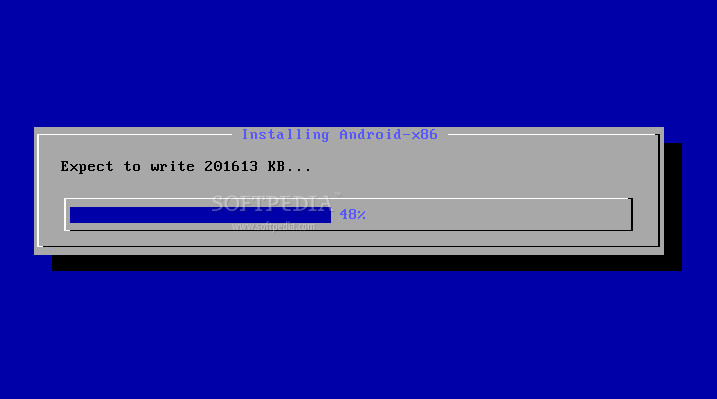
Wait a few seconds for the system to be installed....

Review image

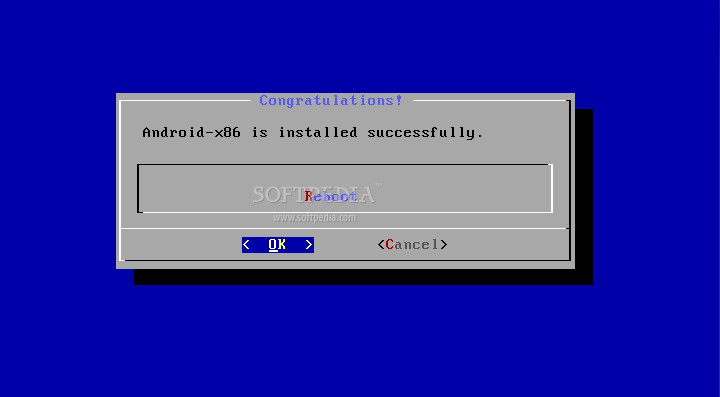
Reboot the machine when the installation is over...

Review image

That's it, you're now a proud owner of the Android-x86 operating system. Enjoy!

Download Android-x86 right now from Softpedia.

TELL US WHAT YOU THINK:

129,078 hits · 31 comments · Link to this article · Print article · Send to friend · Subscribe to news

MUST-READ RELATED ARTICLES:


Ubuntu Manual Needs Your Help

Softpedia Linux Weekly, Issue 80

Pardus Linux 2009.1 Released

Ubuntu 10.04 LTS Alpha 2 Has Plymouth

PelicanHPC 2.0 Is Based on Debian Squeeze

READER COMMENTS:


Comment #1 by: Kostas on 21 Jan 2010, 14:26 UTC reply to this comment

So, can I install this on my pc? (CPU: c2q)

Comment #1.1 by: Marius Nestor on 21 Jan 2010, 15:29 GMT

Yes, just download the ISO image, burn it on a blank CD and boot from it in Live CD mode :) If it works and you like it, you can install it :)


Comment #2 by: AruJammer on 22 Jan 2010, 09:22 UTC reply to this comment

Hi,

I've just install it on VMWare, works gr8!!..no sound but it's ok for testing purposes

Thnx!! just what i needed


Comment #3 by: HELP on 25 Jan 2010, 06:12 UTC reply to this comment

I want to install it but I need to know two things,
1. Does this mean my netbook will have access to the android marketplace and all the apps like the andriod phones do?
2. IS THERE ANY WAY WHAT SO EVER TO KEEP IT FROM REPORTING EVERYTHING I DO STRAIGHT TO GOOGLE HQ?

Seriously, I need to know this, could someone please tell me.


Comment #4 by: Marius Nestor on 25 Jan 2010, 15:47 UTC reply to this comment

Please watch this video preview of Android-x86 for the first question:

http://news.softpedia.com/news/Softpedia-Linux-Weekly-Issue-81-133020.shtml#6

About the second question, maybe you should ask the developers of Android-x86, here http://www.android-x86.org/contact


Comment #5 by: javier1405 on 07 Apr 2010, 22:19 UTC reply to this comment

I downloaded Unetbootin (for windows) in my PC (XP OS). When I run Unetbootinit did not show an option for Android then I chose Ubuntu (and gave me automatically 9.1). I browse to the folder where I have Android.ISO and I check the right letter for installing Android in an USB stick.
I looks like it did it, I mean, I can see in the USB several files that look like system files and so.
I have a Netbook and I st it up to Boot from USB FDD. I restatar the Netbook and Andorid started loading. In the beginning shows something like it did not find it but la few seconds later it continued loading.
After some process (that I do not how to describe) it shows the upper side of Android display desktop (where I can see the time) but below everything is black and in the bottom the message: can not access the tty: job control turn off.
When I rub the mouse pad with my finger for a couple of seconds then it shows the Android display image (desktop)for less than a second and disappear and becomes black again (below the bar where the time is showed).
I push the button to turn the netbook off and it shows me like a ghostly image of Android desktop with the choice to turn the machine off or restart for only one second and again black. I rub my finger on the mouse pad and I can again see the buttons choices (turn off, restart) for less than a second.
I am not seeing theses choices but I press enter and it accepts my choice and restart or turn of the netbook according what I choose.
Can Someone help me with this puzzle?
I thank you in advance for your advise
Regards
Javier

Comment #5.1 by: alexbunder on 19 May 2011, 22:27 GMT

just try to load "VESA mode" because of your PC has resolution which is not supported by androidOS


Comment #6 by: sammy on 25 Apr 2010, 04:39 UTC reply to this comment

this OS is open source, meaning you can do WHATEVER you want with it. no need to worry about anything


Comment #7 by: nichel on 24 Sep 2010, 01:26 UTC reply to this comment

You are nuts no market on android -x86

Comment #7.1 by: mtiddens on 27 Mar 2011, 20:41 GMT

Are you kidding? For the average person, PC's are boring, techy, and the desktop screens are mostly wasted space. Smart Phones and tablets are exciting. Why? Because they have apps! PC's will die if they don't change to include apps.

Comment #7.2 by: Mefisto on 29 Mar 2011, 05:18 GMT

@mtiddens:
Are you kidding me? What exactly do you think Programs are? An app (short for "Application") is merely a program. Computers have had "Apps" for decades, they WOULD NOT FUNCTION if they didn't have them!
If a PC didn't run apps, it would be called a fancy brick, because it does (literally) nothing. App running is the whole point of a computer. Every heard of Microsoft Office? That's what we call an "App Suite", a set of applications bundled together to fulfill a specific purpose.

Just to let you know...


Comment #8 by: Abdulrahman on 14 Nov 2010, 16:13 UTC reply to this comment

Totally cool! I thank the guy who put these efforts very much.


Comment #9 by: tim on 01 Jan 2011, 00:17 UTC reply to this comment

where do i download the iso

Comment #9.1 by: alexbunder on 19 May 2011, 22:30 GMT

http://linux.softpedia.com/get/System/Operating-Systems/Linux-Distributions/Android-x86-53904.shtml


Comment #10 by: brother.scott on 13 Feb 2011, 06:50 UTC reply to this comment

I love it. Saved it to thumb drive. If I put on to the hard drive will it destroy the data on it? Will not save settings or short cuts. Will that change if on hard drive?


Comment #11 by: shawnn on 27 Feb 2011, 22:48 UTC reply to this comment

This is great, I've got it running on my old dell d620 laptop. Only thing is, neither Bluetooth or Wi-Fi are working, which leaves me at a standstill. How would I go about incoperating that driver into the install? Anyone who can help would be greatly appreciated.
Shwnn


Comment #12 by: Ronny on 13 Apr 2011, 20:15 UTC reply to this comment

my laptop c: is formatted, it does not have an cd/dvd drive, if will not boot from usb... What are my options???

Comment #12.1 by: maarten on 01 Jun 2011, 13:20 GMT

eternal dvd/cd /drive?
( if you have usb-port or PCMCIA-slot)


Comment #13 by: prspcwb on 11 Jun 2011, 11:17 UTC reply to this comment

Hi guys,
I have been using Android in my eee-pc 901 for almost 3 months and I am loving the experience.
I downloaded some app and most of them works without any trouble but one, Skype, this one is drive me crazy. It does not works properly has anyone any suggestions?

Comment #13.1 by: Pieter on 20 Jun 2011, 09:42 GMT

I have tried to do an install on an older x86 pc which contains a working Opensuse installation, but no joy. It cam as far as assigning all the hardware but than it started to display all ".".

Because I could boot Linux afterwards, nothing had been written to my discs.


Comment #14 by: Svnny1231 on 05 Aug 2011, 19:10 UTC reply to this comment

is it removable or do you chance your operating system ???


Comment #15 by: mahendra on 16 Sep 2011, 13:36 UTC reply to this comment

Great tutorial it worked for me Mobile Phones


Comment #16 by: Varun on 01 Oct 2011, 16:02 UTC reply to this comment

My monitor shows a low resolution warning after installing and booting and goes off...

Can any one say, what is the required resolution...?


Comment #17 by: Meg on 07 Oct 2011, 21:03 UTC reply to this comment

Very useful, thank you guys!


Comment #18 by: piyush3dxyz on 08 Oct 2011, 15:55 UTC reply to this comment

let me think .....android is specially designed for tablet devices like touch screen phone and tablet pcs...if this iso still worked in pc then its brings to many disadvantages like gyroscope,touch screen apps,many apps not correctly worked with mouse...


Comment #19 by: android man on 20 Oct 2011, 10:55 UTC reply to this comment

can i use downloaded apps in this?


Comment #20 by: android on 20 Oct 2011, 11:01 UTC reply to this comment

can i use download apps


Comment #21 by: Danny2878 on 04 Nov 2011, 20:06 UTC reply to this comment

I downloaded android 3.2 x86 and want to know if theres a way to get the internet working so that i can finally install it on my pc. I want to be able to surf the internet and get apps.


Comment #22 by: billyg on 11 Nov 2011, 13:24 UTC reply to this comment

it works but my screen turns off every time i move the mouse then comes back a couple seconds later, then off again when i try to move mouse...

any advice?


Comment #23 by: Mndeto on 14 Nov 2011, 14:08 UTC reply to this comment

So jus how many developers are on this? in terms of Games, essential softwares like adobe reader or microsoft office? software compactibilty is the biggest issue


Comment #24 by: vishu9219 on 20 Jan 2012, 06:46 UTC reply to this comment

where is the download link

Copyright © 2001-2012 Softpedia. Contact/Tip us at

WindowsGamesDriversMacLinuxScriptsMobileHandheldNews

SUBMIT PROGRAM   |   ADVERTISE   |   GET HELP   |   SEND US FEEDBACK   |   RSS FEEDS   |   UPDATE YOUR SOFTWARE   |   ROMANIAN FORUM