
|
|
|
|
August 12th, 2009, 14:47 GMT · By Ionut Arghire
Rogers Launches Samsung Hype A256 |
|
|
|
|
SHARE:
Adjust text size: 
|
|
|
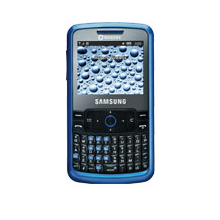
Canadian mobile phone carrier Rogers Wireless has released yet another affordable handset that sports enhanced messaging capabilities, the Samsung Hype A256. The new device, which has already been released in other markets, including US, where AT&T has it since May under the name of Samsung Magnet, is priced at $89.99 on Pay As You Go.
The new mobile phone comes towards the Canadian handset users in a candybar form factor, while providing a full QWERTY keyboard (which also sports enhanced predictive text capabilities), Bluetooth connectivity and a MicroSD memory card slot that offers support for up to 16GB of additional storage space. At the same time, it also includes support for quad-band GSM/EDGE connectivity (850 / 900 / 1800 / 1900 MHz). Some of the key features of the new Samsung Hype A256 include: - Slim bar design with a Full QWERTY keypad - Built in VGA camera, so you can take and send pictures while being mobile. Photos can be shared with multimedia messaging (MMS) - Up to 5 hours of talk time and up to 12.5 days on stand-by - Headset and handsfree Bluetooth profile - 16MB internal storage memory The specification list of Samsung Hype A256 also shows that its battery can deliver up to 5 hours of talk time, or up to 12.5 days of standby time, that it measures 109 x 59 x 12 mm and weighs 87.5g, and that it comes to the market with an address book that can support up to 1000 entries, and with a SMS Memory of 200 entries. “The Samsung Hype is an on-the go necessity,” Rogers says, while also adding that “the phone’s sleek design and large display allows for easy messaging and convenient portability.” For what it's worth, the device doesn't seem to be a bad option, especially considering its messaging capabilities and the price tag it comes with. More details on it can be found on Rogers' website.
|
|
|
|
TELL US WHAT YOU THINK:
|
18,744 hits
· 40 comments
· Link to this article
· Print article
· Send to friend
· Subscribe to news
|
MUST-READ RELATED ARTICLES:
READER COMMENTS: |
| Comment #1 by: Gab on 26 Aug 2009, 00:00 UTC | reply to this comment | This is an amasing phone, though the camera is only 0.3 megapixels, all the rest is amasing, deff a good deal! |
| Comment #2 by: Glen on 29 Aug 2009, 02:45 UTC | reply to this comment | Nice phone only problem is Rogers has it so you cant do anything fun with it. You can buy a USB canle for it but have fun finding a driver. therefore you cannot upload your own pics, video, ringtones, etc.... Its a shame rogers did it that way. Almost makes me wanna smash the phone or return it. |
| Comment #3 by: marc on 04 Sep 2009, 06:52 UTC | reply to this comment | Cant send picture messages, bluetooth only availabe for headsets and not sending files. I do not recommend it |
| Comment #4 by: Allie on 07 Sep 2009, 01:48 UTC | reply to this comment | Good potential, but instructions are very frustrating. Want to connect to PC, but manual says I need "correction version" of PC Studio, and check website to determine, but info is nowhere to be found. |
| Comment #5 by: gb on 06 Oct 2009, 03:23 UTC | reply to this comment | could anyone tell me how to turn off the key pad tones? When I turn the ringer to silent the tones stop but I want the ringer to work without the annoying keypad tones. Otherwise I really like this phone, |
| Comment #6 by: Raissa on 07 Nov 2009, 05:23 UTC | reply to this comment | GREAT PHONE!! but.. How do you get rid of that annoying sound that goes off after you have sent a message?? |
| Comment #7 by: SUSAN on 12 Nov 2009, 23:50 UTC | reply to this comment | YOU CAN GO TO SETTINGS SELECT SOUND PROFILEIT IT WILL OPEN ANOTHER SOUND PROFILE PAGE SELECT EDIT. THERE ARE THREE ICANS THERE CALL ALERT TYPE, MESSAGE ALERT TYPE AND KEYPAD TONE SELECT KEYPAD TONE SELECT CHANGE AND IT WILL AL LOW YOU TO BUT YOUR PHONE TONE ON OFF. |
| Comment #8 by: mike on 18 Nov 2009, 15:19 UTC | reply to this comment | good for the price, I got my samsung hype drunk at a football game (spilled lots of beer on it) , 8 days later I turned it on and it still works fine lol. ANYWAYS, the only thing that sucks is my bluetooth motorolla headset won't connect to it, seems only samsung phones connect but nothing else, I've tried to connect it to multiple phones other than samsung... but only this one headset. |
| Comment #9 by: Emily on 04 Dec 2009, 23:34 UTC | reply to this comment | all you need to do is go to SETTING
then you need to click on SOUND PROFILE
Then Click on NORMAL
then move over twice (Push right button twice)
It will say KEYPAD TONE
Below it you can choose to turn it OFF, BEEP, or GLOSSY.
I really hope this helped ! |
| Comment #10 by: sue on 08 Dec 2009, 14:54 UTC | reply to this comment | havent decided if I like it much yet, keypad is a little small, its practicing to roll your fingers to text not push that I found has worked.
One big thing I have with the phone is that I cant put a ringtone for my recieving a text message alert, just caller. Not sure if I have the wrong file for the ringtone or not..once I figure this out I will be happy, price was right..If this one feature can not be done, which I cant understand why, simply because its a Texting phone, soooooo which is why one would want to be alerted for the text messages on the phone not the calls coming in..
anyone have any ideas? |
| Comment #11 by: sue on 08 Dec 2009, 15:15 UTC | reply to this comment | havent decided if I like it much yet, keypad is a little small, its practicing to roll your fingers to text not push that I found has worked.
One big thing I have with the phone is that I cant put a ringtone for my recieving a text message alert, just caller. Not sure if I have the wrong file for the ringtone or not..once I figure this out I will be happy, price was right..If this one feature can not be done, which I cant understand why, simply because its a Texting phone, soooooo which is why one would want to be alerted for the text messages on the phone not the calls coming in..
anyone have any ideas? |
| Comment #12 by: sara on 12 Dec 2009, 19:14 UTC | reply to this comment | I have this phone and a Motorola headset, and it connects fine for me. I just have to keep the little speaker closed, press and hold the main button until it turns blue, and search for bluetooth devices on the phone. then open speaker and talk away! |
| Comment #13 by: steffi on 20 Dec 2009, 19:16 UTC | reply to this comment | Im getting this phone today.. Is it good? |
| Comment #14 by: Shaudaie on 20 Dec 2009, 21:26 UTC | reply to this comment | it seems like a cool phone. im interested in purchasing one, but one of my main concerns are ringtones and features like that. THe only reason i would like it, is cause of its keyboard which seems to be 'small', acccording to others, do any of you reccomend this phone? |
| Comment #15 by: neha on 26 Dec 2009, 06:09 UTC | reply to this comment | Hey,,
can u guys let me know how to put pictures on my computer frm my samsung hype ??
if anyone can please help me out ....i will really appreacite it :)
thanx
neha |
| Comment #16 by: Abbie on 10 Jan 2010, 03:26 UTC | reply to this comment | Here is how to upload pictures, it looks confusing from my message but it is easy once you get the hang of it.
To send pictures to your computer, first send the pictures to your online album. First, go to your online Album by going to your ALBUM by going to the taking a picture screen and there will be a link thing there. Then go to VIEW ONLINE ALBUM and create one. Then go back to your ALBUM, pick the picture you want and then go to OPTIONS, then go to SEND, then go to ONLINE ALBUM. This might take a few minutes depending on the signal. Then you have to go to your online album, to do this go back to your ALBUM, then go to OPTIONS, then go to VIEW ONLINE ALBUM, this will take you on the internet to your online album. Then you go to STORED MESSAGES and it will have that message. It might take some time if you have uploaded a lot of them to find the one you want. Then from there you go to FORWARD and then type in the address and send it. This works really great for facebook because once you get the hang of it it's really easy. Facebook will send you an email address so you can email your pictures to your phone. Haven't tried sending to your e-mail but it should work.
Hope this Helps:) |
| Comment #16.1 by: CDerro on 08 Nov 2010, 23:57 GMT | Is that process free? |
| Comment #16.2 by: Linda on 20 Jan 2011, 01:16 GMT | How do you put pictures on your computer if you don't have a data plan |
| Comment #17 by: Kris on 10 Jan 2010, 07:14 UTC | reply to this comment | "The new mobile phone comes towards the Canadian handset users in a candybar form factor, while providing a full QWERTY keyboard (which also sports enhanced predictive text capabilities), Bluetooth connectivity and a MicroSD memory card slot that offers support for up to 16GB of additional storage space."
On the Rogers website, it says Memory Expandable NO... there is internal Memory of only 16 MB not 16GB!
This phone looks interesting... the only thing I can see this phone missing is external memory and the lack of PC driver issue. I'm undecided about it... I have big fingers and getting used to the small buttons.... not so sure! I think I will keep reading reviews for a while... coming from LG shine makes me a bit cautious! |
| Comment #18 by: Ken on 18 Jan 2010, 22:09 UTC | reply to this comment | Does not support blue tooth transfer, only head sets.
Does not have video capability only picture.
Does not have micoSD expansion slot.
Does not support ring tone upload from PC through data cable
This phone is a whole bunch of not. You should save spend the extra few dollars and purchase something else and NOT this phone.
If you want bare bones texting and call and dont mind extremely lame ring tones then maybe this phone is for you. |
| Comment #19 by: Simone Bolivar on 16 Feb 2010, 21:03 UTC | reply to this comment | I figured out how to get rid of that annoying sound that plays when you save a setting or send a text message!
1) Settings/SoundProfile/(Normal)Edit
2) Scroll right for keypad tone
3) Ensure the keypad tone is ON (beep or glossy)
4) Only now will you have access to the Volume submenu by pressing down
5) Turn the volume down to mute
6) Turn off your keypad tone (as desired)
No more annoying Sent message/Saved Setting/Unlock sound!!!
Clearly the programers screwed up by causng the volume menu to disappear when the keypad tone is turned off. |
| Comment #19.1 by: Chris on 21 Oct 2010, 23:24 GMT | Thanks, Simone! The only thing I didn't like about my phone is that annoying Sent message/Saved Setting/Unlock sound!!! Your post saved me from getting rid of my fave phone!!! :-) |
| Comment #19.2 by: k33e87 on 30 Aug 2011, 22:27 GMT | thank you SOOOO much! I just got this cell today and loved it except for that annoying sound!! |
| Comment #20 by: Lucas on 17 Feb 2010, 21:01 UTC | reply to this comment | I am about to buy this phone, and i want to know whether its very strong when battered around. i do alot of sports like snowboarding and biking and ive broken a couple phones by just falling on them, is it strong? |
| Comment #21 by: julie on 19 Feb 2010, 21:43 UTC | reply to this comment | i really like this phone but one problem, i only have 4 options for the text messages and i dont kow how to change it to something different
can someonee please tell me how to change them? |
| Comment #22 by: Tyson on 24 Feb 2010, 01:49 UTC | reply to this comment | Hey, Im looking into getting this phone REALLY soon. Can ANYONE tell me if you can send picture messages or not? And can you use songs as a ringer for incomming texts at all? If anyone can help me out, that'd be great! Thanks guy. Take care. |
| Comment #23 by: Tiffany on 05 Mar 2010, 02:11 UTC | reply to this comment | If you want to turn the keypad tones but still have the ringer on, go to Settings, Sound Profile, Normal, then you can change the ringer type for calling to anything you want, vibration, silent, ect. go to the next tab, and you can edit the ringer type for text messaging, and the next tab is for keytone sound, you can set that to off. Hope this helped. |
| Comment #24 by: Megan on 28 Mar 2010, 04:34 UTC | reply to this comment | Okay so I have had mine for about 7 months durable little bugger gets dropped more times then I can count(even down stairs)... gets slightly wet and still doesnt show signs... its a good little keyboard too... now there's its pluses... it has a terrible camera.. can't purchase ringtones or wallpapers ... or anything else for that matter. .. no blue tooth for sending files ... no usb slot and so you can't put files on that way either >< I would only recommend this phone for people who want a phone for strickly texting ...as with talk time ... the bill adds up. |
| Comment #24.1 by: Mellisa on 13 Sep 2010, 03:23 GMT | i have had this phone for a while as well and i agree with the durability but i have purchased ring tones and wallpapers for it so i dont know why you cant... |
| Comment #25 by: Jenna on 29 Mar 2010, 18:01 UTC | reply to this comment | Yes, you can send pic messages with the phone. they're not very good quality but yes you can do it. |
| Comment #25.1 by: CDerro on 08 Nov 2010, 23:56 GMT | If you have unlimited texting and you send picture messages, will you get charged? or is it free? |
| Comment #26 by: Maddie on 18 May 2010, 22:56 UTC | reply to this comment | Can anyone help me?
after someone has sent you a picture via message how do you save it and get it as your wallpaper? |
| Comment #27 by: EDTHESOCK on 18 Sep 2010, 23:33 UTC | reply to this comment | I think it's a great phone for texting for graphics or internet it sucks !! |
| Comment #27.1 by: SHY on 26 Sep 2010, 22:59 GMT | IT REALLY SUCKS |
| Comment #29 by: Kaylyn on 21 Aug 2011, 03:36 UTC | reply to this comment | Does anyone know how set a ringtone that u just bought so that it plays when u get a text? |
| Comment #30 by: kandibar on 07 Oct 2011, 03:17 UTC | reply to this comment | where is the darn memory card slot? |
| Comment #31 by: crystallynn on 17 Oct 2011, 01:03 UTC | reply to this comment | i honestly don't like this phone what so ever .. |
| Comment #32 by: Taylor on 21 Oct 2011, 00:16 UTC | reply to this comment | Where would the Memory card slot be located on this phone? |
| Comment #33 by: daniellaa on 18 Apr 2012, 01:04 UTC | reply to this comment | How do you upload pictures from your phone to your computer? | |
Copyright © 2001-2012 Softpedia. Contact/Tip us at 
|
|