14 DAY TRIAL //
 Google Earth has received lots of updates lately and the Mountain View company seems to enjoy this campaign of improvement so, today, it offers us one new thing: the possibility to read news in Google Earth thanks to a partnership with the New York Times. What's interesting is that the two companies aimed to provide geo-coded news, which means you are able to view a certain location in Google Earth, plus the news available for that area. So, interested in what happened recently in Germany? Go over to Google Earth, search for Germany, zoom in and read the news. It's as simple as that.
"In collaboration with The New York Times, we've come up with a solution: The New York Times offers geo-coded news, and Google Earth offers the platform for reading that news in a 3D browser. This is the first time we've endeavored to show news updated in real time, and we're very excited to work with this first-class publication to bring you the latest and greatest news," Wei Luo, Tech Lead Manager, Google Earth, proudly announced on the blog.
The implementation is made with the help of a Google Earth layer automatically updated every 15 minutes, so fresh news always waits for you all around the world. As you can see in the adjacent screenshot, Google Earth provides only the summary of the news so, in case you're interested in reading the whole article, you have to visit the NY Times page using the provided link.
Now, there are two simple methods to read news in Google Earth:
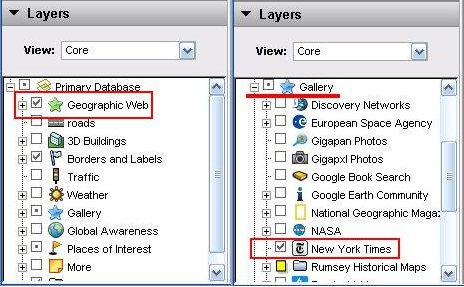
1. Open Google Earth and go to the Layers menu. Check the Geographic Web box and zoom in until you see a NY Times icon. Click on it and read the news. 2. Open Google Earth and, in the Layers menu, expand the Gallery option. Look for the New York Times entry and check it. Zoom in until you see the NY Times icons and click on them in order to read the news.
Please note that, for both methods, you still need the latest version of Google Earth, which is actually available for download right here on Softpedia.