
NEWS CATEGORIES:


NEWS ARCHIVE >>
SOFTPEDIA REVIEWS >>
MEET THE EDITORS >>
Home / News / Apple / Software

Software


Opera 9.5 Adds New Keyboard Shortcuts, Opera Link

Fraud Protection also 'embedded' in the newest version of Opera

By Filip Truta, Apple News Editor

12th of June 2008, 06:58 GMT

Adjust text size:


Enlarge picture
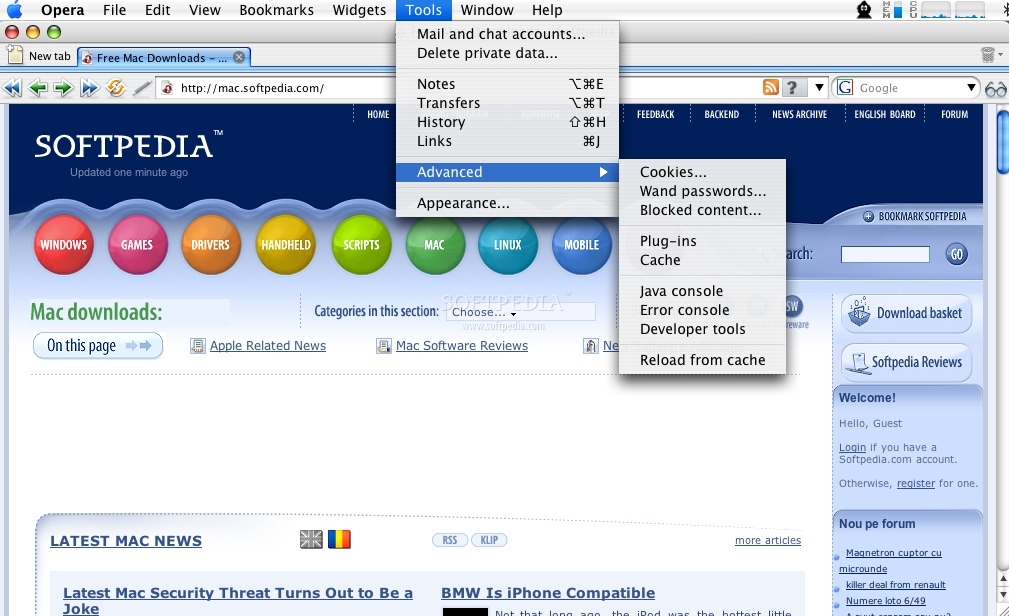
If you're anything like me, you don't just rely on one web browser. I love staying organized by using Opera for one type of web pages (and because of its brilliant classic interface), Safari and Firefox for another. But each one has that little extra something that the other doesn't. Opera 9.50 Build 4870 now has that little extra something: a "significantly altered" set of keyboard shortcuts, as well as two more useful features.

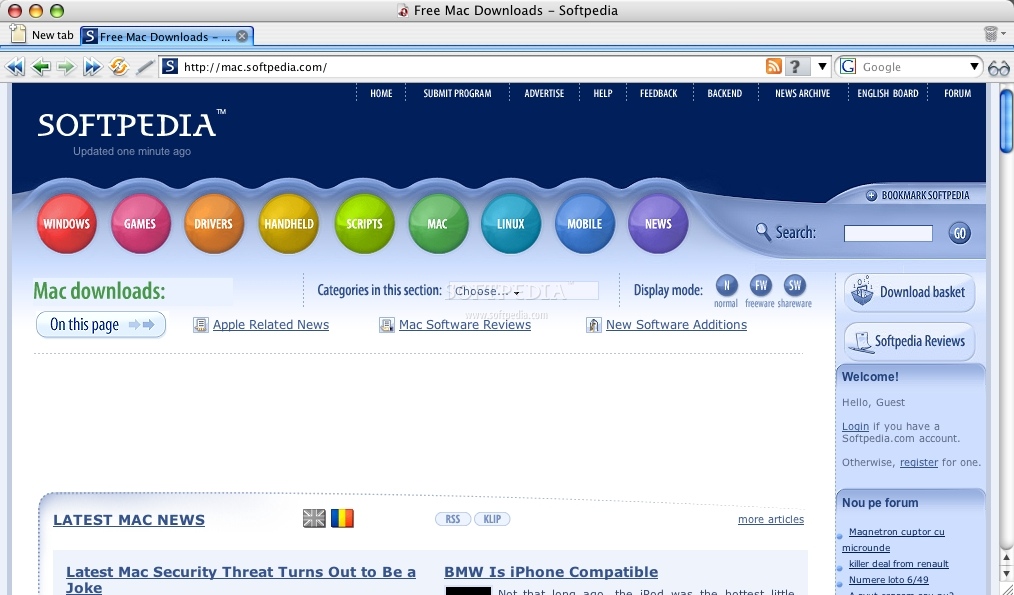
Opera's user interface has recently received a major
overhaul with a new start-up dialog, and new default buttons. The skin and panels are "painted" blue while the overall blue-and-white color scheme just screams "tidy." Opera's appearance can be reverted to classic Opera look or another design any time you wish.


Enlarge picture
Opera is a standards-compliant Web browser for Mac OS X, Unix, Windows, QNX, Symbian, OpenBSD and several other operating systems. The web browser gives users a better Internet experience combining speed, a host of unique features and now, even more keyboard shortcuts.

It offers Mac-specific features such as keychain access in forms and a cookie manager. It is also the first Mac browser to be available as a shared library. Application developers can now include the Opera shared library within their applications.

The newest version, Opera 9.5, introduces Opera Link, improved Fraud Protection, and a "significantly altered" set of keyboard shortcuts, according to the developers.


Enlarge picture
Opera Link is a free service that enables data sharing between all your computers and devices. You can use it to synchronize your bookmarks, Speed Dial entries, notes, and personal bar, so they are available to you any time, any place. Using the web version of Opera Link, you can access your bookmarks on other browsers too, while the username and password for your Opera account is also valid on the My Opera community Web site.

Fraud Protection warns you about suspicious Web pages by checking the page you visit against a database of known "phishing" Web sites.

The Mac version of Opera 9.5 is available for free download at this address.

TAGS:

Opera 9.5 | Opera | Keyboard Shortcuts | Opera Link | fraud protection
Read by 3,281 user(s) | Add comment | Link to this article TWEET THIS


Article rating:
Good (3.6/5) 5 vote(s)    

Subscribe to news | Print article | Send to friend

© Copyright 2001-2009 Softpedia
Contact:


SEARCH THE NEWS ARCHIVE :


Today's News
| Yesterday's News | News Archive


MORE RELATED ARTICLES:


Tooble for Mac Updated - Download YouTube Videos on Your iPod

Safari 4 Preview Seeded to Developers

Agile Web Solutions Waiting for iPhone 2.0 (1Password)

Not Everyone Should Switch to Mac

A Few Laps Around the Office with the iPhoneLego Robot

Help Real-Life Endangered Animals by Purchasing Safari Sketch for Mac

Net Applications' Stats Show Safari Hit Record Market Share in May 2008

User opinions:


Comment #1 by: sehe on 12 Jun 2008, 22:22 GMT reply to this comment

Oh man - they had to do it *again* didn't they?

Exactly when did which moron decide that 'a "significantly altered" set of keyboard short-cuts' is a feature? Just get a French keyboard instead. Go nuts, use Dvorak upside down if your all bored with them shortcuts. But seriously... nevermind that keyboard accessibility is my sole and primary reason to use Opera (otherwise I'm using eLinks).

Everytime I upgrade Opera I get bitten by a gazillion unexplicable breaking changes that I hate. I mean, i'd almost forget to even credit that the overall functionality is improved or at least getting updated.

But, no, everytime I upgrade I get surprises! Lots of them! (What is it? Christmas?)

A while back (I suppose with opera 9:) where is my window menu gone? (i like to be able to undelete tabs, resize/cascade them - I can't seem to find that anywhere anymore). I suppose someone decided that all this menu-business is to complicated for users. Too bad that the functionality is dropped as a sideeffect. I have since forgotten about the good times when opera was the only browser that let you select two tabs and tile them vertically alongside to do a comparison.

What the hell happened to Ctrl-N? Ah I see... Ctrl-Alt-Shift-N is obviously *much* better. I could be mistaken but it just seems like Opera is afraid of Firefox and changed their shortcut to create a new tab to Ctrl-T with sweaty palms just to avoid confusing a Firefox user? Nevermind, confusing Opera users!!!

This release: 9.50 'has that little extra something: a "significantly altered" set of keyboard shortcuts' This apparently is a useful feature. Well, I suppose it useful as I can now no longer switch '1' to previous tab, '2' to next tab. (I now have to cycle using Ctrl W, which is nondeterministic because it indexes the recently-shown tabs, not in sequence).
No longer does backspace conveniently do the same as 'Z' (good for left hand) or alt left (yikes? but standard) or alt backspace (yup... seemed logical to me too).

But fret not: there is a 'Opera 9.2 compatible' set of keyboard shortcuts. Uhoh, backspace still does not work.

Then there is this 'other useful thing': a deviant skin by default. The dark background just screams 'illegible'. Non of my favicons are recognizable in this color setting. This is obviously meant to further impede my productivity (I can now not even resort to mousing the right tab because of temporary visual impairment).

But - fear not: help is nigh. 'Opera's appearance can be reverted to classic Opera look or another design any time you wish'
After searching about for the proper checkbox for some time, I reluctantly hit this button 'find more skins' that I'm far from interested in (GOD NO!!!!! Not more eye-hurting skins! I want no skins! I want bloddy normal windows!). Lo and behold: safely hidden as an optional skin is the 'classical Opera' appearance. Oh, and, you'll have to download that first, please. I'm just going to assume for the moment, that this does not do with performance what I'm afraid it will.*

* to be fair, I'm pretty confident that Opera's classical appearance has always been 'yet-another-skin' technically, so performance is probably unaffected. However: the point is still valid: degrading the current default look to just another skin is confusing. Moreover, forcing the user to 'find' and *download* (gasp) the former default settings in order to be happy with opera as-it-is is just dumb. How much would it cost, to just include it pre-installed and have the user merely select it?

BTW. I know other browsers have this problem too. IE reinvents its security dialogs very 20 seconds. Ok maybe 20 weeks. Also afraid of Firefox, they implemented tabs, so now you can crash 20 browser windows at once! Yay!
Firefox 3.0 obsoletes all my plugins, by making the 2.0 plugins incompatible to 3.0 by default. Nevermind, that the plugins are my sole reason to use Firefox at all? Oh, yes, of course, I can wait till every single plugin is converted (like that'll ever happen, it *is* after all open-source software...).

If I want to browse, I still use opera, for its blazing keyboard accessibility, splendid history (Z, Shift-Z, X!!! Ctrl-Z, Ctrl-Alt-H incremental search, g/f3 repeat incremental search. A/Q and S/W link navigation, links sidebar - unmatched in any browser).

But please, ........ please, don't keep breaking my productivity by doing gratuitous changes every 'slightly less minor' release.

Thank you very much, Opera.


Comment #2 by: MaXSMaC on 16 Jun 2008, 12:24 GMT reply to this comment

Opera is evolving. We may like one of the versions, but Opera is still evolving. We can't stop that and we should not!
For thos who like single key shortcuts [ z - back, x - forward etc.] just go to Tools->Preferences->Advanced->Shortcuts an check "Enable single-key shortcuts."
About the skin... you can go to Tools->Appearance->Skins. Check "Find more skins", select "Editor skins" and choose "Opera 9 Classic skin", then download it. Go back to "Show installed skins", select Opera 9 classic skin and click OK.
Good luck!


Comment #3 by: beovar on 09 Sep 2008, 06:36 GMT reply to this comment

Thank you MaXSMaC for the tip on the single key short cuts. One of the main reasons I use Opera is for the shortcuts and gestures which I've been using for long before Firefox came along (even paying for several versions of Opera), and so, like sehe, I felt a little betrayed when the shortcuts became "firefoxified". But I guess you must do certain things to survive and it's not a matter of just keeping the most of your old Opera fanbase but stealing some from the competiion. To be honest I guess I've been firefoxified myself for a while since what I think was a disastrous version 8 period so coming back I don't notice too manu of the changes - just eager to learn them anew. So go ahead Opera - do what you need to do ... but do spare a thought for the old-timers too where possible.

As for the new version - I'm so glad that support for google calendar and google docs is now improved from Opera 8 and previous --- I may stop using Firefox altogether ... or atleast until I hit those plug-ins that only behave in Firefox.

Share your opinion:

Your Name:
Your Email Address:
(will not be used for commercial purposes)
Solve this to prove you're not a bot: =
Your review/opinion:


Windows tabGames tabDrivers tabMac tabLinux tabScripts tabMobile tabHandheld tabGadgets tabNews tab

SUBMIT PROGRAM   |   ADVERTISE   |   GET HELP   |   SEND US FEEDBACK   |   RSS FEEDS   |   ENTER NEWS SITE   |   ENGLISH BOARD   |   ROMANIAN FORUM