 14 DAY TRIAL //
 The latest Alpha development snapshot of Opera 11.10 codenamed Barracuda brings to the table even more enhancements to the Speed Dial. Opera Software did underline the strong focus on kicking Speed Dial up a notch with the successor of Opera 11.0, and the company is unveiling new improvements to the trademark feature with each new Alpha build.
Opera 11.10 codenamed Barracuda Alpha Build 2033 is now available for download, with early adopters bound to notice that the Speed Dial items are a tad different than before.
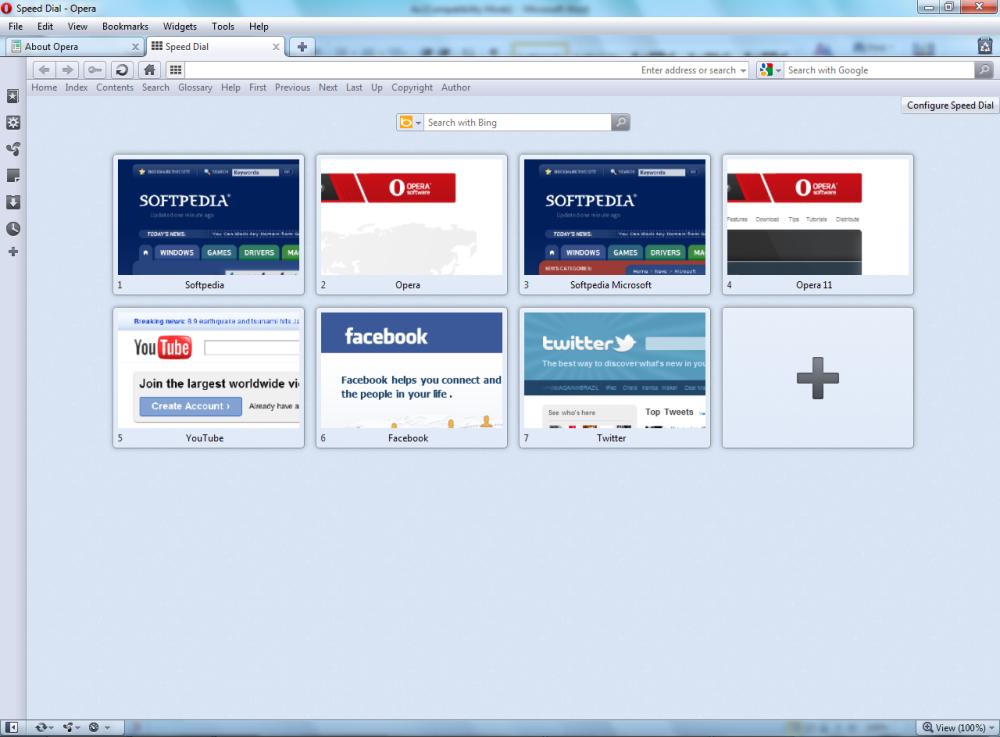
This because the Norway-based browser maker has changed the way that thumbnails are generated for Speed Dial.
“Instead of always generating a thumbnail of the whole page, Opera intelligently tries to find a representative part of the site to display,” revealed Arjan van Leeuwen, from the Opera Desktop team.
“To do that, it searches through all the images on the page and scores them based on size, position and file name. For example, an image called 'logo.png' in the top left corner will be a good candidate. Opera will make a thumbnail of the surroundings of that image, making it clearer which site is in the thumbnail.”
The screenshot on the left is designed to give you a taste of what the new Speed Dial thumbnails look like in Opera 11.10.
And Opera Software has taken it one step further, by enabling web developers to control how thumbnails are generated for Speed Dial.
Sites built to take advantage of the 'minimized' view mode will have that image used as the Speed Dial item.
“Websites now also have the possibility to tell Opera how often they want their thumbnail updated. The Preview-refresh HTTP header can be used for this purpose,” Arjan stated.
“The example below will cause the thumbnail for this website to be refreshed every 10 seconds: < meta http-equiv="preview-refresh" content="10" >.”
At the same time, devs can simply put together a 114x114 pixels image representative of their site and tell Opera 11.10 that they want it used as a Speed Dial thumbnail.
This thumbnail can only be static, and will be displayed provided that the browser comes across code such as “< link rel="image_src" type="image/jpeg" href="thumbnail.jpg" >.”
“Apart from all that goodness Opera now makes it easier for you to install plugins if you don't have them installed on your system. And of course there are all the bug fixes in this snapshot,” Arjan added.
Opera 11.10 codenamed Barracuda Alpha for Windows is available for download here.