 14 DAY TRIAL //
 After hearing countless cries on the Internet, Apple has agreed to reinstate the Save As function back in OS X, but it has done so without admission that it was wrong to pull it in the first place. Moreover, the company fails to properly explain the new standard of saving and reverting to older versions of a document.
To crunch that first paragraph into a single sentence, Apple messed up again.
Apple last year removed one of the oldest features in personal computing with the release of OS X (v. 10.7) Lion. Admittedly, it was all in good faith, as the Mac makers replaced Save As with a more reliable system-wide Save function.
More reliable, but certainly not very intuitive.
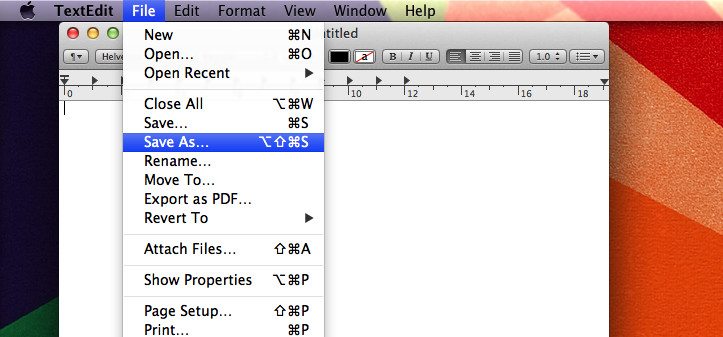
This year, Apple decided to quietly put Save As back in, but not in the way you’d expect.
Adding insult to injury, the California-based computer company now fails to outline these changes for the masses. In all senses, old-time Mac users are now more confused than newcomers. Clearly this is not the way to go for Apple. Not if it wants to keep a solid fan base.
Here’s the deal.
To Save-something-As in OS X Mountain Lion, users must choose File from the menubar, hold down the option (Alt) key on their keyboard to make Save As appear, and finally make another selection with their mouse.
Not only is this a cumbersome affair, you actually have to use both your keyboard and your mouse at the same time to carry out a simple task such as saving a document under a different name or extension.
Unfortunately, it gets even worse. Save As in OS X simply doesn’t work as originally intended. Lloyd Chambers at the Mac Performance Guide explains it best.
“If one edits a document, then chooses Save As, then BOTH the edited original document and the copy are saved, thus not only saving a new copy, but silently saving the original with the same changes, thus overwriting the original.”
“If you notice this auto-whack, you can “Revert To” the older version*** (manually), but if you don’t notice, then at some later date you’ll be in for a confusing surprise. And maybe an OMG-what-happened (consider a customer invoice that was overwritten).”
At this point, even if Apple cedes to reinstate Save As in its original place with its original functionality, the company could well give birth to a PR fiasco.
We’d best forget the old Save As and try to enjoy the more ingenious aspects of OS X Mountain Lion that make up for this rather small inconvenience.
How are you "enjoying" the new Save As in Mountain Lion?