
Softpedia
 

NEWS CATEGORIES:


NEWS ARCHIVE >>
SOFTPEDIA REVIEWS >>
MEET THE EDITORS >>
Home > News > Telecoms > Help guides, tweaks and facts

January 27th, 2009, 17:01 GMT · By

Nokia 5800 XpressMusic Tips and Tricks

SHARE:

Adjust text size:


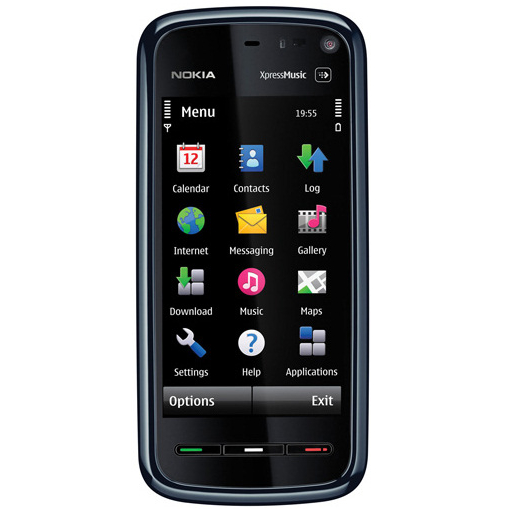
Nokia 5800 XpressMusic menu
Enlarge picture
Nokia 5800 XpressMusic is the latest Nokia addition to the XpressMusic series portfolio and the first to feature a touchscreen. Obviously, the Symbian operating system has been updated to the 5th version, which is compatible with touchscreen. I had the chance to play with the device and I thought I’d give you some tips and tricks that would help you use Nokia 5800 to its full potential.

Maybe some of you already know all these, but there's a slight chance that a new user still hasn't discovered all the tips that I'll be presenting. To illustrate these tips and tricks I took some screenshots that will make it easier for you to identify all the functions that you need to access.

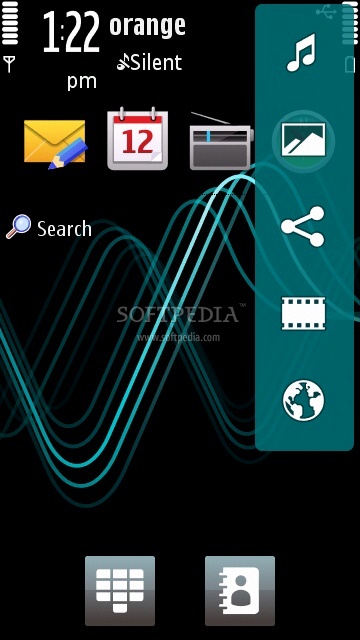
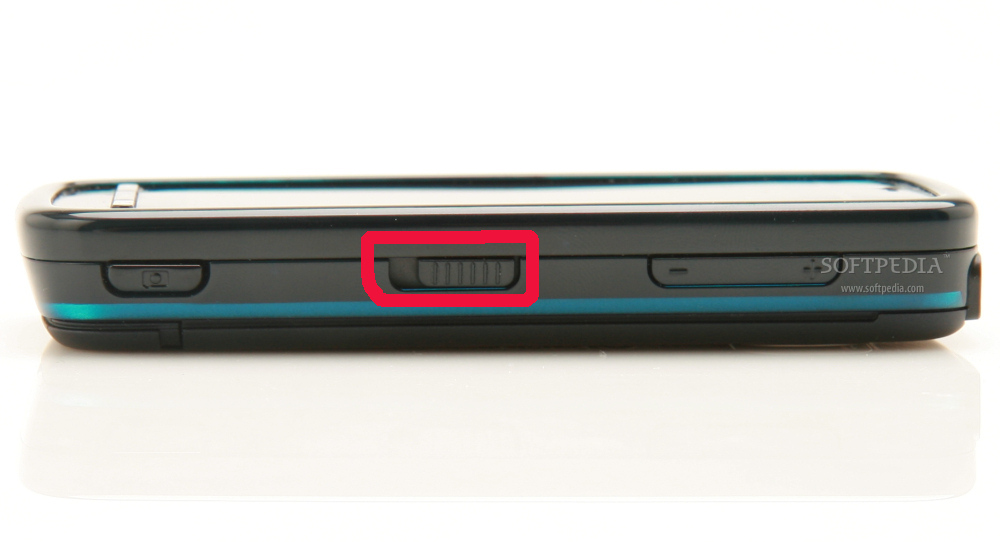
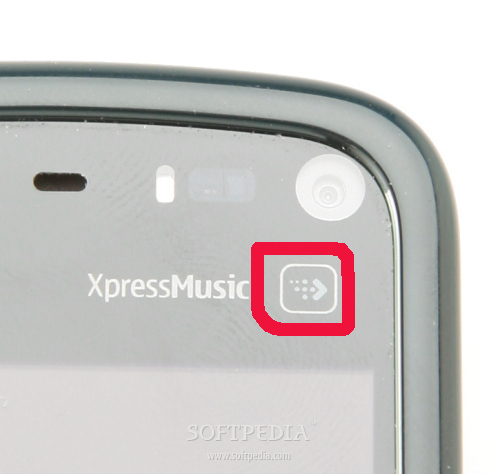
Everything starts by waking up your device, by sliding the large button conveniently placed in the middle of the right side of the phone. The next important key for those who prefer to quickly access areas like Music, Internet, Messages, Video centre and Gallery is the Multimedia bar key. In fact, this is a touch-key, which you can find below the secondary video-call camera.

Check out the pictures to see exactly where it has been placed. The Multimedia bar contains shortcuts to the areas I mentioned above, without the need to open supplementary menus.

Nokia 5800 XpressMusic security key
Enlarge picture
Nokia 5800 XpressMusic multimedia key
Enlarge picture
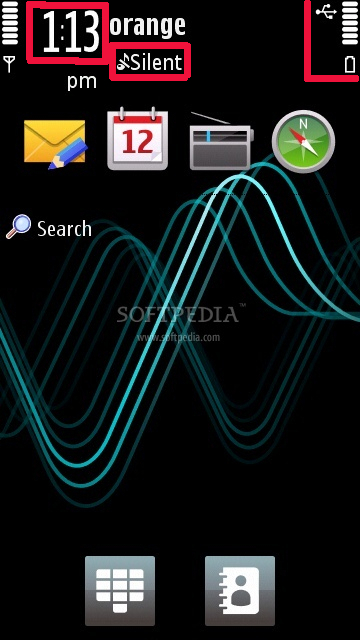
Nokia Home screen shortcuts highlighted
Enlarge picture

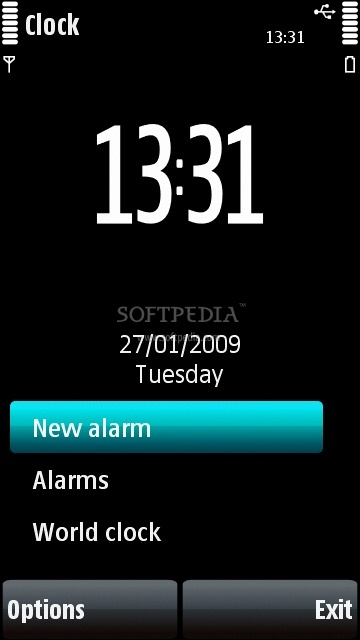
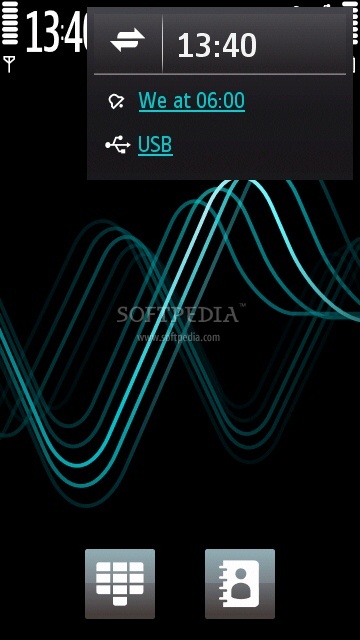
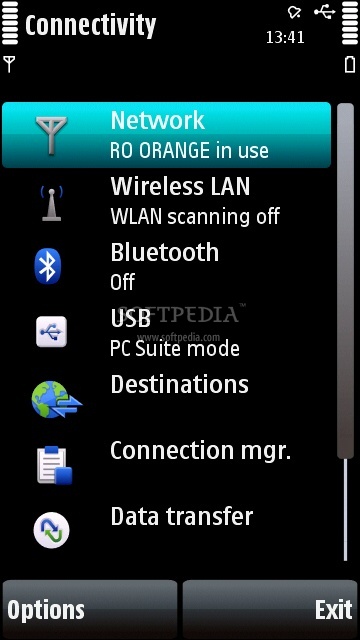
Clicking the clock on the Home screen will lead you to the Alarm menu where you can quickly set a new alarm. There are other shortcuts available on the Home screen, like the Connectivity menu, which can be accessed by clicking on the battery icon in the upper right corner of the screen. If you have USB connection or if the device is Bluetooth enabled, clicking the battery icon will give you fast access to these areas also.

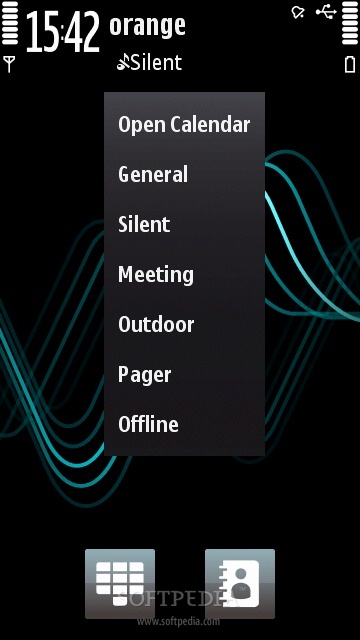
In case you want to change the Profile of the phone or access the Calendar to set an appointment, you only need to click on the Profile name highlighted in the screenshots.

Multimedia shortcut bar
Enlarge picture
Alarm menu
Enlarge picture
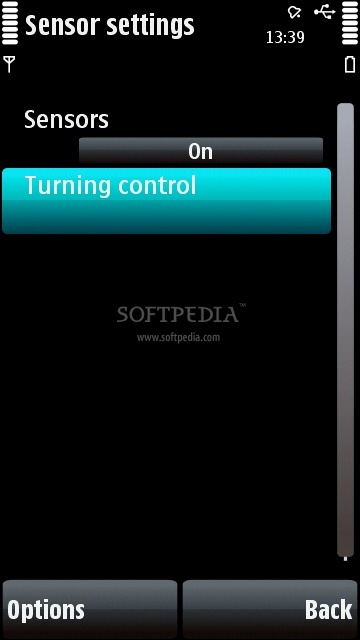
Sensor settings
Enlarge picture
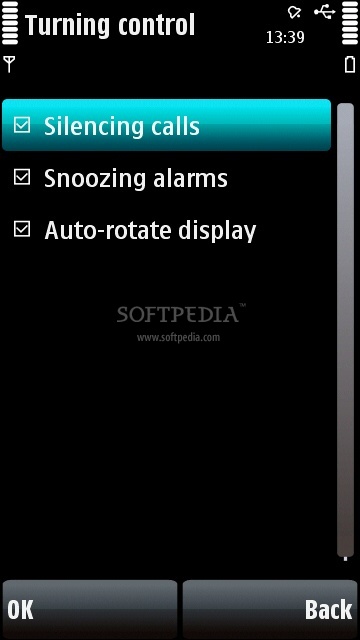
Turning control
Enlarge picture
Connectivity shortcut
Enlarge picture

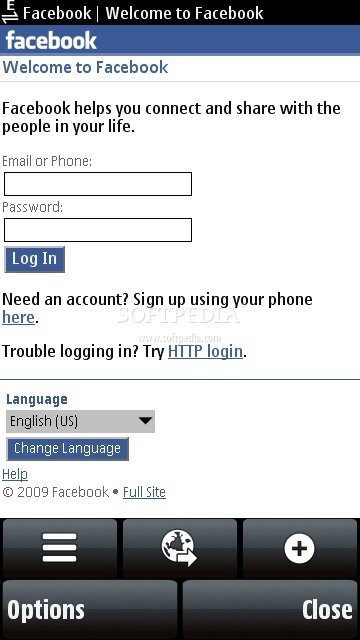
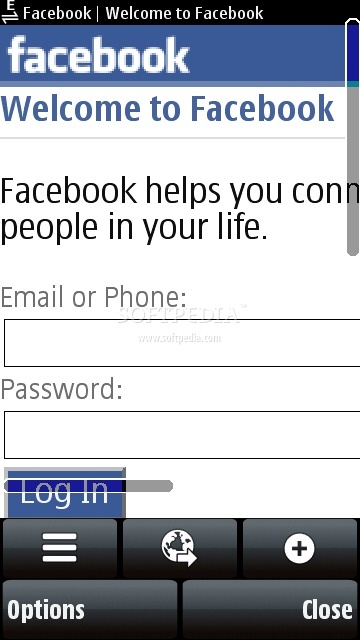
When browsing the Internet, in case you're wondering if you can zoom in/out a page, just double tap on the screen where you want to zoom and it will be done. Usually you can just drag the page to reach where you want, but there's also a scroll bar that activates only when you move the page up/down. It's a nice feature as it gives you an idea of how long a page really is.

Just because Nokia 5800 XpressMusic doesn't feature a keypad doesn't mean it’s less functional, on the contrary. These are just some tips that may help a Nokia fan get used to his new 5800 XpressMusic device. I'm pretty sure that there are more of these, but you can add them under the form of comments attached to this article.
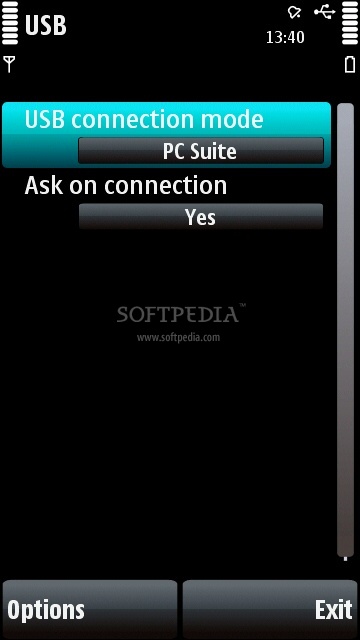
USB mode
Enlarge picture
Connectivity menu
Enlarge picture
Facebook page
Enlarge picture
Facebook page zoom in
Enlarge picture
Profiles menu and Calendar
Enlarge picture

Note: You can easily follow my daily guides by subscribing to the RSS feed.

TELL US WHAT YOU THINK:

36,590 hits · 16 comments · Link to this article · Print article · Send to friend · Subscribe to news

MUST-READ RELATED ARTICLES:


Nokia 5800 XpressMusic Starts Selling in UK This Friday

Nokia 5800 XpressMusic Goes to U.K. Soon

Nokia Ships 1 Million 5800 XpressMusic, Half in 30 Days

Nokia India Unveils Free Applications for Nokia 5800 XpressMusic

Nokia to Redefine the Meaning of Smartphone, Extends S60 Usage

READER COMMENTS:


Comment #1 by: Yatish S Randeria on 10 Mar 2009, 11:29 UTC reply to this comment

After I downloaded new songs on my Nokia 5800, the songs had come preloaded on my phone are not workin Please guide me.


Comment #2 by: Pravej on 17 Mar 2009, 04:31 UTC reply to this comment

I stored some songs from my PC to Nokia 5800, when I am going to refresh the library it going to hang .Then the only solution for me is to switch off the phone. Also the library can't get refreshed. Please Help me.
Thanks

Comment #2.1 by: shirish on 16 Jun 2010, 15:35 GMT

please reboot your nokia 5800 xpress music


Comment #3 by: Mike on 17 Mar 2009, 10:30 UTC reply to this comment

Having replaced my N95 for the 5800XM, I am slightly disappointed. Touch is cool, but it's limiting, and I miss the pencil button on my phone, and the keys. Touch texting is a lot slower and more mistakes are made, which in turn adds to the frustration.

I think the N97 with it's physical keys as well as touch is the answer.


Comment #4 by: keeef on 18 Mar 2009, 11:36 UTC reply to this comment

5800 great phone i find a new function every day


Comment #5 by: yo on 25 Jun 2009, 05:25 UTC reply to this comment

NOKIA 5800 XpressMusic is really an 'ALL-IN-ONE' phone. I think it has all the features that one needs in a phone at a very competitive price point.

Even I'm discovering something new about the phone every passing day.

- A very satisfied user


Comment #6 by: iyke on 20 Jul 2009, 15:51 UTC reply to this comment

pls i just noticed that my 5800 has gone blank wtout falling or any impact,i need ur help on what next to do.


Comment #7 by: Sushil on 25 Jul 2009, 06:23 UTC reply to this comment

its great phone
but i formatted my memory card
i copid all songs before formated in my pc
after formatted i transfered that songs in memory card'
but thats r not playing, key is requireing
wat is key
please help me
i will be highly obliged to u


-sushil


Comment #8 by: Sharing on 20 Aug 2009, 08:48 UTC reply to this comment

The Nokia mobile is cheap ,

lets you provide the affordable way to keep in touch with the important people in your life,

with a host of practical, convenient features that add up to long talk times and easy,

reliable operation, with a touch of fun thrown in too. It's light,

and also comfortable to hold and dial. Also, The battery last long and a durable design will

help you work much better.


Comment #9 by: raahat on 30 Oct 2009, 10:17 UTC reply to this comment

videos on my 5800 are playing but nothing is coming up on the screen.whereas on some videos u can here the volume.same with when i record a video the video plays but nothing can be seen on the screen.please give us a good solution to solve this problem.


Comment #10 by: Marko on 05 Nov 2009, 21:05 UTC reply to this comment

If you have problems with your phone, the best ways is to go to Nokia.com, choose your country. Next click: Get Support and Software > Discussions.
Register there and post all your problems in their forums in an appropriate topic. I hope you all can get your problems fixed there. Else just take it to your nearest Nokia servicing point.


Comment #11 by: Leandro on 20 Jan 2010, 02:56 UTC reply to this comment

I had a Nokia E66, absolutely perfect, and switched to the Nokia XM 5800, mostly because of the fresh new (to me) touch interface, larger screen and media specialty.
I got disappointed in this aspects/functions:
Date and time: they're not onipresent like on E66. If you use any profile other than 'Normal', you don't have the date on the main screen. And there's no button that can show it to you without unlocking the phone (in E66 you can press and hold the central nav button with the phone locked, and the date and time are shown, for as long as you keep pressing the key).
Office files: no support. At all. Zip files: the same. Don't even THINK about buying this phone as a work tool.
Main screen: total disappointment. You have to choose between NOTHING (basic), only 4 shortcuts or 4 contacts themes. Is that all? Unfortunatly, yes. No bottom notifications of sms, e-mail, voice msgs, like E66.
Rolling scrolling: very uncomfortable (not intuitive). Your fingers doesn't 'slide' softly through the list. Most of the times you have to use the sidebar to scroll down, and it has NO PRECISION, at all! Nokia guys, call the Apple people about this.
I guess that's all. Despite of the problems above, it's a great 'entertainment' phone, but not a professional one at all.


Comment #12 by: mohsin rashid on 20 Mar 2010, 19:24 UTC reply to this comment

i like this mobile and it has been a pleasure using it/i will urge all of this mobile fans to copy and buy this cell for luxorious life.take care


Comment #13 by: JB on 05 Apr 2010, 10:35 UTC reply to this comment

Hi is there a way to tweak the recording limit of one hour in XM 5800 ? if so please let me know .. i am not interested in thirdparty software too ...

thank you
JB


Comment #14 by: hashmat huda` on 17 Jun 2010, 12:40 UTC reply to this comment

i thing its a great way to know your phone ......... and i want some new softwares


Comment #15 by: ashok on 18 Nov 2010, 07:24 UTC reply to this comment

such a nice phone i've used ever,.i think it is best touch screen in nokia with gud response for touch,.i does not hang at even if v used roughly,.its price gud,.if it is upgraded to 5 mega pixel with additional features like qwerty keypad etc,.no other company's can beat this model,.

Copyright © 2001-2012 Softpedia. Contact/Tip us at

WindowsGamesDriversMacLinuxScriptsMobileHandheldNews

SUBMIT PROGRAM   |   ADVERTISE   |   GET HELP   |   SEND US FEEDBACK   |   RSS FEEDS   |   UPDATE YOUR SOFTWARE   |   ROMANIAN FORUM