 14 DAY TRIAL //
 Let's cut things short: this is the link for the download.
Ok, now that you're happy and downloading, hear out what's new and why it is the way it is: the feedback from users has been basically focused on a handful of areas and all have been worked upon. And now for the new part, Sarah Bacon, Product Manager says that:
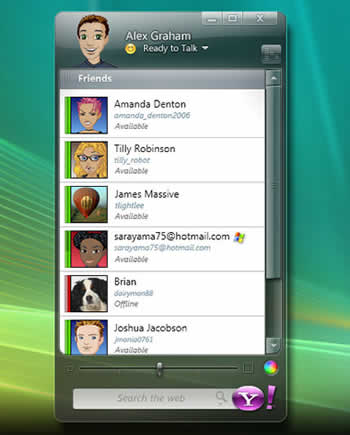
"- Viewing your contacts by their Yahoo! ID vs. their full name or nickname. We've added this preference back in to the product. Download this latest version, then go to Messenger > Preferences > Appearance.
- New expanded contact list. If you're finding that this new look is too spacious for you, go to the Contacts menu and select "Compact List". This will reduce the size of the Avatars and condense the height of your list overall.
- Message formatting in the IM window (the line break after the name rather that starting text on that first line). We've developed a set of handy keyboard shortcuts to give you some other options for your IM window. The shortcuts are a temporary fix; we'll build something more permanent into a future release of 9.0.
- Installation problems for Windows Vista users. In this latest refresh, we've made changes to the Yahoo! Messenger 9.0 Beta installer that should fix most of the Vista errors. If you're on Vista, please give it another try and use our feedback page to let us know if you still encounter issues.
- Games are missing from the IM window. There were some changes to the Yahoo! Games platform that required us to remove them from this version for awhile. We are trying to get them back into a future release of 9.0; we'll keep you posted. In the meantime, if you love your Pool or Checkers, we recommend returning to Yahoo! Messenger 8.1.
- The LAUNCHcast plug-in, along with all the other plug-ins like Yahoo! 360, still work in 9.0! Just click the Plug-ins button near the bottom of your Messenger window to find them."
I do believe that's more than a handful, but anyway, it's a good thing that the job is done. Some more things that people didn't know about the 9.0Beta is that it remembers statuses between sessions, that if a contact in your list has both a Yahoo! and a Windows Live ID only one will appear in the list, the first, for IMing on the Windows Live network the drop down arrow is your friend. Oh, and it is the first version to be unicode compliant, which means that it supports status messages and chat in many more languages than before.
I don't know about you but I will surely be testing it extensively and thoroughly because I like it, because I can and because I can't wait to see it in play.