
|
|
|
|
November 22nd, 2006, 11:14 GMT · By Marius Oiaga
Microsoft Has Scrapped the Defragmenter Display in Vista |
|
|
|
|
SHARE:
Adjust text size: 
|
|
|

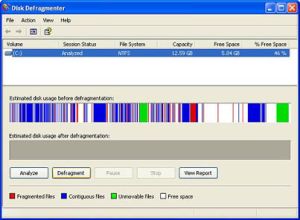
Well, in Windows XP, choose a partition, click Properties, tools and Defragment Now and start the Windows Disk Defragmenter Utility. And, most importantly, don't forget to wave it Good-bye
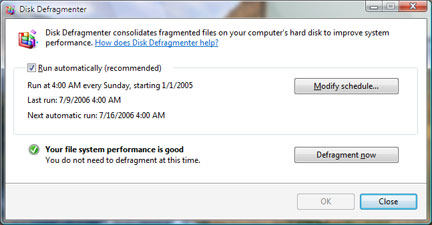
because the Redmond Company has scrapped the disk defragmenter display in Windows Vista. With Vista, Microsoft has simplified and automated the Disk Defragmenter tool. "The Windows Vista Disk Defragmenter was simplified primarily for the purpose of removing it out of the face of the user. It runs periodically and keeps your file system fragmentation at acceptable levels, making it unnecessary for you to launch the tool itself. With the new UI, you can see that we really don't want defrag to be something that people have to worry about, just like any number of other low-level capabilities in the OS," reads a Disk Defragmenter FAQ published back in May. 
Microsoft has dumbed down the details from the Defragmenter UI following negative customer feedback, although the interface has survived for approximately a decade. The only objections have been generated by Windows power users, but Microsoft decided to ignore them. By automating the Disk Defragmenter utility, Microsoft has taken the control out of the hands of the users. The Vista user interface features a check in box for the recommended option to run the utility automatically alongside a "Modify schedule" option. Alternatively, the user is presented with the possibility to "Defragment now." And... that is it. Aside from changing time and the manually start and stop the defragmentation, the process runs in the background. Microsoft didn't even introduce a percentage-based progress bar, not to mention the bars indicating the Estimated disk usage before/after defragmentation.
|
|
|
|
TELL US WHAT YOU THINK:
|
30,134 hits
· 24 comments
· Link to this article
· Print article
· Send to friend
· Subscribe to news
|
MUST-READ RELATED ARTICLES:
READER COMMENTS: |
| Comment #1 by: Kevin on 27 Feb 2008, 21:13 UTC | reply to this comment | Microsoft scrapping the UI for the disk Defragmenter is crap, STOP just taking stuff away in such cases as this, Let the users decide weather or not to look at the progress. That is why the little thing called minimize was included with all open windows. I liked seeing the progress. Don't Decide for us let us choose weather or not to look at it. The idea about you making automatic is freaking awesome, But give a DAMN progress bar AT LEAST!!!!!!!!! For the people that really don't care about it or don't want to look at then MICROSOFT make it optional, Or on the same window put a little bar the reaches across the window with a % read out on it, There is plenty of room for you guys to add a small read out. Take all the graphical interface away IF YOU REALLY MUST. |
| Comment #2 by: William Wells on 05 Mar 2008, 23:16 UTC | reply to this comment | Although the previous writer was a bit over emotional about losing the progress bar, I agree completely about having the option to defrag being taken from me, and I especially miss the progress bar.
Also, defrag seems to ake much longer now. I'll leave my house for hours and when I return, the computer is still defraging. Without the progress bar, I have no idea how much time it's going to take to complete. |
| Comment #3 by: Steve on 25 Apr 2008, 13:14 UTC | reply to this comment | Just one of the many steps backward that Microsoft have taken with Vista. I have just let my 2x200GB drives defrag for 13 hours now and have absolutely no idea how far the defrag got. Only about 240Gb of the drives have been used. How many days do I have to leave my machine on - it would not have taken so long under XP. Vista is a real step backwards in so many respects. |
| Comment #4 by: D J R on 15 Jul 2008, 15:57 UTC | reply to this comment | Scrapping the display is typical of our modern society. make everythingautomatic. Let the machine do everything because those in power find it easier to do that than educate the poor people trying to use their products. I for one liked the visual as it gave eme some idea of how long it was going to take. And with over 1 Tb of disc space this MIGHT be important! I for one will be looking around for another program that I can use to replace Vistas defrag facility |
| Comment #5 by: Tom on 23 Jul 2008, 20:39 UTC | reply to this comment | I don't mind the automation. Sometimes I just forget about it and then it is heavily fragmented. Some kind of progress indicator would have been nice. Perhaps a % indicator would have been good. I started a defrag this morning at 9AM for my C (74 GB WD raptor w/ over half the space unused) & D (320 GB WD w/ 90% of space unused) drives and it is now 1:30PM and it is still working on C. Comment #2 was right. It sure seems to take much longer to defrag now.
I have System Mechanic 8 Pro and it includes a defrag utility but it does not seem to work that great. I will do a thorough defrag and several hours later when it is finished, it is just about as defragmented as before (including the boot time defragmentation). Guess I'll try some others as well. |
| Comment #6 by: Josh Levin on 06 Sep 2008, 17:31 UTC | reply to this comment | I had noticed that Vista was operating very slowly, with very little CPU usage, but with a lot of disk activity. I'm not totally sure about this, but I think that the disk activity is the defrag. I have a lot of programs running, and perhaps the defrag program can never keep up with with all the changes the other programs are making.
I am going to use the Task Manager and Resource Monitor to check out this theory. In the meantime, I'll initiate defrag manually when I'm about the shut down the computer, after I close all my applications.
Any comments would be appreciated. |
| Comment #7 by: Josh Levin on 07 Sep 2008, 07:25 UTC | reply to this comment | I have to withdraw this comment. It seems that what I was observing was simply virtual-memory page faults. I thought I was using less memory than my available RAM, but Microsoft, in its "infinite" wisdom, designed this so that there are still page faults. Go figger! |
| Comment #8 by: Richard on 04 Oct 2008, 10:11 UTC | reply to this comment | I agree with the above comments, why haven't they included a percentage bar? I'm happy not to see the files being moved but my Vista machine has been defragging for 11 hours now & I have no idea how far its got to go!
Come on Microsoft - give us our progres bar back please..... |
| Comment #9 by: Rick on 13 Oct 2008, 21:17 UTC | reply to this comment | I'm glad to see I'm not the only one confused by Microsoft's decision to not include a progress bar of any type for the disk defragmenter program in Windows Vista. My pretty much brand-new computer just took over nine hours to defrag and I found it extremely frustrating to not be able to tell what was going on. |
| Comment #10 by: jessica on 14 Mar 2009, 10:41 UTC | reply to this comment | yea not putting the progress bar on the defragmenter was the worst thing they did. NOW ITS JUST JANK!!! I WANT PROGRESS BAR BACK!!!!!! |
| Comment #11 by: William on 16 Apr 2009, 21:21 UTC | reply to this comment | I agree , I want visual & % bar back , please offer a fix or update or upgrade !! |
| Comment #12 by: MohJ on 15 Jul 2009, 03:09 UTC | reply to this comment | I agree. For the life of me, I can't understand what had possessed Microsoft to decide in their infinite wisdom to remove the progress bar. I mean, okay go ahead and remove the graphical stuff, but why the hell did you guys remove the progress bar? I can't find a logical reason for it. How one of the biggest companies in the world did such a stupid move is beyond me. |
| Comment #13 by: twg on 22 Jul 2009, 02:25 UTC | reply to this comment | What a bunch of idiots they are not providing a progress bar (have they never used a computer before?). And do they really think that this is a helpful message "This may take from a few minutes to a few hours". If somebody who worked for me wrote software that gave a message like that, well, they wouldn't be working for me anymore (but presumably they'd be able to get a job at Microsoft). |
| Comment #14 by: Isaac Loven on 05 Aug 2009, 00:16 UTC | reply to this comment | Perhaps because disks are so large, and defrag takes so long, MS was scared that lots of people would complain when they saw it would take 100 hours. So the simple solution was hide it . It must have been decided by the Marketing / business groups. I am sure ( get just a guess) that the s/w guys at MS would like to know the progress too.
Why can't we also have the option of choosing to defrag only OS files.
I will search to see if any third party tool is any good.
Isaac |
| Comment #15 by: Abdul on 12 Sep 2009, 03:54 UTC | reply to this comment | I have to agree with most of the negative postings on this site! Not providing some sort of progress information makes it difficult if not impossible to judge what is going on. Whereas before it was possible to see how much had been defragmented and how much remained – it is no longer possible to do that and also not possible to determine the outcome of any actions I might take after getting to my boredom threshold looking at a screen that displays no useful information. Instead of acting as an aide it merely confirms why folks seriously dislike the mighty corporation and it’s “we know what’s best or you mentality! I urge the powers to be to return some sort of feedback/progress screens!! |
| Comment #16 by: Kilroy on 26 Sep 2009, 04:32 UTC | reply to this comment | Microsoft has progressively undergone automation with all its features, and this takes the control and enjoyment away from users.
I expect to be empowered by software upgrades, not feel as if decisions have been made for me by a dumb machine. I deeply regret buying my last laptop and notebook with Vista.
Another thing I hate is this pathological need Microsoft has to make features such as volume control software operated. It takes longer to use and is inefficient. Bring back the manual volume scroll! |
| Comment #17 by: Baragla on 14 Dec 2009, 18:39 UTC | reply to this comment | First thing to drive me nuts in Vista was the removal of the Up button in explorer. Now I am met with further "enhancements" that make my blood pressure rise. MS should fire their market research department |
| Comment #18 by: arbee on 29 Apr 2010, 11:06 UTC | reply to this comment | I think the whole point is that by making it automated, you should have been defragmenting so regularly thay it shouldn't take 100 hours to sort out fragments. But I do agree with everyone here. MS made a massive mistake removing the progress bar. There was something comforting/theraputic visually seeing the ordering of you disk.
I was horrifyed when I noticed the change. They need to sort this mistake..pronto! |
| Comment #19 by: Jen on 24 May 2010, 01:01 UTC | reply to this comment | Agree with all the negative points in this message but I'd like to know if anyone is also having this problem. Not only do I have the UNDENDING DEFRAG (probably as said above they hid it b/c they didn't want me complaining about a 100 hour estimate). Anyway, not only that but my "schedule" isn't working. That is, in a perfect world I would like to see my defragment going a LOT. I do alot of work on this horrendous little machine so I know I need to keep up on disk cleanup and defrag. When I click on defrag, it recommends a schedule. I have it set to once a week at 2AM. BUT ... last time it ran was JAN 31 ... I've asked everyone I know how to force a defrag but it won't work. I've run them manually but they just sit there. Why isn't the scheduler working?? HP (a lovely company WINK) says they can't help me (computer's out of warranty). Everyone knows that calling Microsoft is like voluntarily entering a black hole. .... Any solutions? |
| Comment #20 by: Jen on 24 May 2010, 02:34 UTC | reply to this comment | First, I agree with most of the negative comments here. In addition, the defragment scheduler doesn't work (at least for me). So the last successful defrag was 4 months ago. For the last 4 months, I've fought with MS and HP to get the defrag to work. Nothing. But I might have found a solution today. I just downloaded defraggler (someone on an MS chat suggested it) ... the company is Piriform and, based on the chat, it's solving some people's problems. Having failed defrags for so long, it's going to be a long time I'm sure before I know how I like it but I LOVE that it's giving me fragment percentages and it's giving me a progress percentage (15% so far - it's been about 45 minutes) ... |
| Comment #21 by: geneJH on 09 Jun 2010, 00:39 UTC | reply to this comment | I agree with all the negative comments here also, visually seeing the defragmentation in-process is a great thing, now I have do idea when the fragmentation is completed. I turn off my computer when not in use, my drive runs hard all the time, I don't know if the hard drive is defraging or not because, there is nothing to indicate it. I choose to defrag my drive myself and it ran for 4 days before I decided to shut the computer down because the hard-drive just kept running no idea if it was defraging or not. Microsoft please put the indicator back it is of great tool importance. I don't want to buy a program just to defrag my hard drive only - when the OS includes defragmenter - but you can't tell how long it takes nor when it is finished. |
| Comment #22.1 by: scillyman on 23 Aug 2011, 22:52 GMT | Me too. Just sat here waiting for the darn thing to finish zzzzzzzzzzz.
No indicator available in Vista to observe the progress. !!! |
| Comment #23 by: Ross on 14 Jan 2012, 21:55 UTC | reply to this comment | Cannot believe that the display has been removed, I am soritn my daughters machine as it has been performing slowly. Been waiting 12 hours have no idea how much progress it has made..... how many days do you wait? I am so glad I invested in an Apple mac, no such issues..... | |
Copyright © 2001-2012 Softpedia. Contact/Tip us at 
|
|