
Softpedia
 

NEWS CATEGORIES:


NEWS ARCHIVE >>
SOFTPEDIA REVIEWS >>
MEET THE EDITORS >>
Home > News > Apple > Personal Thoughts

January 12th, 2011, 10:00 GMT · By

Mac App Store FAQ Doesn’t Explain How to Uninstall Programs

SHARE:

Adjust text size:


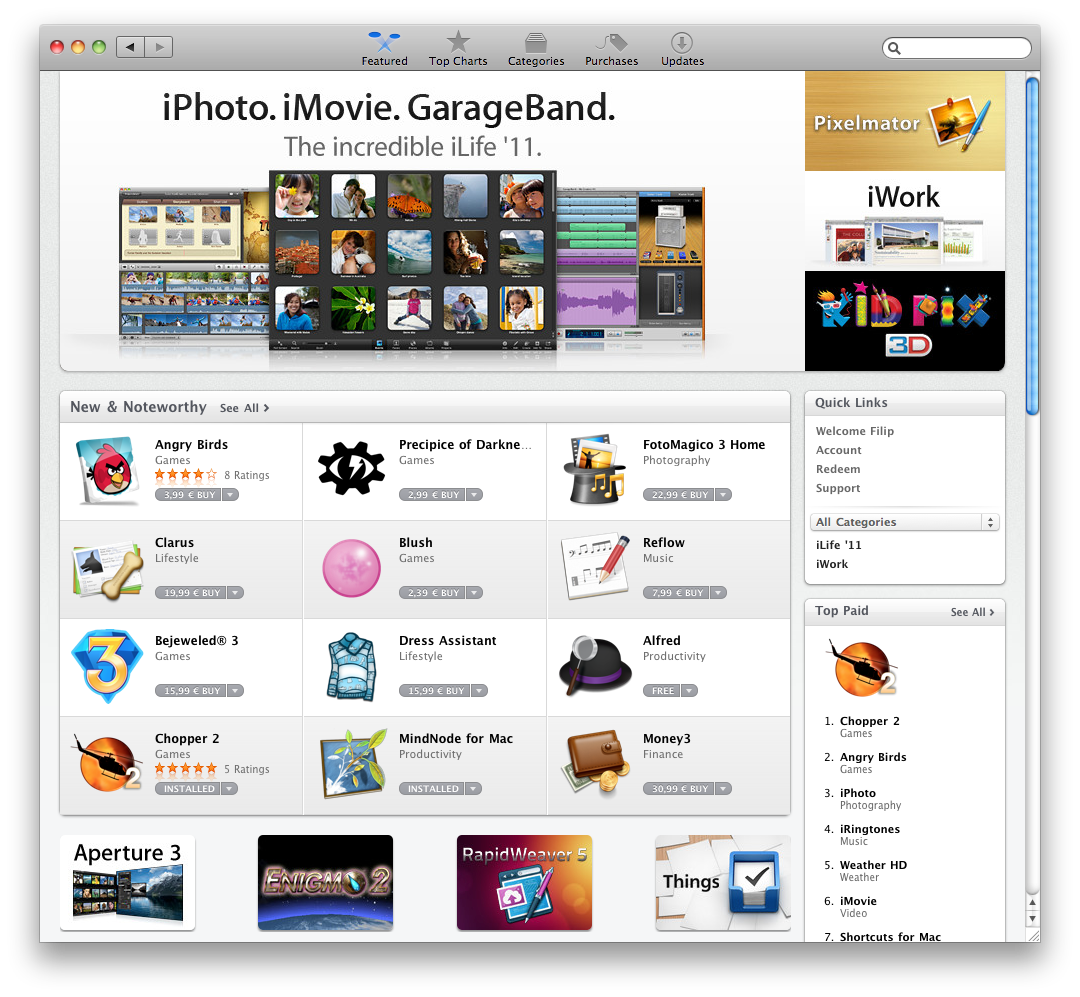
Mac App Store interface (screenshot)
Enlarge picture
The Mac App Store Frequently Asked Questions, “last modified January 06, 2011”, does not include any information on safely removing / uninstalling an application that was downloaded from the venue, Softpedia has found.

This may not be a big deal for avid users of Apple’s Mac operating system, but newcomers will undoubtedly need some clarification on the matter.

Users may ask “Where can I find an app once I've downloaded it?”, according to the FAQ.

Apple explains: “New apps are downloaded to the Applications folder on your Mac, and the app's icon will be placed in the Dock.”

The following potential question is then posted: “How do I remove an app from the Dock?”

Apple, again, explains: “To remove an app from the Dock, drag it out of the Dock.”

The Mac maker then outlines that “This does not remove the app from your Applications folder. To re-add it to the Dock, drag is from the Applications folder back to the Dock.”

FAQ readers would also expect to find the following question answered by Apple: “How do I uninstall an application downloaded from the Mac App Store?”

Unfortunately, the Cupertino giant didn't take the time to address this matter.

Although the process of uninstalling a Mac app is fairly simple, Softpedia believes Apple should have ensured that non-savvy customers would be able to safely rid their system of unwanted apps, by outlining the necessary steps to do so.

Basically, uninstalling a program downloaded from Apple’s Mac App Store is done by locating that program in the Applications folder, selecting it, and dragging it to the Trash.

Unlike applications downloaded from the Internet, Mac App Store apps will prompt the user for their administrator password as the user attempts to delete it.

As such, the steps are:

1. Locate your application in Finder;
2. Drag application to Trash;
3. When prompted, type in your administrator password to confirm that you want to uninstall the application from your system.

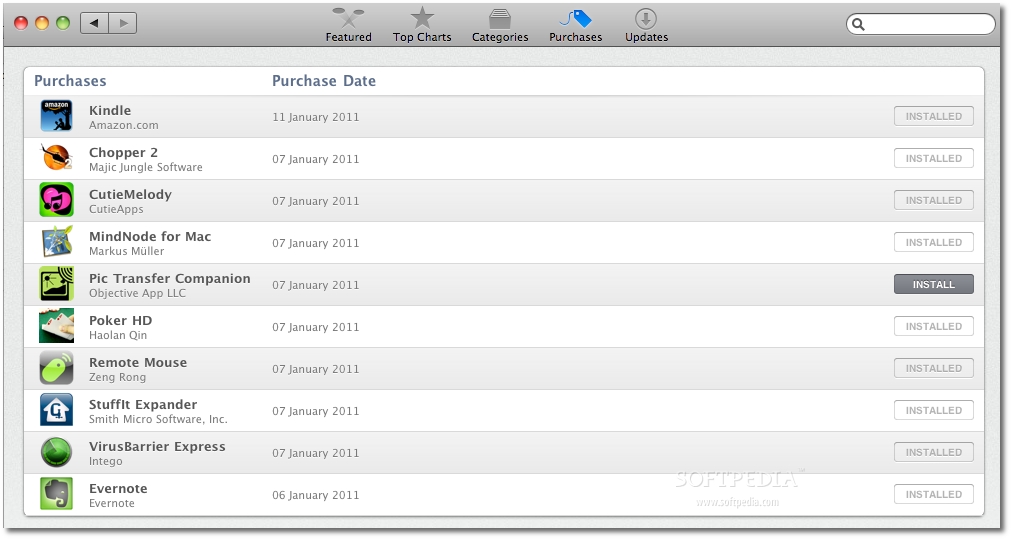
Upon relaunching the Mac App Store, the respective application will no longer be listed as installed, but it will remain in the “Purchases” tab as a listed acquisition, with an option to have the software installed again, as shown in the screenshot below.
(Pic Transfer Companion app was used for this example)
Review image

However, this still doesn’t ensure that all files attributed to a respective application have been removed.

Some applications may store their contents in different parts of the operating system (e.g.: Documents, Library, as well as hidden parts of the OS), therefore additional steps may be required to cleanse the hard drive of any leftover files.

One way to do this is to utilize dedicated programs such as CleanMyMac.

Softpedia believes an “Uninstall” tool would have been handy in the Mac App Store interface (at least for apps that have been downloaded using the Mac App Store).

Additionally, the option to have deleted apps removed from the “purchased” listings should also be available as a Preferences setting.

We were inclined to assume that Apple had its own reasons to not include this option for now - allowing users to get accustomed to the new service, while diminishing the chance of accidentally removing a paid application.

However, we quickly came across another frequently “answered” question:

“If I have already downloaded an app from the Mac App Store, can I redownload it for free?”

According to Apple, yes, you can, therefore accidentally deleting an app from a system would not be a tragedy.

“You can redownload apps from the Mac App Store as long as the app remains available,” Apple notes, in the eventuality that an app will be pulled for various reasons.

“You may be asked to enter the Apple ID and password you initially used to download the app,” the Mac maker adds.

Now it’s the readers’ turn to speak.

Is there anything else you believe should be added to / altered / or clarified with the new Mac App Store?


TELL US WHAT YOU THINK:

15,598 hits · 13 comments · Link to this article · Print article · Send to friend · Subscribe to news

MUST-READ RELATED ARTICLES:


New CDMA iPhones Run iOS 4.2.5

Apple COO Tim Cook Officially Confirms CDMA iPhone 4

Download Amazon’s Free 'Deals' App for iOS

Verizon to Make Headlines with White iPhone 4 Launch Today, Report Claims

How to Fix Mac App Store ‘Error 100’

READER COMMENTS:


Comment #1 by: Lanel on 12 Jan 2011, 21:27 UTC reply to this comment

Personally, I want a link to see a page where ALL the newest Apps have been added to the store. I want it to be similar to this: https://chrome.google.com/extensions/list/newest . Right now, it's an annoying process.

Comment #1.1 by: Filip Truta on 13 Jan 2011, 07:09 GMT

Hi Lanel,

Here's a quick solution to what you need.

http://itunes.apple.com/us/rss

This tool will allow you to set the exact criteria you want for apps that are new, noteworthy, recently updated etc.

Hope this helps.

Comment #1.2 by: Lanel on 13 Jan 2011, 08:15 GMT

Yes, thanks so much Filip Truta! :)


Comment #2 by: Lanel on 13 Jan 2011, 08:19 UTC reply to this comment

Nevermind :(... You can't view the latest Mac Apps. Only top categories.


Comment #3 by: Mac user on 13 Jan 2011, 19:32 UTC reply to this comment

In my opinion the interface needs to be changed a little bit to make it look like a real Mac application.

I hate Windows, because it's one big inconsistent mess. In Windows 2000 every application had the same look and feel, but that has changed. Nowadays every application has designed it's own interface. Some application use the old interface (title bar on top, menu bar below title bar, tool bar below menu bar) like on Windows 2000. Other application (like Internet Explorer 7, Internet Explorer 8 and the Windows Explorer in Windows Vista and Windows 7) have a hidden menu bar which can be enabled and then shows up below the tool bar, instead of above the tool bar. Then there are applications which use the new ribbon interface. Even those applications which use a ribbon are different from each other. Microsoft Office 2007 has an orb on the top left corner, while applications like Wordpad and Paint use an rectangular icon, instead of an orb. Microsoft Office 2007 uses its own way to render it's title bar (so changing the theme of your operating system doesn't change the way Microsoft office looks), while Wordpad and Paint use the title bar of the operating system. Windows Live Messenger has the menu bar hidden by default and doesn't use the title bar of the operating system.

These are just some examples. There are many more of them and all of them are different. Windows is just one big inconsistent mess. That's why I've always loved my Mac. Every application has the same look and feel. All applications use the same colors and layout.

Now Apple is going the Microsoft way. First there was the new version of iTunes. Why are the red, yellow/orange and green button on the top left corner in a vertical position, instead of a horizontal position? Why does one application use a different lay-out than all other applications? They also changed all icons to monochrome icons. Why? The Preferences pane in applications like Safari use colored icons, so use colored icons in all Preferences panes. Why is iTunes the only application to use monochrome icons in the Preferences pane?

Now there's been a new update and we've got the Mac App Store, another application which doesn't fit between already installed applications.

What's wrong with it? The Mac App Store uses one big tool bar on the top which holds the red, yellow/orange and green buttons, the back and forward buttons, the tool bar icons and the search box. This should be two bars: one title bar on top and one tool bar below the title bar. Now the red, yellow/orange and green buttons are not located in the top left corner. They are located a few pixels lower, because they are vertically centered in the tool bar. Those buttons belong in the uppermost left corner, not a few pixels lower. To the right of these buttons there should be the title of the Window, so it should say "Mac App Store". The tool bar belongs below the title bar. The back and forward button belongs completely to the left of the tool bar, so those buttons belong below the three colorerd button, not to the right of them. The other buttons belong to the right of the back and forward buttons and should be of the same size as the back and forward buttons, just like the buttons in Safari and Finder. The search box belongs to the right side of the tool bar.

That's the way all other applications look in Mac OS X, so why did they change the looks of the new iTunes and the Mac App Store? I switched to Mac OS X, because Windows is one inconsistent mess while Mac OS X has always had a consistent look and feel. Why are they going the Microsoft way by implementing a different interface for every new application?


Comment #4 by: hmmm on 18 Jan 2011, 00:21 UTC reply to this comment

Great! This was just what I needed. Thank you:)
Apple should have written this down.


Comment #5 by: agent123 on 21 Feb 2011, 00:44 UTC reply to this comment

Another problem here, I press the Update All on 4 apps w/ available update (2 of which are games). Later on, I decided that I don't like these 2 games anymore and have them uninstalled with the help of AppTrap. I think the apps are still updating when I deleted them. Now, everytime I turn on my mac, there are 2 "iconless" icon space in my dock of the 2 deleted games. I'd have to poof them out everytime.

And yes, I want a Remove App option in the App store.


Comment #6 by: Derian on 24 Feb 2011, 17:07 UTC reply to this comment

I hate that the app store still tries to get me to update apps I have deleted


Comment #7 by: Jimmy on 20 Jun 2011, 10:40 UTC reply to this comment

Well in all fairness that's because the concept of 'uninstalling' is a windows concept.

It tells you where the file is put when you donwload it, so if you dont want it anymore, then delete, like any other file.

Frankly using words like 'uninstall' in a mac environment is going to confuse new users more than simply treating an install file like any other.

Comment #7.1 by: none on 04 Sep 2011, 17:58 GMT

That's untrue. Adobe, and many other application makers include "uninstall" scripts in the application's folder. While it may not be a standard across the board to include these, there is a difference, even on the Mac, with uninstalling an application or simply deleting it.


Comment #8 by: dtharm on 20 Jul 2011, 10:57 UTC reply to this comment

I have an App update for an unknown Apple ID account in my Mac App Store. The Apple ID keeps appearing when I click update for the App but the App is not in my computer.

Any idea how to resolve this?

dtharm


Comment #9 by: Renoman on 06 Aug 2011, 23:45 UTC reply to this comment

Hello, I have to agree that it can be frustrating to new Mac users especially when you are trying to delete apps. However something to add to that frustration is if you have downloaded an app from the app store then decided it does not work for you and deleted it you will still receive update notifications from the app store. The problem is that you can't delete these so they just sit there and try to update when you are updating other apps. I have searched the app store FAQ and support pages looking for some options and found none. Apple states you need to contact the supplier of 3rd party apps but even on the website of this particular supplier there is nothing to deal with cancelling app updates and you can't contact them directly as there is no email or phone numbers just chat forums. If any one has any suggestions I would greatly appreciate them as I am tired at staring at this app update reminder

Comment #9.1 by: none on 04 Sep 2011, 18:01 GMT

I have the same problem, and I'm not a new user...

I've tried everything, even third party application removal software, without luck.

Copyright © 2001-2012 Softpedia. Contact/Tip us at

WindowsGamesDriversMacLinuxScriptsMobileHandheldNews

SUBMIT PROGRAM   |   ADVERTISE   |   GET HELP   |   SEND US FEEDBACK   |   RSS FEEDS   |   UPDATE YOUR SOFTWARE   |   ROMANIAN FORUM