
Softpedia
 

NEWS CATEGORIES:


NEWS ARCHIVE >>
SOFTPEDIA REVIEWS >>
MEET THE EDITORS >>
Home > News > Technology and Gadgets > Laptops

August 29th, 2008, 14:27 GMT · By

Lenovo's ThinkPad X61 Has Serious Heating Issues

SHARE:

Adjust text size:


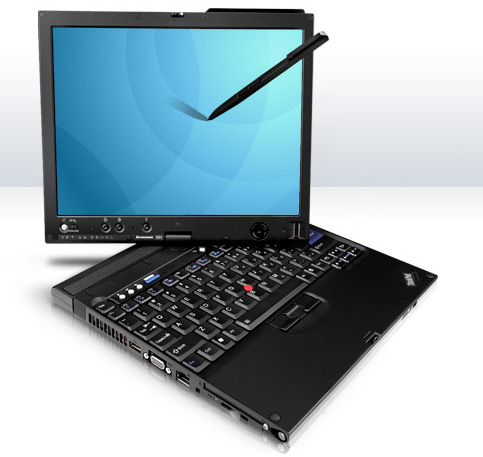
Users complain about the ThinkPad X61 heat issues
Enlarge picture
Several Lenevo ThinkPad X61 users are complaining about their tablet PC, which appears to generate too much heat in the right palm rest area. The issue isn't related to the tablet PC's graphics chip, as you might presume, but rather to a wireless adapter that is installed under the palm rest. According to the users who have complained about the problem, when the ThinkPad X61 wireless module is activated, it generates a considerable amount of heat, so much so that it can have serious health implications for anyone using the palm rest.

These last few months, it seems that everybody has been talking about little else but NVIDIA's graphics chip failures, but it now turns out that those NVIDIA-powered notebooks are not the only ones with serious factory issues. Lenovo and its X61 Tablet PC are also the cause for some serious problems, which have been reported by concerned users on the company's forum.

User “ColMaki” initiated a forum thread, in which he details the problem he has encountered with his own X61 Tablet PC. As mentioned above, the palm rest area tends to get overheated when the system's wireless module is working. The heat problem is even more serious when a user tries to connect to a faster G or N network. According to this user, the problem, of which Lenovo is already aware, has become all the more severe since the company introduced the Intel Wireless WiFi Link 4965AGN wireless module.

Lenovo has tried to fix the problem using several methods, including installing a second fan, placed under the right palm rest. According to “ColMaki,” the company's support policy included all its customers, but only those that had a WWAN option were lucky enough to have their issue solved. In the meanwhile, another user, which has two X61 Tablet PCs (one with WWAN and one without), has confirmed the reported problem.

The issue has been reported by other users as well, after viewing the initial post, and all have agreed on that Lenovo needs to do something about its products, much like Dell has done with the NVIDIA-enabled notebooks.


TELL US WHAT YOU THINK:

10,937 hits · 18 comments · Link to this article · Print article · Send to friend · Subscribe to news

MUST-READ RELATED ARTICLES:


Dell Extends Support for Defective NVIDIA GPUs

More Nvidia Cards Reported to Be Failing

NVIDIA Faulty Chips Reported on MacBook Pros as Well

Nvidia's M84/M86 Chips to Cause More Problems

HP Spotted Defective Nvidia Chips Last November

READER COMMENTS:


Comment #1 by: ColMaki on 29 Aug 2008, 20:35 UTC reply to this comment

thanks for picking up the story. Users that have similar problem can support us in the original thread:
http://forums.lenovo.com/lnv/board/message?board.id=X_Series_Thinkpads&thread.id=3388&view=by_date_ascending&page=1

or by digging the story:
http://digg.com/hardware/Why_Lenovo_doesn_t_solve_X_series_heat_problem


Comment #2 by: lancelot916 on 29 Aug 2008, 22:00 UTC reply to this comment

Although my X61s is not a tablet. it is a normal X61s and has the same issue.


Comment #3 by: go2sydney on 16 Sep 2008, 03:50 UTC reply to this comment

Yes!! It's very true!!
I got ThinkPad X61 A24 for just about 4 months, and it's very HOT!
PLEASE HELP US LENOVO!


Comment #4 by: Ed on 26 Sep 2008, 13:22 UTC reply to this comment

i just got a x61 2 days ago, and the thing is slowly cooking my right hand. either i type with my one left hand or i raise my wrist ......... why did i pay almost 1000 POUNDS for a mini laptop that burns me... ?

(Looking for a good solution now....) and wasting time/money doing so.


Comment #5 by: Nancy on 28 Dec 2008, 00:50 UTC reply to this comment

i have an x 61s that has already been returned once and they replaced the fan....this thing has burned ,my palm badly this time and they have suggested i turn off the biometrics.....what is going on with this? Does anyone have any info about it?


Comment #6 by: Amarendra on 31 May 2009, 04:19 UTC reply to this comment

Hi,

I have an X60, and it gets VERY hot under the right palm rest, when the WiFi is on.

-Amarendra


Comment #7 by: tha san on 20 Jun 2009, 08:16 UTC reply to this comment

Yes, my X60 is very hot on the right palm rest, I wonder whether Lenovo has any intention to solve this problem. I have been in many forum related to this heat problem, no solution offered so far.

Heellllppp.


Comment #8 by: kimotheraphy on 20 Jun 2009, 13:18 UTC reply to this comment

I have a Thinkpad X61 (not tablet) with T7250 Intel chip and I don't have this problem... The adapter does run really hot sometimes though...


Comment #9 by: potollo on 15 Aug 2009, 20:44 UTC reply to this comment

I have a x60 and a x60 tablet. Both have this problem and I'm annoyed Lenovo has not done anything about it.


Comment #10 by: jim on 16 Nov 2009, 18:22 UTC reply to this comment

I have the same problem with my X60 1706 33A, and it's more hot when i docked on X6 Ultrabase, has anyone solve the problem yet?

Comment #10.1 by: Crizal on 08 Feb 2010, 02:20 GMT

Yes, i solved the problem turning off the bluetooth, Irda, WWAN and WLAN devices. I am just using a PCMCIA wireless card.


Comment #11 by: iman on 26 Feb 2010, 00:19 UTC reply to this comment

I have tablet version, even the Radio (bluetooth&WLAN) turned off, it is still hot 70C.
I almost lost faith on lenovo/IBM, what I'm doing keep telling my friend "don't buy lenovo/IBM".


Comment #12 by: pamopw on 15 May 2010, 07:08 UTC reply to this comment

I have a great reduction on the top side and some redction on the bottom side
with following changes:

1. Repaced 2X1GB to single strip 2GB. One strip of Kingston DDR2-667 is about 1.9 Watts.
2. Replaced cracked X60 palmrest with a new X61 palmrest ordered on-line
- X61 palmrest has a plastic insulation but will block infrared port
3. Change the power setting of Windows 7 to Power Saver mode (Max Battery)
4. Change the advance, power setting in the device driver for Wifi-driver to 2. Medium-Low
- Increase power if unstable. Lowest setting is not very stable
5. Turn off LAN in the device driver since I use wireless all the time.

I will replace to a low powered eg. Intel SSD when the price falls furhter. Some reduction at the top right bottom side is expected.

My X60 is more than 2 years old so decided to perform a refurbish.


Comment #13 by: Dooker1 on 16 Jun 2011, 12:36 UTC reply to this comment

Has anyone had skin problems on thier hands after using a Lenovo Laptop (Thinkpad) Machine ?


Comment #14 by: rebiz2001 on 24 Jul 2011, 17:11 UTC reply to this comment

I have a Lenovo X61 Tablet. I just replaced the fan assembly myself and in the process realized there wasn't a second fan installed. The initial issues is resolved; however, there is still a heat problem in the palm rest area. Yes, Lenovo should do something!

Comment #14.1 by: Urobor on 02 Aug 2011, 21:16 GMT

x60 tablet... I feel sad... I just want my dell d400 back, it was cooler and fully operational... laptop with this amount of heat is a joke... are there optional asbestos gloves for this???


Comment #15 by: kc on 06 Oct 2011, 02:20 UTC reply to this comment

hi, i have a x61 laptop that i have had four 4 years or so...fairly constantly..as of late the laptop on the undersigned in the upper right hand corner has gotten really hot...the palm area is warm...it had a hard drive crash today that i restored but i still don't think its very happy right now..any suggestions?


Comment #16 by: cuong on 20 Jan 2012, 22:23 UTC reply to this comment

since i don't use the finger scanner and the 56k modem, i uplug the finger scanner connector and remove the 56k modem... the temperature reduce quite alot... i am looking for a sheet of heat insulation of some kind and thinking to stick it under the palmrest just enough to cover the palmrest area to completely get rid of this issue... Lenovo... can't believe this pass the quality assurance

Copyright © 2001-2012 Softpedia. Contact/Tip us at

WindowsGamesDriversMacLinuxScriptsMobileHandheldNews

SUBMIT PROGRAM   |   ADVERTISE   |   GET HELP   |   SEND US FEEDBACK   |   RSS FEEDS   |   UPDATE YOUR SOFTWARE   |   ROMANIAN FORUM