
Softpedia
 

NEWS CATEGORIES:


NEWS ARCHIVE >>
SOFTPEDIA REVIEWS >>
MEET THE EDITORS >>
Home > News > Linux

April 18th, 2009, 08:11 GMT · By

Latest ATI Linux Driver Introduces Support for Ubuntu 9.04

SHARE:

Adjust text size:


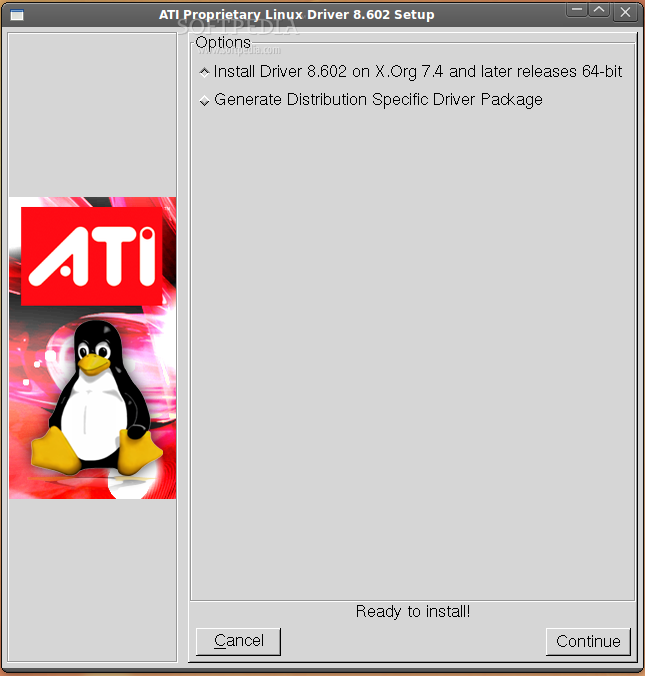
ATI Catalyst 9.4 Installer
Enlarge picture
Yet another stable version of the ATI/AMD Linux display driver was released last night, for both x86 and x86_64 architectures. With version 9.4, ATI Catalyst introduces early support for the upcoming Ubuntu 9.04 operating system and full support for the recently released Red Hat Enterprise Linux 5.3. Users of the Release Candidate of Ubuntu 9.04 (Jaunty Jackalope) can install and test this new ATI driver via the "Hardware Drivers" utility in the System -> Administration menu. Without further introduction, we invite you to take a look at the resolved issues of the new ATI Catalyst 9.4 video driver from AMD:

· Fixed a segmentation fault issue when X was stopped in dual-head mode;
· Fixed indirect rendering in Novel's SUSE Enterprise 10.1;
· When 3D programs are running, errors will no longer be reported in dmesg;
· Fixed video playback issues, that caused the system to freeze, when resuming from S3/S4;
· Repaired the default button for Warning Dialogue in the preferences of the Catalyst Control Center;
· Improved gamma values in the Catalyst Control Center;
· The HDTV Support page of the Catalyst Control Center correctly displays the formats now.

Requirements:

· X.Org 6.8, 6.9, 7.0, 7.1, 7.2, 7.3 or 7.4
· Linux kernel 2.6 or higher
· glibc version 2.2 or 2.3
· Support for POSIX Shared Memory (/dev/shm) is necessary for 3D programs
· The following packages should be installed on your system: XFree86-Mesa-libGL, libstdc++, libgcc, XFree86-libs, fontconfig, freetype and zlib.

Supported operating systems:

· Red Hat Enterprise Linux
· Novell SUSE Enterprise Linux
· Ubuntu Linux

Detailed installation instructions for the ATI Catalyst installer can be found in this PDF file.

Download the ATI/AMD Linux Display Driver 9.4 right now from Softpedia.

TELL US WHAT YOU THINK:

55,723 hits · 14 comments · Link to this article · Print article · Send to friend · Subscribe to news

MUST-READ RELATED ARTICLES:


Ubuntu 9.04 Release Candidate Is Here

Ubuntu 9.04 Free CDs: Orders Are Taken Now

SliTaz GNU/Linux 2.0 Released

AXIGEN Mail Server 7.1 Gets Improved Groupware and Sharing Functionalities

GNOME 2.26.1 Fixes Various Bugs

READER COMMENTS:


Comment #1 by: Nemes Sorin on 18 Apr 2009, 13:36 UTC reply to this comment

Excellent - no teardrops with glxgears, a bit lower frame-rate as with 9.2 and 9.4 beta ( from ~ 2250 to ~ 1600 - 1700 with Compiz enabled and from ~2250 to ~2100 with Metacity ), hi-quality rendering with HD movies (tested with VLC 9.8a and SMplayer SVN r2599 ), better 2D rendering tested with Inkscape-Devel built Feb 2 2009 - with special effects as drop shadow, blur and feather [with Better Quality set].

All in all is a good, expected progress - maybe not as framerate number bus as quality of rendering.

;) ...just my 1.99 cents (yep some discount for this nice season)

Comment #1.1 by: Caleb Rill on 05 Jul 2009, 10:44 GMT

The words "stable" and "ATI/AMD Linux display driver" dont belong in the same sentence.

:|

The 9.4 drivers don't address the flaky, crash prone and poor performance problems that persist when compiz is enabled. Video performance has improved somewhat.

I'm using a Radeon 4670. Decent mid-range card, Direct 10 capable with 1GB DDR3 memory.


Comment #2 by: pixelshop on 18 Apr 2009, 18:52 UTC reply to this comment

The driver is not working. I get a garbage screen and cannot get into my Ubuntu.

Comment #2.1 by: rmg on 22 Apr 2009, 18:13 GMT

Having the same problem with ubuntu rc 9.04.
I'am using a HP Elitebook 8530p. Garbage on the screen and no login possible.

Comment #2.2 by: aacs on 23 Apr 2009, 01:18 GMT

Well, it seems to work for others....
Look up Xorg and figure out how to configure it, or follow tutorials, read documentation, etc.
If you are patient and willing to try and learn, a GNU/Linux system will reward you. Otherwise you can always fire up Windows and stick to the world of screaming, demanding, clueless consumers..

Comment #2.3 by: qsc on 25 Apr 2009, 20:16 GMT

It is so easy to blame the user and tell them to go back to windows when they ask for help isn't?

The major issue with LINUX not just any distribution is that we do not hold the vendors, distributors, package maintainers accountable for releasing software that is not ready for prime time. If QLogic released drivers as buggy and unstable as ATI would we blame the sys admin for using FC on LINUX and tell him to move the storage hosts to Windows? Remember that unless we start pushing back on companies that claim to embrace LINUX and stop blaming the community this discussion will continue for the next ten years.

ATI has always been iffy at best in LINUX, some cards more than others. Unfortunately until ATI embraces LINUX fully as Nvidia has you will have to try to fix yourself. I also had the same issue as listed above. If/when I find a way to make it work correctly on 9.04 and this laptop I will post an URL with a how-to.


Comment #3 by: darxide on 19 Apr 2009, 09:01 UTC reply to this comment

Still doesn't solve problems for hd4650 (i've tested), just an slight improvement :(


Comment #4 by: IC1 on 25 Apr 2009, 02:30 UTC reply to this comment

[quote="aacs aka ahole"]Otherwise you can always fire up Windows and stick to the world of screaming, demanding, clueless consumers.. [/quote]

Not all windows users are clueless you elitist snob, MS, regardless of what you may think of 'em, really opened up computing to the masses. And made it easy (or rather easier) to GTD, which is of the utmost importance to "end-users".(as opposed to hobbyist/enthusiasts). I am both and am constantly seeking out help for issues I can't resolve on my own. And, every now and again, I come across one of you "types" who wants all to know how tres elite they are. Funny thing is, they never offer/provide a solution; just snide remarks about MS/windows. My advise is remain on your high horse, but use the bridle on yourself and tighten up on the throatlatch


Comment #5 by: Hildesheim on 27 Apr 2009, 13:27 UTC reply to this comment

pixelshop and rmg: I got the same thing (a jumbled login screen) after installing the driver. I solved the problem in this way:

1. Boot in recovery mode (press ESC to enter menu before it starts loading Ubunutu).
2. Select one of the 'root' choices in the menu (can't remember their exact names) doesn't matter which one.
3. In the terminal to go /usr/share/ati and run the uninstall script (can't remember its exact name either) by typing sh ./
4. Reboot

Ubuntu should now boot and display the normal login screen. Mine did.

Good luck


Comment #6 by: K Hill on 04 May 2009, 17:16 UTC reply to this comment

I agree with aacs to a point. I agree mostly because this was just an announcement that ATI/AMD had updated their drivers, not a support document, therefore, the author isn't going to be able to help you, he is just a messenger. And I think aacs's main point, although delivered rather bluntly, is often it takes more digging to work with Linux and you have to go to the right place for help and that this is not the right place for help, at least not on this particular page of this site. I think that is the main point of aacs, which if it is, agree with them.


Comment #7 by: ngr on 30 May 2009, 08:06 UTC reply to this comment

[quote="aacs aka ahole aka K.Hill"]Otherwise you can always fire up Windows and stick to the world of screaming, demanding, clueless consumers.. [/quote]
For your info: Ubuntu 9.04 (x64) on x86_64 with Radeon HD4850: Framebuffer error, garbled screen. (see http://wiki.cchtml.com/index.php/Ubuntu_Jaunty_Installation_Guide#Installation)
Here is another place to ask for pushing ATI to embrace LINUX fully (like NVIDIA did). Until than this driver is also good for nothing if you use Ubuntu 9.04 (x64) with Radeon HD4850 / HD 3300 / HD 4850X2 / HD 4870X2


Comment #8 by: anon on 17 Jun 2009, 21:58 UTC reply to this comment

Thank you so much, I shall see if it works. And to the scuffle about ms and driver support, it is pretty crappy that a company boasts about open GL support and support for linux, especially ubuntu 9.04 which could sway someone buying a card when infact it does nothing but give end users hassle. My fuzzy green lines are happy, but i have been left without a computer for an evening. Laptop has an intel chip though it is a much older computer. Manages compiz much better than my expensive ATI chip. If i told you for 20 quid you could buy a tow rope and you could tow anything from your car but gave you a rubber band, you would not complain to the buyer, nor tell me i had the wrong car.


Comment #9 by: skip on 20 Jun 2009, 13:47 UTC reply to this comment

Dear all

I'm a complete newbie to linux..... i've got 9.04 installed...... in the add / remove progs there was an option of a ati control panel (i think) and i've got an ati card in my new dell. I installed it and i've now got the same problem as some of the other users have mentioned. I guess my question is; have a i got the same problem or did i download something different (i'm guessing it's graphics driver related) ? And how can i back out of it? In my /usr/share/ati folder i've got one file; amdcccle .... can i uninstall it?

I've posted here in the hope that one of you guys can point me in the right direction...

Many thanks for any help..

skip


Comment #10 by: Jason on 07 Aug 2009, 20:09 UTC reply to this comment

After spending hours hacking with drivers and kernel modules, following numerous tutorials, on my jaunty system with no luck, only garbled screen or "no cards detected" depending on which driver used, I am returning my XFX HD 4650 AGP 1GB DDR2 video card where I bought it. ATI / XFX loses another sale due to their lack of adequate support to linux users. Nvidia, here I come. The sad thing about Nvidia though, is that they abandoned the AGP interface in favor of PCI-E, which is superior, but means that I must now upgrade my entire system that works just fine for me except for the video requirements I have. Arghhh!

Copyright © 2001-2012 Softpedia. Contact/Tip us at

WindowsGamesDriversMacLinuxScriptsMobileHandheldNews

SUBMIT PROGRAM   |   ADVERTISE   |   GET HELP   |   SEND US FEEDBACK   |   RSS FEEDS   |   UPDATE YOUR SOFTWARE   |   ROMANIAN FORUM