14 DAY TRIAL //
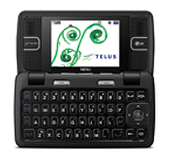
 Telus Mobility, the third largest Canadian mobile operator, has just released the so-called LG KEYBO handset. We already knew that Telus intended to add this device to its line-up of products, and now the KEYBO is finally out, with all the official details, pictures and prices.
Coming as the Canadian version of LG enV2, released in the US by Verizon Wireless (at the end of April), LG KEYBO is presented by Telus as the "ultimate messaging phone". The reason behind this is obvious: the device comes with a full QWERTY keyboard that will surely help users in sending text messages, email and instant messages with ease.
QWERTY keyboard aside, the new LG also features the following: dual-band CDMA connectivity (800 / 1900 MHz) with EV-DO 1x, a 240 x 320 pixels internal display, a 160 x 64 pixels external screen, internal GPS to work with Telus Navigator, Music player, Bluetooth 2.0 with A2DP, Web browser, email, Windows Live Messenger, a 2 Megapixel camera with video recording, speakerphone, calendar, microSD/microSDHC card support (for up to 8GB) and so on.
LG KEYBO weighs 120 grams and, when closed, it measures 102 x 54 x 16.5 millimeters. The battery packed in it should provide a talk-time of up to six hours or a stand-by time of up to 216 hours.
The new KEYBO can be bought either online, from Telus' website, or from the carrier's stores across Canada. The prices of the new handset are: $49.99 with a three-year contract agreement, $99.99 with a two-year contract, $249.99 with a contract for one year, and $300 free of any agreement. All the prices include a 1GB memory card which comes in the phone's package.
All in all, LG KEYBO is a nice addition to Telus' mobile offering, so if you're in Canada and need a decent-priced QWERTY handset, this might be the right choice for you.