
Softpedia
 

NEWS CATEGORIES:


NEWS ARCHIVE >>
SOFTPEDIA REVIEWS >>
MEET THE EDITORS >>
Home > News > Security

February 10th, 2007, 17:11 GMT · By Bogdan Popa

Kaspersky - The Best Antivirus for Windows Vista

SHARE:

Adjust text size:


Windows Vista represents the latest operating system released by the software giant Microsoft that was meant to revolutionize the work on our systems and other computer activities. This version of Windows is regarded as the most secure edition of the operating system, containing several tools to protect the computer: firewall, application control and Windows Defender antispyware tool. Although Windows Vista should be safe, there are a lot of threats already available that are able to harm our systems and are created especially for Windows Vista operating system.

It's
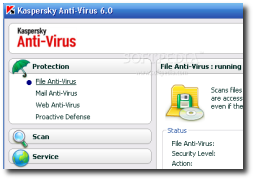
obvious that Vista users must install an antivirus solution but the market is enormous, offering an impressive number of utilities. Kaspersky Antivirus is one of the most known applications that are able to discover and remove infections, being installed on millions of computers from all around the world. Because Windows Vista is continuously spreading, Kaspersky Lab developed a special edition of the antivirus solution compatible with this version of the operating system. Virus Bulletin, one of the most important security authorities in the entire world, conducted multiple tests on several products, Kaspersky being the only tool that blocked 100 percent of the infections.

"Kaspersky Anti-Virus 6.0 passed the test with flying colors: it detected and removed 100% of all the malicious programs used in the test. Virus Bulletin experts also mentioned the product's easy-to-use interface, its high performance and file scanning quality. For providing a high level of security for home platforms based on the Windows Vista operating system, Kaspersky Anti-Virus 6.0 was recognized as one of the best IT security products on the market and received the Virus Bulletin 100% award," it is mentioned in an article posted on the official page of the antivirus solution.

Kaspersky Antivirus Personal was also tested by Softpedia and is available as a free download on this link.

TELL US WHAT YOU THINK:

116,534 hits · 14 comments · Link to this article · Print article · Send to friend · Subscribe to news

MUST-READ RELATED ARTICLES:


Kaspersky Anti-Virus Update Error!

Kaspersky Lab Announces the Launch of Beta Testing for Version 6.0 Corporate Products

Kaspersky Engine Integrates with Tall Emu Security Solution

Update Your Kaspersky Antivirus NOW!

Kaspersky Lab Clinches Strategic Partnership Deal with AOL

READER COMMENTS:


Comment #1 by: nikita on 15 Jan 2008, 20:29 UTC reply to this comment

It is very safe....and this was the thing which i was in need of my pc

Comment #1.1 by: arun kumar on 15 Mar 2008, 06:40 GMT

i want to know more about this antivirus
can i install it in vista ?.....


Comment #2 by: paul on 19 Feb 2008, 08:27 UTC reply to this comment

my opinion about kaspersky is that for me kaspersky is the no.1 antivirus leading in all areas of removing viruses in the net.


Comment #3 by: Muhammad Imran Khan on 23 Mar 2008, 17:05 UTC reply to this comment

I purchased and installed Kaspersky 7 and Norton 360 one by one but both does not work on Windows Vista Ultimate. After installation when you restart your computer, it starts and when desktop is shown the comes the blue screen and system restarts.

Comment #3.1 by: SpArk on 03 Apr 2008, 12:33 GMT

thats because there is a conflict between the 2 antivirus software or previously installed, thats why you have to completely remove each before installing another one. As for Norton in order to be completely removed you need the removal tool from symantec.com (do not try vista remove program). As for the blue screen many people format. No .... safe mode system restore, so simple!!! plus if you go from safe mode to control panel system advanced system settings Start up and recovery and uncheck automatic restart, then you will be able to see the log error of the blue screen. (not pro, just talking from personal experience)


Comment #4 by: Zandor on 15 Jul 2008, 17:53 UTC reply to this comment

i had to uninstall Kaspersky 7 on my vista box because it BSOD my box every time i booted it i had to go into safe mode and uninstall it before i could even use my computer.

it was the only AV installed so i know there were no conflicts.

i'm going to wait a few months and try again i like kaspersky but there email support sucks. i used it one time and never messed with it again. i emailed them and it took over 3 weeks to get a reply.
and 4 weeks when i replied to there reply to me.


Comment #5 by: sandip kulkarni on 15 Aug 2008, 04:52 UTC reply to this comment

Really the best I ever seen amongst all AV softs.


Comment #6 by: alexa on 25 Sep 2008, 11:55 UTC reply to this comment

kasperrsky sucks, i has once a problem with some viruses and it couldn't handle them at all. bit defender is better


Comment #7 by: Dan on 25 Nov 2008, 22:52 UTC reply to this comment

The good folks at Best Buy raved at how good this AV software is. So on their advice I purchased it with my new Dell XPS. Of course when I upgraded to Vista Ultimate then installing Kaspersky I get nothing but the BSOD. I was about this close (holds fingers close together) to returning my laptop and making Best Buy eat the cost (still within my return window), but I'm gonna see if a different AV works because this didn't. It's a shame because everyone seems to like this one. Too bad most using it are still on XP or Vista Home......L8r


Comment #8 by: Ian on 13 Jan 2009, 15:36 UTC reply to this comment

I have run kaspersky internet security for 3 consecutive years now and found it to be very effective against all major forms of threats, especially now that i run KIS (Kas Internet Security) and with 3 home pc's as a repeat customer, i don't think anyone comes close on price either (at around $25/pc/yr)

Pros - very effective, light on system resources (compared to some av's) - cost effective!

Cons - some programs are hard to determine as safe or unsafe, behavioral patterns of some apps - kaspersky will simply not allow them to run. (better safe then sorry i guess - can be frustrating at times (KIS users will know exactly what i mean)

Stop wasting your time and money (fixing your pc) with free av's, take your online security seriously and save the headaches with slow, virus ridden machines!


Comment #9 by: ferdian on 14 Apr 2009, 09:02 UTC reply to this comment

KIS 2009 has used all my processor load!!! a can't process anything again, why?


Comment #10 by: Mark on 23 Aug 2009, 11:19 UTC reply to this comment

Kaspersky has many holes! some latest and brute viruses can pass through that antivirus! i also used it for a while and encounter a simplest virus in a usb which all hidden files are permantly invisible and some tools like regedit are block! bit defender fix that issue for me, and tested to re insert that usb again! and bit defender detected and deleted the virus just like that!


Comment #11 by: bitdefenderblows on 24 Mar 2010, 07:03 UTC reply to this comment

Bit defender sucks:

http://answers.yahoo.com/question/index?qid=20100320095453AA0wjMp


Comment #12 by: RA on 29 Jan 2012, 00:03 UTC reply to this comment

I think Kaspersky sucks. I just renewed my year in November 2011 and now I have to purchase a whole new program. I went to the help support link for a problem and was offered an upgrade for FREE so I said okay. I downloaded it and now they are telling me that they won't refund my money or offer me another activation free considering that I never got a full years worth of protection. Definately taking it off and will pursue other programs. I have been told Vipre is one of the best and even outranked Kaspersky for the 2012 PC Choice Award for AntiVirus Software.

Copyright © 2001-2012 Softpedia. Contact/Tip us at

WindowsGamesDriversMacLinuxScriptsMobileHandheldNews

SUBMIT PROGRAM   |   ADVERTISE   |   GET HELP   |   SEND US FEEDBACK   |   RSS FEEDS   |   UPDATE YOUR SOFTWARE   |   ROMANIAN FORUM