

NEWS CATEGORIES:


NEWS ARCHIVE >>
SOFTPEDIA REVIEWS >>
Home / News / Microsoft

Microsoft


Is Your PC Ready for Windows Vista?

How do you find that out?

By Marius Oiaga, Technology News Editor

21st of December 2006, 07:47 GMT

Adjust text size:


What is the basic system configuration which will endure that you will be able to run Windows Vista? What is the recommended system configuration that will support the complete Vista
experience? Microsoft provides insight for both of these questions.

The Redmond Company has made available two coordinates designed to indicate to users if a PC they acquire will run Windows Vista. As part of Microsoft's logo program, the PCs that are shipping at this point carry either a Windows Vista Capable or a Premium Ready PC logo.

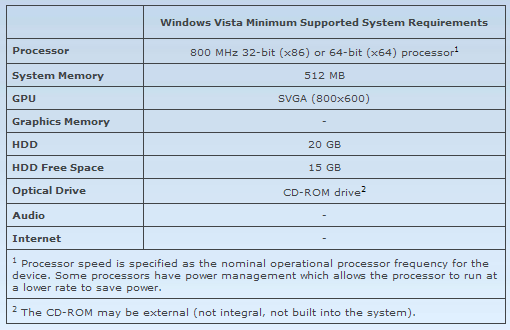
But the bottom line is delivered by the figures. A modern processor (at least 800MHz), plus 512 MB of system memory and a graphics processor that is DirectX 9 capable make up just a basic system, and as such, on the mentioned configuration you will only be able to run Windows Vista Basic.

In order to enjoy all the features and capabilities that Windows Vista has to offer here are the minimum requirements for a Vista Premium ready PC:

- 1 GHz 32-bit (x86) or 64-bit (x64) processor.
- 1 GB of system memory.
- Support for DirectX 9 graphics with a WDDM driver, 128 MB of graphics memory (minimum)2, Pixel Shader 2.0 and 32 bits per pixel.
- 40 GB of hard drive capacity with 15 GB free space.
- DVD-ROM Drive3.
- Audio output capability.
- Internet access capability.

With these basic guidelines you will be able to make the right choice in either buying or upgrading a PC in order to prepare for Vista.


Rating:
Fair (2.6/5) 9 vote(s) so far    

Read by 2,433 user(s) | Add comment | Link to this article
Subscribe to news | Print article | Send to friend

© Copyright 2001-2008 Softpedia
Contact:


SEARCH THE NEWS ARCHIVE :


Today's News
| Yesterday's News | News Archive


MORE RELATED ARTICLES:


Vista's Intelligent Heuristic Memory Management System - SuperFetch

Windows Vista Countdown

Windows Vista and OS X Similarities

Shut Down Alternatives in Windows Vista

Vista and Office Enterprise Learning Framework

Microsoft Application Compatibility Testing

1 M "Gears Of War" in 2 Weeks

Installing Vista RTM on Virtual PC 2007 Beta

Microsoft to Scrap 32-bit Products

Vista Adoption to Outpace XP

Vista Virtual Search Folders

Vista Cartoon Commercial Episode One

Vista Image Deployment Step by Step Guide

Preview of the Vista Media Center Remote

Vista Secrets for Tablet PCs and Laptops Part 1

The Windows Vista Panel

Cracked Windows Vista RTM MDSN Available for Download

Windows Vista - Welcome to a New Day

Vista Enterprise - Pirated and Available for Download

Microsoft Confirms That Vista Is Affected by Malware from 2004

Does Ballmer Have a Tongue Fetish?

Search in Windows Vista

Vista Puerile Commercials Episode 2 and 3

User opinions:

No user comments yet.
Be the first to express your opinion using the form below!

Share your opinion:

Your Name:
Your Email Address:
(will not be used for commercial purposes)
Solve this to prove you're not a bot: =
Your review/opinion:


SUBMIT PROGRAM   |   ADVERTISE   |   GET HELP   |   SEND US FEEDBACK   |   RSS FEEDS   |   ENTER NEWS SITE   |   ENGLISH BOARD   |   ROMANIAN FORUM