
Softpedia
 

NEWS CATEGORIES:


NEWS ARCHIVE >>
SOFTPEDIA REVIEWS >>
MEET THE EDITORS >>
TRENDING TODAY
Home > News > Linux > Linux & Opensource Blog

December 9th, 2012, 00:01 GMT · By

BLOG

Introducing Ubuntu Filesystem Tree Lens for Unity

SHARE:

Adjust text size:


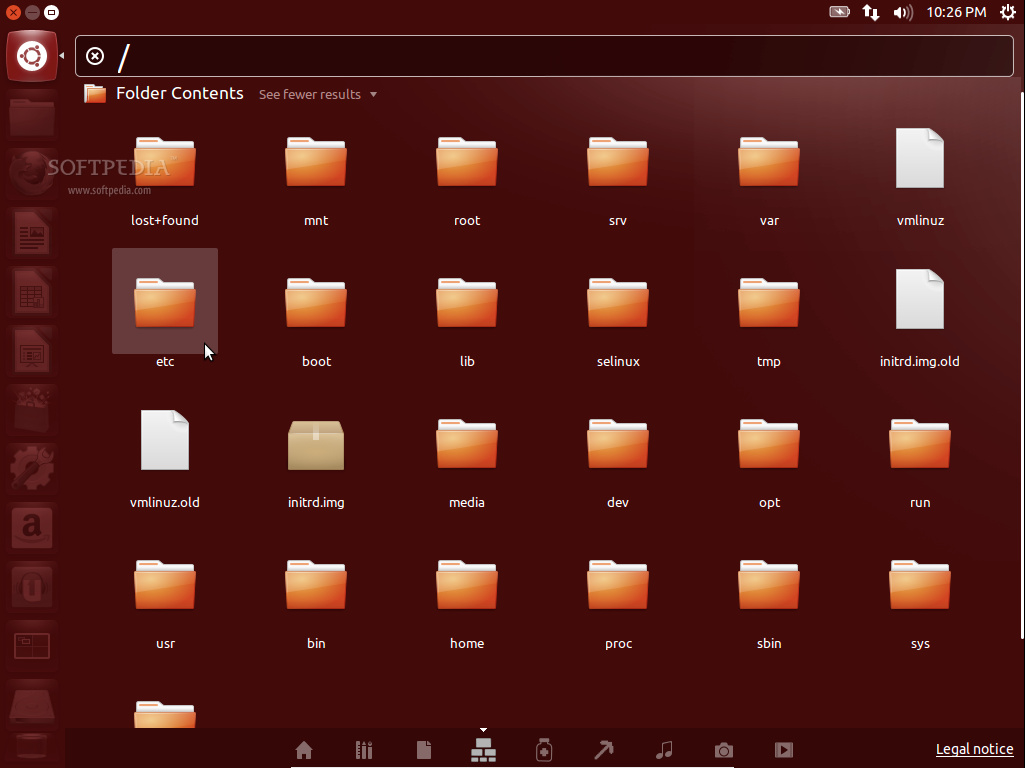
Ubuntu Filesystem Tree Lens for Unity Enlarge picture - Ubuntu Filesystem Tree Lens for Unity
The Ubuntu Filesystem Tree Lens is an Unity Lens that enables users to easily and quickly find files and folder in their filesystem, directly from Unity Dash.

When you click a folder, Nautilus will open it showing you the contents. When you click a file, it will be opened in an app that can view the respective file.

To install the Unity Filesystem Tree Lens plugin in your Ubuntu operating system, open a terminal window (hit the CTRL+ALT+T key combination) and paste the following commands (one by one, hitting Enter after each one):

sudo add-apt-repository ppa:jesse-imaginaryrobots/ppa
sudo apt-get update && sudo apt-get -y install fstree


You will need to restart your session after the installation. This Lens is available only for the Ubuntu 12.10 (Quantal Quetzal) operating systems.

TELL US WHAT YOU THINK:

4,656 hits · Link to this article · Print article · Send to friend · Subscribe to news

MUST-READ RELATED ARTICLES:


Introducing Ubuntu Answers Lens for Unity

Introducing Ubuntu Minecraft Lens for Unity

Introducing Ubuntu PyPi Lens for Unity

Introducing Ubuntu Medicines Lens for Unity

Introducing Ubuntu Thesaurus Scope for Unity

READER COMMENTS:


No user comments yet.
Be the first to express your opinion!
Copyright © 2001-2013 Softpedia. Contact/Tip us at

WindowsGamesDriversMacLinuxScriptsMobileHandheldNews

SUBMIT PROGRAM   |   ADVERTISE   |   GET HELP   |   SEND US FEEDBACK   |   RSS FEEDS   |   UPDATE YOUR SOFTWARE   |   ROMANIAN FORUM