
Softpedia
 

NEWS CATEGORIES:


NEWS ARCHIVE >>
SOFTPEDIA REVIEWS >>
MEET THE EDITORS >>
TRENDING TODAY
Home > News > Microsoft > Windows

October 29th, 2011, 11:51 GMT · By

Installing a Product Key and Activating Windows 8 Developer Preview

SHARE:

Adjust text size:

Windows 8
Enlarge picture
Early adopters putting the first public pre-beta of Windows 8 through its paces know by now that not only is a product key not provided by Microsoft along with the ISO images of the Developer Preview Build, but that it’s also not needed during the installation process.

There’s a simple enough reason for this, Windows Developer Preview comes with the following product key out of the box: 6RH4V-HNTWC-JQKG8-RFR3R-36498.

This being said, feedback indicates that testing Windows 8 is not always a perfectly smooth experience, but Build 8102 Milestone 3 (M3) is a pre-Beta release after all.

For example, some testers revealed stumbling across an issue where a product key was indeed required of them during deployment, or as a part of the Reset process. If you find yourself in such a scenario then go ahead and use 6RH4V-HNTWC-JQKG8-RFR3R-36498 and everything should be fine.

Once Windows 8 Developer Preview is installed, there’s a powerful tool at your disposal to help you manage product keys, as well as deal with activation and licensing problems.

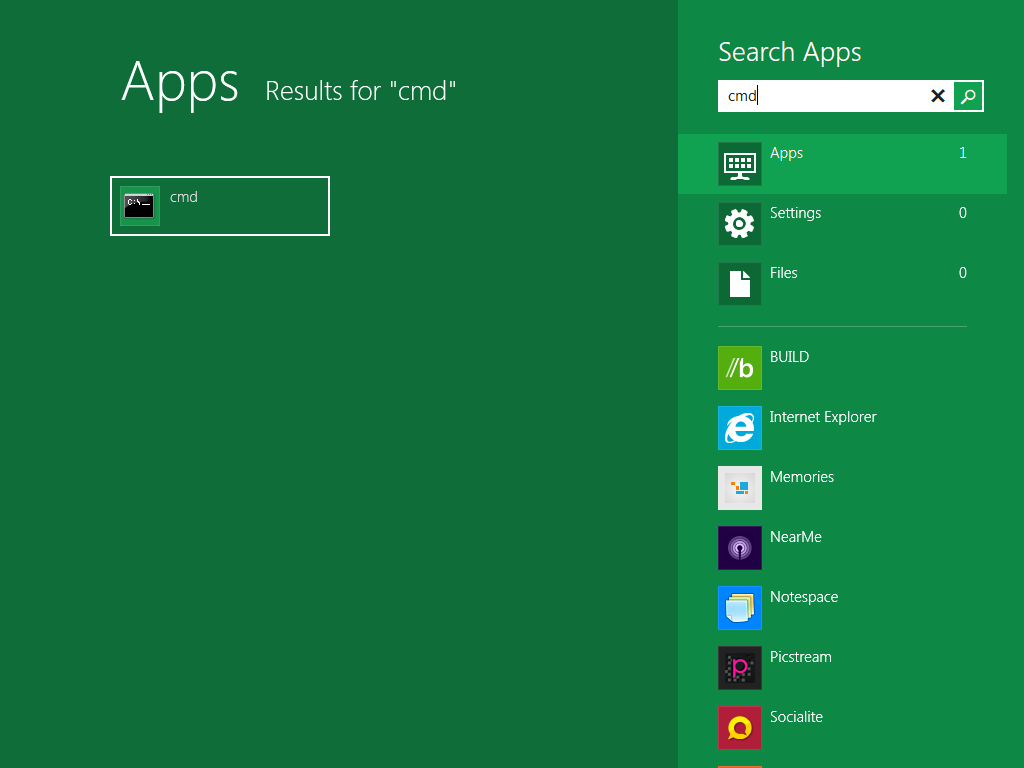
Type cmd and hit Enter
Enlarge picture
The Windows Software Licensing Management Tool might be a command-line utility, but it’s very simple to use, as exemplified below.

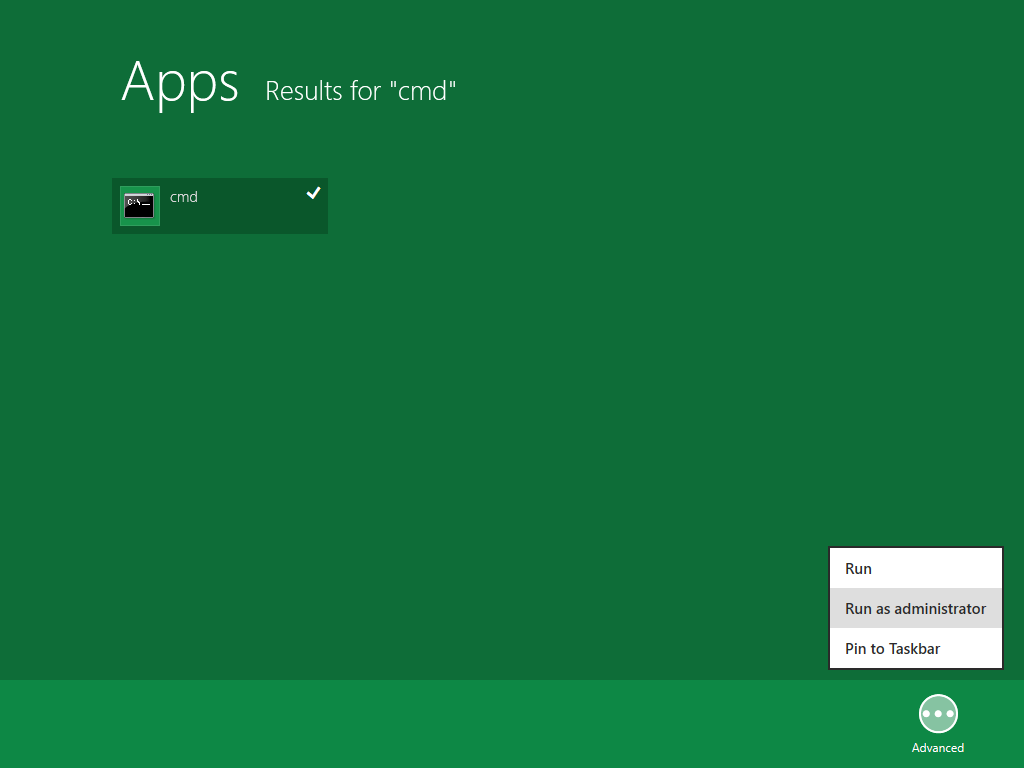
Just type ‘cmd’ on the new Windows 8 Start Screen to search for the Command Prompt executable, but don’t launch it immediately. Instead, right click it if you’re using a mouse, or press it and drag it down on touch screens, to access the ‘Advanced’ contextual menu with some extra options, including ‘Run as administrator,’ which you need to select.

Run cmd with admin rights
Enlarge picture
The Windows Software Licensing Management Tool requires admin privileges in order to operate under normal parameters.

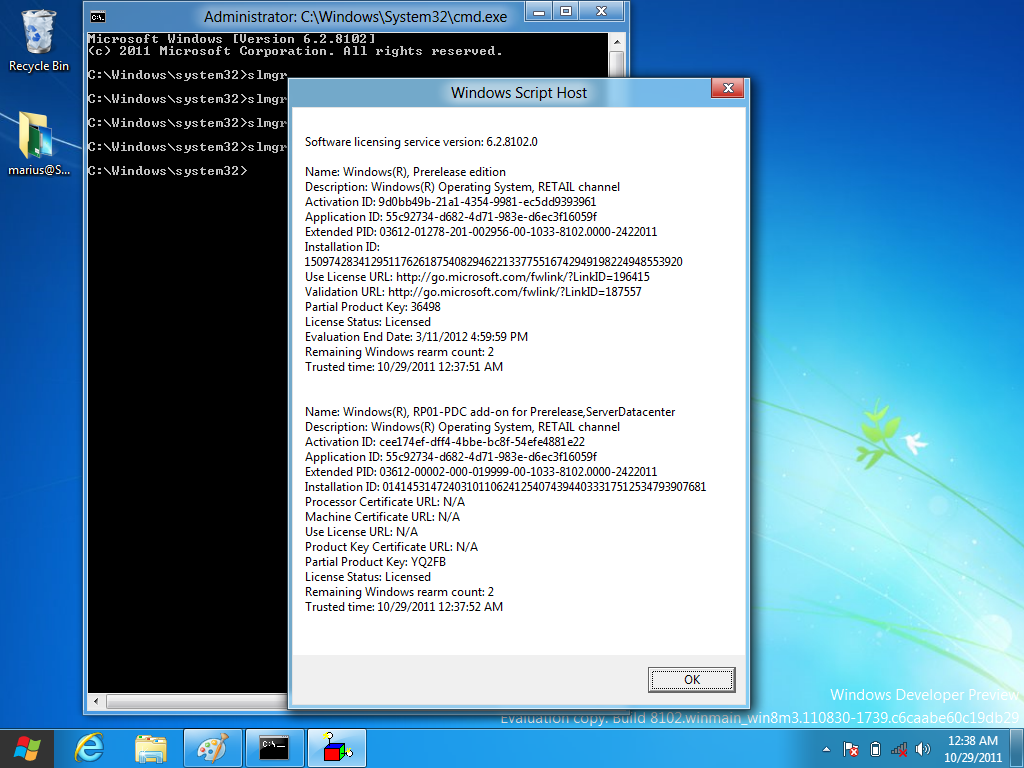
Enter the ‘slmgr’ command and hit Enter to bring up the Windows Script Host and an exhaustive enumeration of all the options for the Windows Software Licensing Management Tool.

You’ll only need a few of them to install and activate Windows 8, but feel free to explore what this utility has to offer.

slmgr
Enlarge picture
Run slmgr /dlv
Enlarge picture
‘slmgr /dlv’ is the command you should use in order to get the tool to display detailed license information.

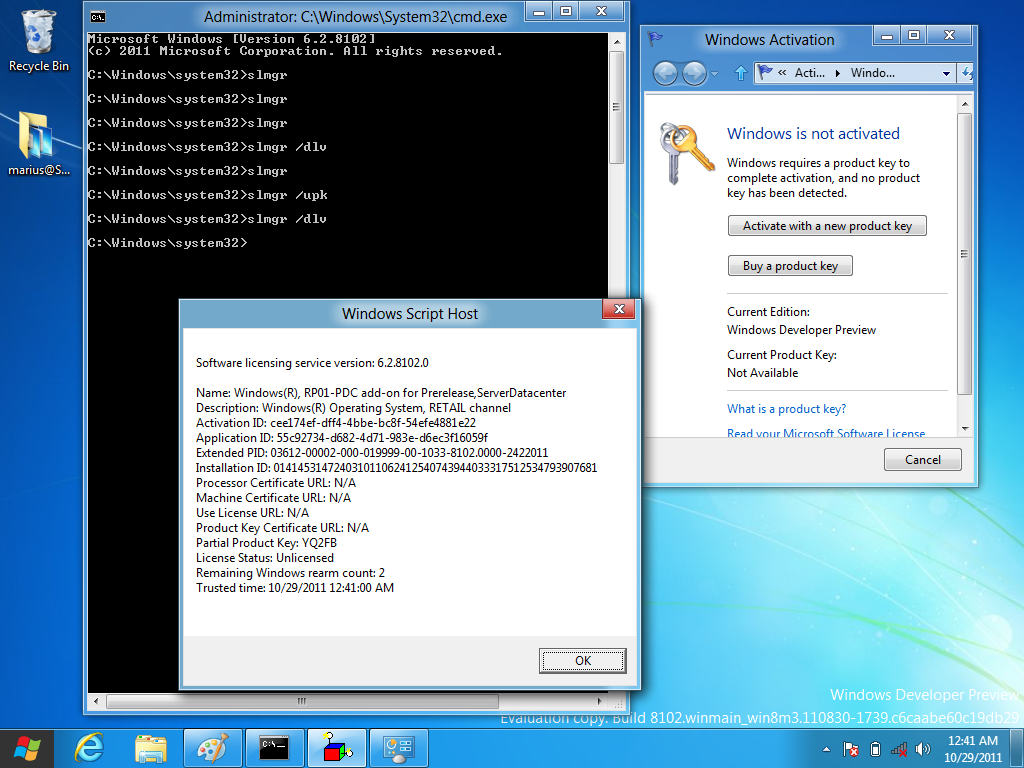
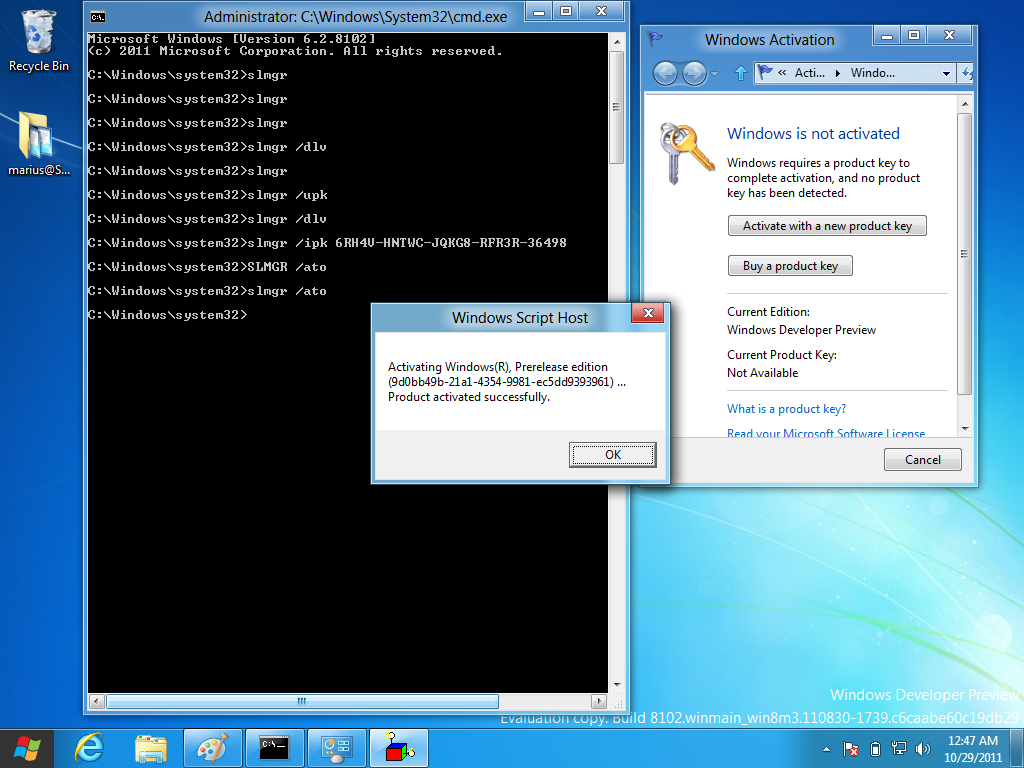
Since the copy of Windows 8 Developer Preview I was using was fully activated, as you can see from the screenshots included with this article, I first uninstalled the existing product key by typing the following command ‘slmgr /upk’ and pressing Enter.

This left me with a copy of Windows 8 Developer Preview which no longer featured a product key, and obviously failed to remain activated.

slmgr /upk
Enlarge picture
slmgr /ipk 6RH4V-HNTWC-JQKG8-RFR3R-36498
Enlarge picture
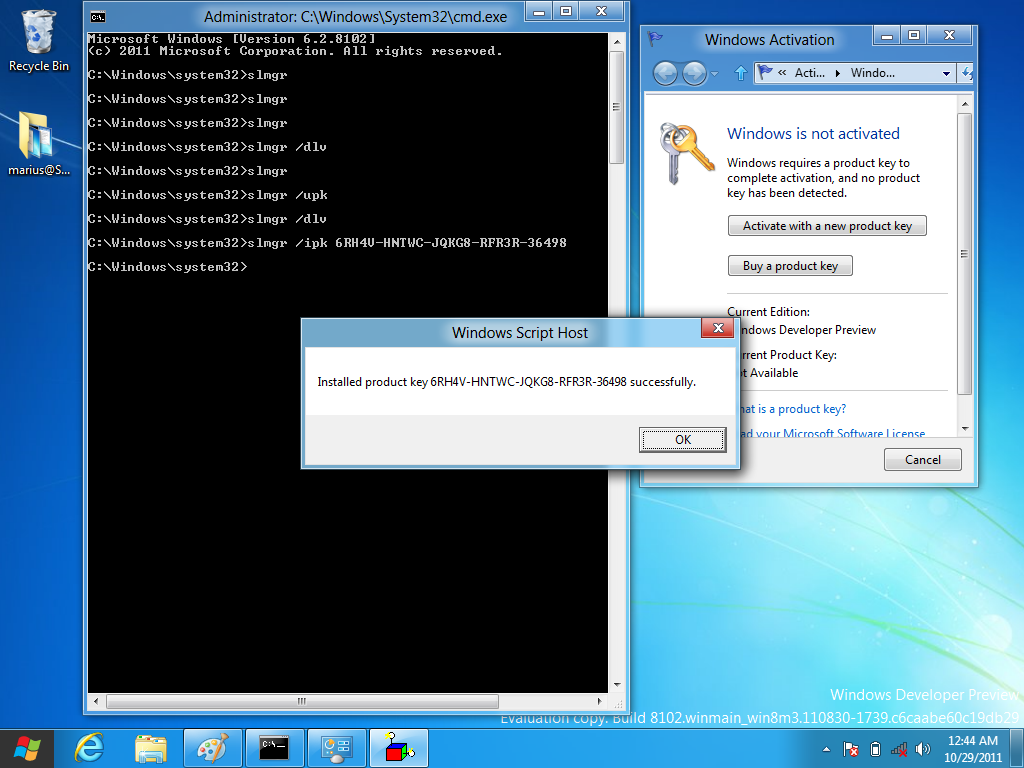
No worries, though, installing the product key I mentioned at the start of this article is really simple. All you’ll need to do is run this command: ‘slmgr /ipk 6RH4V-HNTWC-JQKG8-RFR3R-36498’ and that’s pretty much it.

Once the product key is in place, make sure to also activate Windows 8 Developer Preview. On a test machine connected to the Internet, enter the following ‘slmgr /ato’ and hit Enter.

The Windows Software Licensing Management Tool is also available in the server version of Windows 8 Developer Preview, but a different product key is required: 4Y8N3-H7MMW-C76VJ-YD3XV-MBDKV.

Windows 8 Developer Preview Build 8102 Milestone 3 (M3) is available for download here.

118,249 hits · 50 comments
Link to this article · Print article · Send to friend

MUST-READ RELATED ARTICLES:


Early Windows 8 Beta Builds Dogfooded, New Post-8102 Feature Confirmed

Windows 8 Beta Already Being Tested, Suggest Leaked Screenshots

Windows 8 Screen Rotation Design Goals

Windows 8 pre-Beta Now Available Under MSDNAA

READER COMMENTS:


Comment #1 by: dmbeard on 29 Oct 2011, 19:53 UTC reply to this comment

Same as all from micro$off, they will "allow" you to use your pc as long as you do what they say! They can and will deactivate your windows in a heartbeat. NO MORE micro$off for me, I'm not their pupit any longer. Ubuntu is the way to go, if you dont like something in it, your free to change it.

Comment #1.1 by: Ravi on 30 Oct 2011, 09:32 GMT

You are right bro. I moved from vista to Ubuntu and Ubuntu is awesome. All is free. No more viruses. And the new Ubuntu 11.10 is just awesome!!


Comment #2 by: EHSAN on 30 Oct 2011, 04:57 UTC reply to this comment

NOT WORKS FOR ME ,

Comment #2.1 by: AnimTX on 20 Nov 2011, 10:00 GMT

Dont forget to run as administrator


Comment #3 by: Fadlan on 30 Oct 2011, 11:51 UTC reply to this comment

I WANT GET WINDOWS 8, CAN SENT TO MY EMAIL


Comment #4 by: darpan on 14 Nov 2011, 06:45 UTC reply to this comment

it's working for me ...........
it's great windows


Comment #5 by: Windows 8 Installation on 22 Nov 2011, 07:55 UTC reply to this comment

If Windows 8 Developer Preview installation failed during first attempt or if you’re planning to use Reset your PC setting on Windows 8 or reinstall Windows using installation disk, you need to enter Windows 8 Developer Preview Product key during installation as the setup asks you... Here is the key 6RH4V-HNTWC-JQKG8-RFR3R-36498...


Comment #6 by: Windows Support on 08 Dec 2011, 08:04 UTC reply to this comment

There are in fact two keys that testers can take advantage of, one for client and the other for server.. 4Y8N3-H7MMW-C76VJ-YD3XV-MBDKV is the product key that can be used with Windows Server 8 Developer Preview. 6RH4V-HNTWC-JQKG8-RFR3R-36498 is the product key that can be used with Windows client 8 Developer Preview..


Comment #7 by: Gaurav - INDIA on 18 Jan 2012, 14:42 UTC reply to this comment

Error: 0xC004F025 Access Denied: the requested action requires elevated privileges.

Comment #7.1 by: DEEPAK INDANA on 12 Mar 2012, 10:35 GMT

DUDE ME TOO HAVING SAME PROBLEM ..... DID U GOT ANY SOLUTION

Comment #7.2 by: pradeep on 25 Mar 2012, 18:31 GMT

run cmd as administrator


Comment #8 by: mohsy on 26 Feb 2012, 21:41 UTC reply to this comment

thank u it work


Comment #9 by: Akbar on 10 Mar 2012, 13:25 UTC reply to this comment

Thanks its working 100%


Comment #10 by: Akash on 11 Mar 2012, 05:53 UTC reply to this comment

nice helpfull


Comment #11 by: Amit on 19 Mar 2012, 05:55 UTC reply to this comment

hey this key is not working on my system..its still give that key has been expired..please help me out..

Comment #11.1 by: tej on 17 May 2012, 11:42 GMT

change the DATE to 2011 oct


Comment #12 by: TheMarmo on 30 Apr 2012, 00:08 UTC reply to this comment

This worked for me today!
DNJXJ-7XBW8-2378T-X22TX-BKG7J
Windows 8 Consumer Preview ISO formats
It's the 1st one down, the English version, 32 bit.


Comment #13 by: Ashiq on 04 May 2012, 05:12 UTC reply to this comment

When i command slmgr /ipk 6RH4V-HNTWC-JQKG8-RFR3R-36498, it is telling that i need elevated privilages , please contact me ashiqathooly@gmail.com

Comment #13.1 by: chozy on 30 Oct 2012, 06:06 GMT

rum CMD as Administrator


Comment #14 by: assdasdasd on 04 May 2012, 14:33 UTC reply to this comment

I did as u said but it says activation failed


Comment #15 by: SAAD on 12 May 2012, 10:33 UTC reply to this comment

Awesome! but MS is not activating developer preview anymore. they are activating consumer preview


Comment #16 by: Ash on 25 May 2012, 10:28 UTC reply to this comment

in slmgr /ato is not working

Comment #16.1 by: RS on 27 May 2012, 14:42 GMT

NOR with me! says unvalid key.


Comment #17 by: crazy guy on 08 Jun 2012, 14:24 UTC reply to this comment

after this version of windows expires will i get back my old version of windows


Comment #18 by: siha infor on 03 Jul 2012, 07:04 UTC reply to this comment

difficult to active

Comment #18.1 by: Joejoe on 03 Aug 2012, 15:16 GMT

To activate successfully the time and date must be correct.


Comment #19 by: NiTiN on 10 Jul 2012, 02:47 UTC reply to this comment

it automaticaly restart after each 2 hour, what to do
thanks


Comment #20 by: arun on 18 Jul 2012, 17:35 UTC reply to this comment

my pc is running with windows 8.for every 2 hours it will get automatic restart what to do how to avoid this


Comment #21 by: remi on 07 Aug 2012, 08:21 UTC reply to this comment

hey dude
i am also trying to activate as your but find this msg
error code 0x80072f8f
A security error occured
pls help me


Comment #22 by: ari on 08 Aug 2012, 05:44 UTC reply to this comment

hey it is still not activating it is showing me the error on slmgr/ato......what to do please contact me on arif.ashraf09@gmail.com

Comment #22.1 by: ABC on 05 Oct 2012, 09:08 GMT

Same Here


Comment #23 by: Dipan on 12 Aug 2012, 06:10 UTC reply to this comment

not working


Comment #24 by: Jayson on 14 Aug 2012, 17:07 UTC reply to this comment

I CANT ACTIVATE ! IT SAYS " a computer running Microsoft Windows non-core Edition, run 'slui.exe 0x2a 0xC004e016' to display the error text. please help ! thank you

Comment #24.1 by: ravikiran on 21 Aug 2012, 08:31 GMT

hey jayson ..if u get the solution for your question plz mail me

Comment #24.2 by: Danny on 25 Aug 2012, 08:33 GMT

Yeh same, if you find anything could you mind replying? Thanks

Comment #24.3 by: sau on 27 Aug 2012, 03:40 GMT

same error 4 me . dnt know wat to do next

Comment #24.4 by: Twist on 04 Sep 2012, 11:21 GMT

Same for me..so if u find a solution tell me pleasee :d

Comment #24.5 by: khan on 28 Nov 2012, 11:24 GMT

same error for me also

Comment #24.6 by: jupple on 15 Jan 2013, 16:27 GMT

Me too..

Comment #24.7 by: Aman on 16 Jan 2013, 12:02 GMT

same problem plz help me


Comment #25 by: Labib on 23 Aug 2012, 10:34 UTC reply to this comment

hey it is saying "access denied:the request action requires elevated privileges
why is it not working


Comment #26 by: Akshay on 06 Sep 2012, 07:25 UTC reply to this comment

no its giving an error with the line the computer running with non core edition wt to do plz help by giving solution to my id akshutn@gmail.com .........thanx


Comment #27 by: banna on 25 Sep 2012, 13:29 UTC reply to this comment

this key not worked bro showing error at that time


Comment #28 by: ABC on 05 Oct 2012, 09:07 UTC reply to this comment

it is showing error product key not found what to do


Comment #29 by: umair on 20 Dec 2012, 19:25 UTC reply to this comment

(9d0bb49b-21a1-4354-9981-ec5dd9393961) ...
Error: Product activation failed.

I am getting this message when i try to use "slmgr /ato". Any Suggestions..!!


Comment #30 by: Irsad Jupple on 15 Jan 2013, 16:47 UTC reply to this comment

hey! it's working for me,

but if I change the Date to 2013, that's will still working?


Comment #31 by: kashif on 17 Jan 2013, 19:06 UTC reply to this comment

Thanks a lot mate


Comment #32 by: Vkrant on 18 Jan 2013, 16:14 UTC reply to this comment

after 'Once the product key is in place, make sure to also activate Windows 8 Developer Preview. On a test machine connected to the Internet, enter the following ‘slmgr /ato’ and hit Enter.' step
it says
Activating Windows(R), Prerelease edition
(9d0bb49b-21a1-4354-9981-ec5dd9393961) ...
Error: Product Activation Failed.
What Shall I DO?
PLZ Help....

Comment #32.1 by: djploki on 24 Jan 2013, 21:02 GMT

Everything works.Just run "cmd" as administrator and change the system date-example 2012-01-01.This remove timebomb.

Comment #32.2 by: dj on 24 Jan 2013, 21:05 GMT

Everything works.Just change the system date

Copyright © 2001-2013 Softpedia. Contact/Tip us at

WindowsGamesDriversMacLinuxScriptsMobileHandheldNews

SUBMIT PROGRAM   |   ADVERTISE   |   GET HELP   |   SEND US FEEDBACK   |   RSS FEEDS   |   UPDATE YOUR SOFTWARE   |   ROMANIAN FORUM