
NEWS CATEGORIES:


NEWS ARCHIVE >>
SOFTPEDIA REVIEWS >>
MEET THE EDITORS >>
Home / News / Linux / Ubuntu Tips and Tricks

Ubuntu Tips and Tricks


Install Firefox 3 Beta 3 on Ubuntu 7.10

The easy way!

By Marius Nestor, Linux Editor

16th of February 2008, 12:02 GMT

Adjust text size:


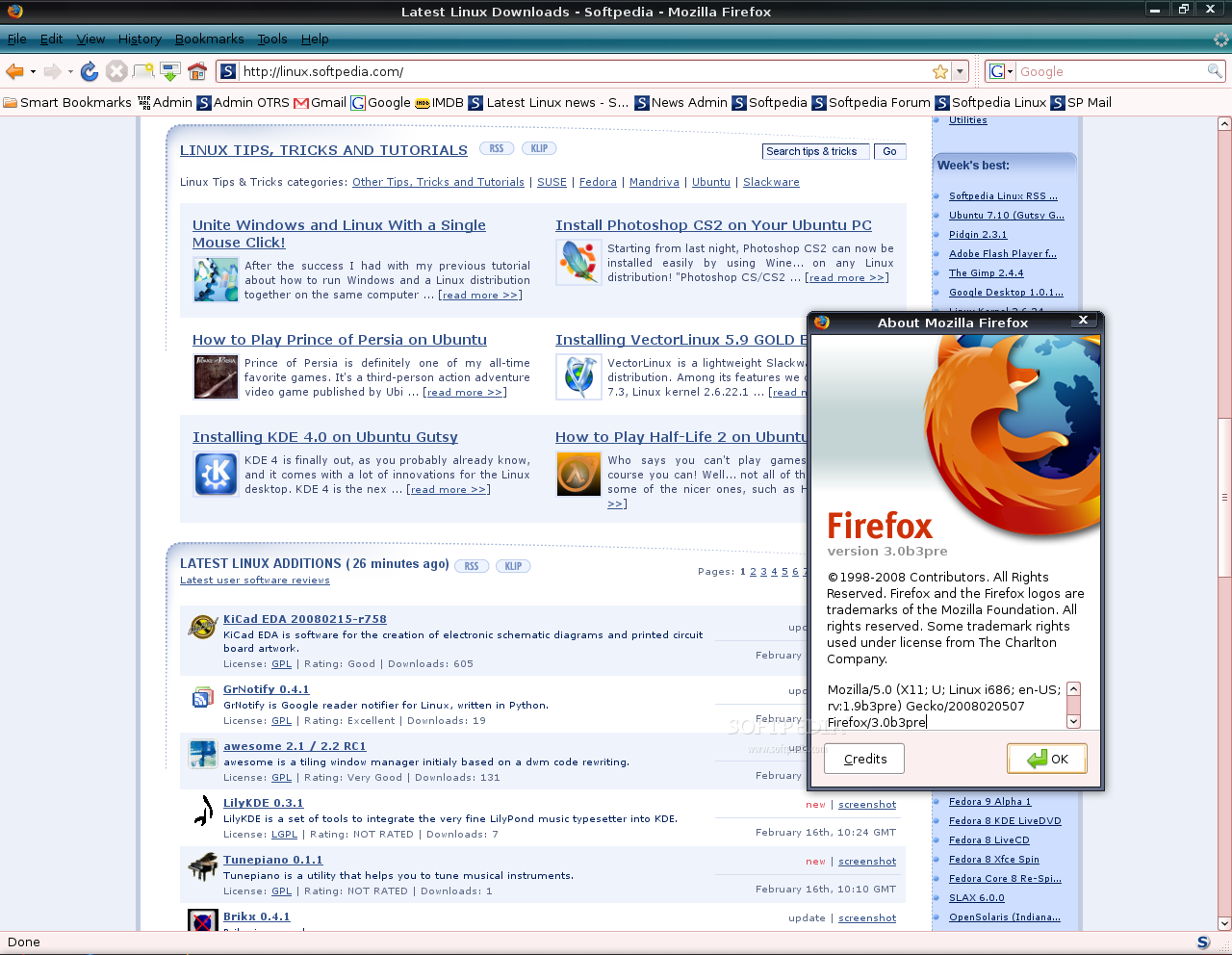
Firefox 3 Beta 3 on Ubuntu 7.10
Enlarge picture
Everybody's talking these days about the brand new beta release of Firefox 3, that it brings many improvements and memory leaks fixes, that it is extremely fast and polishes rough edges. Therefore I wanted to try it myself, but I didn't want to download the binary archive and do some nasty things to my system. So, I've discovered my own simple (5 minutes) method on how to install Firefox 3 Beta 3 on Unbuntu 7.10 (Gutsy Gibbon).

The installation of Firefox 3 Beta 3 under Gutsy Gibbon is quite simple, but it requires a few little tricks which I'll reveal in this guide. Be aware though that this is a beta release and it may have some rough edges here and there; for me, it worked pretty good until now.

Step 1 - Enable the unsupported repositories

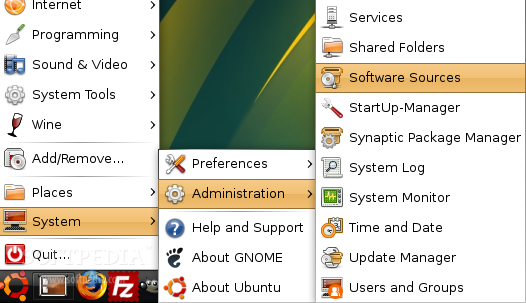
Go to System -> Administration -> Software Sources and enter your password when asked.
Review image


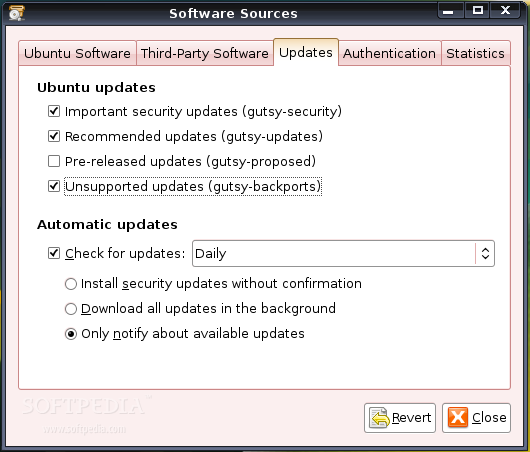
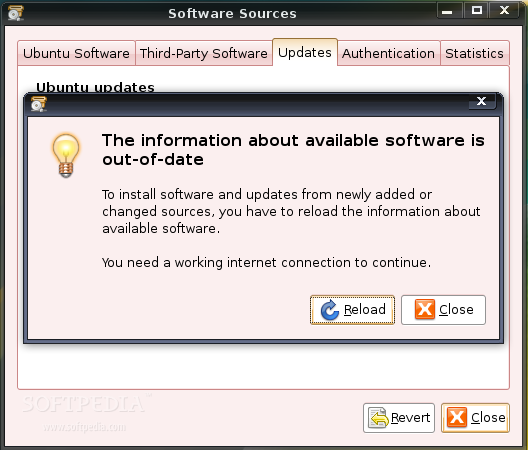
In the Software Sources window, go to the third tab (Updates) and check the "Unsupported updates (gutsy-backports)" option. Then click the 'Close' button and, when you will be asked if you want to reload the information about available software, click 'Reload' and wait until the Software Sources window disappear.
Review image

Review image


Step 2 - Install Firefox 3 Beta 3

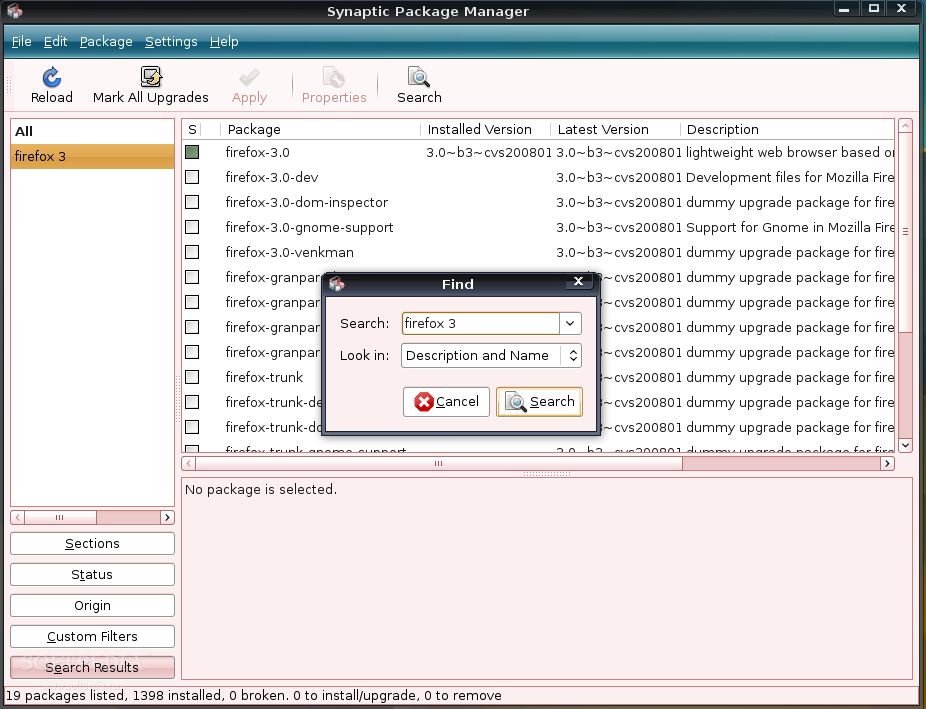
Now, go to System -> Administration -> Synaptic Package Manager and search for firefox 3. The search will return exactly what you were looking for!
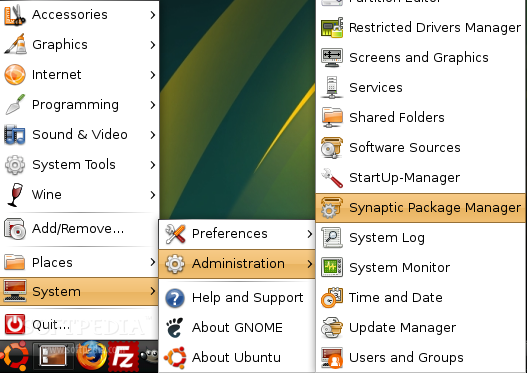
Review image

Review image


Click on the first result (firefox-3.0) and install it by selecting the 'Mark for Installation' option from the context menu that will appear. Click 'Apply' and the installation will begin. Click 'Yes' to any questions and close Synaptic Package Manager when the installation is over.

Step 3 - Cleaning up and a few magic tricks!

WARNING: The software updates icon will appear in your system tray. Ignore it! Do NOT install any of those updates, because they are unstable and unsupported!

Now we need to close the unsupported repositories because the software updates notification will stay in tray all the time and it's pretty annoying. So, go again to System -> Administration -> Software Sources, click the third tab (Update) and uncheck the "Unsupported updates (gutsy-backports)" option. Then click the 'Close' button and I guess you know the drill...

Magic Trick 1 - Power up Firefox 3 with plugins: Because Firefox 3 Beta 3 doesn't have the plugins that you already have in your Firefox 2 installation, we need to do some "dirty work" and copy the installed plugins from the FF2 directory to the FF3 one. So, open a terminal (Applications -> Accessories -> Terminal) and type or paste the following command:

CODE
sudo cp /usr/lib/firefox/plugins/* /usr/lib/firefox-3.0-3.0b3pre/plugins

That it, my friends! You can find the brand new Firefox 3 browser under the Internet category of your main menu.

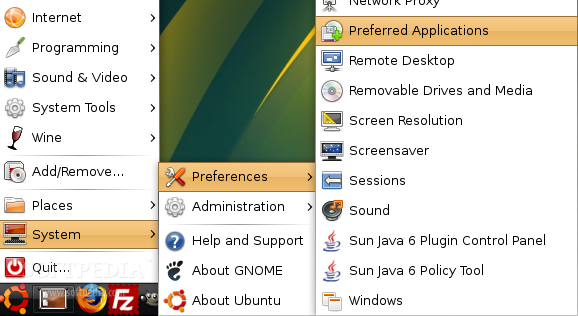
Magic Trick 2 - Set Firefox 3 as default browser: If you want to set it as the default browser for your system, because, I should warn you that any HTTP link (URL) you will click from other applications, such as Pidgin, Thunderbird, etc, will open in Firefox 2. Therefore, you need to open the Preferred Applications tool from System -> Preferences -> Preferred Applications, select 'Custom' and type in the 'Command' field: firefox-3.0 %s and close the window.
Review image


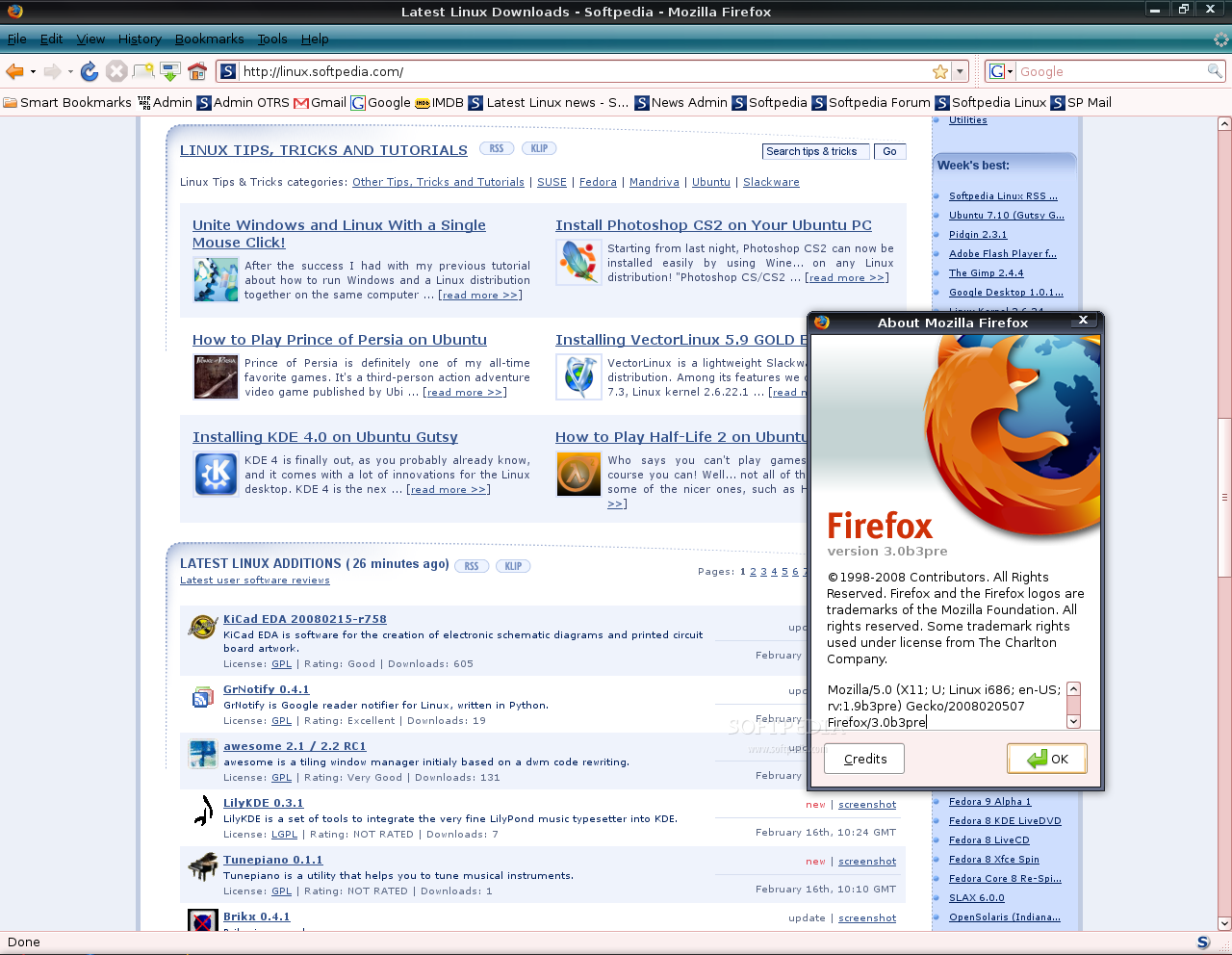
And here's Firefox 3 Beta 3 running on Ubuntu 7.10:
Review image

TAGS:

Firefox 3 | Gutsy Gibbon | Ubuntu 7.10
Read by 31,541 user(s) | Add comment | Link to this article TWEET THIS


Article rating:
Good (3.9/5) 17 vote(s)    

Subscribe to news | Print article | Send to friend

© Copyright 2001-2009 Softpedia
Contact:


SEARCH THE NEWS ARCHIVE :


Today's News
| Yesterday's News | News Archive


MORE RELATED ARTICLES:


Nokia Siemens Networks Is Member of the Linux Foundation

Ark Linux & Ark Linux Live 2007.1 Released

Linux Mint 3.0 Light Edition Released

Linux Mint 3.0 Xfce Available Now

IBM, Oracle, NEC to Promote Linux in Japan

Linux Mint 3.0 KDE Edition Beta Released

Dell Will Sell More Linux Computers

LinuxCertified Announces the Linux Device Driver Development Course

Printer Driver Available for All Linux Distributions

Linux Claims Its Rights in China

User opinions:


Comment #1 by: SilverWave on 27 Feb 2008, 02:41 GMT reply to this comment

Great tip - Thanks :)

I used Mr Tech Toolkit (toolkit.xpi) to see if I could force my disabled extensions to work.
I had a a lot of success :D

But here are the ones that didn't:
- Bookmarks' Full Titles 2.0:
- Boox 1.1.0.0: Would miss this a LOT!
- Firefox Showcase 0.9.4.6:
- Locationbar² 0.9.1:
- MR Tech Local Install 5.3.2.6: (uninstalled and replaced with Toolbox)
- repagination 2006.4.5: Would miss this a Lot!
- Tab Mix Plus 0.3.6: OMG!

List of old extensions in Firefox 2.0 Enabled Extensions: [28]

* Adblock 0.5.3.043
* Adblock Filterset.G Updater 0.3.1.3
* All-in-One Sidebar 0.7.3
* Bookmarks' Full Titles 2.0
* Boox 1.1.0.0
* B ritish English Dictionary 1.19
* ColorfulTabs 2.0.9
* CustomizeGoogle 0.69
* Firefox Showcase 0.9.4.6
* Fission 0.9
* FlashGot 0.8.1
* Forecastfox l10n 0.7.2007100301
* Gmail Notifier 0.6.3.2
* Google Desktop for Firefox 1.1.1
* Image Zoom 0.3
* Locationbar² 0.9.1
* Menu Editor 1.2.3.3
* MR Tech Local Install 5.3.2.6
* No Squint 1.0.1
* NoScript 1.4
* Quick Preference Button 0.1.8.1
* repagination 2006.4.5
* Slogger 0.6.20061221
* Tab Mix Plus 0.3.6
* Toolbar Buttons 0.4.5.2
* ubufox 0.4~beta1
* UnPlug 1.6.06
* Web Developer 1.1.4

Comment #1.1 by: Marius Nestor on 04 Mar 2008, 14:59 GMT

Firefox Showcase works on FF3b3

http://linux.softpedia.com/get/Internet/Firefox-Extensions/Firefox-Showcase-17202.shtml

And yes, it's a shame that Tab Mix Plus doesn't work yet on FF3b3... I miss it too!


Comment #2 by: zia on 06 Mar 2008, 22:54 GMT reply to this comment

THIS IS VEREY GOOD..


Comment #3 by: Abolfazl on 06 Mar 2008, 23:13 GMT reply to this comment

veri good is your


Comment #4 by: jelmer on 12 Mar 2008, 13:00 GMT reply to this comment

Got a problem with it? Flash doesn't work? I made a short manual when I was fixing my problem. (Ubuntu 7.x/8.x/Debian or other, recent distro)

After installing firefox-3.0-b3 using Synaptic package manager or otherwise, you might need to make a manual link amongst flash player of Firefox 2 and plugins folder of firefox 3 - which are located elsewhere.

This is how I did it in Ubuntu 7.10:

$ sudo ln -s /usr/lib/firefox/plugins/flashplugin-alternative.so /usr/lib/firefox-addons/plugins

(the firefox-addons-folder is the folder for plugins of Firefox 3)

Now Flash player is supposed to be working

-- Don't have Ubuntu or any other Debian system? No problem. Login as root ($ su -) and run the same commands without 'sudo'.

-----------------------------------
In Dutch:

Doet Flash het niet in Firefox 3 Beta 3? (Ubuntu 7.x/8.x/Debian of een andere, redelijk recente distro)

Na de installatie van firefox-3.0-b3 via Synaptic package manager of anderzijds, moet je een handmatige link leggen tussen de flash player van firefox 2 en de plugins-mappen van firefox 3 (die een andere locatie hebben).

Zo ziet het commando er bij mij uit:

$ sudo ln -s /usr/lib/firefox/plugins/flashplugin-alternative.so /usr/lib/firefox-addons/plugins

(de firefox-addons-map is de afwijkende locatie van plugins voor firefox 3)

Nu doet flash player het in een keer na een restart van Firefox 3 Beta 3.


-- Heb je geen Ubuntu of ander Debian-systeem? Geen probleem. Login als root ($ su -) en voer het uit zonder 'sudo'.


Comment #5 by: lenam on 31 Mar 2008, 13:58 GMT reply to this comment

very good. Thank you


Comment #6 by: davarse on 17 Apr 2008, 04:02 GMT reply to this comment

i got this message from terminal when i do the magic trick 1:

cp: target `/usr/lib/firefox-3.0-3.0b3pre/plugins' is not a directory

what should i do????


Comment #7 by: cemil on 06 Jul 2008, 09:55 GMT reply to this comment

very good....

Share your opinion:

Your Name:
Your Email Address:
(will not be used for commercial purposes)
Solve this to prove you're not a bot: =
Your review/opinion:


Windows tabGames tabDrivers tabMac tabLinux tabScripts tabMobile tabHandheld tabGadgets tabNews tab

SUBMIT PROGRAM   |   ADVERTISE   |   GET HELP   |   SEND US FEEDBACK   |   RSS FEEDS   |   ENTER NEWS SITE   |   ENGLISH BOARD   |   ROMANIAN FORUM