
 14 DAY TRIAL //
 Windows 8 comes with a wide range of improvements and changes, but the lack of a traditional “Start Menu” is the feature the average user misses the most.
As you probably know if you got the chance to give Windows 8 a spin, the new Windows iteration comes with a so-called “Start Screen” that provides access to all previously-called Metro apps, but also takes the place of the standard “Start Menu”.
Sadly, Windows 8 doesn't give users the option to get back the “Start Menu”, so it's basically impossible to see a “Start” button or a “Start Orb” every time you log on into Windows.
Still, the easiest solution to create a “Start Menu” is to rely on third-party software and although Windows 8 isn't yet released, software companies moved pretty fast to create such applications.
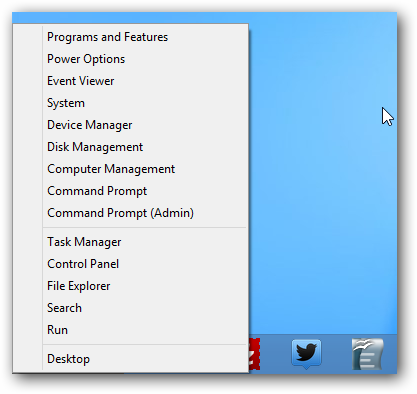
If you find it very difficult to get used to the new Start Screen, try right-clicking in the bottom left corner of the screen, the same place that provides access to this screen. The displayed menu lets you launch programs and features, power options, device manager, Task Manager, file explorer and several other utilities. It's not a “Start Menu” per se, but at least it lets you launch the most popular Windows utilities in a second.
As for third-party apps, the best and the most affordable (because it's free) solution is called Start8 and was developed by Stardock.
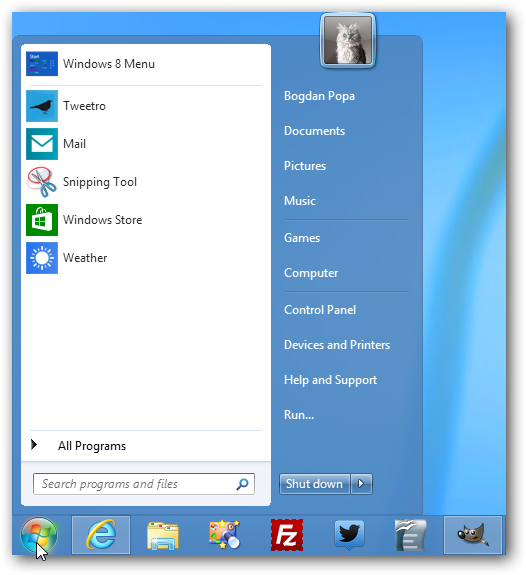
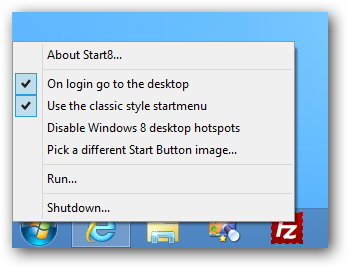
This little app, still in beta stage, creates a standard Windows Start Orb on your Taskbar and lets you access programs just like you do it in Windows 7. Right-clicking the Orb pops out some other options to launch “Run”, initiate a shutdown, pick a different Start Button image or disable the Windows 8 desktop hotspots.
Here is the full feature list, as it's provided by the developer: - Windows 7 style Start menu with Windows 8 enhancements - Users can search for Windows 8-style (Metro) apps with it - Users can pin desktop and Metro apps - Full support for Jump Lists - Unified Search - Users can boot directly to the Windows 8 desktop - Fast access to shut down, devices, music, documents, videos - Automatically matches color to the color of the taskbar - Start button is now skinnable - Optionally disable the desktop "hot spots" - Supports WindowFX 5.1 startmenu animations "currently in beta" - The Windows 8 Start screen becomes accessible from the Start menu - Start menu size fully configurable - Adds option for WinKey to show fullscreen Metro desktop
Obviously, Start8 is also available on Softpedia and you can download it with a single click here.