 14 DAY TRIAL //
 Apple has posted / updated a Support document online outlining the particularities of rebuilding your iPhoto library. Last modified this weekend, the knowledge base article contains (rebuilding) instructions for users of iPhoto 6 or later.
According to Apple, “iPhoto includes a feature that allows you to rebuild the currently selected iPhoto library. Sometimes rebuilding the library may resolve issues such as the library appearing to be unreadable, missing photos, or other issues related to reading the iPhoto library structure,” the company explains.
The document continues with an important note advising users to back up their existing iPhoto Library folder before using the rebuild feature. According to Apple, “a backup allows you to restore the iPhoto Library if anything unexpected happens during the rebuild that prevents the library from rebuilding correctly.”
Also noteworthy is that, before performing a rebuild, you should install any iPhoto updates by using Software Update. Apple claims it's possible for a software update to resolve your issue, therefore you may not need to rebuild. “It's also a good idea to search Apple's Support Page for your specific iPhoto symptom before doing a rebuild, just in case there is a more specific article or relevant solution,” Apple adds.
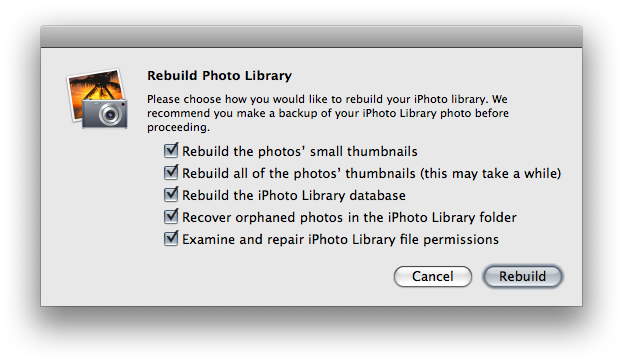
On the other hand, if you're sure rebuilding is what you need to do, Apple outlines these exact steps for you to get the job done properly, and safely. To rebuild the iPhoto library:
- Quit iPhoto if it is open. - Hold down the Command and Option keys on the keyboard. - Open iPhoto. - Keep the keys held down until you are prompted to rebuild the library. - A dialog will appear with rebuild options. Select the options you want to use. - Click Rebuild to begin the rebuild process. This may take a few minutes to complete.
The Mac maker then goes to offer a few guidelines to determine which options to choose in the rebuild dialog. Visit Apple here for those principles and more information on how to rebuild your iPhoto library.