
Softpedia
 

NEWS CATEGORIES:


NEWS ARCHIVE >>
SOFTPEDIA REVIEWS >>
MEET THE EDITORS >>
TRENDING TODAY
Home > News > Apple > Apple & Mac Blog

November 30th, 2012, 16:06 GMT · By

BLOG

How to Make iTunes 11 Look “Normal” Again (Restore Sidebar)

SHARE:

Adjust text size:


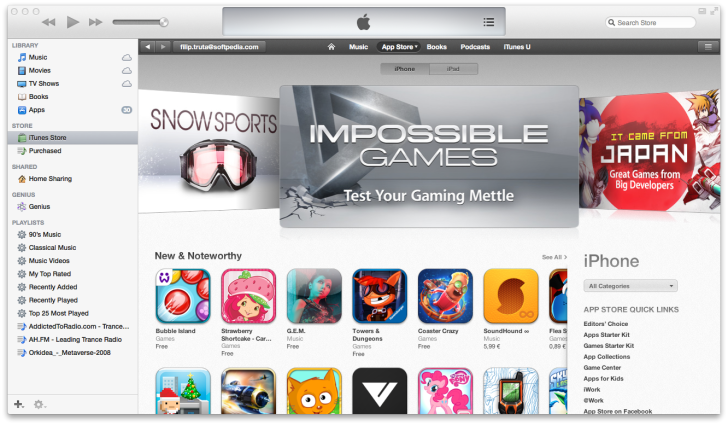
iTunes 11 displaying the left sidebar Enlarge picture - iTunes 11 displaying the left sidebar
iTunes 11 brings a lot of visual enhancements but there’s one change many users already don’t care much for - the lack of a sidebar. Luckily, there’s a fix.

When you upgrade to iTunes 11, you’ll notice that quite a lot of your stuff has been relocated or downright eliminated from its interface.

Don’t worry, your music, movies and apps are still there on your hard drive. The only difference is that iTunes 11 displays all of them in a different manner, and in very different places.

If you’re having a rough time adjusting to the single-pane interface, just hit View in the menubar and select “Show Sidebar.”

iTunes will now display your beloved left pane listing music, movies, TV shows, books and apps as before. Connect an iDevice and it will also show there. Your former playlists should also be intact.

Hope this helped.

TELL US WHAT YOU THINK:

5,410 hits · 5 comments · Link to this article · Print article · Send to friend · Subscribe to news

MUST-READ RELATED ARTICLES:


“You Will Never Finish This Game” Says Mystery Manor Developer

iTunes 11 Features: New MiniPlayer

iTunes 11 Features: Play Purchases from iCloud

Behold the iTunes 11 Icon

Apple Plugs Security Holes in ATV2 and ATV3 Software

READER COMMENTS:


Comment #1 by: Jose_49 on 01 Dec 2012, 01:27 UTC reply to this comment

Thanks a lot :p


Comment #2 by: MattE303 on 02 Dec 2012, 22:46 UTC reply to this comment

Yes, but the album art viewer in the sidebar is GONE, as is the ability to show album art in the Column Browser. These changes are a huge negative that simply makes no sense at all.


Comment #3 by: Charly on 06 Dec 2012, 09:38 UTC reply to this comment

....but every time you close itunes it opens again without the sidebar. How can you change it so that you don't have to turn it on everytime? (why on earth did anyone think this was a good idea?!)


Comment #4 by: Bill_in_Detroit on 25 Jan 2013, 11:39 UTC reply to this comment

Thanks for the help. I got to work this AM and my iTunes had been "automatically" updated. I had been avoiding the update because I had heard of issues with the new look and now I know the new look stinks by default (come on Apple, not all people are that stupid that they need a "simple" interface!). Now I can use iTunes again without spending hours playing with the new interface to figure out where everything went.


Comment #5 by: 6093 on 12 Mar 2013, 11:50 UTC reply to this comment

Having to reopen the sidebar every time is a bit tedious, don't you think? >.>

Copyright © 2001-2013 Softpedia. Contact/Tip us at

WindowsGamesDriversMacLinuxScriptsMobileHandheldNews

SUBMIT PROGRAM   |   ADVERTISE   |   GET HELP   |   SEND US FEEDBACK   |   RSS FEEDS   |   UPDATE YOUR SOFTWARE   |   ROMANIAN FORUM