
Softpedia
 

NEWS CATEGORIES:


NEWS ARCHIVE >>
SOFTPEDIA REVIEWS >>
MEET THE EDITORS >>
Home > News > Linux > Ubuntu Tips and Tricks

October 31st, 2011, 19:01 GMT · By

How to Install GNOME Themes in Ubuntu 11.10

SHARE:

Adjust text size:


Ubuntu 11.10
Enlarge picture
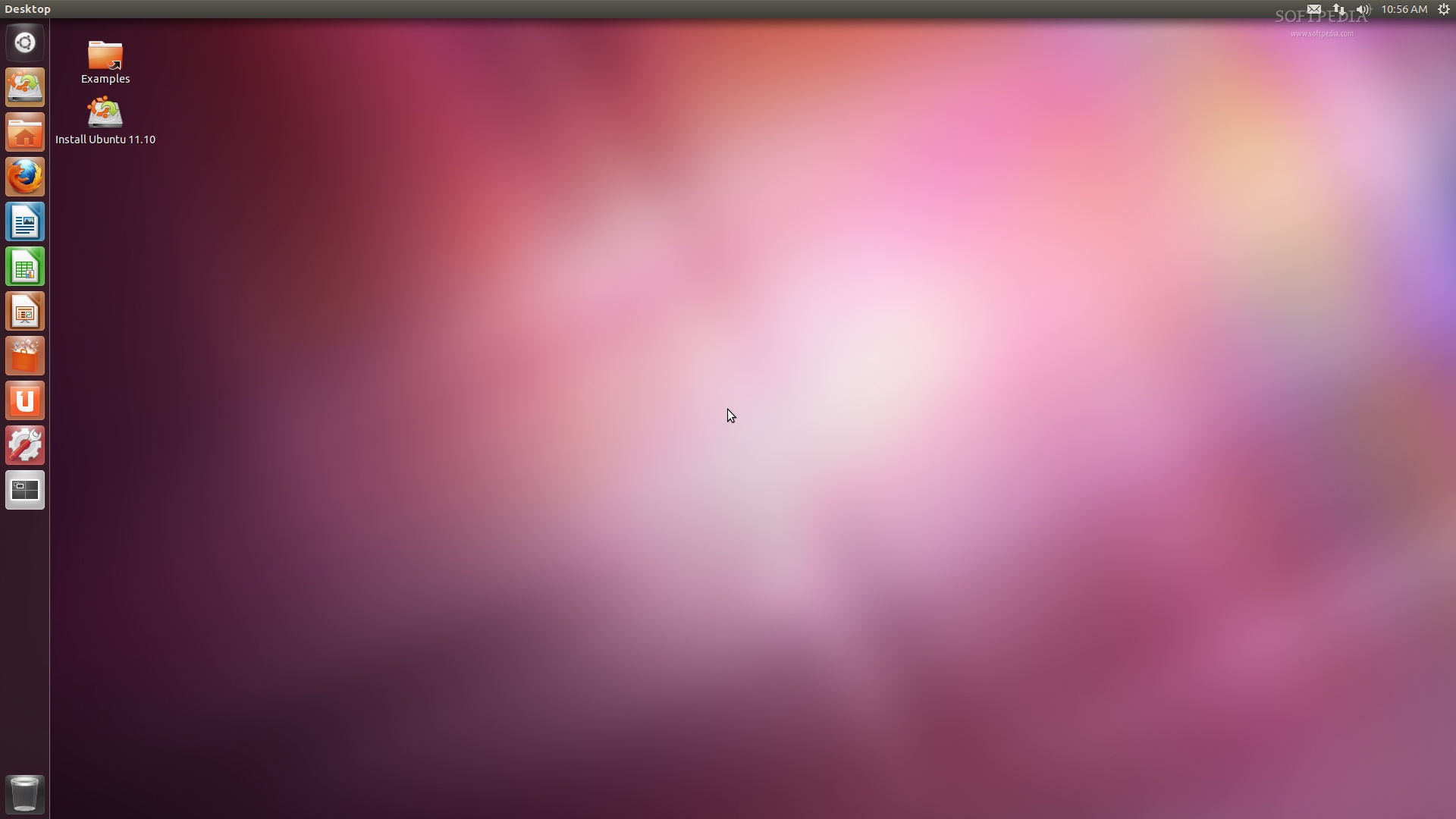
The following tutorial will teach Ubuntu users how to install GNOME themes and icons in the Ubuntu 11.10 (Oneiric Ocelot) operating system.

A lot of Ubuntu users requested this guide, because the new Ubuntu 11.10 operating system doesn't provide a tool to add new GTK or icon themes. Why? Because of the GNOME 3 desktop environment and the complexity of GTK3 themes.

So, let's say you saw that wonderful desktop theme out there on the Internet, and you want it on your brand-new Ubuntu machine, right? What do you do?

Look no further, as the following tutorial will offer you the easiest method to add desktop themes on Ubuntu 11.10. Believe us, this is the easiest way to add these theme on your Ubuntu operating system.

You can use this guide to also add icon themes or fonts, just replace the ~/.themes folder with ~/.icons or ~/.fonts.

What do you need to get started? The GNOME Tweak Tool and a GTK3 theme, of course. So make sure you install the app by clicking the link below and grab your favorite GTK theme from our up-to-date Desktop Themes section, and follow the instructions below.

Install GNOME Tweak Tool

Now that GNOME Tweak Tool is installed, open your home folder and hit the CTRL+H key combination on you keyboard to see the hidden files and folders.

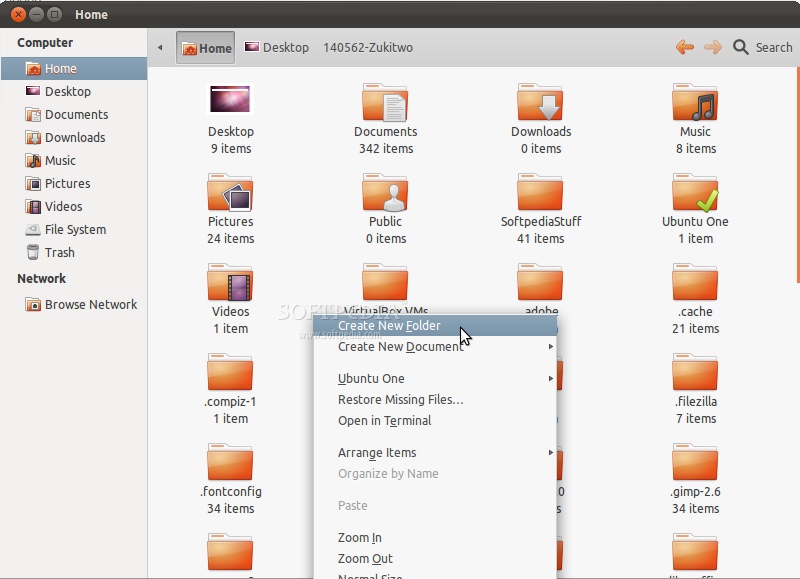
1. Right click on an empty area on the home folder and choose the "Create New Folder" option. Rename the folder as .themes (yes, with the dot in front of the name, as the folder will be hidden).
Review image

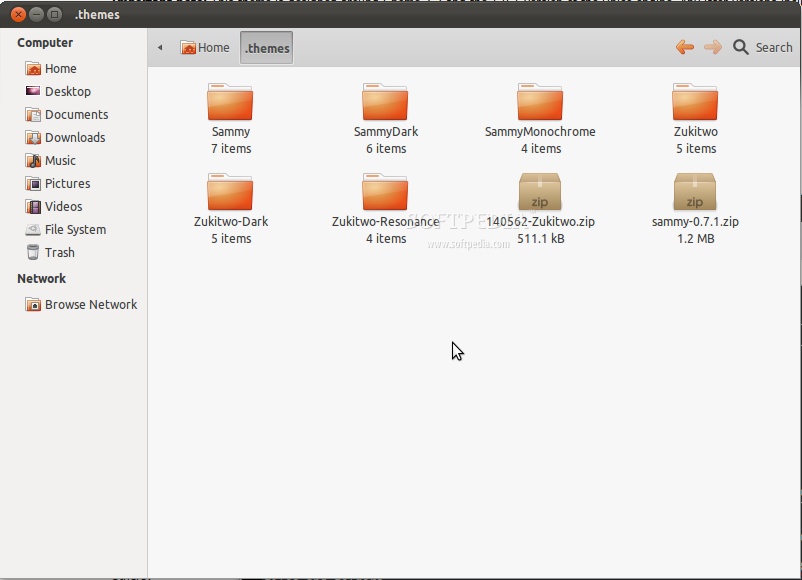
2. Enter that .themes folder and extract there the desired themes. As you can see from the image below, we've added two themes (Sammy and Zukitwo) in the .themes folder, each one with three different versions.

Review image

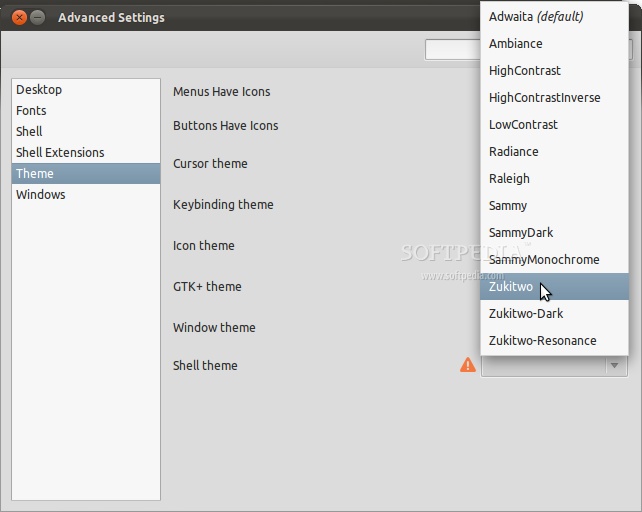
3. Now, click the Ubuntu logo from the Unity panel and search for Ubuntu Tweak Tool, which is actually called Advanced Settings. Click the shortcut and it will open.

4. Go to the "Theme" entry on the left side pane, and select one of the themes you've just extract from the "GTK+ theme" and the "Window theme" drop-down boxes.
Review image

That's it! The selected theme will be applied instantly and you can close the GNOME Tweak Tool. However, you must log out and log back in for the window (Metacity) theme to be applied too.

If you have problems with the tutorial, do not hesitate to comment below!

Editor's note: BE AWARE that root applications (the ones that ask for your password) will not be styled with this method. If you want to apply the theme on the entire system, you should extract the themes in the /usr/share/themes folder. To do that, you must use a terminal as root.

TELL US WHAT YOU THINK:

144,287 hits · 40 comments · Link to this article · Print article · Send to friend · Subscribe to news

MUST-READ RELATED ARTICLES:


Softpedia Linux Weekly, Issue 171

Canonical and Red Hat Join Forces to Stop Secure Boot

GNOME 3.3.1 Development Release Is Here

Helena The 3rd Is Available in Ubuntu 11.10

SalineOS 1.5 Has LibreOffice and Grub-Doctor

READER COMMENTS:


Comment #1 by: RIP! Gnome 3 on 31 Oct 2011, 21:42 UTC reply to this comment

I hate gnome 3 its a real step back from version 2. I will never use version 3 because you have almost no control or options in it not even a right click for desktop (very N00bish!) ): im gonna stick with my Debian squeeze stable with gnome v2.30 installed just now. and when the time comes maybe move to a differnt desktop enviroment. Xfce or LXDE, RIP Gnome...

Comment #1.1 by: cheap uggs on 02 Nov 2011, 02:57 GMT

The only method to actually uncover away would be to really place some upon. We guarantee, you'll immediately ignore about how exactly these people appear. Ugg footwear are in fact merely because cozy because your preferred set of bedroom slip-ons however, you might truly put them on cheap bailey button uggs outside as well as anyplace you need to. The initial Ugg trunk wasn't a brandname, nevertheless Ugg is really a universal phrase for any setting associated with sheepskin footwear that were created at first within Sydney. The actual Ug had been fast with regard to "ugly", and also the extra "g" had been additional bailey button triplet

Comment #1.2 by: joe on 14 Nov 2011, 09:55 GMT

how to transparent theme??

Comment #1.3 by: DUH on 03 May 2012, 16:18 GMT

So you'll never use Gnome 3 but here you are reading up on it. That makes no sense. Dont wanna use it, then quit reading about it.


Comment #2 by: xuser on 01 Nov 2011, 14:12 UTC reply to this comment

rip gnome


Comment #3 by: Bye bye Gnome 3 on 01 Nov 2011, 14:18 UTC reply to this comment

Bye bye Gnome 3, Gnome 2.30 was the best and useful desktop of all. In the future i try XFCE or something else........

Comment #3.1 by: jim on 03 Dec 2011, 02:50 GMT

I agree, gnome 2.x was good. What happened to these people. Are they listening to users? Is this "change" because they want look like iPhone? I program on my computer. I can't program on iPhone. Anybody is listening in gnome group? Can you make gnome 4.0 looking like 2.3 with its functionality? Maybe I MS Windows or Mac is the solution.


Comment #4 by: Lwordish on 08 Nov 2011, 09:02 UTC reply to this comment

I tried to put downloaded themes in both .themes and /usr/theme/share folder. But none of them appers in the dropdown menu. What to do?

Comment #4.1 by: SnoopDag on 10 Nov 2011, 17:03 GMT

Hit Ctrl+H in the folder view.. Struggled with this too..
http://www.debianadmin.com/how-to-view-hidden-files-and-folders-in-ubuntu-file-browser.html

Comment #4.2 by: ncity on 28 Nov 2011, 02:10 GMT

The same happened to me. I've put some random theme, just to see it's working, and it did, but when I found a nice one, and put it into ~/.themes, it didn't show up in tweaks tool... Someone has a solutions? I've been all over google for this, but I didn't find anything...

Comment #4.3 by: JP on 11 Dec 2011, 17:55 GMT

I have exactly the same problem.


Comment #5 by: bharg on 15 Nov 2011, 15:55 UTC reply to this comment

Superb :D..


Comment #6 by: raz on 19 Nov 2011, 02:21 UTC reply to this comment

awesome .. i wasted lot of time .. thank you very much


Comment #7 by: Avatar on 22 Nov 2011, 10:08 UTC reply to this comment

Gnome 3 sucks! Made my Ubuntu 11.04 crash. Gnome 2 the best.


Comment #8 by: F.K on 30 Nov 2011, 11:13 UTC reply to this comment

Made all the steps,,but still the theme not appear in tweak tools ,,, any solutions ?


Comment #9 by: black on 01 Dec 2011, 02:17 UTC reply to this comment

My problem is that I am using the Natty Narwhal version and I just can't seem to open the Ubuntu Tweak Tool. I had to download Ubuntu Tweak which is not working. I would like to know how can I open the Ubuntu Tweak Tool that will also have the drop down menus because this is not the first time that I have tried this.

Comment #9.1 by: fl on 02 Dec 2011, 09:14 GMT

Hi,

You need to install gnome-tweak-tool first

Regards
/Frank


Comment #10 by: L. on 03 Dec 2011, 01:13 UTC reply to this comment

Will the close button be (annoying) orange whatever theme I put on?


Comment #11 by: jim on 03 Dec 2011, 02:52 UTC reply to this comment

I agree with readers. They killed gnome. Why? So they can have the feeling of iPhone. Nobody can program on iPhone.......


Comment #12 by: ivex001 on 10 Dec 2011, 02:01 UTC reply to this comment

Very good, very good indeed. For all the others that doesn't like gnome 3, well, thats only your opinions. But the truth is Gnome still alive. Just try do forget older older customs. This is something new, for new generations that care more for visual than functionality (gnome 3 have both). By the way thanks softpedia for this awsome tutorial


Comment #13 by: dave on 17 Dec 2011, 00:05 UTC reply to this comment

i removed unity in 11.10 so this is not for 11.10 but for unity. i do not have a unity panel so how would i do this without it?


Comment #14 by: boma on 24 Dec 2011, 04:36 UTC reply to this comment

the newly added themes did not show in the GTK+theme list.....


Comment #15 by: stupid geek on 01 Jan 2012, 10:28 UTC reply to this comment

Wow! its worked, this is a really simple guide
Thanks


Comment #16 by: Zatt on 03 Jan 2012, 02:54 UTC reply to this comment

Themes installed this way don't show up under "GTK+theme", though they are in ~/.themes.

Comment #16.1 by: anon on 04 Jan 2012, 03:20 GMT

make sure you are using a gtk3 theme

Comment #16.2 by: skykooler on 24 Jan 2012, 15:18 GMT

Thank you so much!


Comment #17 by: Jlc-One on 03 Jan 2012, 17:28 UTC reply to this comment

Im stuck on step 3&4... how do you get to advanced settings? searching for advanced settings or Ubuntu tweak tool returns 0 results. What folder is advanced settings situated in?

Comment #17.1 by: shushens on 22 Jan 2012, 07:32 GMT

The gnome-tweak-tool is also sometimes called advanced settings. It is not something you should find inside the gnome-tweak-tool.


Comment #18 by: Trotel on 22 Jan 2012, 14:43 UTC reply to this comment

DON'T WORK FOR ME!!! why?? only window theme changed (the border) not GTK+ theme, the themes that I installed only I can see in the window theme, why?? why god why me!!! XD


Comment #19 by: prooom's on 06 Feb 2012, 15:38 UTC reply to this comment

i did all the steps rightly but nothing is appeared any extra theme option on GTK+themes list


Comment #20 by: nevelis on 16 Feb 2012, 03:56 UTC reply to this comment

You've got to laugh at some of the comments here..

"I will never use version 3 because you have almost no control or options in it not even a right click for desktop (very N00bish!)" - Are you serious? Right-click.. oh sheet, there's my context menu. How could you miss that?

"Gnome 2.30 was the best and useful desktop of all" - What do you mean by useful? Gnome 3 has windows, buttons, widgets, toolbars... If by "useful" you mean "oh snap they have changed something and I'm going to have to reluctantly learn something new", then you're a moron! The Gnome UI team don't make fundamental changes to their user experience just because they found some chronic; they are well thought-out decisions to help new users adopt their software. They have indeed 'minimalized' a lot of things in the new Gnome - surely you must think its more USEFUL to not have so much crap in your way? (cough KDE cough)

"Are they listening to users? Is this "change" because they want look like iPhone? I program on my computer. I can't program on iPhone. Anybody is listening in gnome group? Can you make gnome 4.0 looking like 2.3 with its functionality? Maybe I MS Windows or Mac is the solution." - Firstly.. I'm sure they listen to their users, and they conduct usability tests with new users to see which group adopt the concepts easier. For long-time Gnome users, it's probably assumed that you're tech-savvy. You program on your computer, and you can't program on your iPhone? I'm guessing you mean one of 3 things:

1: You run programs on your computer, but you are incapable of running programs on your iPhone. I doubt this is the case, you can't be that stupid.

2: You are a budding software developer, and are only just starting to learn to program on a PC, which is understandable you don't know how to program for iPhone. But, son, an iPhone's API is nearly 100% Objective-C; a language that I highly doubt you'd be learning if you were just starting out on a PC. Gnome 3 haven't changed their API to Objective-C, so it can't be this reason either.

3: You literally mean "You can't program on iPhone". Does this mean you can't write a text document on your iPhone? Or install an SSH client and remote into a Linux box & do your code there?

All these three reasons are completely farfetched, so I'm going to conclude that your reply has absolutely no substance to it.

"Gnome 3 sucks! Made my Ubuntu 11.04 crash. Gnome 2 the best." - Hello, nubling, welcome to Open Source. I've used Gnome since Gnome 1. Nearly 15 years ago. That crashed more than Gnome 3. Hell, I've used Gnome 2 from 2.0 until they made Gnome 3. I lost count of crashes, work lost (which is my own fault for not saving more regularly..). And speaking of that.. You're using Ubuntu. They use bleeding-edge software in all cases, so surely GNOME isn't the only thing you've seen crash?

So to all you retard haters of Gnome 3 out there, the revision is still in its infancy, and you WILL have to adapt to change. But - who gives a rats anus about the window manager you use?? It's not about the window manager.. It's about the APPLICATIONS you use!! If you're a programmer, you'll no doubt be using emacs or vim (unless you have just moved from win32 and have wound up using eclipse...).. The window manager just draws the damned windows. The desktop environment provides you with a DESK-TOP. A calendar, a mail client, a clock and a launcher. If moving to Gnome 3 has REALLY upset you, then I'm sorry, but you're an idiot and spend too much time "tweaking settings and changing your theme".

LONG LIVE GNOME!

Comment #20.1 by: alex on 05 Mar 2012, 19:23 GMT

I see we have our first Gnome fanboy.

Sorry, Gnome 2.30 is their best work so far. You can have the flash and glitz of Gnome 3. I'll take the customizability of Gnome 2.3. Not everyone who uses open-source OSes are programmers, in case you didn't know.

And double sorry because all companies do NOT listen to their users. Netflix surely didn't. Microsoft doesn't -- if they did, for example, people would not be still running 10+ year old Windows XP instead of Vista (trash) and 7 (trash-lite). GM in the past didn't and look where they are now. I don't know where you get your evidence from, but it's not correct. They could have decided to start from the ground up with a new look and feel. How do you know they didn't? Were you there? Whatever they chose, they need to go back to Gnome 2.3 and offer upgrades to that one because Gnome 2.3 rocks, plain and simple.


Comment #21 by: Chippy on 11 Mar 2012, 19:23 UTC reply to this comment

i have a slight problem, i really like ambiance DS BlueBLK (http://linux.softpedia.com/progScreenshots/Ambiance-DS-BlueBLK-Screenshot-81125.html) theme, especially for the circle type menu (universal access) but even though i restarted computer, not just log out, it doesn't happen...


Comment #22 by: HutchHiker on 18 Mar 2012, 23:39 UTC reply to this comment

erm, i did everything you said and it wont show up at all?!


Comment #23 by: Trotel on 21 Mar 2012, 17:10 UTC reply to this comment

I did that, but nothing happen!!!, please tell me other way.


Comment #24 by: Dima on 23 Mar 2012, 05:28 UTC reply to this comment

wooo thats is so cool ... thenx a lot guys ....


Comment #25 by: Joshua on 29 Apr 2012, 19:30 UTC reply to this comment

i think gnome 2 will work in ubuntu 11.10


Comment #26 by: Joshua on 29 Apr 2012, 19:32 UTC reply to this comment

i like this theme thing you just make a new folder named .themes


Comment #27 by: Joshua on 29 Apr 2012, 19:32 UTC reply to this comment

i love gnome 2 but im sad because it may not work in ubuntu 11.10


Comment #28 by: ani on 23 May 2012, 10:06 UTC reply to this comment

i am not able to apply themes i have installed gnome tweak tool...any suggestion?

Copyright © 2001-2012 Softpedia. Contact/Tip us at

WindowsGamesDriversMacLinuxScriptsMobileHandheldNews

SUBMIT PROGRAM   |   ADVERTISE   |   GET HELP   |   SEND US FEEDBACK   |   RSS FEEDS   |   UPDATE YOUR SOFTWARE   |   ROMANIAN FORUM