Softpedia
 

NEWS CATEGORIES:


NEWS ARCHIVE >>
SOFTPEDIA REVIEWS >>
MEET THE EDITORS >>
TRENDING TODAY
Home > News > Linux > Ubuntu Tips and Tricks

November 8th, 2011, 01:01 GMT · By

How to Install Firefox 8 in Ubuntu 10.04 and 10.10

SHARE:

Adjust text size:

Mozilla Firefox 8 on Ubuntu 11.10
Enlarge picture
The following tutorial will teach Ubuntu 10.10 (Maverick Meerkat) and Ubuntu 10.04 LTS (Lucid Lynx) users how to install the newly released Mozilla Firefox 8 web browser.

At the request of many of our readers, we've created the following tutorial to guide them with the installation of the popular Mozilla Firefox 8 web browser in the Ubuntu 10.04 LTS (Lucid Lynx) and Ubuntu 10.10 (Maverick Meerkat) operating systems.

Official 64-bit and 32-bit Mozilla Firefox 8.0 packages are now available for the following Ubuntu distributions:

· Ubuntu 10.10 (Maverick Meerkat)
· Ubuntu 10.04 LTS (Lucid Lynx)

To install Mozilla Firefox 8 on your system follow the next step-by-step (with screenshots) tutorial.

Step 1 - Add the Firefox 8 repository

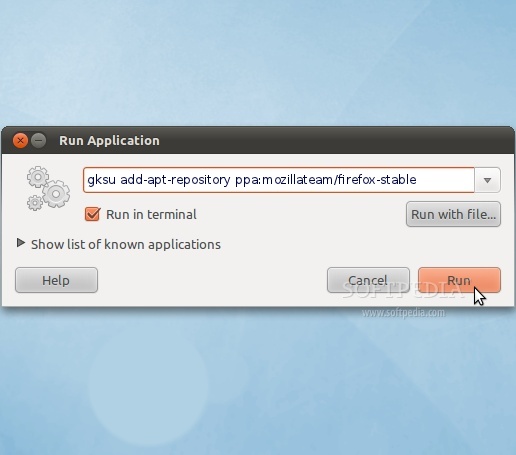
No matter what operating system you are running (Ubuntu 10.10 or Ubuntu 10.04 LTS), hit the ALT+F2 key combination on your keyboard, check the "Run in terminal" option and paste the following command in the "Run Application" dialog:

gksu add-apt-repository ppa:mozillateam/firefox-stable
Review image

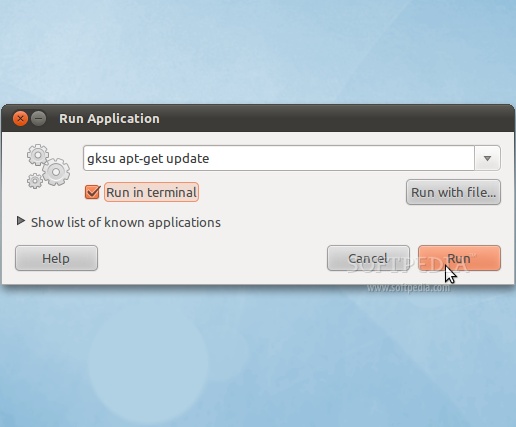
Enter your password when asked and hit the OK button. A terminal window will appear for a few seconds, and it will automatically close. Hit the ALT+F2 key combination again, check the "Run in terminal" option and paste the following command in the "Run Application" dialog:

gksu apt-get update

Review image

Enter your password when asked and hit the OK button. A terminal window will appear for a few seconds, and it will automatically close.

Step 2 - Install Firefox 8

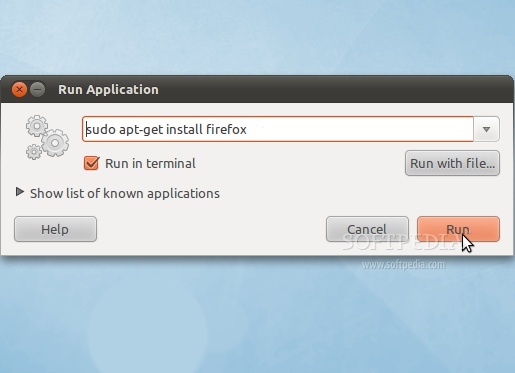
Hit the ALT+F2 key combination on your keyboard, check the "Run in terminal" option and paste the following command in the "Run Application" dialog:

sudo apt-get install firefox
Review image

A terminal window will appear. Enter your password when asked. When you will be asked if you want to install the Firefox 8 packages, type Y and hit the Enter key. Wait for the installation to finish and close the terminal window.

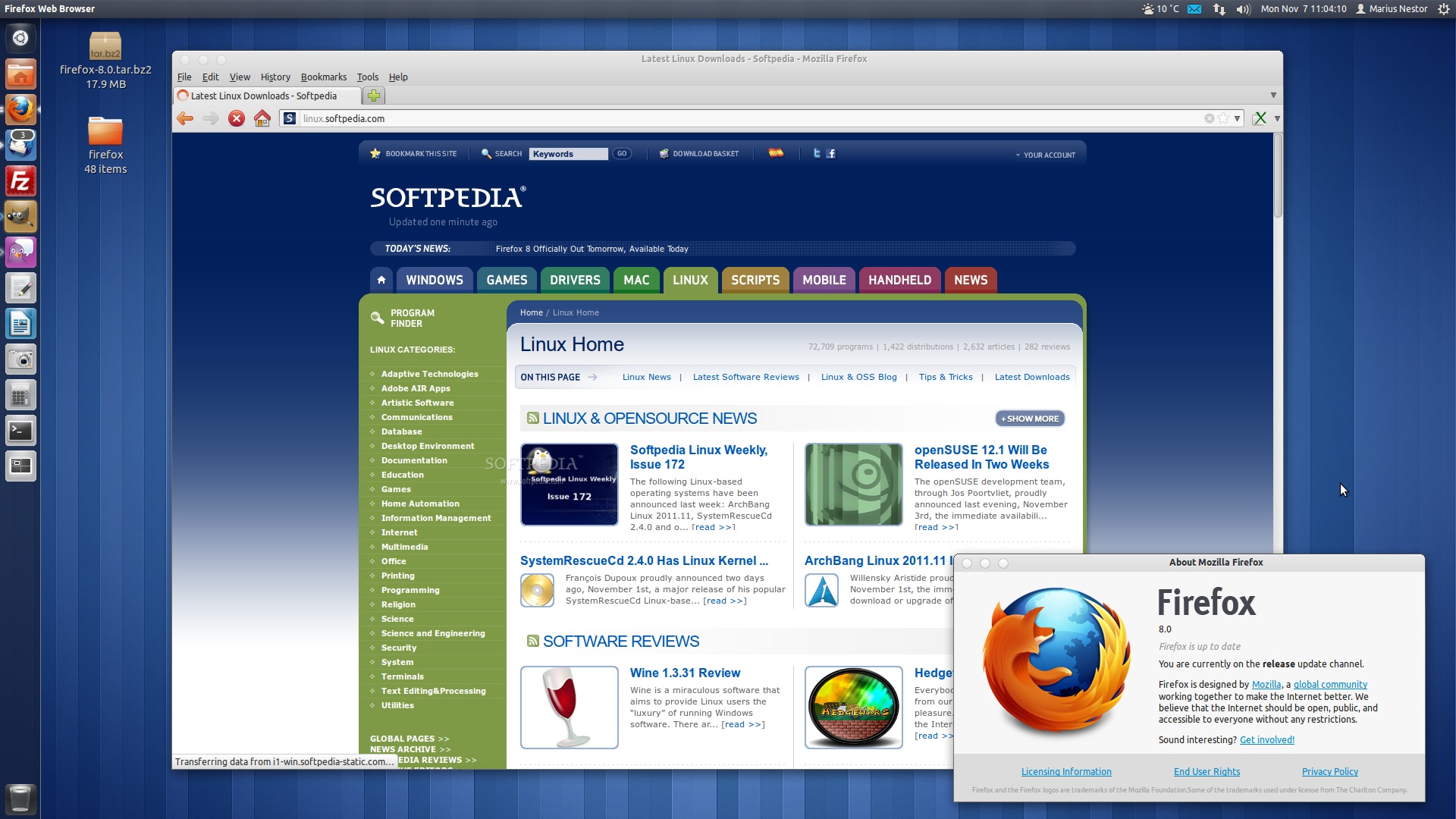
That's it! The new Mozilla Firefox 8 is now fully installed in your Ubuntu machine. You can start it from the Applications -> Internet menu.
Review image
Firefox 8 on Ubuntu 11.10 (Oneiric Ocelot)

In time, Mozilla Firefox 8 will automatically update to newer versions, so make sure you update your system regularly. If you have problems with the tutorial, do not hesitate to comment below!


69,680 hits · 41 comments
Link to this article · Print article · Send to friend

MUST-READ RELATED ARTICLES:


Download Firefox 8 Final for Linux

Ubuntu 12.04 LTS ISO Won't Fit on a CD

Softpedia Linux Weekly, Issue 172

GParted Live CD 0.10.0-3 Can Detect exFAT

openSUSE 12.1 Will Be Released In Two Weeks

READER COMMENTS:


Comment #1 by: :) on 08 Nov 2011, 18:08 UTC reply to this comment

there isn't a firefox 8 yet, still 7.0.1

Comment #1.1 by: Marius Nestor on 08 Nov 2011, 19:15 GMT

Yes it is -> http://news.softpedia.com/news/Download-Official-Firefox-8-and-Thunderbird-8-for-Linux-233227.shtml

Comment #1.2 by: TJG on 09 Nov 2011, 10:37 GMT

I'm not able to get firefox 8 with help of this tutorial. Only 7.0.1, so the first guy was correct

Comment #1.3 by: John Smith on 09 Nov 2011, 17:22 GMT

The packages for Ubuntu 10.04 and 10.10 amd64 and i386 are still pending. They are not ready yet. See https://launchpad.net/~mozillateam/+archive/firefox-stable/+packages

Comment #1.4 by: Vimes on 10 Nov 2011, 07:45 GMT

Still 7.0.1!
8.0 is available only generic version from Mozilla.org
May be just have to wait day or two :)

Comment #1.5 by: Marius Nestor on 10 Nov 2011, 09:25 GMT

Yeah, it looks like there's a problem with publishing the packages. However, here they are:

For Ubuntu 10.10

https://launchpad.net/~mozillateam/+archive/firefox-stable/+files/firefox_8.0+build1-0ubuntu0.10.10.1~mfs1_i386.deb

https://launchpad.net/~mozillateam/+archive/firefox-stable/+files/firefox_8.0+build1-0ubuntu0.10.10.1~mfs1_amd64.deb

For Ubuntu 10.04

https://launchpad.net/~mozillateam/+archive/firefox-stable/+files/firefox_8.0+build1-0ubuntu0.10.04.1~mfs1_i386.deb

https://launchpad.net/~mozillateam/+archive/firefox-stable/+files/firefox_8.0+build1-0ubuntu0.10.04.1~mfs1_amd64.deb


Comment #2 by: mitchauer on 10 Nov 2011, 20:55 UTC reply to this comment

[sudo] password for bob:
Reading package lists... Done
Building dependency tree
Reading state information... Done
firefox is already the newest version.
The following packages were automatically installed and are no longer required:
rpm2cpio debhelper m4 librpmio0 librpm0 rpm-common po-debconf xdotool
intltool-debian gettext cvs libvpx0 pax rpm librpmbuild0 bsd-mailx html2text
lsb-core libmail-sendmail-perl libopenjpeg2 alien ncurses-term
libsys-hostname-long-perl libfaac0
Use 'apt-get autoremove' to remove them.
0 upgraded, 0 newly installed, 0 to remove and 2 not upgraded.

Comment #2.1 by: Dude on 12 Nov 2011, 04:46 GMT

Thanks for the information it's perfectly working :D


Comment #3 by: Gnu-Shoes on 12 Nov 2011, 16:10 UTC reply to this comment

For all of the GUI-Only Linux Users, this is a very nice tutorial to install Firefox. Simply scroll, read, copy, and paste. REMEMBER to check the "Run in terminal" boxes when directed. Flawless install... Thank you!


Comment #4 by: Cancel on 12 Nov 2011, 23:41 UTC reply to this comment

Nice tutorial :) working just fine. Added to favs


Comment #5 by: Adham on 13 Nov 2011, 23:31 UTC reply to this comment

perfecto. Thank you!


Comment #6 by: bgates on 14 Nov 2011, 15:33 UTC reply to this comment

This is why linux will never take over microsoft. This is WAY too hard.


Comment #7 by: jack on 16 Nov 2011, 14:58 UTC reply to this comment

thanks softpedia


Comment #8 by: manoj awasthi on 17 Nov 2011, 13:44 UTC reply to this comment

just now i have seen linex and got me download fire fox 8 finel for linux,please help me to download firfox8 final for linux, thanks you & good wishes.


Comment #9 by: carrie_kanidra on 19 Nov 2011, 03:34 UTC reply to this comment

Brilliant!


Comment #10 by: scruffyeagle on 20 Nov 2011, 11:13 UTC reply to this comment

Well written page. Using Ubuntu 10.04 LTS 32-bit, I was able to move quickly through all the steps without stumbles. My only reservation about this page, is that when the last step completed the terminal window closed - so, I wasn't able to read the contents to discover if I actually got all the recommended programs.


Comment #11 by: jogyLV on 28 Nov 2011, 16:58 UTC reply to this comment

Totorial has wrong repository for 11.10.
You need to use command sudo add-apt-repository ppa:ubuntu-mozilla-security/ppa

Comment #11.1 by: Marius Nestor on 29 Nov 2011, 13:17 GMT

That's because it's not intended for Ubuntu 11.10. As the title says, the tutorial can be used on Ubuntu 10.10 and Ubuntu 10.04 LTS.

Ubuntu 11.10 has Firefox 8 from the official mirrors, no guide needed :)

To install Firefox 9 in Ubuntu 11.10 use this tutorial:

http://news.softpedia.com/news/How-to-Install-Firefox-9-in-Ubuntu-11-10-and-11-04-235482.shtml


Comment #12 by: RSG on 03 Dec 2011, 13:24 UTC reply to this comment

awesome!!!! thanks!!! :) :)


Comment #13 by: biyan on 04 Dec 2011, 07:32 UTC reply to this comment

thanks, it running well.


Comment #14 by: Frank on 09 Dec 2011, 13:58 UTC reply to this comment

Almost as easy as in windoze. Linux has come a long way. However, I think it would be easier just to open the terminal window and run the commands in there, rather than pressing ALT-F2 all the time.


Comment #15 by: ArijitB on 10 Dec 2011, 10:22 UTC reply to this comment

Thanks for this article, worked for me great....stuck ver 3.6 for a long time in Ubuntu 10.04. Again Thanks a Ton to the author of this article.


Comment #16 by: vance on 10 Dec 2011, 13:34 UTC reply to this comment

Thanks a lot :o) greatest and most helpful site on the web today ...love it


Comment #17 by: joice joseph on 12 Dec 2011, 15:00 UTC reply to this comment

excellent , it is working fine- joice mumbai


Comment #18 by: Biju on 16 Dec 2011, 08:19 UTC reply to this comment

The article is very helpful in updating Firefox. Thank u
Biju


Comment #19 by: veeran on 16 Dec 2011, 18:24 UTC reply to this comment

Thanks a lot.....one of the best tutorials for newbie's to ubuntu..


Comment #20 by: AnjanaS on 20 Dec 2011, 18:05 UTC reply to this comment

The tutorial is so accurate and quick. I could get my firefox upgraded from 3.6 to 8.0 very easily. Good one for a newbie. Thank you very much!


Comment #21 by: Jonas Thoms on 20 Dec 2011, 18:06 UTC reply to this comment

Thanks for the instructions, but I think it would have been easier to just open a terminal session once and do the instructions sequentially..


Comment #22 by: Taimi on 21 Dec 2011, 12:26 UTC reply to this comment

Oh Man I have stuck with mozila fire fox installer that is showing in menu not the mozila browser

Comment #22.1 by: CsSpr on 27 Dec 2011, 21:20 GMT

Initial instructions worked great for me.


Comment #23 by: mdm on 09 Jan 2012, 16:44 UTC reply to this comment

Thx you! )


Comment #24 by: salar on 17 Jan 2012, 15:26 UTC reply to this comment

Ilike your site.awesome.I need more softwear support from your site about my ubuntu10.04lts please.thank you.SOMETHING 2 TELL YOU.Iget firefox 9.0.1!!but it's good .


Comment #25 by: Phil on 18 Jan 2012, 17:54 UTC reply to this comment

Good stuff! Thanks


Comment #26 by: Vladimir on 21 Jan 2012, 20:59 UTC reply to this comment

tnx u!


Comment #27 by: kdweeb on 02 Feb 2012, 05:56 UTC reply to this comment

Thanks so much Synaptic package manager did not work for me. Accidentally came here. Cookies on the bottom shelf! I'm not a geek, but I can paste sudu strings where you tell me! Thanks muchly.


Comment #28 by: david on 19 Feb 2012, 18:11 UTC reply to this comment

When I try the first step `gksu add-apt-repository ppa:mozillateam/firefox-stable', I get the error

Error: can't find signing_key_fingerprint at https://launchpad.net/api/1.0/~mozillateam/+archive/firefox-stable


Comment #29 by: wb6csh on 28 Apr 2012, 23:44 UTC reply to this comment

A very useful tutorial! I used it verbatim today (2012 April 28), and it worked perfectly. Only the fisrt two (2) steps were necessary to get the old (3.6?) version of Firefox updated to version 12. Thank you!


Comment #30 by: reddy on 23 Jul 2012, 08:38 UTC reply to this comment

thanks


Comment #31 by: balu on 05 Aug 2012, 11:52 UTC reply to this comment

it is not working


Comment #32 by: Whistling_A_Tune on 11 Aug 2012, 14:08 UTC reply to this comment

Smooth install... thanks for this.


Comment #33 by: Umar on 13 Oct 2012, 17:42 UTC reply to this comment

i have followed all above step but still facing problem

Copyright © 2001-2013 Softpedia. Contact/Tip us at

WindowsGamesDriversMacLinuxScriptsMobileHandheldNews

SUBMIT PROGRAM   |   ADVERTISE   |   GET HELP   |   SEND US FEEDBACK   |   RSS FEEDS   |   UPDATE YOUR SOFTWARE   |   ROMANIAN FORUM