
Softpedia
 

NEWS CATEGORIES:


NEWS ARCHIVE >>
SOFTPEDIA REVIEWS >>
MEET THE EDITORS >>
TRENDING TODAY
Home > News > Linux > Ubuntu Tips and Tricks

February 10th, 2011, 11:30 GMT · By

How to Install Firefox 4 in Ubuntu 10.10, 10.04 and 9.10

SHARE:

Adjust text size:

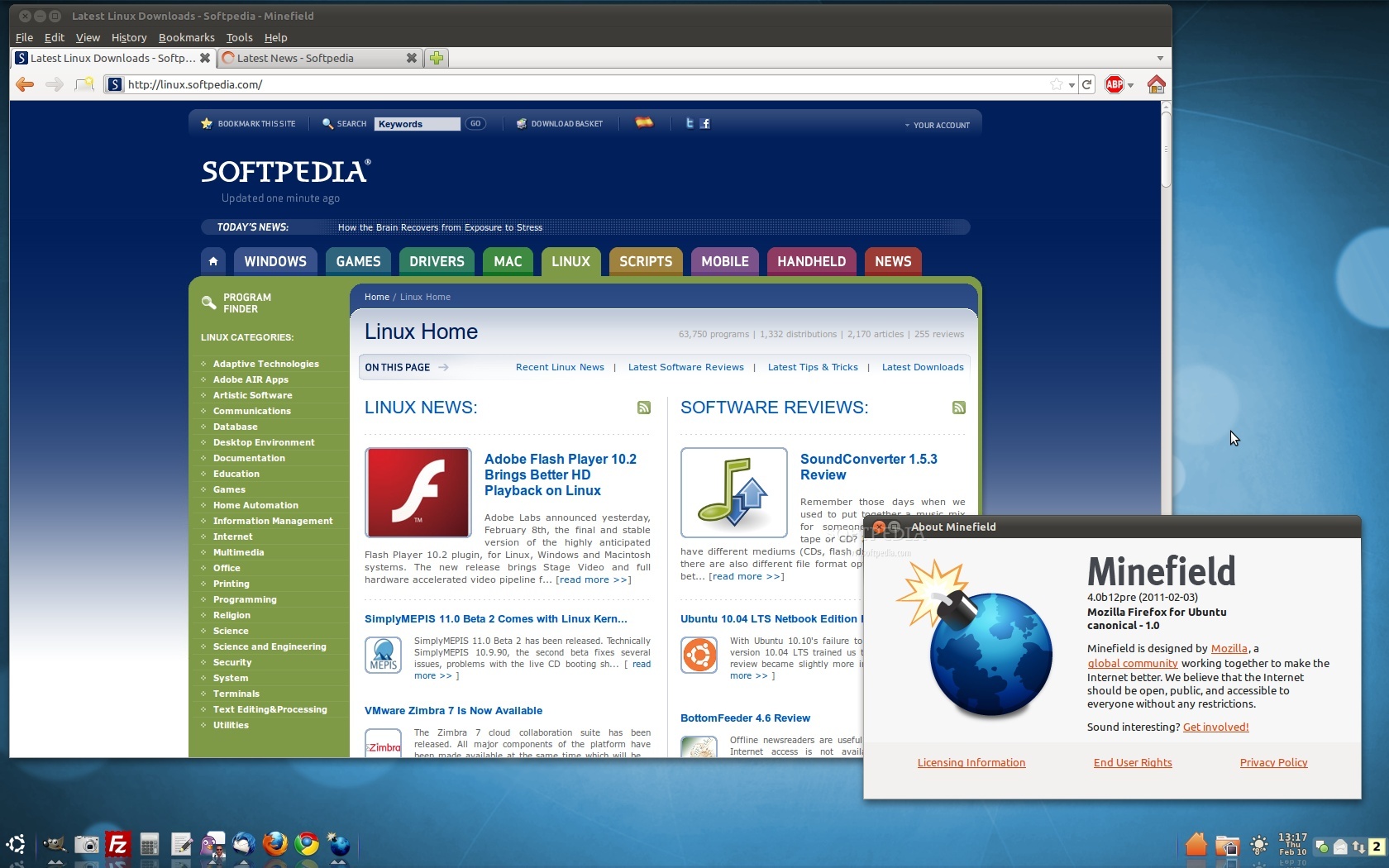
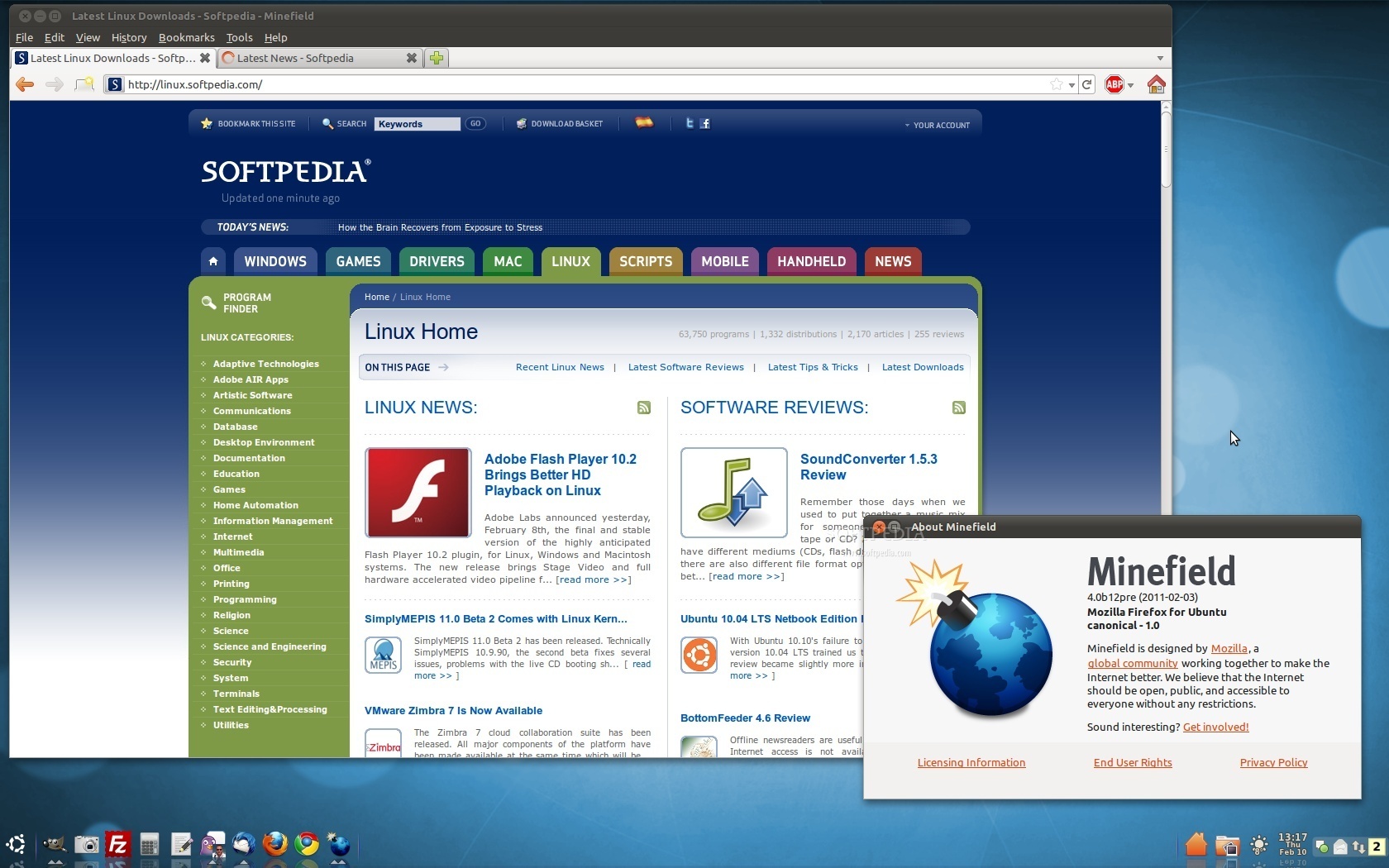
Mozilla Firefox 4 Beta 12 on Ubuntu 10.10
Enlarge picture
The following tutorial will teach every Ubuntu 10.10, Ubuntu 10.04 LTS and Ubuntu 9.10 user how to install the current development version of the upcoming Mozilla Firefox 4 web browser.

At the request of many of our readers, we've created this tutorial to guide them with the installation of the popular Mozilla Firefox 4 web browser. However, be aware that this version is still in development and it may crash often!

The Mozilla Firefox 4 packages are available for the following Ubuntu distributions:

· Ubuntu 10.10 (Maverick Meerkat);
· Ubuntu 10.04 LTS (Lucid Lynx);
· Ubuntu 9.10 (Karmic Koala).

To install Mozilla Firefox 4 on your system follow the next step-by-step (with screenshots) tutorial.

Step 1 - Add the Firefox 4 repository

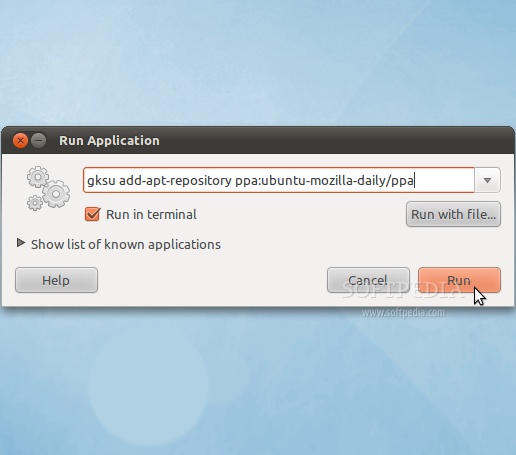
No matter what operating system you are running (Ubuntu 10.10, Ubuntu 10.04 LTS or Ubuntu 9.10), hit the ALT+F2 key combination on your keyboard, check the "Run in terminal" option and paste the following command in the "Run Application" dialog:

gksu add-apt-repository ppa:ubuntu-mozilla-daily/ppa
Review image

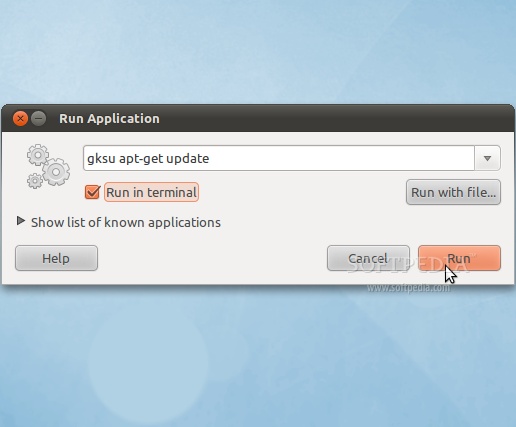
Enter your password when asked and hit the OK button. A terminal window will appear for a few seconds, and it will automatically close. Hit the ALT+F2 key combination again, check the "Run in terminal" option and paste the following command in the "Run Application" dialog:

gksu apt-get update

Review image

Enter your password when asked and hit the OK button. A terminal window will appear for a few seconds, and it will automatically close.

Step 2 - Install Firefox 4

Hit the ALT+F2 key combination on your keyboard, check the "Run in terminal" option and paste the following command in the "Run Application" dialog:

sudo apt-get install firefox-4.0
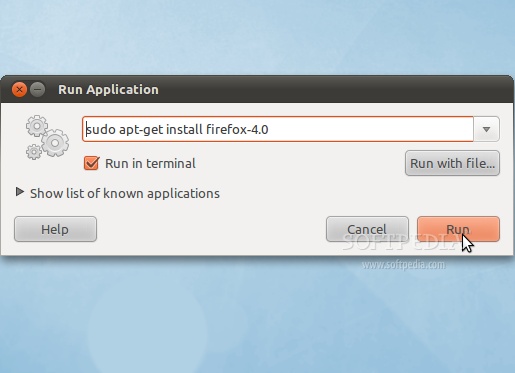
Review image

A terminal window will appear. Enter your password when asked.

When you will be asked if you want to install the Firefox 4 packages, type Y and hit Enter. Wait for the installation to finish...
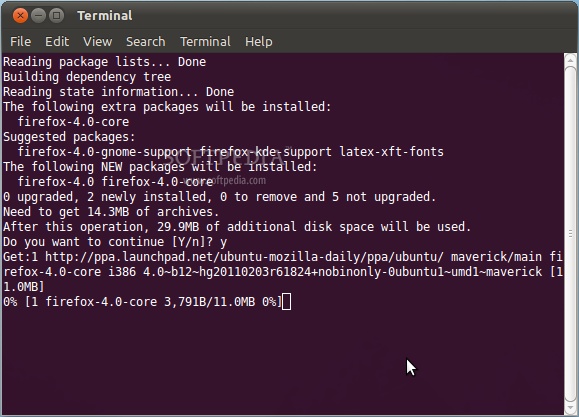
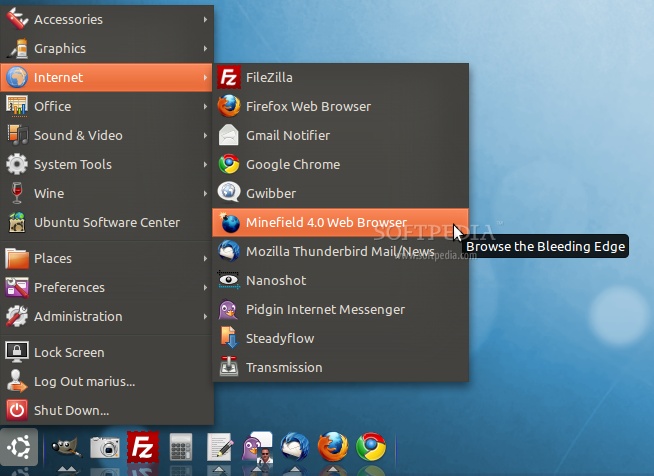
Review image

That's it! Firefox 4 is now completely installed in your Ubuntu machine. You can start it from Applications -> Internet -> Minefield 4.0 Web Browser...

Review image
Review image

In time, Mozilla Firefox 4 will automatically update to newer versions, so make sure you update your system regularly. Mozilla Firefox 4 will also be the default web browser in the upcoming Ubuntu 11.04 (Natty Narwhal) operating system.

If you have problems with the tutorial, do not hesitate to comment below!


60,335 hits · 30 comments
Link to this article · Print article · Send to friend

MUST-READ RELATED ARTICLES:


Adobe Flash Player 10.2 Brings Better HD Playback on Linux

SimplyMEPIS 11.0 Beta 2 Comes with Linux Kernel 2.6.36.2

VMware Zimbra 7 Is Now Available

Sabayon Linux 5.5 CoreCDX and SpinBase Editions Released

Softpedia Linux Weekly, Issue 135

READER COMMENTS:


Comment #1 by: Buzz on 10 Feb 2011, 12:02 UTC reply to this comment

What's that cool bar on the bottom, with menu, quick launch, and notification area ?

Comment #1.1 by: ee955 on 12 Feb 2011, 21:34 GMT

http://news.softpedia.com/news/Ubuntu-10-04-Desktop-Customization-Guide-146134.shtml
thats the tutorial


Comment #2 by: saneman on 10 Feb 2011, 12:51 UTC reply to this comment

Firefox Just keeps getting better and better.


Comment #3 by: Gecko on 10 Feb 2011, 19:25 UTC reply to this comment

Yea, it crashes out of the gate. Can't get the page to load at all. Don't bother, it's obviously not ready for prime time. I run 10.04LTS.


Comment #4 by: FedeleP on 11 Feb 2011, 03:38 UTC reply to this comment

BleedingEdge installs Firefox 4 (Minefield)

http://sourceforge.net/projects/bleedingedge/

Enjoy,

FedeleP


Comment #5 by: herimint on 12 Feb 2011, 14:47 UTC reply to this comment

excellent...thx for ubuntu and firefox


Comment #6 by: ee955 on 12 Feb 2011, 21:31 UTC reply to this comment

what's that dock thing called?


Comment #7 by: saneman on 16 Feb 2011, 12:52 UTC reply to this comment

I put it on my system and it crashed everything and I had to reinstall my entire system. Thanks a lot.

Comment #7.1 by: dickHunter on 22 Mar 2011, 13:33 GMT

Moron or troll ... moron or troll ... I'm going troll. For you to crash your system completely doing this is harder than climbing Mt Everest in a single day in the buff.
Like any pen, a poison one can leak and it is your fingers that will be stained.

Another * ... hunted down


Comment #8 by: thor on 18 Feb 2011, 14:37 UTC reply to this comment

Thanks. its works.


Comment #9 by: weatheredwatcher on 18 Feb 2011, 16:21 UTC reply to this comment

Seriously? Alt-F2? For EVERYTHING? You are not really helping by babying. Run a terminal application(it won't bite I promise) , then enter in the commands:

sudo add-apt-repository .......
sudo apt-get update


Comment #10 by: k7c on 22 Feb 2011, 05:28 UTC reply to this comment

Awesome.. finally got to install firefox 4 on my ubuntu..
cheers


Comment #11 by: Andy on 08 Mar 2011, 05:59 UTC reply to this comment

Just great so far, can't complain, seems fast and efficient, haven't struck any bugs yet. Seems to run well on 10.10


Comment #12 by: Detroitgeek on 22 Mar 2011, 01:32 UTC reply to this comment

What about my addons that I had working with 3.6.13? Should I assume that the addons will have to catch up wit this?

Comment #12.1 by: Marius Nestor on 24 Mar 2011, 10:13 GMT

Yes, most add-ons are begin updated for Firefox 4 as we speak. Check out our up-to-date Firefox extensions section for the latest add-ons:

http://linux.softpedia.com/get/Internet/Firefox-Extensions/


Comment #13 by: MatsH on 22 Mar 2011, 05:37 UTC reply to this comment

What about language packages? There are cases when these Firefox uppgrades are successful but only with english versions.


Comment #14 by: theBlueSage on 22 Mar 2011, 13:47 UTC reply to this comment

Just followed the exact directions on my Ubuntu 10.10 64bit system. Worked perfectly. It even picked up the persona that I had applied to my 3.6 version of firefox. My FoxyProxy plugin, y-slow, web developer toolbar all worked fin. Firebug did not but that is to be expected on day one of the release.
AS for the postest decrying the use of 'alt-f2', eh - it works and supports the lowest common denominator. If you are familiar with the command line adapting the instructions on the fly is easy, however if you have no idea what a command line is, then that should not stop you from using firefox-4.0.
What makes me laugh is the trolls/MS plants who write comments about how they needed to re-install their entire system afterward. THEY ARE JUST TROLLS. Ignore them. This is a safe process, and unlike windows systems, the browser is in NO WAY connected to the operating system so it simply cannot take down the computer and require a reinstall.
Do not be afraid of the angry jealous man my friends and fellow Ubuntu users, there will always be haters, but they have no bite and can be safely ignored
What will be interesting is seeing how soon this browser makes it into the official Ubuntu 10.10 repositories, and how long it takes firebug to catch up.


Comment #15 by: comediablue on 23 Mar 2011, 13:22 UTC reply to this comment

Thank you! Thank you very much!!! Imagine this: there are many "how to" installing the latest version of Firefox in Linux, but any of them had told us that Firefox 4 for Linux is called "Minefield"!!!!! Thanks for that, because many hours ago I had installed this browser and I didn't know!


Comment #16 by: vivek on 29 Mar 2011, 12:06 UTC reply to this comment

sir, I m vivek..
I understand your steps but this will result in downloading of firefox 4.0b12.tar.bz2....
I want to ask how we can install it if we are having in a disk as I have already downloaded it from windows 7 and burned in a disk..
Plz give your suggestions for installing it from a disk..


Comment #17 by: lintonsol on 13 Apr 2011, 13:32 UTC reply to this comment

Why can't the Linux community issue instructions like this for all software installations?

I'm a Windows 7 user by choice because it is so difficult to install software on Linux!

Having said that, Ubuntu 10.10 with wubi is a dream to install from a windows environment but I do have difficulty installing some software especially if I have to compile the source :o(>


Comment #18 by: Downshifter on 15 May 2011, 04:00 UTC reply to this comment

I typed "Y" and it's not there...in my apps.


Comment #19 by: DJ on 25 May 2011, 20:55 UTC reply to this comment

after upgrading Ubuntu10.10 to Ubuntu11.4
& installing compiz my ubuntu get bug.....


Comment #20 by: tropicaline on 30 May 2011, 13:14 UTC reply to this comment

well, in the terminal it tels me thar it's impossible to find the "firefox-4.0" package.. i'll keep trying! thanks!


Comment #21 by: vijay on 03 Jun 2011, 10:30 UTC reply to this comment

helpful... thanks!....


Comment #22 by: dibya on 20 Jun 2011, 05:56 UTC reply to this comment

worked on ubuntu 10.04 thanks :)


Comment #23 by: priscilla on 12 Jul 2011, 03:54 UTC reply to this comment

Love the instructions--easy to follow. I was a little surprised to end up with Firefox 8.0x from the Nightly channel rather than FF 4, but it's working a treat, so no problems on that account.
Many thanks.


Comment #24 by: Guarav Mittal on 21 Sep 2011, 18:52 UTC reply to this comment

Thanks for sharing such useful information
Keep it up.!!!!!!


Comment #25 by: chicholino on 18 Oct 2011, 02:04 UTC reply to this comment

Thank you very much!! totally helpful.. works great!!!
Cheers from Argentina


Comment #26 by: hoohaa on 02 Dec 2011, 23:05 UTC reply to this comment

2nd December 2011 .... This actually downloads a 'nightly' build of Mozilla/Firefox, (not minefield) which, while working, has incomplete generic folder icons and html icons in your bookmarks. All bookmarks are migrated from my previous firefox 3.6.8. I was hoping tho get the updated version of Adobe flash player pre-installed with this browser download, but that was not the case.


Comment #27 by: Buzz on 28 Nov 2012, 21:32 UTC reply to this comment

Have done everything step by step, when entering
sudo apt-get install firefox-4.0 in to the terminal command line, click "run in terminal" , click run, enter password and all I get is "transferring data from s7.addthis.com" and nothing happens after that. Why can't this stuff be programmed to work correctly?

Copyright © 2001-2013 Softpedia. Contact/Tip us at

WindowsGamesDriversMacLinuxScriptsMobileHandheldNews

SUBMIT PROGRAM   |   ADVERTISE   |   GET HELP   |   SEND US FEEDBACK   |   RSS FEEDS   |   UPDATE YOUR SOFTWARE   |   ROMANIAN FORUM