
Softpedia
 

NEWS CATEGORIES:


NEWS ARCHIVE >>
SOFTPEDIA REVIEWS >>
MEET THE EDITORS >>
TRENDING TODAY
Home > News > Webmaster > Internet Life

June 7th, 2012, 18:41 GMT · By

How to Get Rid of the New Tab Page in Firefox 13, or Provide a Custom One

SHARE:

Adjust text size:

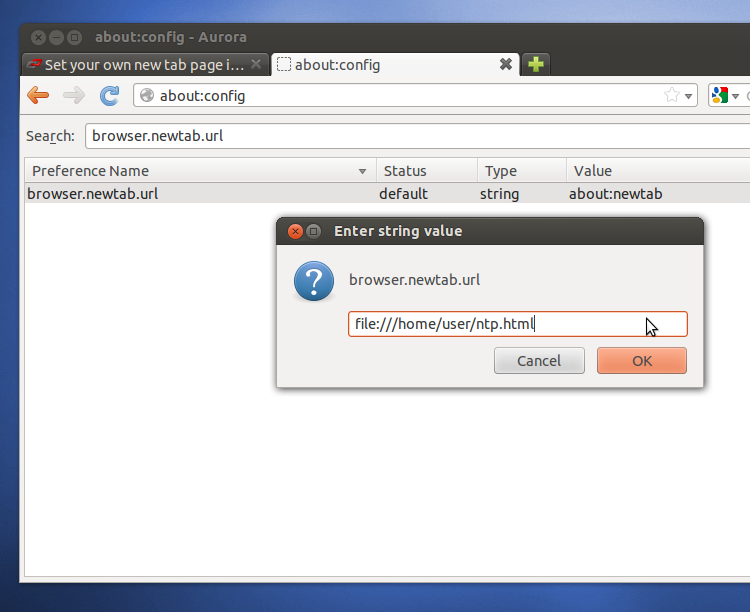
You can customize or remove the new tab page in Firefox 13
Enlarge picture
Firefox 13 comes with a brand-spanking new tab page. It's the first time Firefox has had anything than a blank page in there and, even though it's spartan to say the least, there are only nine shortcuts to frequently visited sites, it's a great addition for the people that have waited for it for so long.

Unfortunately, some people haven't been waiting for the feature, in fact some may even have chosen Firefox precisely because it didn't have one.

Those people don't like the new tab page, which is hardly surprising, there is someone, somewhere that is not going to like anything you do to your software, website or anything else.

Luckily for them, it's easy to get rid of the new tab page. For one, there is a small button, in the upper right corner that hides the site tiles, leaving only the small button visible. It simple and fast, it's unlikely that the small grey button is going to annoy you.

But if it does, or you want your own custom new tab page, there is another option. You can dig your way through about:config, type it in the addressbar, and find the "browser.newtab.url" setting.

Double click on the line to edit it to put in anything you like, a website like Google (https://www.google.com) or Facebook (https://www.facebook.com) for example.

You can also point it at a custom local file, so you can create your own personalized new tab page with a bit of knowledge of HTML, CSS and JavaScript.

There are simpler, or at least sounder, ways of creating a custom new tab page. Finally, if all you want is a simple blank page, you can type in "about:blank" and be done with it.


3,874 hits · 9 comments
Link to this article · Print article · Send to friend

MUST-READ RELATED ARTICLES:


Firefox Will Look and Feel the Same on PCs, Phones and Tablets (Design Mockups)

Google Chrome Overtakes Internet Explorer for an Entire Week

Firefox 14 Adds a Download Panel, It's Here to Stay This Time

Firefox 14 Aurora Adds Click-to-Play Plugins, SSL Google by Default

What You Need to Know About Firefox 13, Landing Next Week

READER COMMENTS:


Comment #1 by: Mo on 08 Jun 2012, 04:18 UTC reply to this comment

Thanks for sharing this information; I particularly hate the new tab set up, so I'll check out some of the solutions that you posted.


Comment #2 by: duh on 09 Jun 2012, 00:23 UTC reply to this comment

Thank you very much for the article. I am one of those who like a clean page when opening a tab. Your button solution was a snap.


Comment #3 by: FF-Fan on 17 Jun 2012, 12:51 UTC reply to this comment

A tab page 'broadcasting' your recent browsing history by default to all that have view of your monitor - ABSOLUTELY IDIOTIC! - what on earth were Mozilla thinking of!!!!!
If the feature was desired by some (not necessary OR desirable IMHO) it should have been an OPT-IN, NOT a default.


Comment #4 by: Xtro5 on 18 Jun 2012, 02:21 UTC reply to this comment

Never have wanted this kind of feature, just a nice blank page that's clean. Thanks for the how-to.


Comment #5 by: Chris on 20 Jun 2012, 16:20 UTC reply to this comment

EPIC FAIL Mozilla. Thanks for taking screenshots of my online banking and webmail messages. Those pages are being secure HTTPS logins for a reason!!!


Comment #6 by: JCMX on 23 Jun 2012, 19:22 UTC reply to this comment

Thanks for the info. Like others, this is not a feature I have been waiting for. But I have found myself waiting ON it since it has been introduced. Instead of being able to open a new tab and immediately tart typing a url or opening a bookmark, Firefox basically freezes until the nine tab images are loaded. Maybe my box is slow, but 2-3 seconds of waiting is anoying every time I want a new tab. Changing the settings in about:config takes care of that though.


Comment #7 by: Kedarz on 25 Aug 2012, 09:42 UTC reply to this comment

Wow It works thanks a lot ..!!


Comment #8 by: Zorba on 20 Sep 2012, 21:49 UTC reply to this comment

Wonderful! I'm sick and tired of my desktop being dumbed down to the level of a limited mobile/touch device. Thank you.

Comment #8.1 by: jakci on 26 Sep 2012, 08:44 GMT

The other truth is that most end users typically just click on one of the web sites from the very first research benefits.
first page of google

Copyright © 2001-2013 Softpedia. Contact/Tip us at

WindowsGamesDriversMacLinuxScriptsMobileHandheldNews

SUBMIT PROGRAM   |   ADVERTISE   |   GET HELP   |   SEND US FEEDBACK   |   RSS FEEDS   |   UPDATE YOUR SOFTWARE   |   ROMANIAN FORUM