
|
|
|
|
May 15th, 2009, 10:19 GMT · By Marius Nestor
How to Fix VirtualBox USB Support |
|
|
|
|
SHARE:
Adjust text size: 
|
|
It is actually a known fact that there
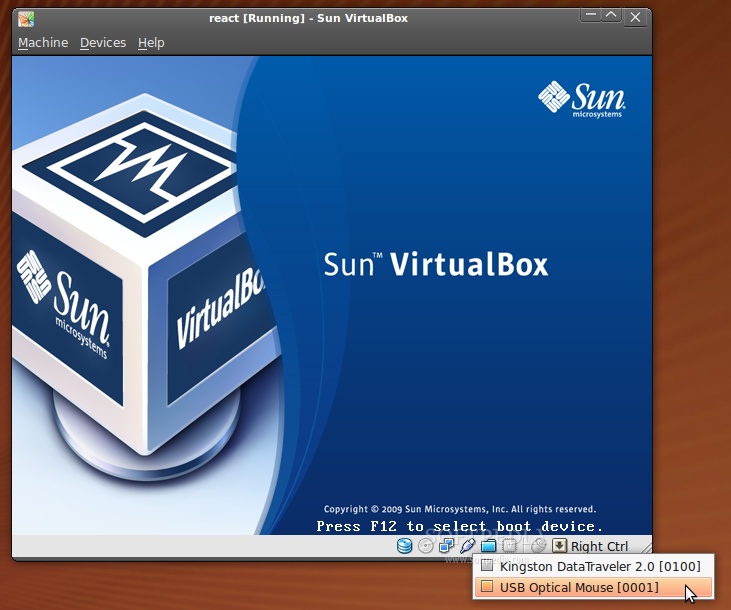
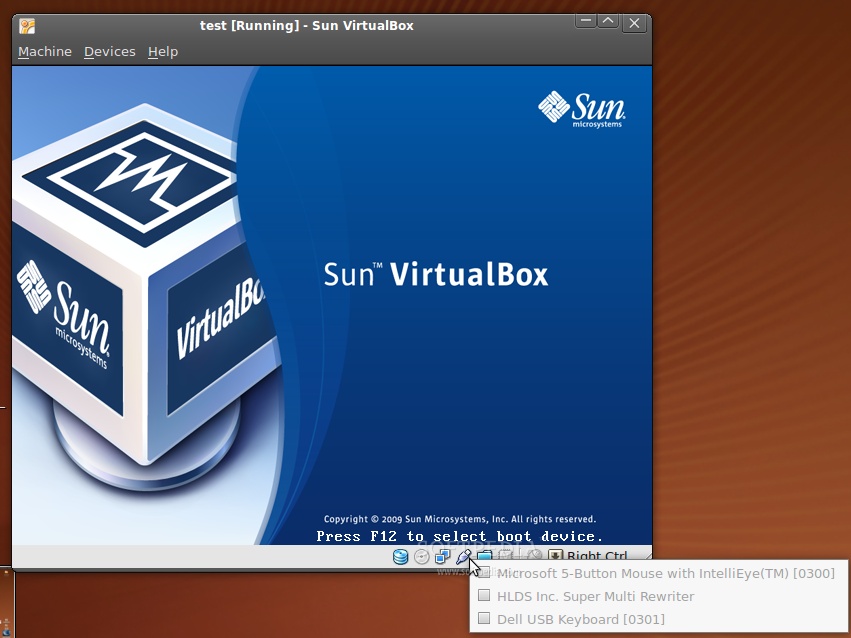
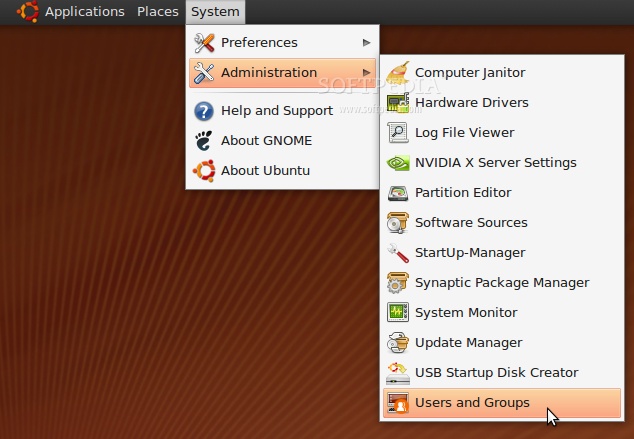
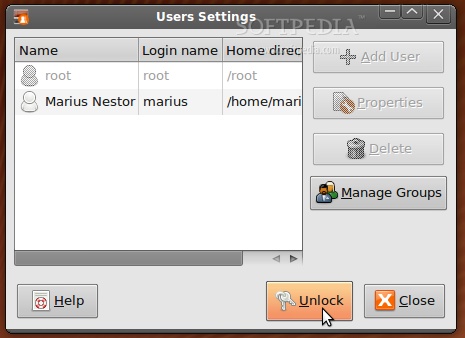
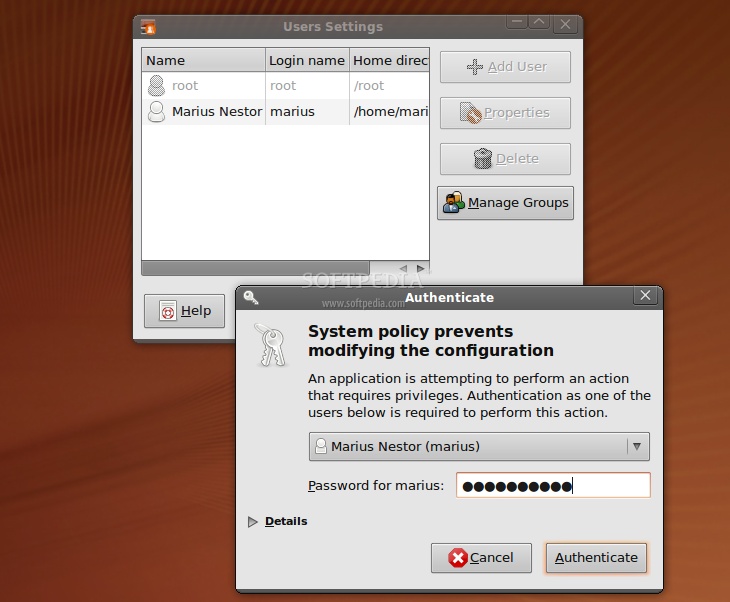
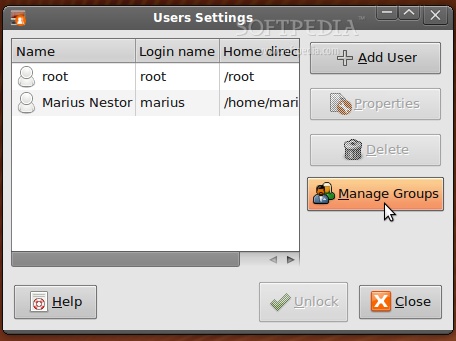
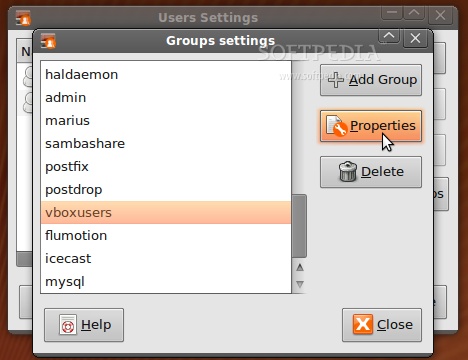
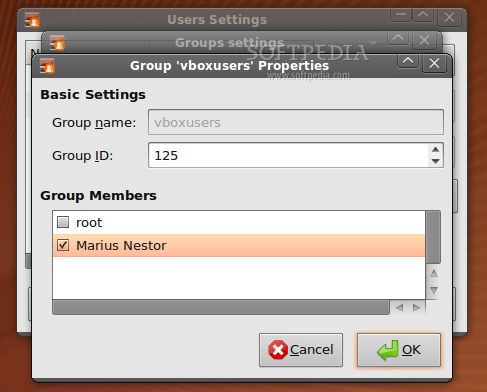
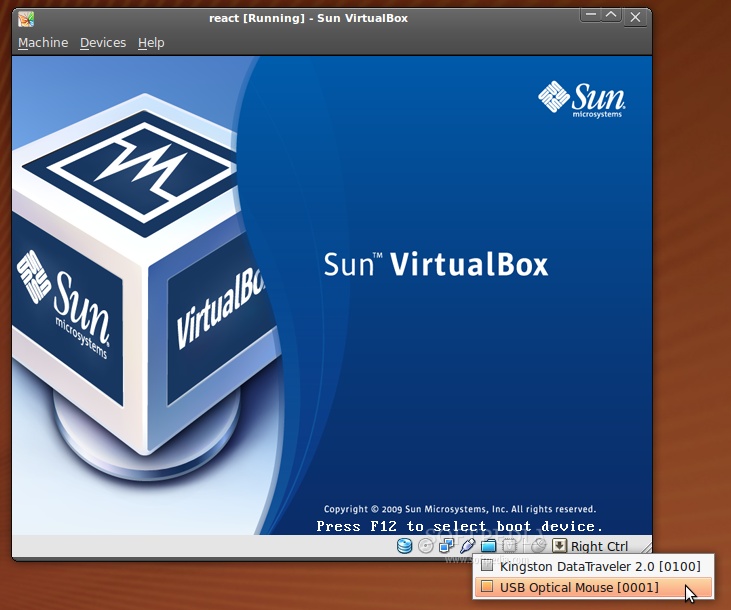
is an issue with VirtualBox and the attached USB devices that many of us are trying to use in the virtual machine. Here is a real-life example: I am a 100% Linux user and I have a photo printer that Linux can't recognize. Let's say that I want to print some photos quickly, to give them to someone. I have a Windows installation in a virtual machine just for this reason (sad, I know) and I want to access my printer, which is connected via a USB port. To my surprise, I can see the printer in the USB device list of VirtualBox, but I can't access it (very frustrating). Firing up Firefox and searching on Google for a fix takes too long, because there are many old tutorials that teach you how to modify various files or change permissions, etc. What to do? Well, below is the answer to the endless VirtualBox – USB issue (and it's pretty damn simple too!). This tutorial was created mostly for my needs, but I am sure that many of you will find it very helpful. Ready? This is how a default installation of VirtualBox in Ubuntu 9.04 shows the USB devices, and we need to fix it. Go to System -> Administration -> Users and Groups... Click the "Unlock" button... Type your password and click the "Authenticate" button.... Click on the "Manage Groups" button... In the "Groups settings" window that will appear, scroll down until you see the vboxusers entry. Select it and then click on the "Properties" button... Another window will appear, called "Group 'vboxusers' Properties. Just check the box in front of your username and click the "OK" button when you're done... Close the "Group settings" and "Users Settings" windows and log out. Log in and open up VirtualBox, start your virtual machine and you will see that you can now access the USB devices! Yes... it was that simple!
|
|
|
|
|
 |
460,077 hits
· 200 comments
Link to this article
· Print article
· Send to friend
|
MUST-READ RELATED ARTICLES:
READER COMMENTS: |
| Comment #1 by: Hussain on 15 May 2009, 14:55 UTC | reply to this comment | Thanks Marius for the tutorial i was looking for the solution since a month. |
| Comment #2 by: Adz on 15 May 2009, 15:30 UTC | reply to this comment | It is really useful. I searched a lot in the net to find a solution for this problem and i was empty handed until now. Thanks |
| Comment #3 by: nocompiz on 15 May 2009, 15:45 UTC | reply to this comment | You need to desactivate Compiz too.
I can't have the mouse with that. |
| Comment #3.1 by: lukas on 06 Sep 2010, 09:34 GMT | how do you do that? |
| Comment #4 by: thagoat on 15 May 2009, 20:27 UTC | reply to this comment | Wow. Don't I feel like a fool. I played with this setting for 3 weeks and deleted my vbox install because of this |
| Comment #6 by: Anonymous on 17 May 2009, 17:23 UTC | reply to this comment | so does anyone know if this will help with problems in installing XP with virtualbox? certain... permission....problems? |
| Comment #6.1 by: Marius Nestor on 18 May 2009, 07:51 GMT | What problems? I am not aware of such "permission" problems, please be more explicit. |
| Comment #7 by: itnet7 on 18 May 2009, 15:40 UTC | reply to this comment | Marius,
I want to thank you so much for posting this. I have told a lot of people to add their user account to the vboxusers group, some of them were able to without more assistance, but some couldn't understand how to do this (I try and help out users at work and play that are "trying" linux so it's no wonder they can't add the group themselves without much assistance). I was thinking of similarly documenting it, prior to finding this. I will point them in your articles direction!
Thanks for taking the time out to post this.
Chris Crisafulli
itnet7 |
| Comment #8 by: Andrew on 21 May 2009, 03:07 UTC | reply to this comment | Running VirtualBox 2.2.0 on Debian Lenny. Am already in vboxusers group yet usb devices in virtual machines are grayed out. |
| Comment #8.1 by: rob on 13 Oct 2009, 22:54 GMT | i have the same problem.
here is the proof
rob@robunto:~$ cat /etc/group | grep rob
adm:x:4:rob
dialout:x:20:rob
cdrom:x:24:rob
plugdev:x:46:rob
lpadmin:x:104:rob
admin:x:115:rob
rob:x:1000:rob
sambashare:x:122:rob
vboxusers:x:123:rob
~~~~~
i am in the vboxusers.
bu still greyed out in vertualbox |
| Comment #8.2 by: rob on 13 Oct 2009, 23:06 GMT | duh.. had to logout and login |
| Comment #9 by: mohaned_nj on 22 May 2009, 11:25 UTC | reply to this comment | coooooooooooool , it works .......................... at last
but let me inform u that that dosent work only on the last version of VB 2.2.2
thanks alot |
| Comment #11 by: Skiesare on 28 May 2009, 16:59 UTC | reply to this comment | This will not work with the version in the Ubuntu repositories, you have to down load the version from http://www.virtualbox.org/wiki/Linux_Downloads
This is because the USB code is not entirely free and open. |
| Comment #12 by: b.h. on 29 May 2009, 06:39 UTC | reply to this comment | Brilliant,
I could not use vb for ages, I know that I had to a member of vboxusers but it had not been ticked off.
How stupid am I?
Thanks |
| Comment #13 by: dyess002 on 16 Jun 2009, 05:56 UTC | reply to this comment | My vb tells me at the top under devices that there are no usb devices. How do I fix this?
Hope you can come up with something.
Thanks |
| Comment #15 by: Wow! on 06 Jul 2009, 18:22 UTC | reply to this comment | It's amazing to me how many users missed the large type, bold faced instructions when installing VirtualBox. That notice was to make sure all users that were going to use VirtualBox should be made members of the vboxusers group. I've used VirtualBox for almost two years now, and I didn't miss it when I installed the first time. (Maybe it's the default Ubuntu packages that fail to show the instructions. I installed it into Debian from a package file downloaded from the VirtualBox download site. Synaptic popped up an instruction box at the end of the install with instructions to add users to the vboxusers group. |
| Comment #16 by: Wow! on 06 Jul 2009, 18:35 UTC | reply to this comment | Make sure the USB device you want activated in VB is plugged in. Open the VB starting window but don't start a machine. Select the machine you want the USB device attached to. Click the "Settings" button. On the left-hand side, choose "USB." Make sure "Enable USB Controller" is selected. Unless you have an older computer, also make sure that "Enable USB 2.0 (EHCI) Controller" is also selected. On the far right side, there are several buttons that have a picture of a USB plug and a symbol. The second button from the top is a USB plug with a plus sign. It is to add a device filter from a plugged device. Click it. If your desired device is in the list, select it. This adds the device to the list of devices that can be accessed by VB. If it is not in the list, then you have problems with your USB set up working well with VB.
BTW, when VB is "attached" to a USB device, the same device becomes unavailable in your host OS. If this is for an external drive, it is best to register the external drive as a shared folder in VB. This way both the host and the guest can access the external drive at the same time. |
| Comment #16.1 by: Beeble on 29 Jul 2012, 09:47 GMT | Thanks very much Wow. Your tips got usb working for me. Absolutely wonderful. Thank you. |
| Comment #17 by: André on 24 Jul 2009, 15:57 UTC | reply to this comment | I don't even have "USB" on the menu to the left, all I have is:
General
Hard Disks
CD/DVD-ROM
Floppy
Audio
Network
Serial Ports
Shared Folders
And I've seen screenshots of the menu and they all have a USB tab, but I don't. What the heck? I don't have that USB icon on the bottom of the VB window that you have in your screenshots either. |
| Comment #17.1 by: Marius Nestor on 31 Jul 2009, 14:09 GMT | Install the DEB package from www.virtualbox.org not from the Ubuntu repository! |
| Comment #17.2 by: nazmieski on 23 Dec 2009, 03:15 GMT | I think urs is OSE that's why u dont have USB menu. |
| Comment #20 by: Live on 09 Aug 2009, 06:10 UTC | reply to this comment | In my case, you need to LOGOUT of Ubuntu.
This will reset Users and Groups.
Don't need to reboot, remember this when you change users and groups in the future. Thanks for the info.
PS Can you change the design of the website, it's really hard to read and type using small letters. |
| Comment #22 by: Franki on 14 Aug 2009, 14:26 UTC | reply to this comment | This just confirms my belief that many problems can be solved simply. Thank you!! |
| Comment #23 by: Rocco on 24 Aug 2009, 15:27 UTC | reply to this comment | This is a good tutorial. However, this does not work for everyone. While I am able to connect my usb devices, I am unable to access them with USB 2.0 enabled. When I disable USB 2.0, everything works. |
| Comment #24 by: Ashura on 28 Aug 2009, 01:27 UTC | reply to this comment | Wow really nice. it work . thanks Marius |
| Comment #25 by: tsai on 29 Aug 2009, 18:34 UTC | reply to this comment | I have followed the instructions above fully. I:
installed VB 3.0
added my user to the vboxusers group
enabled usb 2.0
logged out/in (even restarted)
disabled usb 2.0
The attached usb items show up on the usb button, but do not show up in the WinXp VM. Am I missing something else?
Thanks
twitter: @tsairox |
| Comment #26 by: walterav on 18 Sep 2009, 08:29 UTC | reply to this comment | Thanks it still works!
ubuntu 9.04 kernel verion 2.6.28-15 + virtualbox 3.02 |
| Comment #27 by: mzsade on 21 Oct 2009, 11:17 UTC | reply to this comment | Thanks, i had given up on, and about to remove, virtualbox when i found your life-saver. |
| Comment #28 by: Paul on 25 Oct 2009, 11:28 UTC | reply to this comment | Thank you very very much for such a simple work around without playing with the console. |
| Comment #31 by: whit on 19 Nov 2009, 23:24 UTC | reply to this comment | wow that was really helpful! I had been researching this answer for almost 2 days! Thanks so much! :) |
| Comment #32 by: jone on 01 Dec 2009, 07:50 UTC | reply to this comment | it doesn't work on ubuntu 9.10 with virtual box 3.0.10. is there any way to solve like this?? |
| Comment #33 by: Don Birdsall on 04 Dec 2009, 17:52 UTC | reply to this comment | Fixed my USB problem running VirtualBox 3.0 with Ubuntu 9.10 host. However, you must insert the correct group ID on your system. To do this open a terminal and issue the command..
grep vboxusers /etc/group
You will see something like
vboxusers:x:122:
In this case 122 is the correct group ID. |
| Comment #34 by: Vinnie1 on 10 Dec 2009, 21:43 UTC | reply to this comment | I have searched Google for about a week to try and solve this problem, like you I was finding a lot of outdated tutorials talking about modifying this file and that, which I tried to no avail.
The fix to the problem is so simple, it's a wonder that when Virtualbox gets installed on the computer that this is not done automatically.
Just for the record -
Ubuntu 9.10 64bit
Virtualbox 3.1 |
| Comment #35 by: Herry on 19 Dec 2009, 05:13 UTC | reply to this comment | after i follow eatch step above. it still won't work with usb device. my epson r230 is anuavailabel too.
what can i do, please help ..... thx,
how can send you a screen shot to you ?
hope you can help me ..... |
| Comment #35.1 by: Marius Nestor on 22 Dec 2009, 10:35 GMT | Upload the image here -> http://www.freeimagehosting.net/ .... and post the link of the image, after the upload.
I also have a problem with my Canon CP740 printer, it says unavailable. I managed to make it work by running VirtualBox as root from the command-line, like this:
sudo VirtualBox
or just hit ALT+F2 and type gksu VirtualBox, enter your password and it should work. |
| Comment #36 by: gordon on 19 Dec 2009, 21:18 UTC | reply to this comment | I had good success with this on my samsung N110 netbook and HP NC8000however I used virtualbox version 3.1.12 build 54655.
Thanks very much |
| Comment #37 by: IT on 24 Dec 2009, 03:23 UTC | reply to this comment | Hello,
Thanks for the tut and all, but this does not work for me.
after I did all that, virtualbox (I'm using virtualBox OSE) can not detect and usb's I have in my machine.
help please?
Thanks; IT |
| Comment #37.1 by: Marius Nestor on 25 Dec 2009, 10:36 GMT | Do NOT user VirtualBox OSE, uninstall it and install a version from the virtualbox.org website. |
| Comment #38 by: DGremlin on 29 Dec 2009, 07:38 UTC | reply to this comment | I had to add the following line to /etc/fstab
none /proc/bus/usb usbfs devgid=125,devmode=664 0 0
only then did my usb work. ah well. |
| Comment #39 by: m.nour on 02 Jan 2010, 11:40 UTC | reply to this comment | thanks a lot Marius, that was very useful,
i was wondering if u got something similar but for windows host & linux guest?
i'm still running linux on virtualbox before taking the decision of changing totally to linux, which will be very soon :D |
| Comment #41 by: Stopping By on 06 Jan 2010, 11:53 UTC | reply to this comment | I am running Fedora 12 with Sun Virtualbox (not Virtualbox OSE) with XP as a guest. I had to REBOOT after I made all of the changes. A log out and login did not cut it. |
| Comment #43 by: Paul on 08 Jan 2010, 09:58 UTC | reply to this comment | There is a new problem - in 9.10 the Group ID will NOT go to 125, it keeps going back to 0.
Any ideas how to fix this? |
| Comment #44 by: Paul on 08 Jan 2010, 10:20 UTC | reply to this comment | Hi, From my last post - I think I may have a solution (well it worked for me) - Change the settings and the Group ID - - But do not close it, open the VBox and the USB settings are there. Then close the goup management and the Group ID stays and you have your USB active. Hope this works for other people who have had the same problem. |
| Comment #48 by: YannDMX on 12 Jan 2010, 02:13 UTC | reply to this comment | Thousand Thanks
I just add my username to the vboxusers group and VB views my USB Devices !!!
I'm with Kubuntu 9.10 and the last VB from virtualbox.org
Yannick
France |
| Comment #50 by: Ngoc Loi on 20 Jan 2010, 10:52 UTC | reply to this comment | You are my Man!
it's very useful for me,
thanks
Ngoc Loi
Viet Nam |
| Comment #51 by: Achu on 22 Jan 2010, 09:16 UTC | reply to this comment | Hello,
Im using RHEL5
USB works on root but not on user.
I have added the user to vbox group, edited the fstab and tried with adding and removing the usb filters. VB shows the USB - but greyed out.
Can anybody help?
Is there any other file i need to edit, for the right permissions?
Thanks in advance
Achu |
| Comment #52 by: Nur D. on 22 Jan 2010, 21:31 UTC | reply to this comment | your tutorial is really the best.
i 've tried to follow other tips, but nothing, so i was going crazy.
thank you very much. |
| Comment #53 by: David on 25 Jan 2010, 18:41 UTC | reply to this comment | Using Xubuntu 10.4, VirtualBox 3.1.2 r56127. I followed your instructions, and I still cannot get my printer to work through VirtualBox unless I run it as root. Am I missing something, or is there simply not a workaround at the moment?
Thanks,
David |
| Comment #53.1 by: Marius Nestor on 26 Jan 2010, 09:21 GMT | The tutorial was created with and for Ubuntu 9.04 (the current stable version at that time). Starting with Ubuntu 9.10, things changed... it appears that printers are unavailable for VirtualBox, even if you do the hack from this guide. The current workaround is to run VirtualBox as root. If I find something else, I will modify the tutorial accordingly! |
| Comment #54 by: GrahamG on 28 Jan 2010, 23:22 UTC | reply to this comment | I can't add any other words to those that have already been said about this tutorial.
It's so simple. Like many people, I'd been looking around for months for a way of enabling USB support in VirtualBox. This method works perfectly.
I'm using Linux Mint 8 - Helena and the instructions in this tutorial apply exactly to this version of Mint.
Excellent work and I'm so glad I stumbled across the tutorial.
Big thanks!
Graham, Cambridge, UK |
| Comment #55 by: GrahamG on 28 Jan 2010, 23:47 UTC | reply to this comment | @Achu: Just follow Marius' instructions exactly. There should be no need to edit fstab - I certainly didn't.
The USB filters need to be activated in VB.
If you've followed Marius' instructions about selecting your username and putting a tick against it etc... then everything should work. It didn't for me to start with - the USB devices were still greyed out. If this is the case, simply close VB and then log out / closedown your Linux OS. Now, boot it up against, start VB, select your virtual environment (mine is Windows XP) and this time you will see the USB devices are not greyed out and when you use Windows Explorer you will see any USB hard / pen drives as new drives.
These instructions do work - but you might need to log out / log in just to get things working properly.
Cheers,
GrahamG |
| Comment #56 by: Martin on 31 Jan 2010, 13:30 UTC | reply to this comment | For Ubuntu 9.10 Karmic, additionally see this link with a great description: https://help.ubuntu.com/community/VirtualBox/USB
Basically, you also need to add this line to your /etc/fstab:
none /proc/bus/usb usbfs devgid=userid,devmode=664 0 0
where "userid" must be replaced with the number in the output of "grep vboxusers /etc/group" (I think this is the group user id of vboxusers, but hit me if I'm wrong).
Then restart and go to your machine settings (machine must be powered off for that). Make sure USB 2.0 is enabled and also APIC IO on the Systems tab must be enabled!
That should do it. Worked great for me on Ubuntu 9.10 Karmic with VB 3.1 PLUE.
Cheers,
Martin |
| Comment #57 by: Paolo on 07 Feb 2010, 14:44 UTC | reply to this comment | hi!
I've a problem, vbox is working perfectly but i wanna have the possibility to use the usb ports...
the guide seems clear and perfect, but i haven't vboxuser in my user e group settings... how can i do |
| Comment #57.1 by: Marius Nestor on 09 Feb 2010, 09:48 GMT | Use the following command in a terminal:
sudo adduser YOURUSERNAME vboxusers
Do not forget to replace YOURUSERNAME with your own user name! Enter your password and you should now see vboxusers... |
| Comment #58 by: Carmen Dragomir on 26 Feb 2010, 07:40 UTC | reply to this comment | Hi,
Do you have any instructions for the reverse case? I'm running Ubuntu 9.04 in a Virtualbox under Win XP and want to connect a phone to the linux environment through USB. Sometimes it detects an unknown device, but nothing happens over the port...the mouse and keyboard seem to work though over the USB, it is only the device I can't get to work.
Thanks,
Carmen |
| Comment #59 by: fear on 26 Feb 2010, 09:35 UTC | reply to this comment | Hmmhh. Well i know now for sure, i am a fool. I'm running Ubuntu 9.04 and either i am really stupid or this tutorial just don't work for me. I still can't access my usb devices.....
May be i must restart my pc after doing this changes.... |
| Comment #60 by: Pooria on 02 Mar 2010, 16:37 UTC | reply to this comment | Thanks a lot!! That solved my problem. |
| Comment #61 by: Glenn on 02 Mar 2010, 18:44 UTC | reply to this comment | Running Ubuntu 9.10 and VirtualBox 3.1.4 r57640. Followed the instructions, including comment #16. Had to restart Ubuntu to get it to work. Tested with my SanDisk cruzer usb key. I'm going to be trying it with my Garmin 305 tonight... Will let everyone know if it works. Wish me luck! |
| Comment #62 by: Dulwithe on 04 Mar 2010, 04:10 UTC | reply to this comment | If you still can't get a printer working, don't worry about doing the fstab editting.
I just added user names to the 3 following groups: vboxusers; usb; lp.
Should work.
D> |
| Comment #63 by: Martin on 04 Mar 2010, 09:33 UTC | reply to this comment | Thanks! Spot on. Very easy in contrast to other solutions I tried (which failed). |
| Comment #64 by: Anonymous on 05 Mar 2010, 18:17 UTC | reply to this comment | Mint 8 (KDE) Solution:
- Add your user to the "vboxusers" and "lp" groups then log off and back on again
- Add the correct USB filter entries for your Windows Virtual Machines |
| Comment #65 by: OE on 05 Mar 2010, 22:03 UTC | reply to this comment | Thanks a LOT!!! It does work now, tanks again |
| Comment #65.1 by: Alan on 19 Dec 2010, 05:06 GMT | I couldn't get this to work until I added to the vboxusers and lp groups then rebooted. I had a lot of problems because I upgraded from the version that came with Mint. One should uninstall Vbox and do a fresh install to keep stuff clean. |
| Comment #68 by: Shannon on 15 Mar 2010, 23:42 UTC | reply to this comment | I haven't read all the feedbacks, but I wanted to post my experience.
I'm testing PCLinuxOS 2010 Beta 1, and I couldn't get USB working. I use the version that I downloaded from the Sun website, and 3.1.4 is what I am using. I have it working just fine in my 2009 install for the same OS, using the same /home partition and the same virtual machine. We tried adding me to the VBoxUsers group, and specifying in fstab that the usb subsystem permissions should be 0666, but those didn't work. If you've gotten this far and still it doesn't work, here is what made the difference for me:
Add ourself to the USB group. :D |
| Comment #69 by: jerome on 17 Mar 2010, 07:48 UTC | reply to this comment | yes that work for usb devices. . but when i use a usb epson printer it doesn't work. how can i enable it? |
| Comment #70 by: ralphieᶟ on 17 Mar 2010, 18:23 UTC | reply to this comment | Thanks, totally works. Just needed to log out then log back in for the settings to take effect. Wooooo Hooooo! Now to get Shared Folders working :) |
| Comment #72 by: Edgar on 24 Mar 2010, 08:58 UTC | reply to this comment | hey, i have a problem. my virutalbox is not recognizing the usb devices after i did what u said. can u help me? it still in the same way than before. |
| Comment #72.1 by: RottNKorpse on 28 Mar 2010, 05:56 GMT | @Edgar , did you Log Out and Log back in like it says to? otherwise the change won't take affect. |
| Comment #73 by: RottNKorpse on 28 Mar 2010, 05:55 UTC | reply to this comment | thanks...worked like a charm and very easy as you said. |
| Comment #74 by: Billy on 19 Apr 2010, 14:29 UTC | reply to this comment | Thank you - it worked great after I restarted my hosted system. You alleviated much frustration!! |
| Comment #75 by: yayyyy on 22 Apr 2010, 14:35 UTC | reply to this comment | finally i spent something like 8 hours trying to fix the usb issue thanks to this it worked yayyyyyyyyyyyy |
| Comment #76 by: abood250 on 25 Apr 2010, 06:14 UTC | reply to this comment | it's not working how can do-it?
I've 3.1.6 |
| Comment #77 by: Turquitojc on 30 Apr 2010, 14:18 UTC | reply to this comment | Muchas gracias!!! me ayudó mucho!!
Many thanks! |
| Comment #78 by: barinov2000 on 01 May 2010, 11:07 UTC | reply to this comment | same here I've 3.1.6 - no more usergroup vboxusers or anything like that |
| Comment #79 by: tuxedo on 02 May 2010, 16:06 UTC | reply to this comment | Hi Marius. I'm a 100% Linux user too, however for similar reasons I have to use Windows in VM. I found this very same problem with USB for a iPAQ device. And as you said before: "It's pretty damn simple!"
Thank you and "May the source be with you"
;) |
| Comment #80 by: Atlscrog on 07 May 2010, 00:52 UTC | reply to this comment | I found that in Ubuntu it's best to disable automount of USB devices... otherwise VirtualBox is not able to capture the device.
Look here: https://help.ubuntu.com/community/Mount/USB |
| Comment #81 by: Akrino on 09 May 2010, 05:11 UTC | reply to this comment | I know that this is the solution, but i have a problem!!! when a click MANAGE GROUPS and I search vboxusers, I DON'T SEE THAT |
| Comment #82 by: ma8yu on 15 May 2010, 15:53 UTC | reply to this comment | Great fix! I wish it worked for printers too. |
| Comment #83 by: ma8yu on 15 May 2010, 19:31 UTC | reply to this comment | To make USB printers work, you must repeat this procedure for the "ls" group. |
| Comment #84 by: dman on 23 May 2010, 23:56 UTC | reply to this comment | My brand new VirtualBox 3.2.0 with a brand new install of 64-bit Ubuntu Lucid Lynx under 64-bit Win 7 Ultimate does not have USB working and there is no vboxusers group at all. I tried creating one manually (though I didn't know the group number to use), but that didn't solve the problem. There was also no usb group. I created that as well. Of course I added myself as user to both groups. Still no USB devices are recognized. |
| Comment #85.1 by: Alan on 19 Dec 2010, 05:09 GMT | Same here; couldn't get it to work, rebooted a second time and it did... |
| Comment #86 by: Rich- Kiwi - NZ on 06 Jun 2010, 10:40 UTC | reply to this comment | I missed the virtualbox group membership as well, thanks for the fix. On a suggestion by 'Stoppingby' up the page in January I confirmed a reboot was required of the host OS (Using 32bit Karmic), a logout and login did not make the USB devices available without the restart.
I do not have much need for windows, however I need to program radios with software written for windows connected to the radio with a Prolific chipset based USB serial cable - so I installed NT 5.0 as the software would not work properly under WINE.
Great work guys.
Rich |
| Comment #88 by: Luke on 11 Jun 2010, 20:41 UTC | reply to this comment | This doesn't seem to be working anymore. I clicked on the vbox users group and added myself, yet I still can't access USB devices in my guest OS... It's really getting me down. |
| Comment #89 by: Jan on 22 Jun 2010, 21:18 UTC | reply to this comment | Everybody having problems please note that the Virtualbox OSE version (included in the repositories) does not have USB support.
To be able to use USB make sure you download the closed source version from the Oracle Virtualbox site.
Hope this save you guys a headache ^_^
Regards |
| Comment #89.1 by: hayo on 18 May 2011, 19:24 GMT | I just faced the USB problem on an OpenSUSE 11.4 with the OpenSource VirtualBox 4.0.4 provided by SUSE.
Installing the version 4.0.8 from the Oracle site http://www.virtualbox.org/wiki/Linux_Downloads solved the problem. Have a look at the bottom of the page first and install the zypp repo in OpenSUSE. Then you do not have to download the rpm manually, but can use YaST.
Uninstall the old packages before installing the new ones.
The vboxusers group had been set by the OpenSUSE distributed package. Whether the Oracle distribution does that, you have to check out yourself. |
| Comment #90 by: Franzl on 27 Jun 2010, 19:07 UTC | reply to this comment | Hello,
I am using Vbox (non OSE) 3.2.6 on a Ubuntu 10.4 64 bit (HW : Zotac Mag Mini PC)
Guest system is XP
I managed to enable (thanks for the tutorial!) the USB devices in XP (before I was running Vbox as root), but still I have an issue :
The USB device is a Line 6 POD X3 (guitar effects) and it is seen by XP, however it seems to be attached to a USB 1.0 port instead of the HS USB 2.0 (note : two controllers appear in XP and yes, I enabled EHCI ).
Unfortunately the device will not work if not on a USB 2.0.
Here the "funny" thing : I changed port (physically) and magically, for a while, the device appears correctly connected, then, after about 1 minute, back to low speed and since then no way to get it back, whatever port I am using.
Question : how can I make sure it is connected to the EHCI controller and not to the standard one? (I also disabled the standard controller in XP, did not work)
Thanks |
| Comment #91 by: Luiz Felipe on 28 Jun 2010, 12:57 UTC | reply to this comment | Ok, for those using Windows? in my case WinDOE 7 emulating Win XP? still does not recognize USB printer and prendrive. |
| Comment #92 by: yopyhi on 17 Jul 2010, 11:56 UTC | reply to this comment | Genial, Marius!!!!
easy and exact!! |
| Comment #93 by: jolly on 23 Jul 2010, 16:06 UTC | reply to this comment | I've got Ubuntu 10.04 LTS - the Lucid Lynx and it doesn't work. I can find the unlock. I can find on Users Group the vboxusers. Can somebody help me? |
| Comment #93.1 by: Francis on 11 Aug 2010, 05:49 GMT | I also using Ubuntu Lucid Lynx and I'd use this steps and it works fine.... i can access all my USB devices now....
1. Go to System - Administration - Users and Groups
2. click Manage Groups, select vboxusers, then Properties, and make sure that your username has check mark then OK (enter your root password when required), OK, then close the Group Settings
3. Click Advance Settings and at the User Privileges tab scroll down and make to check "Use VirtualBox virtualization solution", then OK and close all applications.
4. Rebooting your system is required. then re-run your Virtual Box Machine and it works. Cheers!
Francis S. Crisostomo |
| Comment #93.2 by: Phakos on 13 Aug 2010, 23:23 GMT | I am also running 10.04 LTS and this solution worked for me. I would advise going through the steps again. The first time through for me it didn't work, even after rebooting. When I went back to the user groups, somehow my name was not checked off. Perhaps I didn't authenticate properly with my password. Anyway I rechecked my name, logged out and back in, and everything went perfectly.
So simple, yet somehow I goofed it the first time through.
Anyway I advise repeating the steps to be sure you are in the vboxusers group.
Many thanks to Marius!!! |
| Comment #94 by: Riba on 17 Aug 2010, 10:12 UTC | reply to this comment | I'm having trouble with my Canon printer. Win XP on VM can't recognize it. Has anyone had similar problem with USB printers? |
| Comment #96 by: jtnott on 18 Aug 2010, 00:46 UTC | reply to this comment | How about the same kind of issue but on a Mac OS? |
| Comment #96.1 by: tz on 18 Sep 2011, 03:03 GMT | have you found the solution for mac? |
| Comment #97 by: CycleDude on 24 Aug 2010, 17:13 UTC | reply to this comment | Thanks for your help. Added myself to vboxusers and added filters for various usb devices attached, and now they're recognized. I'm running Linux Mint 9.
Thanks for your help! Much appreciated. |
| Comment #99 by: mataselo on 05 Sep 2010, 17:11 UTC | reply to this comment | I've tried your solution and it doesn't work!!!!!
When I open 'GROUP SETTINGS' and scroll down VBox doesn't show..
I have win7 as host and Ubuntu10.04 installed in Vbox...... |
| Comment #99.1 by: BobC on 17 Sep 2010, 08:54 GMT | This tutorial covers using Ubuntu as the host and Windows as the guest. Virtualbox on your machine is running under Windows. You will have check with a Windows guru to figure out how to do it. |
| Comment #101 by: ruben on 14 Sep 2010, 16:04 UTC | reply to this comment | Thanks! life saver! Keep on spreading the knowledge! |
| Comment #102 by: MintyFresh on 14 Sep 2010, 20:39 UTC | reply to this comment | Two words, dude: YOU.... ROCK...
This has been driving me crazy - I did your fix and BAM! it's now working. It never even occurred to me that it could be a permissions issue (lol dumb of me since it is a Linux host, ah well..)
Thank you. |
| Comment #103 by: sam on 16 Sep 2010, 00:28 UTC | reply to this comment | Thanks! It worked for my ubuntu 10.04 virtualbox. I can use usb printer and usb storage. sweet! |
| Comment #104 by: Alex Vulpes on 22 Sep 2010, 04:55 UTC | reply to this comment | Well - that worked perfectly!
I've heard of the VBox-USB problem a lot before, can't believe no one else has said anything - thank you! |
| Comment #105 by: fixxser on 25 Sep 2010, 03:21 UTC | reply to this comment | For this problem of the usb devices unavailable:
I found out I had the wrong version of Virtualbox installed on my Ubuntu AMD64. I tried all suggestions on the web, but when I uninstalled and installed the correct version my USB's showed available. |
| Comment #106 by: saejin on 25 Sep 2010, 17:23 UTC | reply to this comment | when I open the groups file there is no vboxusers group..... |
| Comment #107 by: saejin on 25 Sep 2010, 22:47 UTC | reply to this comment | I am running X86 Ubuntu 9.10 64 bit as a host system and X86 UBuntu 9.10 32 bit as a guest system. Neither system has a group called vboxusers. When I add a vboxusers group to the host system with a group ID of 125 as shown in your example, and reboot, it comes back as a group ID 0. I tried adding the same to the guest system, but of course that has no effect. What do you suggest?
roger.burney@gmail.com |
| Comment #109 by: AVCI on 30 Sep 2010, 12:04 UTC | reply to this comment | Thank you for this document. it's very useful. |
| Comment #110 by: wy125 on 14 Oct 2010, 23:08 UTC | reply to this comment | Marius,
Thanks so much for this! I had thought I would have to live without USB support. I was up with USB in two minutes after reading your tutorial. |
| Comment #111 by: Vitt on 19 Oct 2010, 12:01 UTC | reply to this comment | I gonna logout and login right now. If it would work, this is the best tutorial I found in the last three months or more. Thanx a lot. |
| Comment #112 by: iSubaru on 22 Oct 2010, 13:04 UTC | reply to this comment | Great and simple tutorial, plus it's universal to most Linux distributions (with possible skips like unlock button in User and Groups window)
5/5 Grade ^_^ |
| Comment #114 by: alex on 24 Oct 2010, 07:19 UTC | reply to this comment | thanks a lot mate! great job there!!! |
| Comment #115 by: Yoganandam G on 28 Oct 2010, 08:47 UTC | reply to this comment | Well am glad it worked as expected I tried it on ubuntu 10.04 though. How ever I have a question will both the host and gust have the device available as I am using a usb wifi adapter to access INTERNET and network function ? |
| Comment #115.1 by: Marius Nestor on 28 Oct 2010, 10:45 GMT | No! The USB device will work ONLY in one side... where it is connected at that moment (host or guest). It will NOT work on both! |
| Comment #116 by: che on 30 Oct 2010, 15:23 UTC | reply to this comment | Thank u very much. It has been my headache since I installed the VirtualBox. I have been using my local server to transfer files from the host to the guest OS. But now I have got the solution. |
| Comment #117 by: koneeweb on 02 Nov 2010, 02:17 UTC | reply to this comment | Thank you!
After a restart, works like a charm :) |
| Comment #118 by: redusek on 11 Nov 2010, 18:56 UTC | reply to this comment | Wonderful! Thank you. Fixed my problem. I have a word of warning for users, though... if you add filters into the USB section of a VirtualBox guest, the guest will automatically comandeer those devices when it starts (ie. it's not an option). I found out the hard way by adding all of my USB devices into the filter list for my guest, as part of trying to make them available to the guest (before I found this helpful piece). |
| Comment #120 by: fredLoop on 30 Nov 2010, 20:48 UTC | reply to this comment | This fix worked very well but required re-start. Using Linux Mint 8 (Kernel 2.6.31-14) and VirtualBox .v3.2.10. This is a laptop with some proprietary issues, but a great machine none the less. However, I have learned how to get around these issues and become much more Linux savvy. But now I can use a VM to run some software that I love like Rosetta Stone on my Linux laptop(sorry Richard Stallman). Thanks for the great post and peace to all who read this. |
| Comment #120.1 by: Marcusone on 27 Dec 2010, 19:27 GMT | Great Stuff. Been looking for months for a solution. Needed to logout and back in. Linux Mint 10. Virtualbox running Windows 7 Home. External hard drive on usb now visible. Many Thanks. |
| Comment #121 by: rambo6006 on 20 Dec 2010, 20:09 UTC | reply to this comment | i have tried it on ubuntu 10.10 but it didn t work with me , somebody has an idea ,i need it for the printer too |
| Comment #123 by: vincent on 29 Dec 2010, 08:46 UTC | reply to this comment | Thanks for the guide, Marius.
It's really work.
Vincent.jbr |
| Comment #126 by: Zethy on 15 Jan 2011, 18:01 UTC | reply to this comment | Thank you very much. This is a really logic and simple solution. All the other post are just misleading. |
| Comment #127 by: Claudestephane on 28 Jan 2011, 09:10 UTC | reply to this comment | I regret to report that USB drive still not available, though instructions were exceptionally clear. Ubuntu 10.04 host OS saw USB dr immediately, but Win7 guest OS saw only (mousing over USB icon) grayed out unavailable flash memory. I hope some one has an answer short of buying "full" version for my one personal virtual machine. |
| Comment #129 by: Gacko on 29 Jan 2011, 20:48 UTC | reply to this comment | Thanks a lot Marius ! I have been looking for a solution for 1 month and in 5 minutes with your tutorial my issue was solved. Great ! |
| Comment #130 by: Lloyd-Ubuntu on 05 Feb 2011, 05:19 UTC | reply to this comment | Wow!!!, this is really helpful, I've been googleing this for a week... Can I kiss you man? |
| Comment #131 by: ialexs on 26 Feb 2011, 15:44 UTC | reply to this comment | just install virtualbox4.0.4 on mandriva2010.2 host |
| Comment #133 by: Hans on 09 Mar 2011, 21:19 UTC | reply to this comment | You're today's hero for me. Thanks a lot! I can go to bed early now.
Hans (Germany) |
| Comment #134 by: deadlock on 15 Mar 2011, 18:21 UTC | reply to this comment | Brilliant..................I have no words to tell u my thanks to u...i badly needed USB support on virtual machine.....thanks .....all d best |
| Comment #135 by: budi on 20 Mar 2011, 20:34 UTC | reply to this comment | Hey thanks a lot, Marius. You're da maaaann... |
| Comment #136 by: BR on 22 Mar 2011, 23:00 UTC | reply to this comment | Thank You!!! I had been struggling and struggling with the grayed out USB problem. It seems so simple now, your tutorial is brilliant. I just did a 1 hr. maps update on a Garmin Nuvi 255 on USB via VirtualBox 4.0.4 and it worked flawlessly! Thanks again!!! |
| Comment #137 by: Ganesh Kumar on 04 Apr 2011, 19:26 UTC | reply to this comment | I had almost abandoned my attempt to set up virtualbox due to the failure to access USB from the guest OS till I accidentally came across this tutorial. I am speechless, it is such a simple solution that has been lucidly explained with illustrations. Thanks a ton. Please continue guiding loyal followers of Linux. |
| Comment #138 by: Toshi on 04 Apr 2011, 23:27 UTC | reply to this comment | This worked in Fedora 14. Thank you for this. I would have driven myself crazy looking for this. |
| Comment #139 by: sco on 15 Apr 2011, 19:54 UTC | reply to this comment | Peachy - that has helped me no end!
Thanks v. much. |
| Comment #140 by: Kevin C. on 16 Apr 2011, 17:30 UTC | reply to this comment | Thanks! That was perfect! I couldn't figure out how (I'm a Linux noob) until I saw this. It's stupid how simple the fix is, but oh well. It works now thanks again! |
| Comment #141 by: zaq.hack on 22 Apr 2011, 23:59 UTC | reply to this comment | Perfect. Works on Ubuntu 11.04 Beta and VirtualBox 4.06. Now I don't need to boot Windows, anymore! Thanks! |
| Comment #143 by: yanny5 on 27 Jun 2011, 21:36 UTC | reply to this comment | This fix has once again made Linux the OS of my choice xp does have it's place just not on my computer. |
| Comment #144 by: Hman1169 on 03 Jul 2011, 14:29 UTC | reply to this comment | Awsome, quick easy to do post. Amazing that every time I install I forget this step... |
| Comment #146 by: The Artful Dodger on 25 Jul 2011, 15:12 UTC | reply to this comment | Would it be possible to provide guidance as to how to get USB flashdrive access using MS-DOS 6.22 as the Guest on a VB that is running on Windows 7, 64-bit, Home Premium. I can get everything else to work but not the USB. VB seems to acknowledge the drive but I cannot find it - I would like to have it mapped to a drive letter (E:, F:, etc.)
Thanks in advance.
Sparky |
| Comment #147 by: Max Matti on 25 Jul 2011, 16:56 UTC | reply to this comment | I have tried this and it doesn't work (I have joined the group and when I open the USB settings there's the Message that vbox can't control the USBs and i can fix that by becoming member of the group "vboxusers"), can anyone help me? |
| Comment #148 by: asas on 26 Jul 2011, 06:12 UTC | reply to this comment | orcale vbox and ubuntu 11.04 host and ubuntu 11.04 guest
also work!(I want to use vbox to install ubuntu in my USB) |
| Comment #149 by: asas on 26 Jul 2011, 06:15 UTC | reply to this comment | hope I can install winXP in the USB with vbox with no hard disk. |
| Comment #150 by: KasperH on 27 Jul 2011, 17:20 UTC | reply to this comment | Yes! Thanks, now I need to find out why I do not see the HP scanjet 3670 inside VirtBox (don't see it under Fedora either, only sane-find-scanner(1) reports it) |
| Comment #151 by: Zoran on 29 Jul 2011, 07:41 UTC | reply to this comment | Thanks Marius, visual staff is fine, just some prefer command as it save time, so here is it:
sudo usermod -a -G vboxusers your_username;
logout/login and start vbox that have usb conected devices for your choise touse it on the guest |
| Comment #152 by: ironfingers on 30 Jul 2011, 13:38 UTC | reply to this comment | THANK YOU THANK YOU THANK YOU |
| Comment #153 by: serkko on 03 Aug 2011, 16:02 UTC | reply to this comment | works....but then with extra config for usb, choosing one per one the usb device in order to use, |
| Comment #154 by: Ganesh kumar Thevar on 27 Aug 2011, 07:52 UTC | reply to this comment | There are lots of online guidance available for linux users and then there are few like this which are detailed and simple to follow. keep up the good work. |
| Comment #155 by: Pavan on 27 Aug 2011, 16:39 UTC | reply to this comment | Thanks a ton. Worked Flawlessly. Kudos. :) |
| Comment #156 by: Saturn on 09 Sep 2011, 18:41 UTC | reply to this comment | Thank you thank you very much! Oh and your story with the USB printer is similar to mine(but I have a USB scanner) |
| Comment #157 by: Danel on 18 Sep 2011, 07:17 UTC | reply to this comment | it didn't work for me. i did find those settings in ubuntu, and tried to make them as accessible as possible. should have worked, but my guest machine only detects the cd drive and what's in it, besides everything else but no usb, no printer, no external hard drive etc. etc. |
| Comment #158 by: young on 28 Sep 2011, 22:03 UTC | reply to this comment | Thank you. I've found a similar solution to yours and I tried but never worked. When I read your post, I just realised that I need to log out and log in again from my ubuntu. Now everything is find. It even detects fingerprint sensor on the laptop!!! |
| Comment #160 by: BadGoomba on 04 Oct 2011, 16:58 UTC | reply to this comment | Thanks alot, nice to find straight forward answers like this. |
| Comment #161 by: ramyz on 15 Oct 2011, 08:34 UTC | reply to this comment | Works well for Lexmark X2650 on Windows 7 (guest) inside Ubuntu 11.04 (host). |
| Comment #162 by: alex on 21 Oct 2011, 10:16 UTC | reply to this comment | thank you! this was a simple solution. I did not see the usb devices before adding myself to the group so I did not know if this would solve that issue but tried it anyways and now I can see the devices and pass them through. I am passing my usb bluetooth adapter so I can send files directly to devices. |
| Comment #164 by: Jeremy on 01 Nov 2011, 04:13 UTC | reply to this comment | Saved me from searching high and low for a really strange problem! |
| Comment #166 by: Mohammed on 11 Nov 2011, 21:05 UTC | reply to this comment | thanks a lot Marius, you really helped me. |
| Comment #167 by: Bogan hater on 23 Nov 2011, 18:06 UTC | reply to this comment | Works well mate. Beer on it,s way. Thx |
| Comment #168 by: jsx1000 on 07 Dec 2011, 04:52 UTC | reply to this comment | Amazing I just spent three hours trying and finally got here and in 60seconds it was fixed Thank You! |
| Comment #169 by: tb-yadayada on 13 Dec 2011, 20:14 UTC | reply to this comment | Thanks much, this was driving me bonkers. Works for my Novatel usb modem. (Maybe go CAPS LOCK on the log out and log back in part, I see from other comments I'm not the only one who had a duh moment on that one). |
| Comment #170 by: webmin on 22 Dec 2011, 11:58 UTC | reply to this comment | Open Webmin https://localhost:10000/ if you have it. Goto System/Users and Groups. Goto "Local Groups" tab. Scroll down to "vboxusers" and click it.
There are two boxes on this page. One has loads of names and stuff in it one as nothing in it. Scroll down the box with all the names in it. Find your user name and click it once. Click the little arrow pointing towards the empty box.
Your name should now be in the once empty box. Press save. Logout or reboot. |
| Comment #171 by: bryabn on 05 Jan 2012, 22:33 UTC | reply to this comment | thank you for making this, soo. much |
| Comment #172 by: yesenkay on 14 Jan 2012, 10:32 UTC | reply to this comment | i had to install windows xp on linux mint 10.. followed the above said procedures but still unable to use the usb drive on the guest OS.. |
| Comment #173 by: Happy VB User on 15 Feb 2012, 14:48 UTC | reply to this comment | Great tutorial, very clear everything worked! I also had to log out after changing the group settings. Using Linux Mint 11 LXDE, Virtual Box v4.0.4 |
| Comment #174 by: Emerald214 on 21 May 2012, 04:37 UTC | reply to this comment | It doesn't work. I have Win7 as quest machine and Ubuntu as host machine. |
| Comment #175 by: garotomaroto on 31 Jul 2012, 22:24 UTC | reply to this comment | by garotomaroto
For the Editor of this Tutorial:
Thanks for this. You saved my life! Q:
I'm using openSuse 12.1 and I've been like crazy trying to find a solution for this, for several months...
Live Long And Prosper! ((: |
| Comment #176 by: Geof on 01 Aug 2012, 16:44 UTC | reply to this comment | Very useful works with me ubuntu 10.04 Thank You! |
| Comment #177 by: Lee on 10 Sep 2012, 06:56 UTC | reply to this comment | I would like to add that when 12.10 comes out, users will need to add the "Users and Groups " Manually. That is you will need to enter into "Ubuntu Software Centre" and "Install" the App.
And Ubuntu 12.10 will add some things that are already plugged in.
Also the Newer systems have made things much easier .
They also added Full Screen mode in the latest version OF Virtual box.
I hope that you make a revamped help , if you are still creating these helps.
Other wise I was able to gain some information on what I was missing in 12.10. And I thank you very Much
Lee |
| Comment #178 by: Ju on 10 Oct 2012, 02:50 UTC | reply to this comment | So easy to follow and it works! In VirtualBox4.2, the group is called "vboxsf". Thanks. |
| Comment #179 by: RWCINCT on 30 Dec 2012, 16:22 UTC | reply to this comment | BLESS YOU!
I have been pulling out my hair on this one - thanks so much for an extremely useful post! | |
Copyright © 2001-2013 Softpedia. Contact/Tip us at 
|
|