 14 DAY TRIAL //
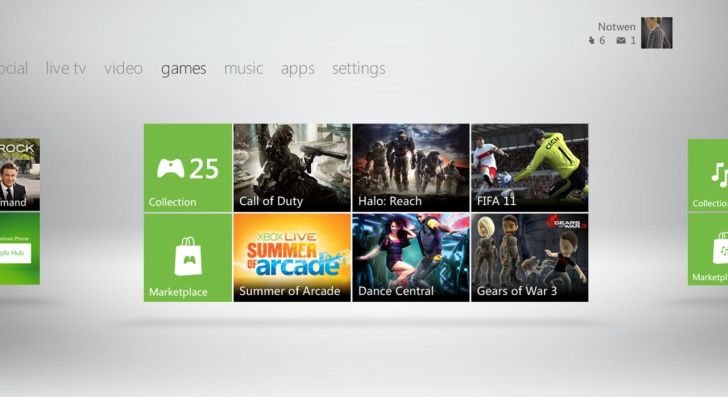
 Microsoft has just released a brand new dashboard update for its Xbox 360 console and, while it certainly brings an interface reminiscent of Windows Phone 7 or Windows 8, it has plenty of ads that some users find annoying.
Thankfully, a few clever owners have found a couple of workarounds that prevent the console from going online and downloading new ads which can be displayed in the variety of squares and rectangles that now dominate every page of the console’s dashboard.
The simplest method, provided you have a router in your home which you use to share an internet connection with multiple devices, is to just block a single domain with the address ‘https://rad.msn.com/’.
This is where the Xbox 360 gets its ads from and, if you successful blocked it with your router, the commercials will no longer appear. You might need to clear the cache of the console’s hard drive before they’re completely gone, which can be done by going into System Settings>Storage>Hard Drive and pressing Y to clear your system cache.
If you don’t have a router that can block specific domains, you can follow a trickier method that involves using the free OpenDNS service.
Check out the full list of instructions below, as highlighted by a Reddit member.
- Sign up for an OpenDNS account (it's free). - Add a network for your current IP address. - Go to Advanced Settings and next to 'Domain Typos', check the box 'Enable typo correction' if it's not already checked and apply. - Got to Web Content Filtering settings and set the filtering level to 'None', and under 'Manage individual domains', put rad.msn.com and select 'Always block' and then click 'Add domain'. - On your Xbox, go to System Settings -> Network Settings -> (your connection) -> Configure Network -> DNS settings -> Manual, and enter the OpenDNS IP addresses for the primary and secondary DNS servers: 208.67.222.222 and 208.67.220.220. You may also need to clear the cache of your hard drive, which could involve having to redownload all the updates that you got for your games, but it’s a small price to pay for getting rid of those ads.
Considering the large amount of commercials served by Microsoft through this new update, it would’ve been nice to at least reward those who have an Xbox Live Gold subscription, which costs $60 (43 Euros) a year, with less ads or even remove them altogether.
Still, by using the methods above you might be able to trick the company, at least for the time being, and have an ad-free experience with the new Xbox 360 dashboard.