
Softpedia
 

NEWS CATEGORIES:


NEWS ARCHIVE >>
SOFTPEDIA REVIEWS >>
MEET THE EDITORS >>
Home > News > Science > How to

July 20th, 2007, 14:38 GMT · By Lucian Dorneanu

How to Recover Unreadable CDs/DVDs: Just Boil Them!

SHARE:

Adjust text size:


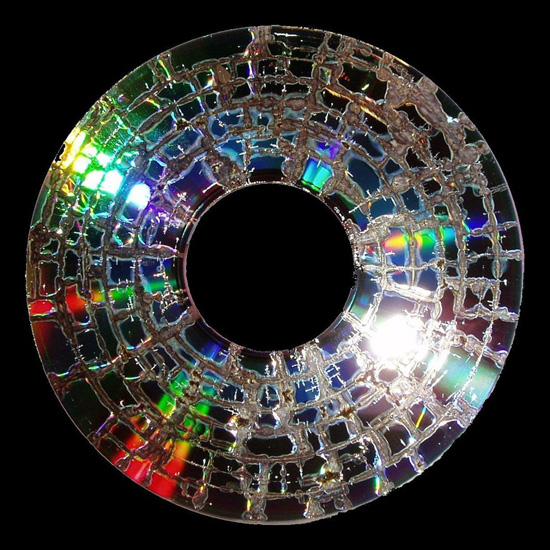
This is what a CD that's been left in the microwave oven for 10 seconds looks like, so dont' try this at home if you plan on using the disk again.
Enlarge picture
Did it ever happen to you to buy a new CD or DVD only to find out that the optical drive doesn't recognize it? There's a good way of making it readable again and it doesn't involve rocket science. It just requires a good hot bath.

Not for you, for the disk. Boiling disks in water for
a short time can recover even the most stubborn of them and can save you from pulling out some hairs from not being able to play the coolest game in the world that you just purchased.

One of the reasons why a brand new disk can become unrecognizable for the drive is the exposure to condensation, a phenomenon that occurs within the plastic wrapped subscription, as water molecules trapped in the air turn liquid when the temperature drops, for example during shipping.

The thin layer of plastic covering all discs, meant to protect the readable surface, can expand and contract in the optical drives, where the temperature is much higher than in the room or on a store shelf. The simplest way to eliminate water from the disk is to boil it.

Now don't go boil them like you were making soup, you just need enough water in a bowl to cover the disk, then place the bowl WITHOUT THE DISK in the microwave oven for about 60 seconds. If you put the actual disk in the oven, you won't get a readable disk back, you will only get to see a fireworks display and will be stuck with a probably useless appliance.

After you take the bowl out of the oven, put the disk inside for 30 to 40 seconds that take it out using a tool, not your fingers, to grab it by the inner orifice and then dry it off with a paper towel gently.

The reason this process works is because the small elastomeric film on the disk is forced to expand, thus fixing all minor twists caused by shipping and removing the particles or debris from the surface in the hot water.

Now that you know a new use for your microwave, get ready for an instant RPG soup...
FILED UNDER:
disk
microwave
film
fireworks

TELL US WHAT YOU THINK:

17,115 hits · 7 comments · Link to this article · Print article · Send to friend · Subscribe to news

MUST-READ RELATED ARTICLES:


How to Send a 3,106 Carat Diamond by Post!

How to Avoid the World's Most Advanced Cannon Artillery System

How Does the World's Most Efficient Internal Combustion Engine Work?

The Weapon That Fires Around Corners

How Does the Smartest Bomb in the World Work?

READER COMMENTS:


Comment #1 by: rotorhead on 02 Aug 2007, 10:57 UTC reply to this comment

This is a little scary: 1272 users read this before me, and not one commented on "just enough water in a ball" to cover the disc.

Drove me crazy trying to figure out how to find a ball to put water in and microwave it--then it hit me.

BOWL, not ball! A ball is what you throw, or bounce; a BOWL is what you eat cereal from, or microwave water in.

Is it me, or the world. Ball! Did everybody always spell bowl that way?


Comment #2 by: Magichand on 14 Mar 2009, 02:44 UTC reply to this comment

I'm surprised there has been very little comments on this.Personally I just had this dvd, and well, It was brand new and it kept skipping an important scene and I had lost the receit so I couldn't take it back,I had try everything, buffers/just plain hot water/rubbing alachol and it seemed like everything in the book and I was about to give up since it seemed worthless with nothing being having to fix it,but then I saw this guide and did it myself except using a stove countertop to boil the water and then cleaned it off after leaving it in for 25 seconds and it worked!

The reason I'm surprised there aren't more comments is because this guide actually worked better for me with this disc then anything else so thank you Lucian Dorneanu,now I can watch this dvd :D


Comment #3 by: Matt on 15 Jul 2009, 21:59 UTC reply to this comment

im sorry, but i have waited longer, and yet it did'nt work.... sorry guys!


Comment #4 by: rob on 22 Feb 2010, 05:22 UTC reply to this comment

just do a slow burn of the cd dvd it shoud work worked 4 me :-) made a back up copy for my recovrey cd for my laptop


Comment #5 by: moe on 15 Jul 2010, 02:16 UTC reply to this comment

hi my names mahogany im still puzzeled on how to put a bowl big enough to hold a good amount of water in the microwave with out some kind of electrical reaction accuring please help me im only eleven and myvideo game got scratched and mi mom cant afford that expensive buffer or even care about getting it for me

Comment #5.1 by: dave on 30 Aug 2010, 12:28 GMT

Hey Moe
Use a glass bowl. That'll be fine. Don't use metal in a microwave oven - you were absolutely right that it'll spark. Hope that helps.


Comment #6 by: Frank on 05 Dec 2011, 22:20 UTC reply to this comment

The story gives one reason why this supposedly works in the 3rd and 4th paragraphs, but then in the second-to-last paragraph gives a totally different reason. So which one is it? I'm sceptical that this would really work at all anyway.

Copyright © 2001-2012 Softpedia. Contact/Tip us at

WindowsGamesDriversMacLinuxScriptsMobileHandheldNews

SUBMIT PROGRAM   |   ADVERTISE   |   GET HELP   |   SEND US FEEDBACK   |   RSS FEEDS   |   UPDATE YOUR SOFTWARE   |   ROMANIAN FORUM