
NEWS CATEGORIES:


NEWS ARCHIVE >>
SOFTPEDIA REVIEWS >>
Home / News / Technology / Daily gadget

Daily gadget


How to Keep Your Crotch Cool While Using the Laptop

With the Lapinator from Lapinator Inc.

By Alex Vochin, Technology Editor

16th of August 2006, 06:23 GMT

Adjust text size:


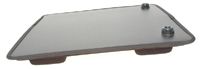
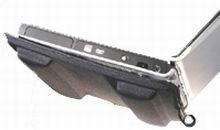
It's quite a well-known fact that (some) laptops have a tendency of overheating when used for long periods of time, one of the main reasons being the battery (as all the commotion regarding the withdrawal of Dell laptop batteries proves it). However, due to the high demand among (generally male) users, Lapinator Inc. has developed a very interesting solution for this problem, called...The Lapinator.

Basically, this crotch-protecting device consists of a laptop-sized (33 x 30 x 2.5 cm, 311 grams) support placed underneath the mobile computing system, and made out of an insulating material that blocks around 95% of the heat generated by the laptop. Moreover, it is quite ergonomic, compatible with a wide range of laptop models and can fit in just about any laptop bag, thus making it quite easy to carry around.

This device could prove to be quite important (as a scientific study carried out by the State University of New York links the laptop heat to male infertility) and has up until now received quite positive reviews from some important industry publications. Also, one of its most important advantages is its very low price (around 25 US dollars, or 30 dollars, for the 45 cm mode), quite a small sum considering the importance it might have for the users'...crotches.

We are just a few, but there are many of you, Softpedia users, out there. That's why we thought it would be a good idea to create an email address for you to help us a little in finding gadgets we missed. Interesting links are bound to be posted with recognition going mainly to those who submit. The address is .


Rating:
Fair (2.6/5) 6 vote(s) so far    

Read by 1,594 user(s) | Add comment | Link to this article
Subscribe to news | Print article | Send to friend

© Copyright 2001-2008 Softpedia
Contact:


SEARCH THE NEWS ARCHIVE :


Today's News
| Yesterday's News | News Archive


MORE RELATED ARTICLES:


The Solar Powered Radio Cap

Sony Launches An Impressive Pocket Personal Communicator

The Computer You Can Control by Simply Moving Your Eyes

Become A Bedroom DJ with The USB Mixing Kit

The Analog Projection Clock

The Beer Barrel-Shaped Portable Music Box

The Retro Style Portable Rotary Phone

How to Spy on Everybody, Even During the Night

Logitech Brings VoIP Communications at Your Fingertips

User opinions:


Comment #1 by: Phynigan on 09 Aug 2007, 10:30 GMT reply to this comment

A lightweight, low profile “temporary” (less than 2 hours) solution.

Having been an owner of a Dell Inspiron 5160 (2GHz Prescott), the term “heat-generator” comes into play. I recently upgraded to a HP Compaq nx9420 17” Dual Core 2 notebook due to the intensive applications I have been more involved in as of late. The Dell could not keep up and the heat generation was getting unbearable. When I first purchased the Dell about three years ago, I came across a new lap pad by Laplogxx (L/L). Very costly but it made working with the Dell amazingly comfortable. Since upgrading the notebook, I have done extensive research on any “newer/improved” passive lap pads. I came across the Lapinator Plus! (L/P), reviewed their claims, research and the reviews so…I made the purchase.
Having received the Lapinator Plus! in short order, I immediately put it to work with the new HP. Within 2 hours of non-intensive work with the HP, I began to feel some heat at my thighs and on my fingertips…fingertips? ((105.5 to 102.5 degrees at touch pad and wrist rest (L/P) compared to 90.0 and 92.0 degrees (L/L))
I know I have placed the supplied rubber feet at the appropriate locations and there was nothing running on the notebook in the background to cause the heat I was feeling. I promptly downloaded a couple of temperature monitoring utilities to measure the HPs’ temps. The temps never went over 48 degrees in a 2-hour period with the notebook sitting on a table but when placed on the Lapinator, I was still feeling the heat above and below plus the temps were at or above 58 degrees. To my amazement, I lifted the notebook off the rubber feet and placed my hands on the Lapinator surface, oh my God! I could only hold my hand on the surface ((110.5 (L/P) compared to 93.5 degrees (L/L)) for about two seconds before having to remove it. Plus, the bottom of the notebook was equally as hot ((113.5 (L/P) compared to 93.0 degrees (L/L)). As I let the surface of the pad cool (leaving the notebook raised), I felt the surface of the pad actually had bubbled up the same height as the rubber feet effectively blocking the airflow under the notebook. This was unacceptable even though after about an hour for cool-down it sort of returned to the semi-flat position. At this point I need to take some real measurements (I am a technician by trade and have all the required tools) with my digital probe.
To make a long story short, I measured five critical points (see above) on the Lapinator, the LapLogxx and the HP and found an average difference of 20 degrees between the two, the LapLogxx being the coolest.
One area to point out to the male gender, the BIGGEST difference was the notebook temps at the front by the left speaker and MediaCard ports, with the L/P: 106.5 vs. L/L at 78.0 degrees!
Well, to that end I have promptly requested Lapinator for an immediate refund and RMA to return this pad after only using it for four days and go back to the tried and true L/L.

Share your opinion:

Your Name:
Your Email Address:
(will not be used for commercial purposes)
Solve this to prove you're not a bot: =
Your review/opinion:


SUBMIT PROGRAM   |   ADVERTISE   |   GET HELP   |   SEND US FEEDBACK   |   RSS FEEDS   |   ENTER NEWS SITE   |   ENGLISH BOARD   |   ROMANIAN FORUM