
Softpedia
 

NEWS CATEGORIES:


NEWS ARCHIVE >>
SOFTPEDIA REVIEWS >>
MEET THE EDITORS >>
TRENDING TODAY
Home > News > Games > Columns

February 24th, 2011, 10:50 GMT · By

How to Fix Bulletstorm PC Graphics Issues

SHARE:

Adjust text size:

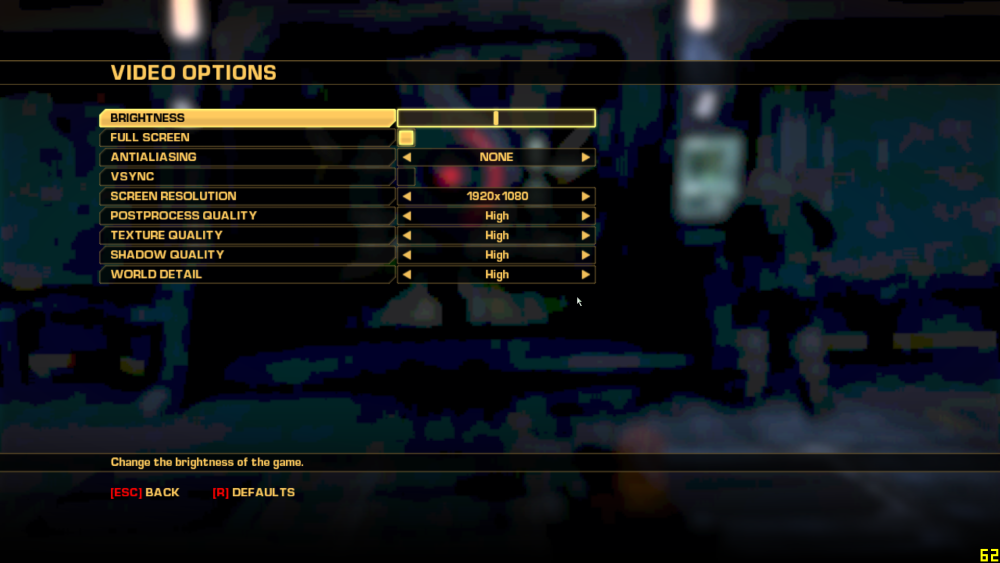
The video options in Bulletstorm with jagged graphics on the background
Enlarge picture
Barely has Bulletstorm been launched and already PC users are encountering a wide array of issues with their version, including 16-bit jaggy shadows, lighting issues or bad overall graphics performance even if they have a powerful PC.

On our own playthrough, Bulletstorm has been running smoothly, with all the details cranked up too high, but the forums of the game are being flooded with complaints from PC users.

As such, we decided to showcase a few of the quick fixes that can be done before the development team at People Can Fly will launch a patch for the game.

First up, before we start addressing the issues, you need to download the Bulletstorm INI File Editor, a special little program that allows you to open the game's .ini files. These files are encrypted, meaning you need to get this little program in order to make changes to them.

Get the Bulletstorm INI File Editor right now from Softpedia.

After you download it, start it up and select File>Open, then navigate through the new window to where you installed Bulletstorm. By default, it's located at C:\Program Files\Bulletstorm. Here, go to Engine\Config folder and select BaseEngine.ini.

The contents of the file will now be displayed in the Bulletstorm INI Editor and you'll be able to make any changes you want.

By far the biggest complaint is that the game has jagged shadows, as if they were rendered in older 16-bit visuals, so a lot of people want a solution.

In order to change this, located the "bUseMaxQualityMode" entry (located towards the end of the .ini file) and change its setting from "False" to "True" (without the quotes).

While this will make the game look better and solve some of the shadow issues, many players are reporting that it pretty much makes it unplayable, because it uses only the best textures, thus reducing framerate.

Another possible solution is to locate the "AllowD3D10" entry (located below bUseMaxQualityMode) and change its entry from "False" to "True".

It seems that the developers set the game to render using the older DirectX 9 protocol, but PC owners who have a DirectX 10-certified video card can edit the entry to render in the newer version.

This doesn't have any impact, from what we can tell, on performance.

Last but not least, another solution has been found, which involves editing multiple entries in the same .ini file. Make the changes mentioned below to affect the shadows in the game.

bEnableVSMShadows=True
bEnableBranchingPCFShadows=True
bAllowHardwareShadowFiltering=True
bAllowBetterModulatedShadows=True
bEnableForegroundShadowsOnWorld=True
bEnableForegroundSelfShadowing=True
bAllowWholeSceneDominantShadows=True

As of yet, the team at People Can Fly hasn't made any statement concerning these issues, instead just sending owners to EA's official support page.

Try these fixes and share your experience with the PC edition of Bulletstorm by leaving a comment below.


27,956 hits · 13 comments
Link to this article · Print article · Send to friend

MUST-READ RELATED ARTICLES:


Free Duty Calls Game Parodies Call of Duty, Promotes Bulletstorm

Gears of War 3 Beta Makes Up for Delayed Launch Date

Bulletstorm Demo Out on January 25, Unlocks Exclusive Content

Dead Space 2 Gets Severed DLC

Gears of War 3 Beta Will Also Be Open to Those Who Don't Buy Bulletstorm

READER COMMENTS:


Comment #1 by: Jerryjuicejr on 25 Feb 2011, 00:54 UTC reply to this comment

I get the error "unhandled exception has occured to your application" Anyone know how to fix this?


Comment #2 by: abdo on 25 Feb 2011, 13:04 UTC reply to this comment

After i've done all of these steps i still get a lot of issues
First the 16-bit shadowing show up in some areas


Comment #3 by: zero on 02 Mar 2011, 08:42 UTC reply to this comment

First one work for me But i have to open the game at low setting then change it to High


Comment #4 by: ThatDeeBloke on 04 Mar 2011, 00:00 UTC reply to this comment

This did not assist me. I am running a two year old rig nearly. But still a bloomfield 3.2 proc, evga x58 board, and a pair of gtx285 cards. I can not seem to get rid of the pink and green outlining and pixelation.


Comment #5 by: General on 09 Mar 2011, 01:10 UTC reply to this comment

Worked great, thanks. A bit slower but my rig can handle it. Cheers!


Comment #6 by: Alcatraz on 08 May 2011, 10:21 UTC reply to this comment

well "AllowD3D10" didnt work for me

Comment #6.1 by: Ultimate Game Fixer on 25 May 2011, 11:57 GMT

Do not do the "bUseMaxQualityMode" or "AllowD3D10", Just change your aspect ratio from 16:10 to 16:9 for me only 1280 - 800 worked 1400 x 900 didn't. Shadows fixed and game ran perfect the shadow fixes do however work. UsemaxQaulity will fck everything you must delete your StormCompat and StormEngine ini located My Games\BulletStorm\StormGame\Config and try again.


Comment #7 by: Irfan.Sadib on 29 May 2011, 16:50 UTC reply to this comment

I played this in my HP Ati, graphics sucked. Played in my Desktop Nvidia, No problem at all :/ any explanation for this bro?! BTW the game's * awesome. I wish we had the original version in my country so that I could atleast buy it to honor the makers :/


Comment #8 by: FScythe on 13 Jun 2011, 06:50 UTC reply to this comment

Radeon owners! UPDATE DRIVERS! My HD 5750 is doing his job for a year now, but yet still needed driver update! That was the only solution, which has helped, not any other from this list.
Cheers


Comment #9 by: Sev13 on 30 Jun 2011, 02:04 UTC reply to this comment

thanks , the 1st two solutions I tried simultaneously and they work like magic


Comment #10 by: sev13 on 30 Jun 2011, 11:52 UTC reply to this comment

I have Ati radeon 4670 , there is something in the options called post process quality each time I increase it the shadows is 16 bit awful , whatever fixes I use , but increasing it makes graphics look bad instead of making them look better


Comment #11 by: xHassan on 04 Jan 2012, 17:02 UTC reply to this comment

The last tweak doesn't affect anything as such. Enabling DX10 resolves a little with the shading. No go with the shadows though. OR the fact that the screen blacks out on bloom


Comment #12 by: monkeyface on 10 Jun 2012, 11:40 UTC reply to this comment

Jerryjuicejr run as admin

Copyright © 2001-2013 Softpedia. Contact/Tip us at

WindowsGamesDriversMacLinuxScriptsMobileHandheldNews

SUBMIT PROGRAM   |   ADVERTISE   |   GET HELP   |   SEND US FEEDBACK   |   RSS FEEDS   |   UPDATE YOUR SOFTWARE   |   ROMANIAN FORUM