 14 DAY TRIAL //
 I guess all of you agree that Google is the most popular search engine on the Internet, having millions of users every day. Because it is the best search technology in the entire world, the service is able to index and crawl millions of websites although their content is not quite acceptable. Take the example of the pornographic websites or even warez or illegal material that is often accessible using a simple command typed on Google. If you didn't know, Google has several hidden operators that allow users to find a certain type of information quicker than typing a longer phrase.
Let me present some of the most useful commands used in the Google search box to allow you to find information quicker:
"info:www.softpedia.com" displays some interesting information about www.softpedia.com.
"weather:Bucharest, Romania" displays the current forecast for Bucharest, Romania.
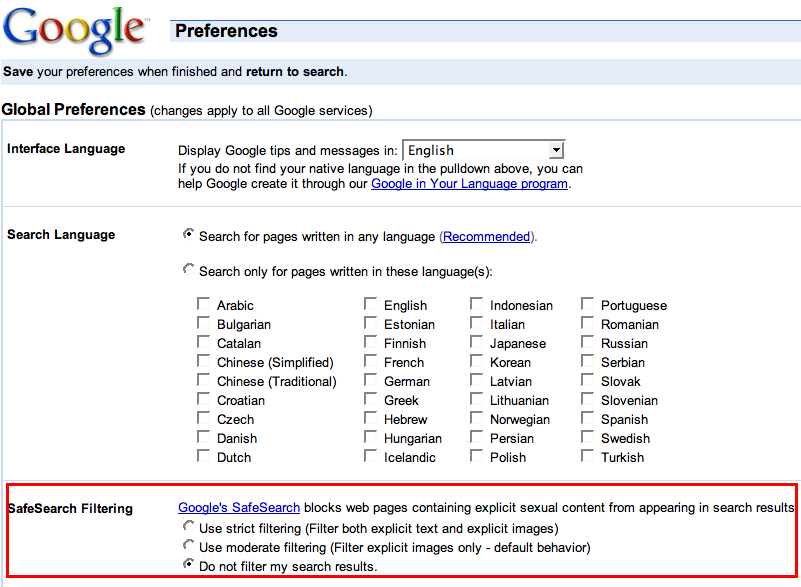
Another security utility developed by Google is the filter included in the search engine, allowing you to block adult content from the results included in the SERP. If you want to avoid filtering your results, you must disable the option from the preferences menu displayed on the official page of Google.
Now, it is said the Internet allows users to find any type of information, no matter where is it located. But, how many times have you tried to find a picture but none of the websites returned by Google were useful? Well, this issue is quite often encountered so I'll present you an easy way to find pictures, sounds or movies.
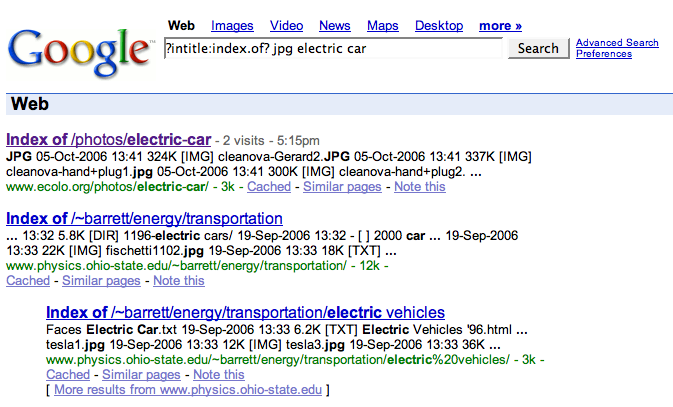
Let's suppose you're looking for some picture with the electric car announced some time ago. You opened Google, typed electric car but all the results were quite useless. The Image Search function included in Google's technology was useless as well because it displayed only a picture or irrelevant results. So, let's try a little trick:
Open Google by visiting the official page of the company. Type the following phrase in the search box without modifying it and press enter.
As you can see in the code displayed above, it includes the "intitle" expression. The term concerns the title of the information searched by Google, in our case "index.of". Usually, this kind of title is assigned to the directories that contain exactly the information included on a website such as pictures, audio files or videos, without HTML codes or other content. The jpg term refers to the extension searched by Google while the "electric car" is the name of the photo. Basically, you can search for anything, no matter its extension. So, give it a try and don't forget: don't be evil using this hidden command!