
Softpedia
 

NEWS CATEGORIES:


NEWS ARCHIVE >>
SOFTPEDIA REVIEWS >>
MEET THE EDITORS >>
Home > News > Webmaster > Tips and Tricks

December 1st, 2011, 10:22 GMT · By

Guide to Enabling the New Integrated Universal Google Navbar

SHARE:

Adjust text size:


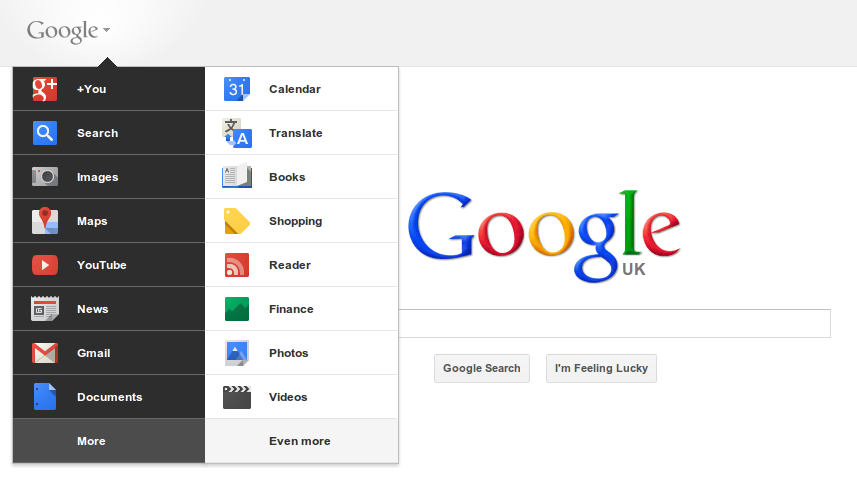
The new Google navbar on Google.co.uk
Enlarge picture
Google has just unveiled a brand new look for the navigational bar which actually gets rid of it altogether. Its features are now integrated in the search/header section that used to be below it.

Google has been working towards unifying the looks and functionality of its sites, the new navbar is just an extension of that. The new navigational bar is being rolled out to all users, but that may take a while and Google hasn't mentioned a deadline.

There is a way of checking out the new navgar in action even if Google hasn't enabled it for you and, as you may have guessed, it involves editing some browser cookies. Most browsers come with a way of issuing JavaScript commands via a console.

What you'll have to do is open up the JavaScript console in your browser and paste a snippet of code. Here are the steps:

1. go to google.com in your browser.

2. a. in Firefox press Ctrl+Shift+K;
    b. in Google Chrome press Ctrl+Shift+J;
    c. in Safari you have to enable the "Develop" menu if you haven't already:
        - go to Safari Preferences > Advanced and check "Show Develop menu in the menu bar";
        - in the Develop menu select Web Inspector and go to the Console tab;
    d. in Internet Explorer press F12 to bring up Developer Tools and go to the Console tab;

3. Paste the following code in the console and press Enter:

CODE
document.cookie="PREF=ID=03fd476a699d6487:U=88e8716486ff1e5d:FF=0:LD=en:CR=2:TM=1322688084:LM=1322688085:S=McEsyvcXKMiVfGds; path=/; domain=.google.com"; window.location.reload();

4. (Optional) If you don't use google.com, you will want to replace the domain in the code snippet with the one you use.

That should do it, the new nav bar with the app menu in the logo and the Google+ tools next to the search bar should be enabled for most Google products, at least the ones that use the new design.

TELL US WHAT YOU THINK:

2,779 hits · 1 comment · Link to this article · Print article · Send to friend · Subscribe to news

MUST-READ RELATED ARTICLES:


The New Gmail Is Here with a New Look, Streamlined Conversations, Better Search

YouTube Testing/Rolling Out New Gray Design

Work on Firefox 11 Has Started, Here's What to Expect

Google Debuts Really Slick, Really Fast New Chrome Web Store (Pics)

Check Out the Brand New Gmail from a Leaked Google Video

READER COMMENTS:


Comment #1 by: khu on 13 Dec 2011, 13:56 UTC reply to this comment

great! thanks for sharing this.

saw it couple of weeks ago on my mobile, just remembered now to do it. worked fine in Opera (go to the console via 'Dragonfly')

at last the horrible duplicated horizontal/vertical bars are gone :)

Copyright © 2001-2012 Softpedia. Contact/Tip us at

WindowsGamesDriversMacLinuxScriptsMobileHandheldNews

SUBMIT PROGRAM   |   ADVERTISE   |   GET HELP   |   SEND US FEEDBACK   |   RSS FEEDS   |   UPDATE YOUR SOFTWARE   |   ROMANIAN FORUM