 14 DAY TRIAL //
 A flaw was reported in the fresh out of beta Google tool bar utility, related to how the tool performs in relation to the management of the default search engine. Is has recently been announced that an automatically enabled feature of the utility acts as a barrier for external services that attempt to alternate the default status of Google search engine via Internet Explorer.
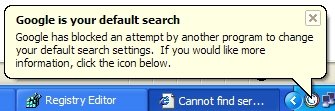
Google tool bar for IE comprises a default activated option of notification in the case of exterior software search engine alteration, but in fact when such is the case, the utility simply denies any changes to be made and informs the user of its performed action through the following message: "Google is your default search engine. Google has blocked an attempt by another program to change your default search settings."
"GoogleToolbarNotifier is a companion to the Google Toolbar. This executable is necessary to enable the Search Settings Notifier feature of the Toolbar. This feature lets you keep Google as your default search engine and prevents this setting (and others as we add new features) from being changed without your consent. To enable or disable this feature, please click the "Settings" button on your Toolbar and choose "Options." In the "More" section, check or un-check the box next to "Search with Google." As long as this feature remains enabled, GoogleToolbarNotifier.exe will run silently in the background," reads Google's explanation of this features functionality.
"Even if you disable "Search with Google" from the toolbar, and kill GoogleToolbarNotifier.exe, every time you load IE, Google Toolbar launches GoogleToolbarNotifier.exe once again. The only way to get rid of the notifier is to delete the folder C:Program FilesGoogleGoogleToolbarNotifier. I think Google has started to become a little evil. The description above clearly states that the exe will run as long as this feature remains enabled," stated Ionut Alex. Chitu on his blog.
"The fact that GoogleToolbarNotifier.exe remains in memory after disabling the feature is a bug - thank you for reporting it. We're working on it right now and should have it fixed shortly. As long as the feature is disabled the .exe doesn't actually do anything, it just remains in memory (not that this makes it less of a problem)," explained Benjamin Lewis, a Google representative.
Photo credit:Ionut Alex. Chitu.