 14 DAY TRIAL //
 Google products may be known for their design simplicity but don't let that fool you for lack of depth. Gmail is already one of the most powerful email clients out there and you can extend the functionality further by enabling add-ons from Gmail Labs. One such add-on which can prove quite handy at times is the Google Search widget, which, expectantly, enables you to do Google searches inside Gmail, has just gotten a big update bringing a bunch of new or enhanced features.
"I've been taking advantage of my 20% time to make some improvements in the Google Search lab I told you about last April. For starters, I've hooked up a bunch of Google's most popular search features," Google Software Engineer Adam de Boor writes.
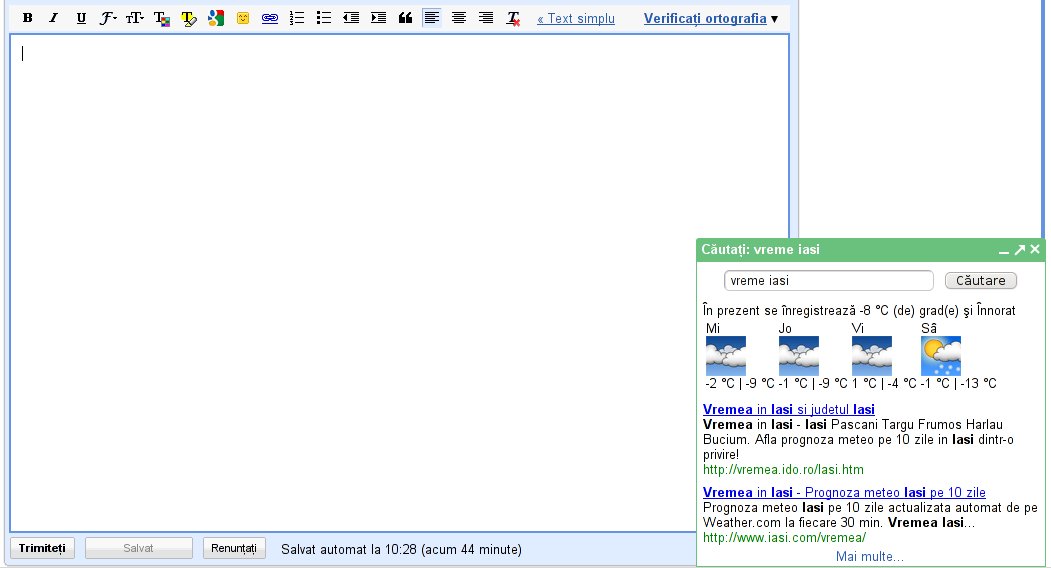
As is usually the case, the hardest part, or the easiest part depending on how you look at it, of making a new Google product is leveraging all the tools the company already has at its disposal. In this case, it meant integrating some of the biggest features which enhance Google Search into the Gmail tool. The updates are mostly from the universal search set of tools bringing additional inline information. Specifically, Google Search for Gmail now supports dictionary definitions, spelling corrections, calculations, local result, weather and news.
Some of them are really obvious, spelling corrections have saved a lot of time and headaches by suggesting the correct spelling for a search and returning results for that search instead. Definitions also come in handy when composing an email and you want to check a term or insert a definition in the message. Calculations and weather are also something you'd want to be able to check out quickly without going to another page.
The tool is now also available in any language that Gmail officially supports, there are a lot of them. The thing that you'll notice first though is the new search button in the Gmail compose toolbar which either searches for the selected text or opens up a search box if there is no selection. The Google Search widget is available from the Labs tab in the Settings section in Gmail.