 14 DAY TRIAL //
 One of the most useful tools to be introduced for Google Search has been Search Options. It allows users to customize the search to include only a certain type of results or only entries made during a specific timeline. Now, Google has introduced several new options that could prove useful enough in many cases. Users can now see larger text snippets for the search results or even a thumbnail preview of the page to check what it looks like without having to load it.
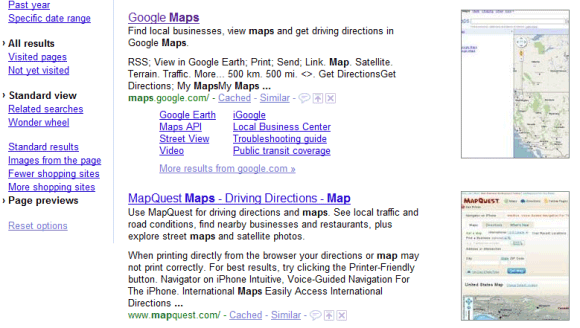
The biggest new feature is the Page Previews, which, unfortunately, doesn't seem to be available to all users at the time. For those lucky enough to get it, Page Previews, like the name suggests, adds a small preview of the page in the search results next to the regular entries. This could make it easier to find out if a page is relevant to your search without visiting it, speeding things up considerably.
It's not without its flaws, though, as the preview thumbnail doesn't include the entire page, just a crop of a section of it, meaning that it's not always very relevant. It also takes longer to load than the regular results page as, according to the Google Operating System blog, all of the thumbnails are just one big image that is then split when displayed. This, though, could be fixed or at least improved by the time Google will release it for everybody.
Another new option that might prove helpful in some circumstances is the “Images from the pages” one. The name pretty much says it all, as Google has a way of naming all of its options and even most of its products as plainly and clearly as possible. When enabled, the feature will load a couple of thumbnails of photos from the pages in the search results next to the regular entry snippet. Finally, for those unsatisfied with the length of the text snippets, Google introduced the “More text” option that shows a bigger text snippet for most web pages.