 14 DAY TRIAL //
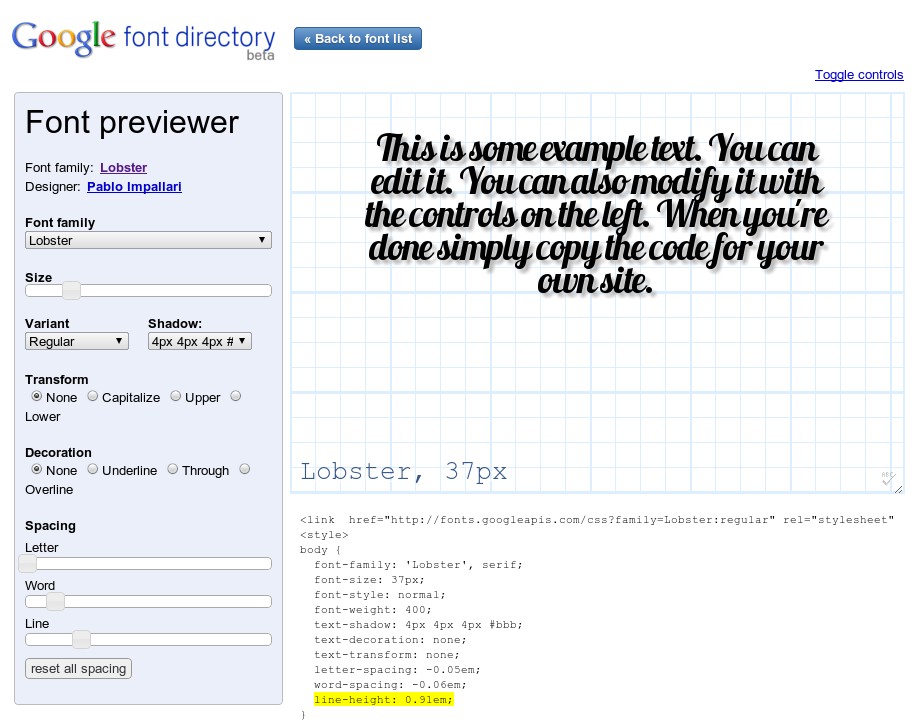
 At this year’s Google I/O conference, Google unveiled its new Fonts API and online directory. The API enables webmasters to embed any of the free fonts hosted by Google on their websites. Now, the repository got an useful new feature, the ability to preview and customize the font you want to use with the Google Font Preview tool.
Typography has been one of the sore spots of web development for many, many years now. While the rest of the web technologies evolved and improved, web designers were stuck using the same standard fonts as two decades ago. Thankfully, in recent years, things have finally started moving forward, and websites can use more ‘eccentric’ fonts with the security that most of their visitors will be able to actually see them. But this opens up another issue, there are very few places where you can get access to quality fonts, even paid ones.
Google’s Font Directory won’t solve the problem at large, there are just 18 fonts available for now, but it’s a good step forward. All of the fonts are released under an open source license and you can easily get the embed code for your website.
“To give developers a choice of high-quality fonts when using the Font API, we have created the Google Font Directory. There you can browse our catalog of available fonts, learn about the font designers who created them, and copy the code required to use them on your web page,” Google says on the Google Font API directory page.
Now, you can check out how the text on your site will actually look like with the font you selected. More importantly, you can customize the finer aspects of the font from the preview page. You can change things like the its default size, add shadows and transformations like Uppercase, Underline and so on. You can also adjust the spacing between letters, words and lines. Overall, there are enough options to get exactly what you’re looking for and all of this doesn’t involve fiddling with any code.