 14 DAY TRIAL //
 Google has released the latest update to its Google Earth desktop application. The tool comes with the usual array of tweaks, fixes and improvements, but also with a couple of new big features. Those who love the outdoors will also love the new tracking and visualization features in Google Earth 5.2, which enable users to ‘relive’ their excursions. Google Earth 5.2 also comes with an integrated web browser to make it easier to get more information on a place or landmark without switching between applications.
“Today we are proud to announce the latest version of the Google Earth desktop application, Google Earth 5.2. With this release, we are bringing exciting new features to both the free version, Google Earth, as well as our paid professional version, Google Earth Pro,” Peter Birch, product manager, wrote.
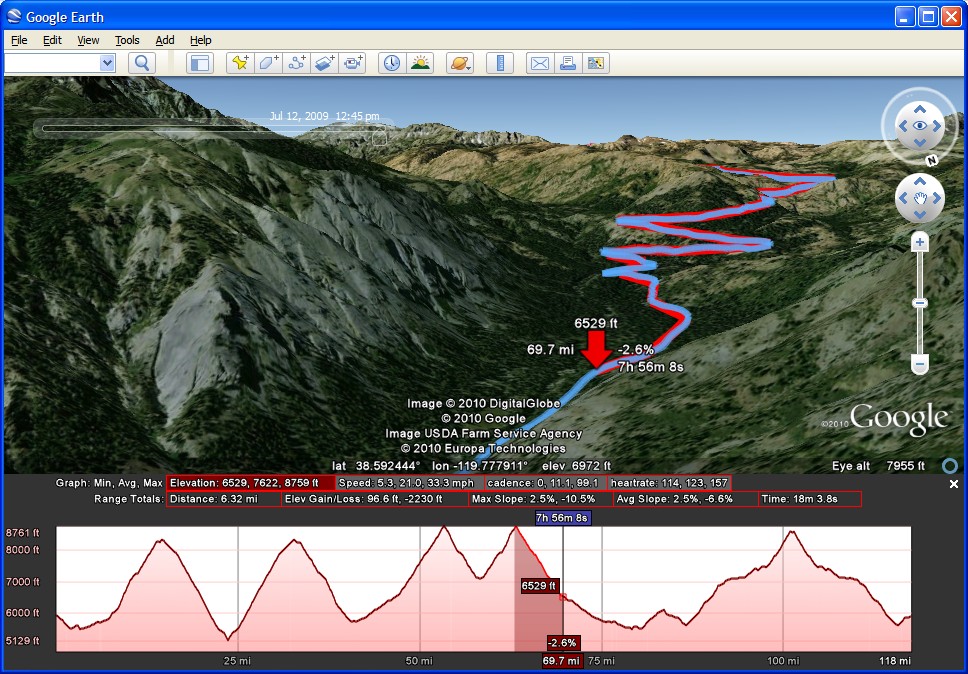
“Now, with Google Earth 5.2, we’ve added the ability to view elevation, speed, and other data as a graph directly in Google Earth. Just connect your GPS device to upload your track, and select ‘View Elevation Profile’ from the menu. This will bring up elevation and speed graphs,” he explained the new features.
Users have been able to import GPS data from their devices since Google Earth 5.0. Google has built on that feature and now more data is available for import. There are better visualization tools as well, helping users make sense of all the info.
All this information can be very useful, but Google has also improved the Tours feature, also introduced in Google Earth 5.0. Users will be able to import GPS data and then play back the trip as well as edit the tour to add a cinematic feel to it. The results can be quite impressive as the video below shows.
For those using Google Earth as somewhat of a documentation tool or are just curious about the places they visit in it, the app now comes with an integrated browser engine, courtesy of Google Chrome no doubt. It’s a fully working browser and it can fill up the entire window to maximize the space. When you’re done, you can go back to the 3D view, or open the page in Google Chrome.
Google Earth 5.2 for Windows is available for download here. Google Earth 5.2 for Linux is available for download here. Google Earth 5.2 for Mac is available for download here.