 14 DAY TRIAL //
 Google Docs has always been about collaboration and a big part of that is the comments system. Users who work on the same document can share thoughts and opinions in the comments, besides the document.
But, by enabling someone to comment, you would enable them to edit the document as well. Of course, that's not much of an issue in a neatly working team and a group can decide who gets to edit the document or not and enforce this in other ways.
If you were sharing with a larger group or the world, though, there was no way of getting feedback without enabling everyone to edit the documents.
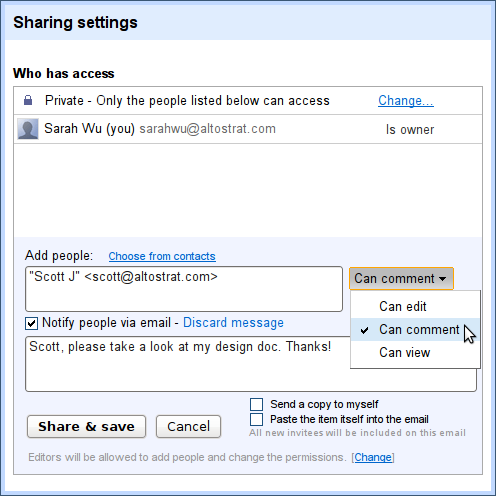
This is no longer the case as Google has introduced a new privacy setting for documents dubbed "Can comment," which, as you might have guessed, enables those with whom the document is shared to comment on it, but nothing else.
"Over the next several days, we're releasing a new sharing option so that you can let people view and add comments to your documents without giving them edit access," Sarah Wu, a software engineer at Google, wrote.
"To give comment-only access to your document, click on the Share button. From there, add in the contact you’d like to share your document with, and select Can comment," she added.
This works for sharing with specific individuals, but you can also enable the privacy setting when sharing with more people. For example, if a document's visibility is set to "Anyone with a link" or even "Public on the web," you can still change the access options and set it to "Can comment."
This creates a brand new type of interaction for documents. You can have something on the web, available to all, and ask for feedback on it without worrying that people will be able to edit it.