 14 DAY TRIAL //
 Mountain View-based company Google has recently announced that it has included new administrative controls in its Google Apps for mobile (available on the iPhone, Nokia, and Windows Mobile devices). According to the developing team, the new features are meant to offer administrators the possibility to manage the handsets of their employees in an easier manner. At the same time, the team also notes that the new enhancements are added to the list of already available ones for various smartphone operating systems on the market.
Google Apps for mobile already included a series of productivity features launched since the third quarter of the last year, such as Google Apps Connector for BlackBerry Enterprise Server for users of RIM's smartphones, new web versions of Gmail and Google Calendar for Android users, Google Sync for iPhone, Nokia E series, and Windows Mobile devices, and more. The new enhancements come towards Google Apps Premier and Education Edition administrators, who have now the possibility to manage iPhone, Nokia E series and Windows Mobile devices of the employees directly from the Google Apps administrative control panel.
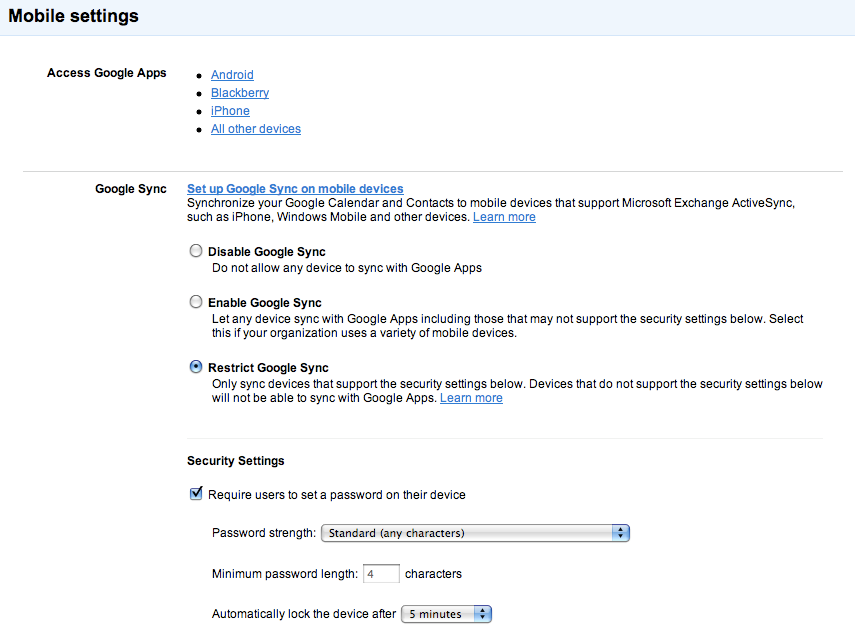
A recent post on Google's Mobile Blog states the following: “These controls will enable new administrative policies for employees using iPhones, Windows Mobile devices, and Nokia E series phones including: - Remotely wipe all data from lost or stolen mobile devices - Lock idle devices after a period of inactivity - Require device passwords on each phone - Set minimum lengths for more secure passwords - Require passwords to include letters, numbers and punctuation”
All of the new features are accessible to enterprises from the 'Mobile' tab under 'Service Settings' in the Google Apps control panel. Domain administrators will be able to remotely control the data on the device directly from the user settings page as soon as an employee starts syncing the handset with Google Apps. At the same time, the new policies will offer employees the possibility to access all data directly from the mobile phone, while IT administrators should find it simpler to control the access users have to corporate data on their devices.