 14 DAY TRIAL //
 Google has always trumpeted about Google+'s focus on sharing with just the people you want and following just the people you want. Circles are at the core of this, but circles are not enough.
People wanted not only the ability to share with specific people, they wanted to hear from specific people, or rather, they wanted to hear more from some of their friends and less from others.
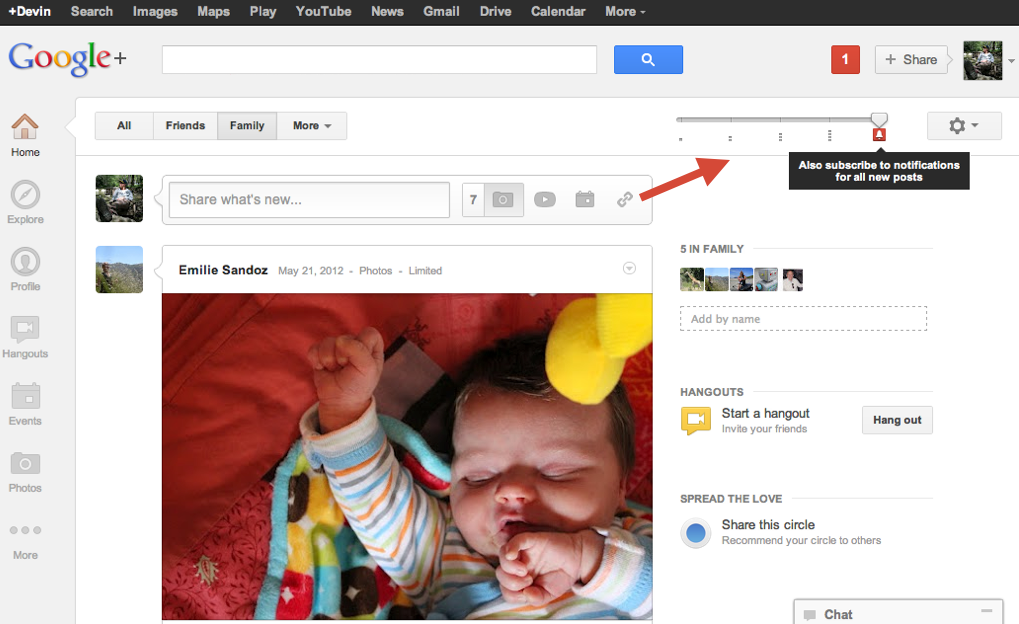
Google+'s "volume" sliders were introduced exactly for that, to give users some control over their main stream. Now, Google is adding several more features for the same goal.
These latest additions have more to do with notifications than the stream, but they're in the same vein.
For example, turning the "volume" all the way up for a circle will now make sure you get notified of any update in that circle.
What this means is that anything that gets published in that circle will spring up a notification that you'll see no matter on which Google site you are.
Another feature takes this idea and turns it upside down, there are posts that you want to make sure everyone sees, or at least everyone that's intended to see them actually sees them.
There's no way to guarantee that on Google+ alone and no way to check whether someone saw your announcement or not.
This is where the new option, of also sending an email to all the people you shared the announcement with, comes in handy. Granted, not even an email can guarantee that everyone gets the message, but it's much more likely.
The new feature comes with the danger of being overused, but if you find yourself constantly getting bombarded by unwanted email notifications, the next feature may be for your.
The third improvement to the notifications system is the ability to mute them for particular users. The Mute button, available on all profiles and in the notifications box, will only mute the notifications, you'll still get the posts from muted users in your stream, just like before.